
WooCommerce Checkout Blocks — Custom Fields & Plugin Integrations Guide (2026)
Extending WooCommerce checkout blocks requires a completely different approach from the classic shortcode checkout — hooks like woocommerce_checkout_fields do not fire in WooCommerce checkout blocks. The block-based checkout uses the WooCommerce Store API and a JavaScript extension system built on React. This guide covers how to add custom fields to WooCommerce checkout blocks, pass data to the server, save it to order meta, and integrate third-party plugins with the new architecture — with complete PHP and JavaScript code for WooCommerce 8.x and 9.x.
WooCommerce checkout blocks replaced the classic [woocommerce_checkout] shortcode as the default checkout experience from WooCommerce 8.3 onwards. The blocks render a React application that communicates with WooCommerce’s Store API — a separate REST API endpoint at /wp-json/wc/store/v1/. Customising WooCommerce checkout blocks means working within this React architecture rather than against it.
WooCommerce Checkout Blocks vs Classic Checkout — What Changes for Developers
The most important thing to understand about WooCommerce checkout blocks customisation is which hooks no longer apply. Classic checkout hooks like woocommerce_checkout_fields, woocommerce_before_checkout_form, and woocommerce_after_checkout_form do not fire inside WooCommerce checkout blocks. The PHP hooks that do work are the order processing hooks fired server-side after the customer submits.
- Does not work in checkout blocks:
woocommerce_checkout_fields,woocommerce_checkout_field_display,woocommerce_before_checkout_form - Does work in checkout blocks:
woocommerce_checkout_order_created,woocommerce_checkout_order_processed,woocommerce_payment_complete - New blocks-specific:
IntegrationInterfacePHP class,woocommerce_blocks_checkout_order_processed, Store API extension endpoints
Adding Custom Fields to WooCommerce Checkout Blocks via IntegrationInterface
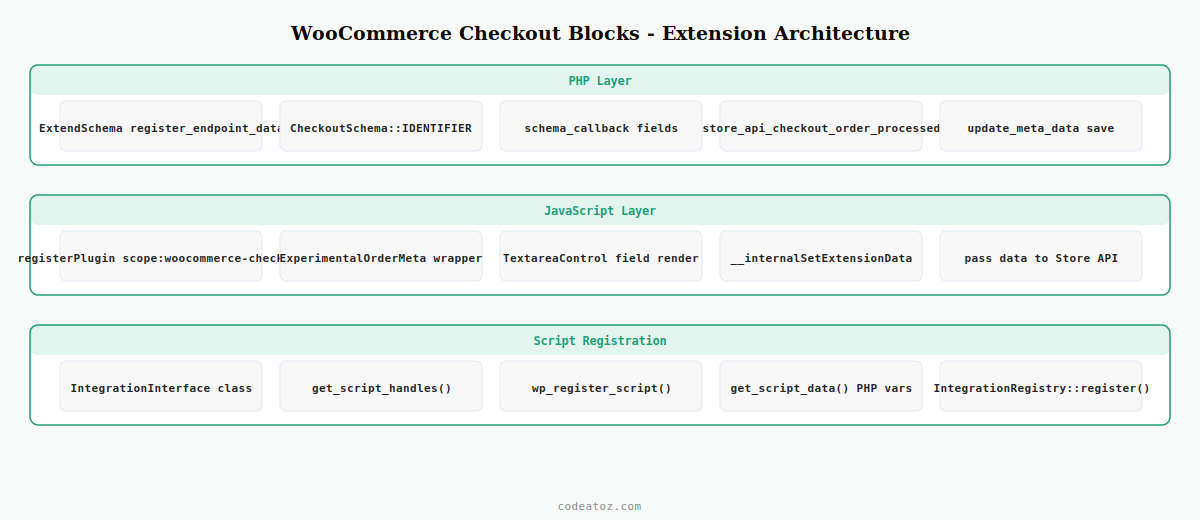
The correct way to add custom fields to WooCommerce checkout blocks is to implement AutomatticWooCommerceStoreApiSchemasExtendSchema alongside a JavaScript extension registered via @woocommerce/blocks-checkout. The PHP side registers the extension and handles saving; the JavaScript side renders the field inside the checkout block.
<?php
use AutomatticWooCommerceStoreApiStoreApi;
use AutomatticWooCommerceStoreApiSchemasExtendSchema;
use AutomatticWooCommerceStoreApiSchemasV1CartSchema;
use AutomatticWooCommerceStoreApiSchemasV1CheckoutSchema;

add_action( 'woocommerce_blocks_loaded', function() {
    // Register extension data endpoint for WooCommerce checkout blocks
    StoreApi::container()
        ->get( ExtendSchema::class )
        ->register_endpoint_data([
            'endpoint'        => CheckoutSchema::IDENTIFIER,
            'namespace'       => 'caz-checkout-extension',
            'schema_callback' => function() {
                return [
                    'delivery_note' => [
                        'description' => 'Customer delivery note',
                        'type'        => 'string',
                        'context'     => ['view', 'edit'],
                        'readonly'    => false,
                        'default'     => '',
                    ],
                ];
            },
        ]);
});

// Save the custom field from WooCommerce checkout blocks to order meta
add_action( 'woocommerce_store_api_checkout_order_processed', function( WC_Order $order ) {
    $payload = WC()->session->get( 'caz_checkout_extension_data', [] );
    $note    = sanitize_textarea_field( $payload['delivery_note'] ?? '' );
    if ( $note ) {
        $order->update_meta_data( '_caz_delivery_note', $note );
        $order->save();
    }
});// src/checkout-extension/index.js
import { registerPlugin } from '@wordpress/plugins';
import { ExperimentalOrderMeta } from '@woocommerce/blocks-checkout';
import { useState } from '@wordpress/element';
import { TextareaControl } from '@wordpress/components';
import { useDispatch } from '@wordpress/data';
import { CHECKOUT_STORE_KEY } from '@woocommerce/block-data';
const CazDeliveryNote = () => {
const [ note, setNote ] = useState( '' );
const { __internalSetExtensionData } = useDispatch( CHECKOUT_STORE_KEY );
const handleChange = ( value ) => {
setNote( value );
// Pass data to WooCommerce checkout blocks Store API
__internalSetExtensionData( 'caz-checkout-extension', {
delivery_note: value,
});
};
return (
<ExperimentalOrderMeta>
<TextareaControl
label="Delivery note (optional)"
value={note}
onChange={handleChange}
rows={3}
/>
</ExperimentalOrderMeta>
);
};
registerPlugin( 'caz-delivery-note', {
render: CazDeliveryNote,
scope: 'woocommerce-checkout',
});Enqueuing Scripts for WooCommerce Checkout Blocks
Scripts for WooCommerce checkout blocks must be enqueued differently from classic checkout scripts. Use the IntegrationInterface to register your block extension script so it only loads inside the checkout block context and has access to the block’s data.
<?php
use AutomatticWooCommerceBlocksIntegrationsIntegrationInterface;

class CAZ_Checkout_Integration implements IntegrationInterface {

    public function get_name(): string {
        return 'caz-checkout-extension';
    }

    public function get_version(): string {
        return '1.0.0';
    }

    public function initialize(): void {
        wp_register_script(
            'caz-checkout-blocks-extension',
            plugin_dir_url( __FILE__ ) . 'build/checkout-extension.js',
            [],
            '1.0.0',
            true
        );
    }

    public function get_script_handles(): array {
        return [ 'caz-checkout-blocks-extension' ];
    }

    public function get_editor_script_handles(): array {
        return [];
    }

    public function get_script_data(): array {
        // Pass PHP data to the WooCommerce checkout blocks JavaScript
        return [
            'ajaxUrl' => admin_url( 'admin-ajax.php' ),
            'nonce'   => wp_create_nonce( 'caz-checkout-nonce' ),
        ];
    }
}

// Register the integration
add_action( 'woocommerce_blocks_loaded', function() {
    if ( class_exists( 'AutomatticWooCommerceBlocksPackage' ) ) {
        AutomatticWooCommerceBlocksPackage::container()
            ->get( AutomatticWooCommerceBlocksIntegrationsIntegrationRegistry::class )
            ->register( new CAZ_Checkout_Integration() );
    }
});
The WooCommerce checkout blocks developer documentation covers the full Store API extension system. The WooCommerce block development environment guide covers the webpack build setup needed for the JavaScript. See our guide on WooCommerce custom checkout fields for the classic shortcode approach, and our WooCommerce AJAX add to cart guide for complementary JavaScript patterns.
⚠ The ExperimentalOrderMeta and __internalSetExtensionData APIs used in this guide are marked experimental in WooCommerce’s JavaScript package. They are stable in practice but the API surface may change between WooCommerce minor versions. Always pin your @woocommerce/blocks-checkout package version and review the WooCommerce changelog before upgrading.
Frequently Asked Questions — WooCommerce Checkout Blocks
Why don’t my classic checkout hooks work in WooCommerce checkout blocks?
WooCommerce checkout blocks render a React application that communicates via the Store API, bypassing the traditional PHP template rendering pipeline. Hooks like woocommerce_checkout_fields, woocommerce_before_checkout_form, and woocommerce_after_checkout_form are only fired in the classic shortcode-based checkout. For WooCommerce checkout blocks, you need to use the IntegrationInterface PHP class and register JavaScript extensions using @woocommerce/blocks-checkout.
How do I add a custom field to WooCommerce checkout blocks?
Register a Store API extension using ExtendSchema::register_endpoint_data() with the CheckoutSchema identifier. Build a JavaScript component using @woocommerce/blocks-checkout that renders inside ExperimentalOrderMeta and passes data via __internalSetExtensionData. On the PHP side, hook into woocommerce_store_api_checkout_order_processed to read the extension data from the session and save it to order meta.
Can I disable WooCommerce checkout blocks and use the classic checkout?
Yes — you can replace the Checkout block with the classic shortcode by editing the Checkout page in the block editor and replacing the Checkout block with a shortcode block containing [woocommerce_checkout]. However, WooCommerce is investing primarily in the blocks checkout going forward. For new builds, adapting to WooCommerce checkout blocks is the better long-term investment.
How do I save custom field data from WooCommerce checkout blocks to order meta?
Use the woocommerce_store_api_checkout_order_processed action hook, which fires server-side when the checkout block submits. Your JavaScript extension stores custom field values via __internalSetExtensionData, which sends them to the Store API. On the PHP side, retrieve the extension data from the request and save it to the WC_Order object using update_meta_data() before calling $order->save().
Do payment gateway plugins work with WooCommerce checkout blocks?
Payment gateways must explicitly declare support for WooCommerce checkout blocks by implementing the PaymentMethodTypeInterface. Major gateways like Stripe and PayPal have been updated. Custom or less-maintained gateways may still only support the classic checkout. Check WooCommerce Settings Payments for a compatibility status icon next to each gateway — a warning icon indicates the gateway falls back to the classic checkout when WooCommerce checkout blocks are active.
How do I test my WooCommerce checkout blocks integration during development?
Use a local WordPress environment with WooCommerce 8.x or 9.x, add items to the cart, and navigate to /checkout. Enable WordPress debug logging by setting WP_DEBUG and WP_DEBUG_LOG to true in wp-config.php. Store API errors are logged to var/log in a WP environment — check these for extension registration failures. Use the browser’s network tab to inspect Store API requests to /wp-json/wc/store/v1/checkout during your WooCommerce checkout blocks testing.
Need Custom WooCommerce Checkout Blocks Development?
CodeAtoZ builds custom WooCommerce checkout blocks integrations — custom fields, payment gateway support, and Store API extensions.




