
The Complete Shopware 6 Flow Builder Guide 2026
Automate your store with Shopware 6 Flow Builder — triggers, Rule Builder conditions, built-in actions, webhooks, and custom flow actions from plugins.
Shopware 6 Flow Builder is the no-code automation engine built into the Shopware admin — trigger on store events, filter with Rule Builder conditions, and execute actions like sending emails, setting tags, changing order states, or calling external webhooks. For a large class of store automation that previously required custom event subscriber plugins, Shopware 6 Flow Builder handles it from the admin UI with zero code.
Every significant store event in Shopware fires a trigger that Shopware 6 Flow Builder can react to — order placed, payment state changed, customer registered, product review submitted, and dozens more. Combined with Rule Builder conditions and chainable actions, Shopware 6 Flow Builder covers everything from transactional email customisation to external system notifications. This guide covers the trigger catalogue, condition logic, built-in and custom actions, and the most useful automation recipes. Refer to the Shopware Flow Builder documentation for the full trigger list.
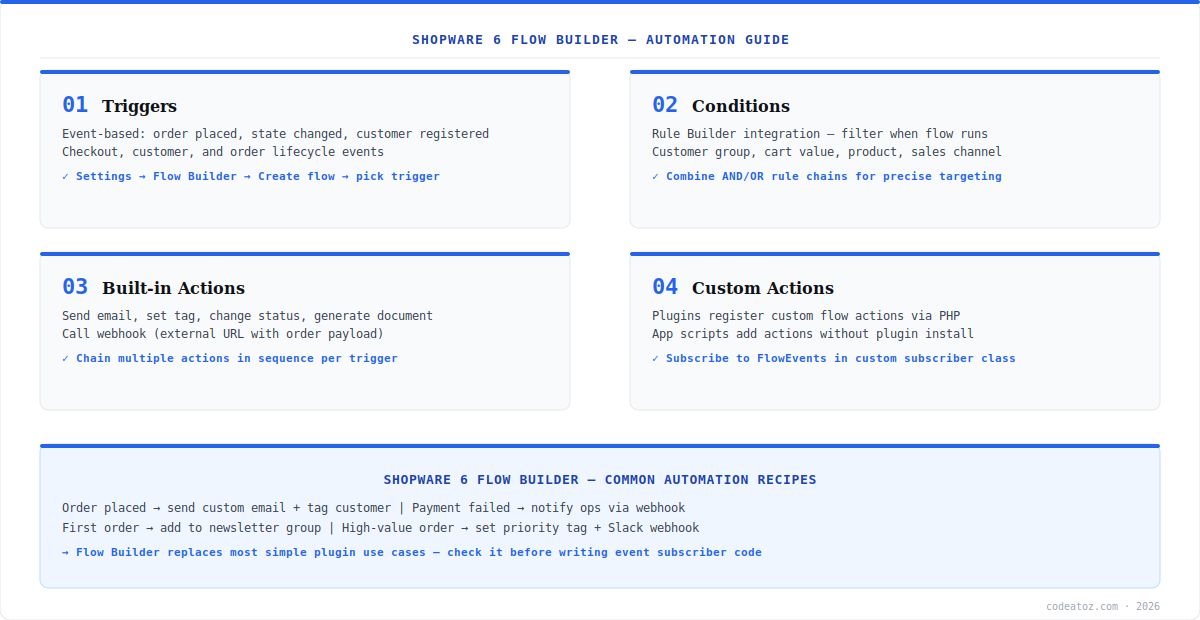
Shopware 6 Flow Builder: Triggers and Conditions
Create a flow in Shopware 6 Flow Builder at Settings → Flow Builder → Create flow. Choose a trigger — the event that starts the flow. The most-used triggers are Order placed (checkout complete), Order state changed (payment, delivery, or order status transitions), Customer registered, and Contact form sent. The Shopware Rule Builder documentation covers all available condition fields. After the trigger, add conditions using the Rule Builder — the same rule engine used for shipping and payment availability. Conditions filter when the flow’s actions run: customer group is B2B, cart amount exceeds 500, sales channel is the UK storefront, or any AND/OR combination.
Shopware 6 Flow Builder: Actions and Webhooks
Actions in Shopware 6 Flow Builder execute in sequence when the trigger fires and conditions pass. Built-in actions include: send email (any mail template), add or remove tag (on order or customer), set order state, generate document (invoice, delivery note), grant promotion code, and call webhook. The webhook action POSTs the event payload to any external URL — the simplest way to connect Shopware 6 Flow Builder to Slack, an ERP, or a custom microservice without writing a plugin. For actions Shopware does not provide, plugins can register custom flow actions in PHP, and Shopware apps can add actions via app scripts. Check the custom flow action documentation for the implementation pattern. Our Shopware development team builds custom flow actions when the built-in catalogue runs out. See our Shopware 6 scheduled task guide for time-based automation that complements event-based flows.
namespace MyPluginFlow;
use ShopwareCoreContentFlowDispatchingActionFlowAction;
use ShopwareCoreContentFlowDispatchingStorableFlow;

class SlackNotifyAction extends FlowAction {
    public static function getName(): string { return 'action.slack.notify'; }
    public function requirements(): array { return [OrderAware::class]; }
    public function handleFlow(StorableFlow $flow): void {
        $orderId = $flow->getStore('orderId');
        // POST to Slack webhook with order details
        $this->slackClient->notify("New priority order: {$orderId}");
    }
}
// Register in services.xml with tag: flow.action
// + name attribute: action.slack.notifyBefore writing an event subscriber plugin, check whether Shopware 6 Flow Builder covers the requirement. Tag a customer after their first order, email ops on payment failure, generate invoices automatically, notify a webhook on high-value orders — all of these are flows, not plugins. Reserve custom code for logic Flow Builder genuinely cannot express.
Frequently Asked Questions About Shopware 6 Flow Builder
What is Shopware 6 Flow Builder?
Shopware 6 Flow Builder is the built-in no-code automation engine in the Shopware admin. It reacts to store events (triggers) like order placed or customer registered, filters with Rule Builder conditions, and executes actions — send email, set tag, change state, generate document, or call an external webhook. It replaces many simple event subscriber plugin use cases.
What triggers are available in Shopware 6 Flow Builder?
Shopware 6 Flow Builder triggers include order placed, order state changed (payment, delivery, order status), customer registered, customer group changed, contact form sent, product review submitted, newsletter registration, and many more lifecycle events. Each trigger exposes its event data to conditions and actions in the flow.
How do conditions work in Shopware 6 Flow Builder?
Conditions in Shopware 6 Flow Builder use the Rule Builder — the same rule engine that powers shipping and payment availability. Build AND/OR rule chains on customer group, cart amount, sales channel, products in order, billing country, and dozens of other fields. The flow’s actions only execute when the rule evaluates true for the triggering event.
Can Shopware 6 Flow Builder call external systems?
Yes. The call webhook action in Shopware 6 Flow Builder POSTs the event payload to any external URL — connect to Slack, an ERP, Zapier, or a custom microservice without writing a plugin. For richer integrations needing transformation or authentication flows, build a small receiving endpoint that processes the webhook and calls the target system.
How do I add custom actions to Shopware 6 Flow Builder?
Add custom actions to Shopware 6 Flow Builder from a plugin by extending FlowAction, implementing handleFlow(), and registering the class in services.xml with the flow.action tag. Shopware apps can also add flow actions via app scripts without a full plugin. Custom actions appear in the Flow Builder action picker alongside built-in ones.
When should I use Shopware 6 Flow Builder vs an event subscriber?
Use Shopware 6 Flow Builder for business automation that fits trigger-condition-action: emails, tags, state changes, documents, and webhook notifications — merchants can then adjust it without deployments. Use a PHP event subscriber when you need complex data transformation, multiple entity writes, or logic that must be version-controlled and tested in CI.
Automating with Shopware 6 Flow Builder?
Our team builds flows, custom flow actions, and webhook integrations for ops automation and ERP connectivity.




