
Best WooCommerce Server Configuration Guide — PHP + NGINX 2026
Optimise WooCommerce server configuration — PHP-FPM pool tuning, OPcache, NGINX FastCGI cache, Redis object cache, and MySQL configuration for faster stores.
WooCommerce server configuration is the infrastructure layer that determines how fast every single page request processes — before any caching, CDN, or frontend optimisation takes effect. Correct WooCommerce server configuration for PHP-FPM, OPcache, and Redis can reduce TTFB by 60% on stores with average plugin loads. This guide covers the complete WooCommerce server configuration stack: PHP 8 with JIT, OPcache, NGINX with FastCGI cache, and Redis for object and session caching.
Most WooCommerce performance problems blamed on plugins or themes are actually WooCommerce server configuration problems — under-allocated PHP-FPM workers causing queue-up, OPcache thrashing on deploys, NGINX serving static files through PHP, or missing Redis making WordPress hit the database on every object cache read. This guide covers WooCommerce server configuration in priority order from highest to lowest impact. See our WooCommerce database guide and caching plugins guide for the complementary layers.
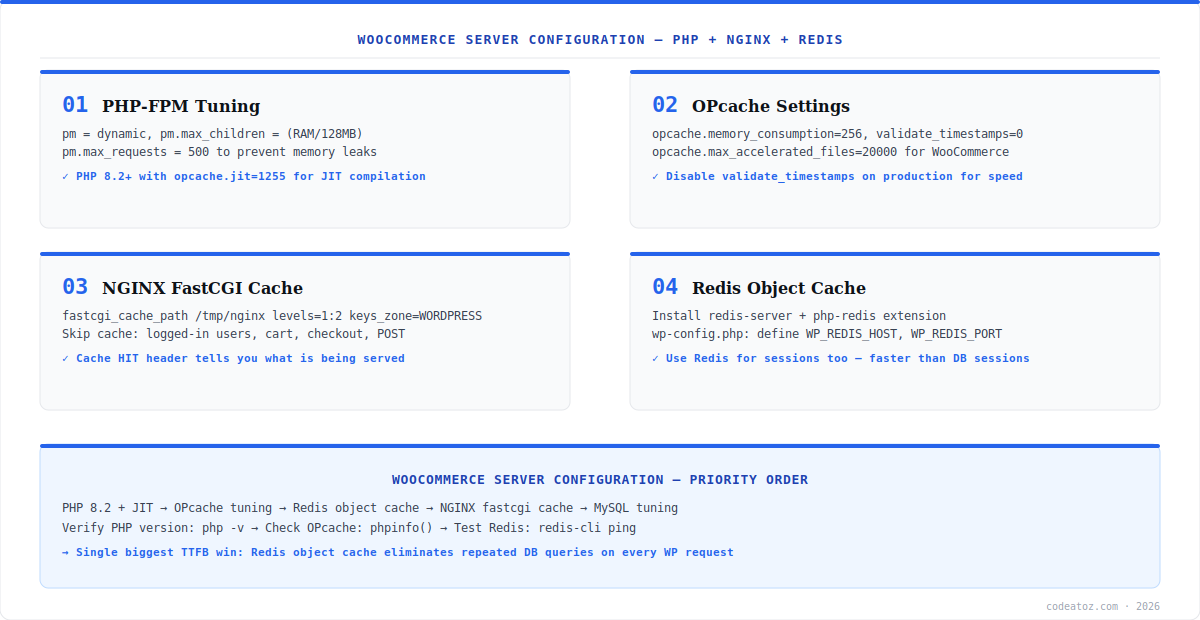
WooCommerce Server Configuration: PHP-FPM and OPcache
PHP-FPM pool size is the most critical WooCommerce server configuration parameter. Too few workers and requests queue; too many and they compete for RAM. Set pm.max_children to available RAM divided by average PHP process size (typically 128–256MB on a WooCommerce store). Enable PHP 8.2+ with JIT (opcache.jit=1255) — JIT provides 10–20% improvement on WooCommerce’s class-heavy codebase. Set opcache.validate_timestamps=0 on production to disable file modification checks, and opcache.max_accelerated_files=20000 to accommodate WooCommerce and plugin file counts. Check the PHP OPcache configuration documentation for all available settings.
; PHP OPcache — php.ini or /etc/php/8.2/fpm/conf.d/10-opcache.ini
opcache.enable=1
opcache.memory_consumption=256
opcache.max_accelerated_files=20000
opcache.validate_timestamps=0          ; disable on production
opcache.jit=1255                       ; PHP 8+ JIT
opcache.jit_buffer_size=100M

; PHP-FPM pool — /etc/php/8.2/fpm/pool.d/www.conf
pm = dynamic
pm.max_children = 20                   ; (available_RAM_MB / 200)
pm.start_servers = 5
pm.min_spare_servers = 3
pm.max_spare_servers = 8
pm.max_requests = 500                  ; recycle workers to prevent leaks
WooCommerce Server Configuration: NGINX and Redis
NGINX FastCGI cache is the highest-throughput layer in WooCommerce server configuration — it serves cached HTML directly without executing PHP at all. Configure a cache zone in NGINX, skip caching for logged-in users, cart pages, and POST requests, and add a X-Cache-Status header to verify hits. Redis is the single biggest TTFB improvement in WooCommerce server configuration for stores without full page cache — it eliminates repeated database queries for WordPress options, transients, and post metadata on every request. Install redis-server, the php-redis extension, and the Redis Object Cache plugin. Combine with the NGINX FastCGI module documentation. Our WooCommerce performance team configures the full WooCommerce server configuration stack as part of site speed audits.
fastcgi_cache_path /tmp/nginx levels=1:2 keys_zone=WPCACHE:100m inactive=60m;
fastcgi_cache_key "$scheme$request_method$host$request_uri";

# Skip cache conditions
set $skip_cache 0;
if ($request_method = POST) { set $skip_cache 1; }
if ($query_string != "")    { set $skip_cache 1; }
if ($request_uri ~* "/wp-admin/|/cart|/checkout|/my-account") { set $skip_cache 1; }
if ($http_cookie ~* "wordpress_logged_in") { set $skip_cache 1; }

fastcgi_cache_bypass $skip_cache;
fastcgi_no_cache $skip_cache;
fastcgi_cache WPCACHE;
fastcgi_cache_valid 200 60m;
add_header X-Cache-Status $upstream_cache_status;Frequently Asked Questions About WooCommerce Server Configuration
What is WooCommerce server configuration?
WooCommerce server configuration is the setup of the PHP, web server, and cache layers that process WooCommerce requests — PHP-FPM pool size, OPcache settings, NGINX FastCGI cache, Redis object cache, and MySQL configuration. Correct WooCommerce server configuration typically reduces TTFB by 50-70% before any application-level optimisation is applied.
What PHP version should I use for WooCommerce server configuration?
Use PHP 8.2 or 8.3 for optimal WooCommerce server configuration. PHP 8.2+ includes JIT compilation which improves performance on WooCommerce’s class-heavy codebase. Enable opcache.jit=1255 and set opcache.jit_buffer_size=100M. PHP 8.2 is significantly faster than PHP 7.4 and PHP 8.0 for typical WooCommerce workloads.
How many PHP-FPM workers should I configure for WooCommerce?
Set pm.max_children in WooCommerce server configuration by dividing available RAM by the average PHP process size. On a typical WooCommerce store, each PHP process uses 100-250MB. For a 4GB server with 2GB available for PHP, set max_children to 10-20. Set pm.max_requests=500 to recycle workers and prevent memory leaks from long-running plugins.
Why should I use Redis in WooCommerce server configuration?
Redis in WooCommerce server configuration replaces WordPress database-based object cache with in-memory storage. Every WordPress request reads dozens of cached options, transients, and post metadata — without Redis these hit the database every time. With Redis, they are served from memory in microseconds. Redis is the single highest-impact WooCommerce server configuration change for stores without full page cache.
How does NGINX FastCGI cache help WooCommerce server configuration?
NGINX FastCGI cache serves cached HTML pages directly from disk without executing PHP at all. For WooCommerce server configuration, this means product and category pages load in under 10ms for cached requests. Configure bypass rules for logged-in users, cart, checkout, and POST requests so dynamic content is never cached. Add X-Cache-Status header to monitor cache hit rates.
What OPcache settings are recommended for WooCommerce server configuration?
For WooCommerce server configuration, set opcache.memory_consumption=256, opcache.max_accelerated_files=20000 to cache all WooCommerce and plugin files, and opcache.validate_timestamps=0 on production to disable file change checks on every request. Enable JIT with opcache.jit=1255 and opcache.jit_buffer_size=100M on PHP 8.2+. Clear OPcache after every deployment.
Need WooCommerce Server Configuration Help?
Our performance team configures PHP-FPM, OPcache, NGINX, and Redis as a fixed-price server optimisation service.




