
WooCommerce API React Tutorial — Complete Integration Guide 2026
The best WooCommerce API React tutorial: API keys, Node proxy, Vite setup, React Query, cart state, and production error handling in one complete guide.
This WooCommerce API React tutorial is the complete, production-ready guide — not just a product list component. A proper WooCommerce API React tutorial covers API key management, a Node.js proxy server to protect secrets, React Query for data caching, cart state via Context, and real error handling. By the end of this WooCommerce API React tutorial you will have a working storefront foundation with products, cart, and auth — ready to extend into a full headless store. We assume you have read our headless WooCommerce overview.
The architecture for this WooCommerce API React tutorial: WooCommerce as a headless backend serving product and order data, a lightweight Node.js Express proxy to keep API keys off the client, and a Vite + React 18 frontend using TanStack React Query for data layer management. This separation of concerns is the correct production pattern.
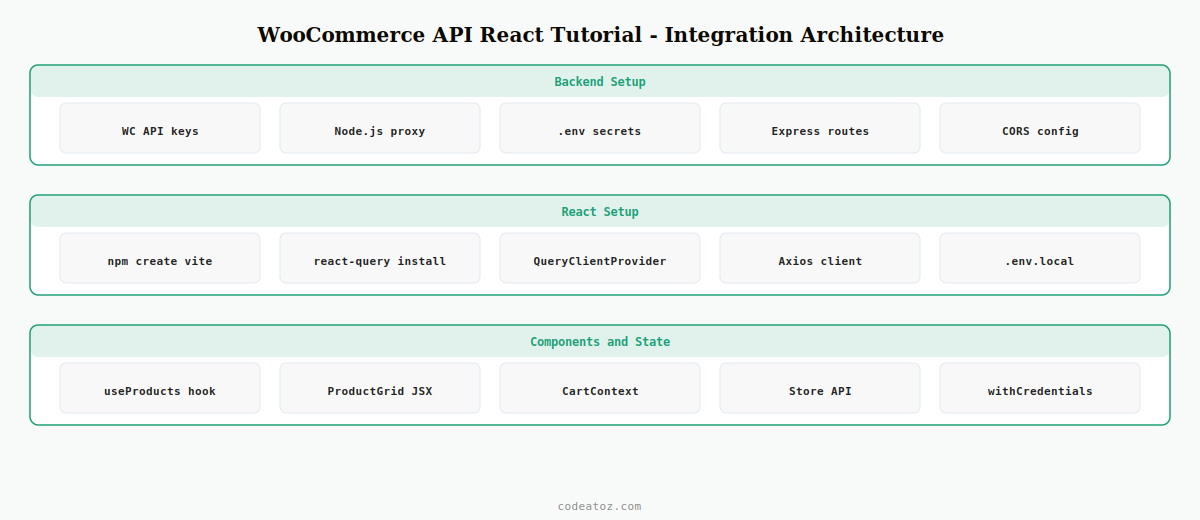
Step 1: WooCommerce API React Tutorial — Generate API Keys and Set Up Environment
The first step in this WooCommerce API React tutorial is generating secure API credentials. In your WooCommerce store go to Settings → Advanced → REST API → Add Key. Set Permission to Read/Write and copy both keys immediately — they are only shown once.
WC_BASE_URL=https://yourstore.com/wp-json/wc/v3
WC_STORE_URL=https://yourstore.com/wp-json/wc/store/v1
WC_CK=ck_your_consumer_key_here
WC_CS=cs_your_consumer_secret_here
FRONTEND_URL=http://localhost:5173VITE_PROXY_URL=http://localhost:4000Step 2: WooCommerce API React Tutorial — Build the Node.js Proxy Server
In any WooCommerce API React tutorial, the Node.js proxy is the most important security component. It keeps your consumer key and secret server-side, preventing them from appearing in the browser’s network tab or your bundled JavaScript.
import express from 'express'
import cors    from 'cors'
import axios   from 'axios'
import 'dotenv/config'

const app  = express()
const auth = { username: process.env.WC_CK, password: process.env.WC_CS }

app.use( cors({ origin: process.env.FRONTEND_URL, credentials: true }) )
app.use( express.json() )

// Products endpoint — authenticated via server-side credentials
app.get( '/api/products', async ( req, res ) => {
  try {
    const { data } = await axios.get(
      process.env.WC_BASE_URL + '/products',
      { auth, params: req.query }
    )
    res.json( data )
  } catch ( e ) {
    res.status( e.response?.status || 500 ).json({ message: e.message })
  }
})

// Store API — cart and checkout (session-based, no auth)
app.use( '/store', async ( req, res ) => {
  try {
    const { data } = await axios({
      method:  req.method,
      url:     process.env.WC_STORE_URL + req.path,
      data:    req.body,
      headers: { 'Content-Type': 'application/json' },
    })
    res.json( data )
  } catch ( e ) {
    res.status( e.response?.status || 500 ).json({ message: e.message })
  }
})

app.listen( 4000, () => console.log( 'WooCommerce API proxy running on :4000' ) )
Step 3: WooCommerce API React Tutorial — Vite + React Setup with React Query
npm create vite@latest wc-react -- --template react
cd wc-react
npm install @tanstack/react-query axios
npm install -D @tanstack/react-query-devtoolsimport React from 'react'
import ReactDOM from 'react-dom/client'
import { QueryClient, QueryClientProvider } from '@tanstack/react-query'
import { ReactQueryDevtools } from '@tanstack/react-query-devtools'
import App from './App'
const queryClient = new QueryClient({
defaultOptions: {
queries: {
staleTime: 1000 * 60 * 5, // 5 min cache
retry: 2,
refetchOnWindowFocus: false,
},
},
})
ReactDOM.createRoot( document.getElementById('root') ).render(
<QueryClientProvider client={queryClient}>
<App />
<ReactQueryDevtools initialIsOpen={false} />
</QueryClientProvider>
)Step 4: WooCommerce API React Tutorial — Products with React Query
React Query is the data layer that makes this WooCommerce API React tutorial production-ready. It handles caching, background refetching, stale data management, and error states automatically — eliminating hundreds of lines of useEffect boilerplate.
import { useQuery } from '@tanstack/react-query'
import axios from 'axios'

const api = axios.create({ baseURL: import.meta.env.VITE_PROXY_URL + '/api' })

// Global error handler
api.interceptors.response.use(
  res  => res,
  err  => Promise.reject( new Error( err.response?.data?.message || 'API error' ) )
)

export function useProducts( params = {} ) {
  return useQuery({
    queryKey: ['products', params],
    queryFn:  async () => (await api.get( '/products', { params } )).data,
  })
}import { useProducts } from '../hooks/useProducts'
export default function ProductGrid() {
const { data, isLoading, isError, error } = useProducts({
per_page: 12,
status: 'publish',
})
if ( isLoading ) return <div className="loading">Loading products...</div>
if ( isError ) return <div className="error">{error.message}</div>
return (
<div className="product-grid">
{data?.map( p => (
<div key={p.id} className="product-card">
<img src={p.images[0]?.src} alt={p.images[0]?.alt || p.name} loading="lazy" />
<h3>{p.name}</h3>
<div dangerouslySetInnerHTML={{ __html: p.price_html }} />
</div>
))}
</div>
)
}Step 5: WooCommerce API React Tutorial — Cart State with Context and Store API
The final piece of this WooCommerce API React tutorial is cart state. Use the WooCommerce Store API (/wc/store/v1) for cart operations — it uses session cookies and requires no authentication, making it ideal for guest shopping flows in a WooCommerce API React tutorial setup.
import { createContext, useContext, useState, useCallback } from 'react'
import axios from 'axios'

const CartContext = createContext( null )
const STORE = import.meta.env.VITE_PROXY_URL + '/store'

export function CartProvider({ children }) {
  const [cart,    setCart   ] = useState( null )
  const [loading, setLoading] = useState( false )

  const addItem = useCallback( async ( productId, qty = 1 ) => {
    setLoading( true )
    try {
      const { data } = await axios.post(
        STORE + '/cart/add-item',
        { id: productId, quantity: qty },
        { withCredentials: true }  // ← required for session cookie continuity
      )
      setCart( data )
    } catch ( e ) { console.error( 'Cart error:', e.message ) }
    finally { setLoading( false ) }
  }, [] )

  return (
    <CartContext.Provider value={{ cart, loading, addItem }}>
      {children}
    </CartContext.Provider>
  )
}

export const useCart = () => useContext( CartContext )
💡 withCredentials: true is critical in this WooCommerce API React tutorial — it sends the WooCommerce session cookie with every Store API request, enabling guest cart persistence across page loads.
For authentication setup beyond consumer keys, see our WooCommerce REST API authentication guide. The TanStack Query documentation covers advanced patterns including infinite scroll and optimistic updates. See our WooCommerce development services for production-ready headless builds.
Frequently Asked Questions — WooCommerce API React Tutorial
What is the best tech stack for a WooCommerce API React tutorial in 2026?
The best stack for a WooCommerce API React tutorial in 2026 is Vite + React 18, TanStack React Query for data fetching, a Node.js Express proxy for API key security, and the WooCommerce Store API for cart operations. For production storefronts with SEO requirements, replace Vite with Next.js App Router.
Why do I need a Node.js proxy in a WooCommerce API React tutorial?
In any WooCommerce API React tutorial, the proxy keeps your consumer key and secret server-side. If you call the WooCommerce REST API directly from React, your credentials appear in the browser’s network tab and in your bundled JavaScript — visible to anyone who inspects the page source.
What is the difference between the WooCommerce REST API and Store API in a React tutorial?
The WooCommerce REST API (/wc/v3) requires consumer key authentication and serves product, order, and customer data — use it server-side through your proxy. The Store API (/wc/store/v1) uses session cookies for cart and checkout operations with no authentication — it is safe to call directly from React with withCredentials:true.
Why use React Query in a WooCommerce API React tutorial instead of useEffect and fetch?
React Query in this WooCommerce API React tutorial handles caching, background refetching, stale data, loading states, and error states automatically. The alternative — useEffect and fetch — requires hundreds of lines of boilerplate to achieve the same result, and is prone to race conditions, duplicate requests, and memory leaks.
Should I use Vite or Next.js for a WooCommerce API React tutorial?
Use Vite when building a single-page app where SEO is not a priority. Use Next.js when you need server-side rendering for product pages, ISR for catalogue pages, built-in API routes (replacing the Node proxy), and Image Optimisation. For any e-commerce store expecting organic search traffic, Next.js is the better choice for a WooCommerce API React tutorial base.
How do I handle errors in a WooCommerce API React tutorial?
Add an Axios response interceptor to normalise errors globally — extract the WooCommerce error message from the response body and throw a standard Error. In React Query, errors automatically surface in the isError and error properties of the query result. Display inline error messages in the UI rather than alerts, and use React Query’s built-in retry option for transient failures.
Need a WooCommerce React Integration Built?
CodeAtoZ builds production headless WooCommerce storefronts with React — from architecture through to deployment.




