
How to Build a Headless WooCommerce Store with React — 2026 Guide
Decouple your WooCommerce backend from your frontend. Full architecture walkthrough, React setup, cart + checkout — production ready.
A headless WooCommerce store decouples the WordPress/WooCommerce backend from any frontend framework. With a headless WooCommerce setup, your React app fetches products, manages carts, and processes checkouts entirely through the WooCommerce REST API — giving you full creative control over the user experience while retaining WooCommerce’s battle-tested order management, payment gateways, and product catalogue. This 2026 guide covers the full architecture of a headless WooCommerce store with React.
The headless architecture has matured significantly since 2022. WooCommerce’s REST API covers products, categories, cart, and checkout without additional plugins. Paired with React and a lightweight Node.js proxy for CORS and credential management, you get a fast, flexible storefront that can be deployed to Vercel, Cloudflare Pages, or any CDN — completely separate from your WordPress server.
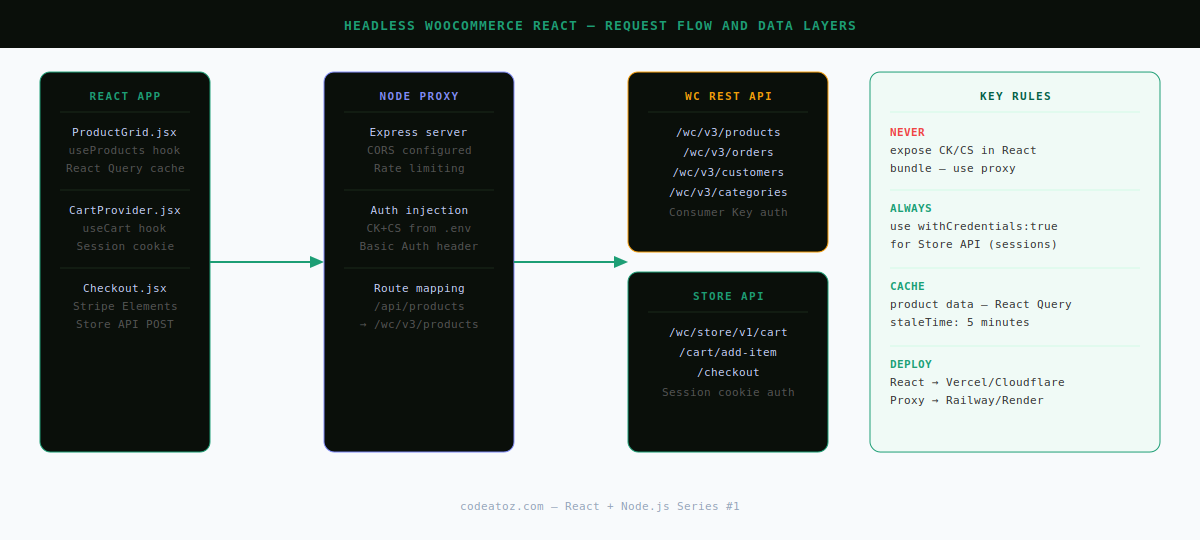
Headless WooCommerce Architecture — How It Works
A headless WooCommerce store has three layers:
- WooCommerce backend — WordPress + WooCommerce running on a standard LAMP/LEMP server, acting purely as a data and transaction API
- Node.js proxy — a thin Express server that holds your consumer key/secret and forwards requests to WooCommerce, preventing credential exposure in the browser
- React frontend — your decoupled storefront, hosted separately on a CDN or edge network (Vercel, Netlify, Cloudflare Pages)
⚠️ Never put your WooCommerce consumer key/secret in your React bundle. Anyone can read it from the browser. Always route authenticated API calls through a server-side proxy or Next.js API routes.
Step 1 — Set Up the Node.js API Proxy
mkdir wc-proxy && cd wc-proxy
npm init -y
npm install express cors node-fetch dotenvimport 'dotenv/config';
import express from 'express';
import cors from 'cors';
import fetch from 'node-fetch';
const app = express();
const PORT = process.env.PORT || 4000;
app.use( cors({ origin: process.env.FRONTEND_URL }) );
app.use( express.json() );
const WC_BASE = process.env.WC_BASE_URL; // https://yourstore.com/wp-json/wc/v3
const CK = process.env.WC_CK;
const CS = process.env.WC_CS;
const AUTH = 'Basic ' + Buffer.from( `${CK}:${CS}` ).toString( 'base64' );
// Generic proxy — /api/:resource maps to WC REST resource
app.get( '/api/:resource', async ( req, res ) => {
const url = `${WC_BASE}/${req.params.resource}?${new URLSearchParams( req.query )}`;
const upstream = await fetch( url, { headers: { Authorization: AUTH } } );
const data = await upstream.json();
res.status( upstream.status ).json( data );
} );
// Cart — uses WooCommerce Store API (no auth needed for guest sessions)
app.post( '/api/cart/add-item', async ( req, res ) => {
const upstream = await fetch(
`${process.env.WC_STORE_URL}/cart/add-item`, // /wp-json/wc/store/v1
{
method: 'POST',
headers: { 'Content-Type': 'application/json' },
body: JSON.stringify( req.body ),
}
);
const data = await upstream.json();
res.status( upstream.status ).json( data );
} );
app.listen( PORT, () => console.log( `Proxy on :${PORT}` ) );Step 2 — Build the React Product Catalogue
npm create vite@latest wc-frontend -- --template react
cd wc-frontend && npm install
npm install @tanstack/react-query axiosimport { useQuery } from '@tanstack/react-query';
import axios from 'axios';
const PROXY = import.meta.env.VITE_PROXY_URL; // http://localhost:4000
export function useProducts( params = {} ) {
return useQuery({
queryKey: ['products', params],
queryFn: async () => {
const { data } = await axios.get( `${PROXY}/api/products`, { params } );
return data;
},
staleTime: 1000 * 60 * 5, // 5 minutes
});
}import { useProducts } from '../hooks/useProducts';
export default function ProductGrid() {
const { data: products, isLoading, error } = useProducts({ per_page: 12 });
if ( isLoading ) return <div className="loading">Loading products…</div>;
if ( error ) return <div className="error">Failed to load products.</div>;
return (
<div className="product-grid">
{products.map( product => (
<div key={product.id} className="product-card">
<img
src={product.images[0]?.src}
alt={product.images[0]?.alt || product.name}
loading="lazy"
/>
<h3>{product.name}</h3>
<p dangerouslySetInnerHTML={{ __html: product.price_html }}/>
<button onClick={() => addToCart( product.id )}>
Add to Cart
</button>
</div>
))}
</div>
);
}Step 3 — Cart Management in Headless WooCommerce
WooCommerce’s Store API (introduced in WooCommerce 6.x) provides a session-based cart API that works without consumer key authentication. Use it for cart operations, keeping the REST API for product data.
import { useState, useCallback } from 'react';
import axios from 'axios';

const STORE_API = import.meta.env.VITE_WC_STORE_URL; // https://yourstore.com/wp-json/wc/store/v1

export function useCart() {
  const [cart, setCart]       = useState( null );
  const [loading, setLoading] = useState( false );

  const addItem = useCallback( async ( productId, quantity = 1 ) => {
    setLoading( true );
    try {
      const { data } = await axios.post(
        `${STORE_API}/cart/add-item`,
        { id: productId, quantity },
        { withCredentials: true } // send session cookie
      );
      setCart( data );
    } finally {
      setLoading( false );
    }
  }, [] );

  const getCart = useCallback( async () => {
    const { data } = await axios.get( `${STORE_API}/cart`, { withCredentials: true } );
    setCart( data );
  }, [] );

  return { cart, loading, addItem, getCart };
}
Step 4 — Checkout in a Headless WooCommerce Store
async function submitCheckout( billingData ) {
  const { data } = await axios.post(
    `${STORE_API}/checkout`,
    {
      billing_address:  billingData,
      shipping_address: billingData,
      payment_method:   'stripe',
      payment_data: [
        { key: 'stripe_source', value: billingData.stripeSourceId },
      ],
    },
    { withCredentials: true }
  );
  // data.payment_result.redirect_url — redirect user to confirmation page
  window.location.href = data.payment_result.redirect_url;
}
Headless WooCommerce Performance Considerations
- Static product pages — pre-render product catalogue at build time with Vite SSG or Next.js
getStaticPropsfor near-instant loads - Incremental Static Regeneration — use Next.js ISR to keep product data fresh without a full rebuild on every price change
- CDN edge caching — the React frontend deploys as static assets; cache aggressively on Cloudflare or Vercel Edge
- WooCommerce object cache — Redis or Memcached on the WooCommerce server dramatically reduces REST API response times
- Image optimisation — use Next.js Image or Cloudflare Image Resizing to serve WebP to browsers that support it
For authentication setup between your React app and WooCommerce, see our guide on WooCommerce REST API authentication methods. For building custom endpoints to power your headless store, see WooCommerce custom REST API endpoints. The React documentation covers React 18 fundamentals.
Frequently Asked Questions About Headless WooCommerce with React
What is a headless WooCommerce store?
A headless WooCommerce store uses WooCommerce purely as a backend — handling products, orders, and payments through its REST API — while the frontend is a completely separate React (or any framework) application. The two communicate via HTTP, decoupled from WordPress’s template system.
Do I still need WordPress for a headless WooCommerce setup?
Yes — WooCommerce runs on WordPress, so you still need a WordPress installation. The difference is that WordPress never renders HTML seen by end users. It acts purely as a headless CMS and e-commerce engine, with the React app serving all the pages.
Is headless WooCommerce with React faster than standard WooCommerce?
Usually yes — a React frontend deployed to a CDN serves pre-rendered or statically generated HTML much faster than PHP-rendered WordPress pages. Product listing pages can load in under 300ms on a CDN edge versus 800ms+ for server-rendered WooCommerce. Checkout speed depends on payment gateway integration quality.
How do payment gateways work in a headless WooCommerce store?
Stripe and PayPal both support headless checkout flows via their JavaScript SDKs. Stripe Elements or Stripe Payment Element collects card data client-side, sends a payment method ID to your backend, which then calls WooCommerce’s Store API checkout endpoint with the payment data. No card data touches your server.
What is the WooCommerce Store API versus the WooCommerce REST API?
The Store API (/wp-json/wc/store/v1) is designed for storefront interactions — cart management, checkout, and product browsing — and uses session cookies rather than consumer keys. The REST API (/wp-json/wc/v3) is for admin operations and requires authentication. Headless stores typically use both: Store API for cart/checkout, REST API for product data.
Should I use Next.js or Vite for a headless WooCommerce React store?
Next.js is generally the better choice for e-commerce headless stores because of its built-in ISR, image optimisation, and API routes (which handle the authentication proxy without a separate Node.js server). Vite is faster for development but requires more manual configuration for SSR and ISR in production e-commerce deployments.
Building a Headless WooCommerce Store?
CodeAtoZ specialises in headless WooCommerce builds with React and Next.js — architecture design, REST API integration, payment gateway setup, and performance optimisation.




