
WooCommerce REST API Authentication — Every Method Explained
Consumer keys, OAuth 1.0a, Application Passwords, and JWT — with code examples and security best practices.
Getting WooCommerce REST API authentication wrong is the fastest way to expose your store data to the public internet. This guide covers every method of WooCommerce REST API authentication — from the simplest consumer key setup to OAuth 1.0a and JWT tokens — so you can pick the right approach for your integration and implement it securely. WooCommerce REST API authentication is not optional; every endpoint you hit must be properly secured.
WooCommerce’s REST API is powerful, but it’s only as secure as its authentication layer. Whether you’re building a mobile app, syncing to an ERP, or creating a headless storefront, choosing the right authentication method affects both security and developer experience.
This guide covers all four supported methods, shows you exactly when to use each, and gives you production-ready code examples. We also cover HTTPS requirements, common authentication errors, and the security practices that prevent credential exposure.
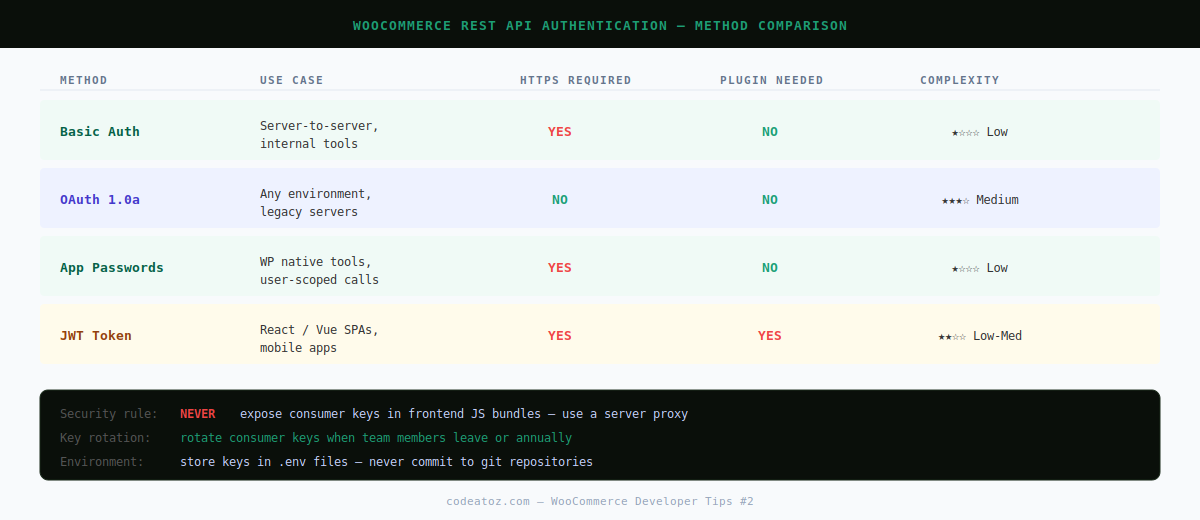
WooCommerce REST API Authentication Method 1 — Consumer Key / Secret (Basic Auth)
Best for: server-to-server calls, internal tools, quick integrations. Always use over HTTPS.
Generate keys under WooCommerce → Settings → Advanced → REST API → Add Key. Assign Read, Write, or Read/Write permissions based on your needs.
curl -u "ck_your_consumer_key:cs_your_consumer_secret"
"https://yourstore.com/wp-json/wc/v3/orders"$ck = 'ck_your_consumer_key';
$cs = 'cs_your_consumer_secret';
$response = wp_remote_get(
'https://yourstore.com/wp-json/wc/v3/orders',
[
'headers' => [
'Authorization' => 'Basic ' . base64_encode( "{$ck}:{$cs}" ),
],
]
);
$orders = json_decode( wp_remote_retrieve_body( $response ), true );⚠️ HTTPS is mandatory for Basic Auth. Over plain HTTP, your consumer key and secret travel in base64 (not encrypted) and can be intercepted. Never use Basic Auth without a valid SSL certificate.
WooCommerce REST API Authentication Method 2 — OAuth 1.0a
Best for: situations where HTTPS isn’t available (development environments, legacy servers). OAuth 1.0a signs each request with a cryptographic signature, so credentials are never sent in plain text.
The OAuth 1.0a spec requires generating a signature from the HTTP method, request URL, and a sorted set of parameters. WooCommerce validates this signature server-side.
import OAuth from 'oauth-1.0a';
import CryptoJS from 'crypto-js';

const oauth = new OAuth({
  consumer: {
    key:    'ck_your_consumer_key',
    secret: 'cs_your_consumer_secret',
  },
  signature_method: 'HMAC-SHA256',
  hash_function( base, key ) {
    return CryptoJS.enc.Base64.stringify(
      CryptoJS.HmacSHA256( base, key )
    );
  },
});

const requestData = {
  url:    'https://yourstore.com/wp-json/wc/v3/products',
  method: 'GET',
};

const authHeader = oauth.toHeader( oauth.authorize( requestData ) );

const response = await fetch( requestData.url, {
  headers: { ...authHeader },
});
const products = await response.json();
WooCommerce REST API Authentication Method 3 — Application Passwords (WP 5.6+)
Best for: user-specific operations, WordPress-native integrations, tools that need to act as a specific user account. Available natively since WordPress 5.6 — no plugin required.
Generate an Application Password under Users → Your Profile → Application Passwords. The password is only shown once on creation.
curl -u "your_wp_username:xxxx xxxx xxxx xxxx xxxx xxxx"
"https://yourstore.com/wp-json/wc/v3/customers"function my_permission_check( WP_REST_Request $request ) {
// Application Password sets the current user — just check capability
return current_user_can( 'manage_woocommerce' );
}WooCommerce REST API Authentication Method 4 — JWT Tokens
Best for: SPAs (React, Vue, Next.js), mobile apps, any frontend that needs to authenticate users and make API calls without exposing credentials. Requires a JWT plugin such as JWT Authentication for WP REST API.
const loginRes = await fetch(
  'https://yourstore.com/wp-json/jwt-auth/v1/token',
  {
    method:  'POST',
    headers: { 'Content-Type': 'application/json' },
    body:    JSON.stringify({
      username: 'admin',
      password: 'your-password',
    }),
  }
);
const { token } = await loginRes.json();const productsRes = await fetch(
'https://yourstore.com/wp-json/wc/v3/products',
{
headers: {
'Authorization': `Bearer ${token}`,
'Content-Type': 'application/json',
},
}
);
const products = await productsRes.json();Security Best Practices for WooCommerce REST API Authentication
- Always use HTTPS — every auth method transmits credentials or tokens that must be encrypted in transit
- Limit consumer key permissions — use Read-only keys unless Write access is specifically required
- Rotate keys regularly — treat consumer keys like passwords; regenerate after team members leave
- Never commit credentials to version control — use environment variables or
.envfiles - Set JWT token expiry — short-lived tokens (1 hour) reduce the blast radius of a leaked token
- Use IP allowlisting for server-to-server — restrict API access to known IP ranges where possible
Common WooCommerce REST API Authentication Errors and Fixes
ERROR REFERENCE
woocommerce_rest_authentication_error — Invalid consumer key
Fix: Double-check the key in WooCommerce → Settings → Advanced → REST API. Keys are only shown once — if lost, delete and regenerate.
401 — Consumer secret is invalid
Fix: Ensure you’re not URL-encoding the key/secret unnecessarily. The colon separator in Basic Auth must not be encoded.
OAuth signature_invalid
Fix: Timestamps must be within 15 minutes of server time. Check your server’s NTP sync. Also ensure parameters are sorted alphabetically before signing.
rest_forbidden — You cannot do that
Fix: The key has insufficient permissions. Regenerate with the correct Read/Write setting for the resources you need to access.
For building custom endpoints to go alongside your authentication setup, see our guide on creating a WooCommerce custom endpoint. For headless React integrations, see our WooCommerce API React tutorial.
Frequently Asked Questions About WooCommerce REST API Authentication
What is the easiest WooCommerce REST API authentication method?
Consumer key / secret with Basic Auth is the simplest — generate a key in WooCommerce settings and pass it as a Basic Auth header. It only works securely over HTTPS but requires no additional plugins.
Can I use WooCommerce REST API authentication without HTTPS?
Only OAuth 1.0a is safe over plain HTTP, as it uses cryptographic signatures rather than transmitting credentials. Basic Auth and Application Passwords must always use HTTPS. For production stores, HTTPS is non-negotiable regardless of auth method.
What WooCommerce REST API authentication should I use for a React app?
JWT tokens are the best choice for React frontends — users log in once to receive a token, which the app stores (in memory, not localStorage) and passes as a Bearer header. Consumer keys should never be bundled in frontend JavaScript as they would be publicly visible.
Do WooCommerce consumer keys expire?
No — WooCommerce consumer keys do not expire by default. This makes them convenient but means you must manually revoke them if they are compromised. Always treat them as long-lived secrets and rotate them when team members leave.
How do I test WooCommerce REST API authentication in Postman?
In Postman, open the Authorization tab for your request, choose Basic Auth, and paste your consumer key as the Username and consumer secret as the Password. Postman handles the base64 encoding automatically. For OAuth 1.0a, use Postman’s built-in OAuth 1.0 auth type.
Is WooCommerce Application Password the same as a consumer key?
No — Application Passwords are a WordPress core feature tied to a WordPress user account. Consumer keys are WooCommerce-specific and operate independently of user accounts. Application Passwords respect WordPress user roles; consumer keys have their own Read/Write permission scopes.
Need Secure WooCommerce API Integration?
CodeAtoZ builds production-grade WooCommerce integrations with proper authentication, error handling, and security hardening built in.




