
The Complete Guide to Shopware 6 Plugin Development in 2026
Build production-ready Shopware 6 plugins using the Symfony DI container, event subscribers, database migrations, and Twig overrides — with real PHP code throughout.
DI container
Event subscribers
Database migrations
Twig overrides
Admin API
This guide covers Shopware 6 plugin development from first principles — creating the plugin manifest through to event subscribers, database migrations, and deploying to a live store. All examples use Shopware 6.6 with PHP 8.2 and follow Shopware’s official plugin architecture patterns.
Shopware 6 plugin development is built on Symfony’s service container, event system, and dependency injection patterns. If you have Symfony experience, the mental model translates directly. If you are coming from WooCommerce or Magento, expect a steeper initial learning curve — but a significantly more structured and testable architecture once you understand it.
Shopware 6 has grown rapidly as a platform for mid-market and enterprise European retailers. Its open-source Community Edition gives full plugin development access, and the plugin ecosystem covers everything from payment gateways to ERP integrations. Understanding Shopware 6 plugin development positions you to serve a growing segment of the European commerce market.
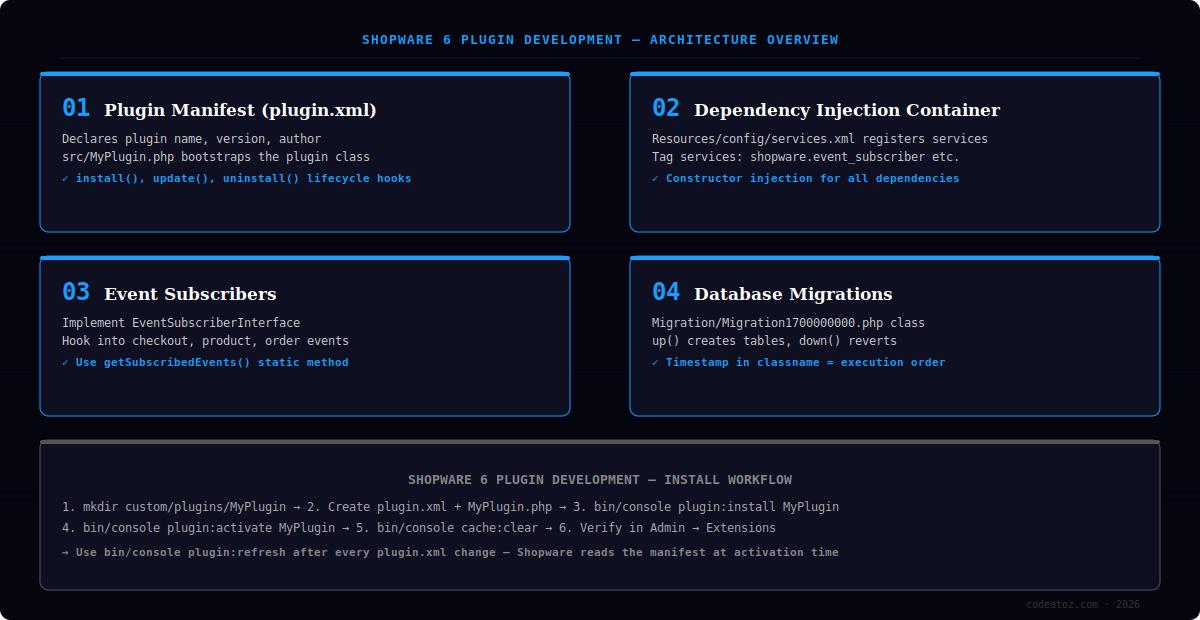
Shopware 6 Plugin Development: Project Structure
Every Shopware 6 plugin development project follows the same directory convention. Plugins live in custom/plugins/ at the Shopware root. The plugin’s root class — typically src/MyPlugin.php — extends ShopwareCoreFrameworkPlugin and serves as the bootstrap entry point. The plugin.xml manifest at the project root declares metadata.
custom/plugins/MyPlugin/plugin.xml— name, version, author, descriptioncustom/plugins/MyPlugin/src/MyPlugin.php— main plugin classcustom/plugins/MyPlugin/src/Resources/config/services.xml— DI service definitionscustom/plugins/MyPlugin/src/Migration/— timestamped migration classescustom/plugins/MyPlugin/src/Subscriber/— event subscriber classes
Run bin/console plugin:refresh after every plugin.xml change. Shopware reads the manifest at activation time — without a refresh, the Admin panel shows stale metadata. During active Shopware 6 plugin development, add this to your pre-commit hook.
Shopware 6 Plugin Development: The Dependency Injection Container
Shopware 6 uses Symfony’s service container for all dependency management. In Shopware 6 plugin development, every service your plugin provides — subscribers, custom repositories, commands, decorators — is registered in Resources/config/services.xml. Constructor injection is the only pattern Shopware supports; property injection is not used.
<?xml version="1.0" ?>
<container xmlns="http://symfony.com/schema/dic/services">
  <services>
    <service id="MyPluginSubscriberOrderSubscriber">
      <argument type="service" id="order.repository"/>
      <argument type="service" id="ShopwareCoreCheckoutOrderOrderDefinition"/>
      <tag name="kernel.event_subscriber"/>
    </service>
  </services>
</container>Shopware 6 Plugin Development: Event Subscribers
Event subscribers are the primary extension point in Shopware 6 plugin development. Shopware dispatches events throughout the request lifecycle — before and after entity writes, during checkout, on cart updates, and at many other points. Your subscriber listens on specific events and runs custom logic when they fire.
namespace MyPluginSubscriber;

use ShopwareCoreCheckoutOrderOrderEvents;
use ShopwareCoreFrameworkDataAbstractionLayerEventEntityWrittenEvent;
use SymfonyComponentEventDispatcherEventSubscriberInterface;

class OrderSubscriber implements EventSubscriberInterface
{
    public static function getSubscribedEvents(): array
    {
        return [
            OrderEvents::ORDER_WRITTEN_EVENT => 'onOrderWritten',
        ];
    }

    public function onOrderWritten(EntityWrittenEvent $event): void
    {
        foreach ($event->getWriteResults() as $result) {
            // React to new or updated order
            $orderId = $result->getPrimaryKey();
        }
    }
}Never perform heavy processing synchronously inside an event subscriber. In Shopware 6 plugin development, subscriber methods run in the same request thread. Offload slow operations — email sending, API calls, PDF generation — to Shopware’s message queue via the MessageBusInterface.
Shopware 6 Plugin Development: Database Migrations
Any Shopware 6 plugin development project that needs custom tables or schema changes uses Shopware’s migration system. Migration classes live in src/Migration/ and are named with a Unix timestamp prefix — this determines execution order. The up() method runs on install or update; down() reverts the change.
Shopware runs pending migrations automatically when you install or update a plugin via bin/console plugin:install or the Admin panel. You can also run them manually with bin/console database:migrate --all MyPlugin. Always reference the Shopware 6 migration documentation for the full API.
Shopware 6 Plugin Development: Twig Template Overrides
Shopware uses Twig for its storefront templates. Shopware 6 plugin development can override any storefront template by mirroring the Storefront bundle’s path inside your plugin’s Resources/views/ folder. The override uses {% sw_extends %} instead of standard Twig’s {% extends %} — this ensures the Shopware theme inheritance chain is respected.
- Mirror the Storefront path:
views/storefront/page/product-detail/index.html.twig - Use
{% sw_extends '@Storefront/storefront/page/product-detail/index.html.twig' %} - Override specific blocks with
{% block page_product_detail_buy_form %} - Use
{{ parent() }}to preserve original content and append/prepend yours - Run
bin/console cache:clearafter every Twig change — Shopware caches compiled templates
For more complex Shopware 6 plugin development work or when evaluating Shopware against other platforms, our team publishes a detailed comparison of commerce platforms and can assist with developer hiring for Shopware projects.
Test your Shopware 6 plugin development work with the Shopware PHPUnit integration and the Shopware plugin fundamentals docs. Shopware provides a KernelTestBehaviour trait that boots a test kernel with your plugin loaded, making service and subscriber testing straightforward without mocking the entire container.
Frequently Asked Questions About Shopware 6 Plugin Development
What is Shopware 6 plugin development?
Shopware 6 plugin development is the process of building custom extensions for the Shopware 6 e-commerce platform using PHP, Symfony’s dependency injection container, and Shopware’s event system. Plugins can extend checkout flows, add custom entities, override storefront templates, integrate third-party APIs, and add new Admin panel features.
How does Shopware 6 plugin development differ from WooCommerce?
Shopware 6 plugin development is more structured than WooCommerce. Shopware uses Symfony’s DI container and event dispatcher rather than WordPress hooks and filters. This makes Shopware plugins more testable and maintainable, but requires Symfony knowledge to get started. WooCommerce has a shallower learning curve but fewer architectural guardrails.
What PHP version does Shopware 6 plugin development require?
Shopware 6.6 requires PHP 8.2 or above. Shopware 6 plugin development on older PHP versions is no longer supported as of 2025. PHP 8.3 is recommended for new projects as it offers performance improvements and is the version Shopware’s CI pipeline tests against.
How long does Shopware 6 plugin development take?
A simple Shopware 6 plugin — adding a custom field, subscribing to one event, and displaying data in the storefront — takes one to two days for a PHP developer familiar with Symfony. A complex plugin with custom entities, Admin UI, API endpoints, and background processing takes two to four weeks depending on scope.
Can Shopware 6 plugin development use Composer packages?
Yes. Shopware 6 plugin development supports any Composer package. Add dependencies to your plugin’s composer.json and run composer install inside the plugin directory. Shopware’s autoloader picks up the plugin’s vendor directory automatically during plugin activation. Be careful with packages that conflict with Shopware’s own dependencies.
How do I distribute a Shopware 6 plugin development project commercially?
Commercial Shopware 6 plugins are distributed through the Shopware Store at store.shopware.com. Shopware reviews submitted plugins for code quality and security. Plugins pass review faster when they include unit tests, follow Shopware’s coding standards, and handle migration rollbacks correctly. You can also sell plugins directly outside the store for private clients.
Need a Shopware 6 Plugin Built?
Our team builds production-ready Shopware 6 plugins — custom entities, checkout extensions, ERP integrations, and Admin UI. Fixed-price delivery.
Event subscriber
Store-ready
PHPUnit tested




