
The Complete Guide to Shopify Custom App Development in 2026
Build production-ready Shopify apps using OAuth 2.0, GraphQL Admin API, App Bridge 4, and Shopify CLI 3 — with real Node.js code throughout.
OAuth 2.0 install flow
GraphQL Admin API
App Bridge 4
Webhooks & GDPR
Billing & deployment
If you are starting Shopify custom app development in 2026, this guide gives you the complete picture — from scaffolding your first app with Shopify CLI 3 through OAuth 2.0, GraphQL Admin API queries, App Bridge 4 embedding, webhooks, billing, and Partner Dashboard submission. Every code sample is production-ready Node.js.
Shopify custom app development has shifted significantly. The REST Admin API is deprecated on most endpoints from version 2025-01 onward, App Bridge has reached its fourth major version, and the Remix template is now the officially supported scaffold. If your knowledge of Shopify app architecture dates from 2022 or earlier, much of what you know has changed.
This guide focuses on building a Shopify custom app the way Shopify expects it in 2026 — using GraphQL exclusively, embedding correctly with App Bridge 4, and passing the security checks that Shopify’s review team looks for. Whether you are building a private custom app for one merchant or a public listing on the App Store, the foundations are identical.
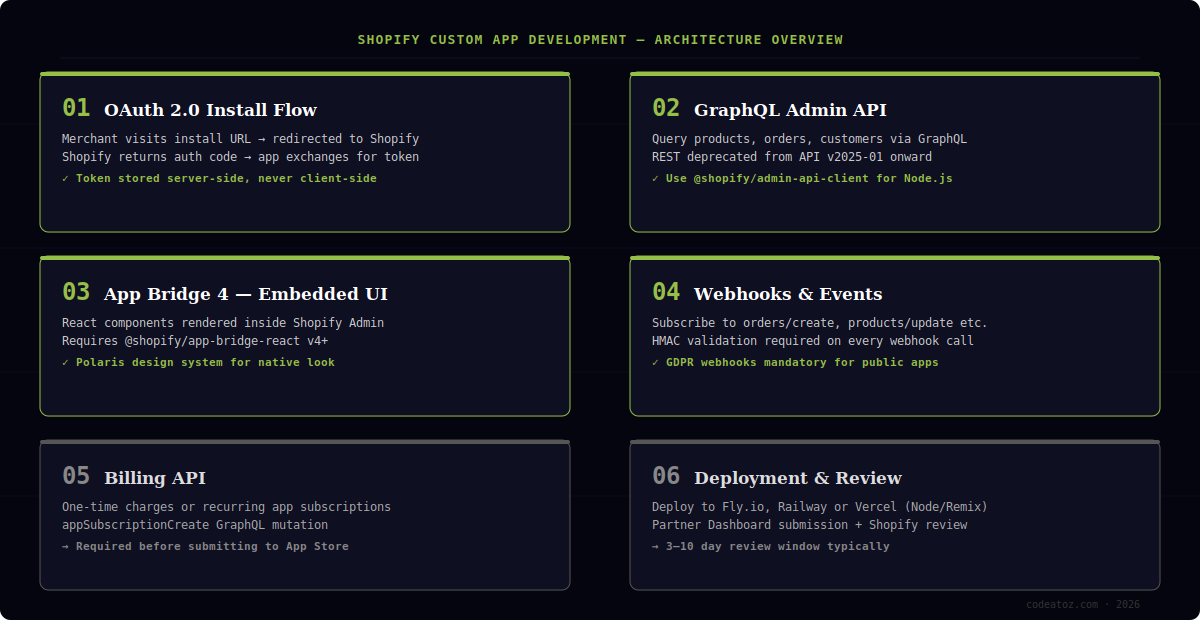
What Shopify Custom App Development Requires in 2026
Before writing a single line of code for your Shopify custom app, you need three things in place: a Shopify Partner account, a development store, and Node.js 20 or above. The Partner account is free and gives you access to the Partner Dashboard where apps are registered and submitted.
Shopify CLI 3 is the command-line tool that scaffolds your Shopify custom app development project. It handles OAuth boilerplate, session storage, GDPR webhook registration, and the local development tunnel automatically. You should be using it — writing these layers from scratch in 2026 is unnecessary work.
- Shopify Partner account — free at partners.shopify.com
- Node.js 20+ (LTS recommended for production deploys)
- Shopify CLI 3 — install globally via npm
- A development store — create one from your Partner Dashboard
- Basic knowledge of GraphQL query syntax — REST knowledge transfers but GraphQL is now mandatory
Use the Remix template when running shopify app init. It scaffolds OAuth, session storage, GDPR webhooks, App Bridge wiring, and Polaris components in one command — saving two to three days of boilerplate setup for every Shopify custom app development project.
npm install -g @shopify/cli @shopify/app
shopify app init my-custom-app
cd my-custom-app
shopify app dev
Shopify Custom App Development: The OAuth 2.0 Install Flow
Every Shopify custom app authenticates merchants via OAuth 2.0. When a merchant clicks Install, Shopify redirects them to your app’s authorisation endpoint. Your app constructs an authorisation URL specifying the requested access scopes, and Shopify shows the merchant a permission consent screen. On approval, Shopify sends a temporary code to your callback URL. Your app exchanges this code — alongside your API secret — for a permanent access token.
The access token is the credential your Shopify custom app development project will use for every Admin API call. It must be stored server-side, encrypted at rest, and never exposed in client-side JavaScript or committed to version control. The Remix scaffold handles token storage in a session database out of the box — SQLite locally, PostgreSQL in production.
- Register your app in the Partner Dashboard — note the API key and secret
- Build the install entry point — redirects to Shopify’s OAuth authorisation URL
- Handle the OAuth callback — verify HMAC, exchange code for access token
- Store the access token encrypted against the shop domain
- On subsequent requests — retrieve stored token and inject into API client
Always verify the HMAC signature on the OAuth callback before exchanging the authorisation code. Skipping HMAC verification makes your Shopify custom app vulnerable to authorisation code injection. Shopify CLI’s scaffold includes this check — do not remove it.
Shopify Custom App Development: GraphQL Admin API Queries
From API version 2025-01, Shopify has deprecated the majority of REST Admin API endpoints in favour of GraphQL. All new Shopify custom app development must use the GraphQL Admin API. The @shopify/admin-api-client package is the recommended client for Node.js projects.
GraphQL lets your Shopify custom app request exactly the fields it needs — no over-fetching, no multiple round trips for related data. A single query can return an order alongside its line items, shipping address, and fulfilment status in one network request. This matters at scale when you are processing thousands of webhooks per hour.
import { createAdminApiClient } from '@shopify/admin-api-client';

const client = createAdminApiClient({
  storeDomain: session.shop,
  apiVersion: '2025-01',
  accessToken: session.accessToken,
});

const PRODUCTS_QUERY = `
  query getProducts($first: Int!) {
    products(first: $first) {
      edges {
        node {
          id
          title
          status
          variants(first: 5) {
            edges {
              node { id price inventoryQuantity }
            }
          }
        }
      }
    }
  }
`;

const { data } = await client.request(PRODUCTS_QUERY, {
  variables: { first: 10 },
});Request only the scopes your Shopify custom app genuinely needs. Over-permissioned apps are flagged during Shopify’s review process and make merchants hesitant to install. Start with read_products and add scopes incrementally as your feature set grows.
Embedding Your Shopify Custom App with App Bridge 4
App Bridge 4 is the React library that embeds your Shopify custom app development UI directly inside the Shopify Admin. Without it, merchants see your app in a separate browser tab. With App Bridge, your app renders inside the Admin frame — consistent navigation, native loading states, and access to Shopify’s Polaris design components.
The Remix scaffold wires App Bridge automatically. Your root app.jsx is wrapped in the AppProvider from @shopify/shopify-app-remix/react. Any page component can then use App Bridge React hooks — useAppBridge, useToast, useNavigate — to interact with the Admin host.
- Use App Bridge 4 official documentation for the full hook reference
- Polaris components handle all UI — buttons, cards, data tables, modals
- Never use custom CSS that conflicts with Polaris — it breaks the embedded experience
- Session tokens replace cookies for Admin authentication in embedded context
Shopify Custom App Development: Webhooks and GDPR Compliance
Webhooks let your Shopify custom app react to store events without polling. When an order is placed, a product is updated, or a customer is created, Shopify sends an HTTP POST to your registered webhook endpoint. Your app must respond with a 200 status within five seconds — offload heavy processing to a queue.
GDPR webhooks are mandatory for all Shopify custom app development projects that handle customer data. You must register and handle three endpoints: customers/data_request, customers/redact, and shop/redact. The Remix scaffold registers these automatically — but you must implement the handler logic yourself to pass App Store review.
// app/routes/webhooks.jsx
import { authenticate } from '../shopify.server';

export const action = async ({ request }) => {
  const { topic, shop, payload } = await authenticate.webhook(request);

  switch (topic) {
    case 'ORDERS_CREATE':
      await processNewOrder(shop, payload);
      break;
    case 'CUSTOMERS_DATA_REQUEST':
      await handleGdprDataRequest(shop, payload);
      break;
    case 'CUSTOMERS_REDACT':
      await deleteCustomerData(shop, payload);
      break;
  }

  return new Response(null, { status: 200 });
};Shopify Custom App Development: Billing API and Deployment
If your Shopify custom app is a public listing, you need the Billing API. Shopify handles all payment processing — your app calls appSubscriptionCreate via GraphQL to initiate a recurring charge, and Shopify presents the merchant with a confirmation screen. On approval, the subscription is active and Shopify pays you monthly via your Partner account.
For deployment, the Remix scaffold runs on any Node.js host. Fly.io and Railway are popular choices for Shopify custom app development because they support persistent session storage and long-running processes without cold starts. Vercel works for simple apps but requires careful handling of the session database on serverless functions.
- Set
SHOPIFY_API_KEY,SHOPIFY_API_SECRET,SCOPES, andHOSTas environment variables - Run database migrations before deploying — session tables must exist
- Enable HTTPS on your host — Shopify rejects HTTP callback URLs
- Submit via Partner Dashboard — review typically takes 3–10 business days
Once live, ongoing Shopify custom app development maintenance means keeping your API version current. Shopify deprecates old API versions on a rolling 12-month cycle, so schedule a version bump every six months. Our e-commerce development team also handles Shopify-to-WooCommerce migrations if you are evaluating platform options.
Frequently Asked Questions About Shopify Custom App Development
What is Shopify custom app development?
Shopify custom app development is the process of building a private or public application that extends Shopify’s admin or storefront functionality using OAuth 2.0, the GraphQL Admin API, and App Bridge. Custom apps can automate merchant workflows, add embedded admin UI panels, sync data with external systems, or add checkout extensions.
How long does Shopify custom app development take?
A basic Shopify custom app that reads and writes products via GraphQL takes an experienced developer one to two days. A full public app with billing, webhooks, App Bridge embedding, and admin UI extensions typically takes two to four weeks depending on scope. GDPR compliance and App Store review add another one to two weeks.
Do I need to know GraphQL for Shopify custom app development?
Yes, from API version 2025-01 onward. Shopify has deprecated most REST Admin API endpoints in favour of GraphQL, so any new Shopify custom app development project must use GraphQL for reading and writing store data. The learning curve is moderate — if you know REST, you can pick up GraphQL basics in a day or two.
What is the difference between a public and private Shopify custom app?
A private Shopify custom app is built for one specific merchant and installed directly via a URL — no App Store listing or Shopify review required. A public custom app is listed on the Shopify App Store and can be installed by any merchant, but must pass Shopify’s review process, implement GDPR webhooks, and use the Billing API for paid plans.
Can Shopify custom app development work with PHP instead of Node.js?
Yes. Shopify custom app development is supported in any language that can handle HTTPS and OAuth 2.0. Node.js with Remix receives the most official tooling support, but Shopify’s PHP library covers OAuth, webhook verification, and GraphQL client setup. Laravel is a popular PHP framework choice for Shopify custom app development projects.
How does Shopify custom app development affect store performance?
A well-built Shopify custom app has no impact on storefront performance because it runs server-side and communicates via the Admin API. Performance issues arise when apps inject excessive client-side scripts into the storefront via ScriptTag or Theme App Extensions. Keep frontend injections minimal and load them asynchronously to avoid Core Web Vitals impact.
Need a Shopify Custom App Built?
Our Shopify developers have shipped production apps across retail, wholesale, and subscription models. Fixed-price scoping — no surprises.
App Bridge 4
OAuth 2.0 secure
Partner-reviewed




