
The Complete Shopware 6 Admin API Guide — REST + OAuth2 2026
Integrate with the Shopware 6 Admin API — OAuth2 client credentials, CRUD endpoints, Search API with criteria, Sync API for bulk operations, and media upload.
The Shopware 6 Admin API is a REST API that provides full programmatic access to your Shopware store — products, orders, customers, media, categories, and configuration. The Shopware 6 Admin API uses OAuth2 with the client credentials grant for machine-to-machine integration. Every entity in Shopware is accessible through the Shopware 6 Admin API, making it the standard integration layer for ERP sync, marketplace connectors, and custom back-office tooling.
The Shopware 6 Admin API follows a consistent pattern — all entities share the same CRUD endpoint structure, filtering via the Search API, and bulk processing via the Sync API. Understanding these three patterns covers 90% of all Shopware 6 Admin API use cases. Refer to the Shopware 6 Admin API reference for the complete entity and field documentation.
Shopware 6 Admin API: OAuth2 Authentication
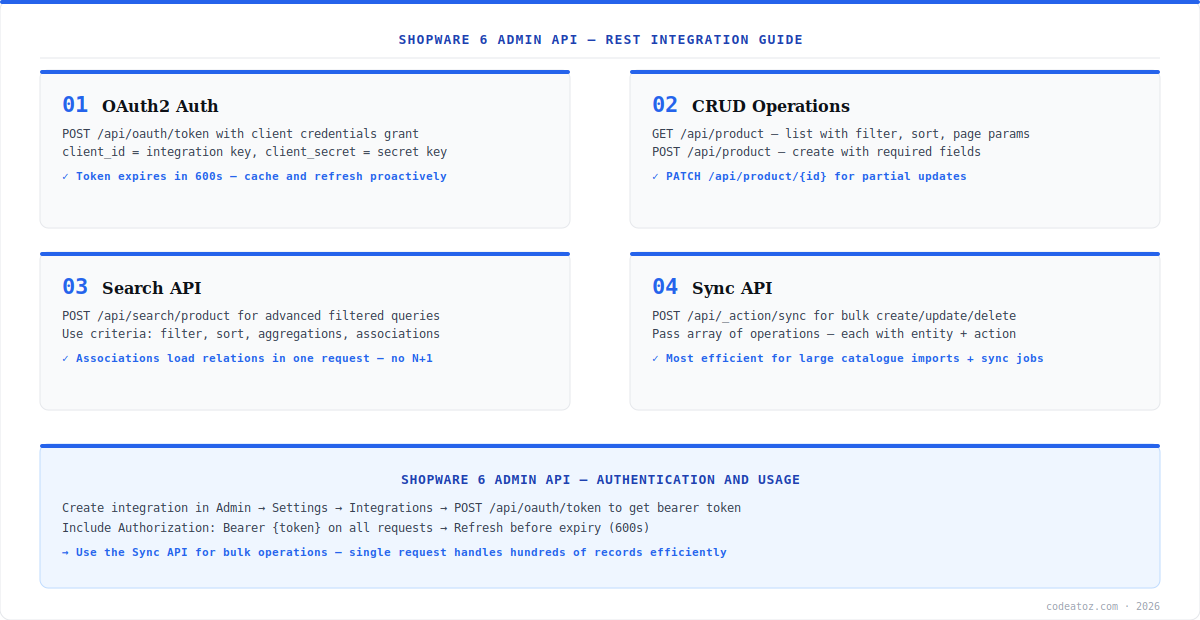
The Shopware 6 Admin API uses OAuth2 client credentials grant. Create an integration in the Shopware admin (Settings → System → Integrations) to get a Client ID and Client Secret. POST to /api/oauth/token with grant_type=client_credentials to receive a bearer token valid for 600 seconds. Cache the token and refresh it proactively before expiry — every Shopware 6 Admin API request needs an Authorization: Bearer header.
const res = await fetch(`${SW_URL}/api/oauth/token`, {
  method: 'POST',
  headers: { 'Content-Type': 'application/json' },
  body: JSON.stringify({
    grant_type: 'client_credentials',
    client_id: process.env.SW_CLIENT_ID,
    client_secret: process.env.SW_CLIENT_SECRET,
  }),
});
const { access_token, expires_in } = await res.json();
// Cache access_token, refresh after (expires_in - 60) secondsShopware 6 Admin API: Search API and Sync API
The Search API (POST /api/search/product) is the most powerful feature of the Shopware 6 Admin API. It accepts a criteria object with filter, sort, page, limit, and associations — loading related entities in a single request. Use associations instead of separate requests to load product media, options, properties, and tax rules together. For bulk operations, the Sync API (POST /api/_action/sync) accepts an array of operations — each with an entity name, action (upsert or delete), and payload. This is the most efficient method for large imports in the Shopware 6 Admin API. Check the Shopware Sync API documentation for the full request format. Our Shopware development team builds ERP and PIM integrations using the Shopware 6 Admin API daily. See our Shopware 6 plugin development guide for broader integration context. The Shopware Sync API documentation covers the full bulk operation request format.
// Search API — products with media associations
const products = await fetch(`${SW_URL}/api/search/product`, {
  method: 'POST',
  headers: { Authorization: `Bearer ${token}`, 'Content-Type': 'application/json' },
  body: JSON.stringify({
    limit: 25, page: 1,
    filter: [{ type: 'equals', field: 'active', value: true }],
    associations: { media: {}, options: {}, tax: {} }
  })
});

// Sync API — bulk upsert products
await fetch(`${SW_URL}/api/_action/sync`, {
  method: 'POST',
  headers: { Authorization: `Bearer ${token}`, 'Content-Type': 'application/json' },
  body: JSON.stringify([{
    action: 'upsert', entity: 'product',
    payload: [{ id: 'uuid-here', name: 'Product Name', price: [{ currencyId: 'EUR-ID', gross: 29.99, net: 25.20, linked: false }] }]
  }])
});Frequently Asked Questions About Shopware 6 Admin API
What is the Shopware 6 Admin API?
The Shopware 6 Admin API is a REST API providing full programmatic access to Shopware store data — products, orders, customers, categories, media, and configuration. It uses OAuth2 client credentials for authentication and follows a consistent CRUD pattern across all entities. It is the standard integration layer for ERP sync, marketplace connectors, and back-office automation.
How do I authenticate with the Shopware 6 Admin API?
Create an integration in Shopware Admin under Settings → System → Integrations to get a Client ID and Secret. POST to /api/oauth/token with grant_type client_credentials to receive a bearer token valid for 600 seconds. Include Authorization: Bearer in all subsequent Shopware 6 Admin API requests. Cache the token and refresh proactively before expiry.
What is the Shopware 6 Admin API Search API?
The Shopware 6 Admin API Search API at POST /api/search/{entity} accepts a criteria object with filter, sort, page, limit, and associations. It returns filtered, sorted results with related entities loaded in a single request. Use associations instead of separate requests to load product media, options, and properties together — this avoids N+1 query patterns.
What is the Shopware 6 Admin API Sync API?
The Shopware 6 Admin API Sync API at POST /api/_action/sync accepts an array of operations for bulk create, update, or delete across any entity. Each operation specifies action (upsert or delete), entity name, and payload array. It is the most efficient approach for large catalogue imports and ERP sync jobs — one request handles hundreds of records.
How do I upload media via the Shopware 6 Admin API?
Upload media via the Shopware 6 Admin API in two steps. First, create a media entity via POST /api/media to get a media ID. Then upload the binary file to POST /api/_action/media/{mediaId}/upload?extension=jpg&fileName=image-name. The file is processed and stored in Shopware’s media system with the correct thumbnail generation queue triggered automatically.
What are the rate limits on the Shopware 6 Admin API?
The Shopware 6 Admin API rate limits depend on your hosting configuration — there is no fixed global rate limit like Shopify. Self-hosted stores are limited by server resources. For high-volume integration, use the Sync API to batch requests rather than individual CRUD calls, add delays between batches, and monitor server load. Cloud-hosted Shopware instances may have configured rate limits — check your provider documentation.
Building a Shopware 6 Admin API Integration?
Our team builds ERP, PIM, and marketplace integrations on the Shopware 6 Admin API — auth, sync, and media handling.




