
The Complete Shopify CLI Development Guide 2026
Master Shopify CLI development — app scaffolding, local dev tunnel, extension generation, deploy and release workflow for Shopify apps in 2026.
Shopify CLI development is the official workflow for building, testing, and deploying Shopify apps. Shopify CLI 3 handles scaffolding, local dev with a live tunnel, extension generation, and deployment through a single shopify binary. All Shopify CLI development commands unify what used to require separate tools and manual OAuth setup.
Shopify CLI development uses Vite for bundling embedded apps and Remix as the default template for new projects. shopify app dev creates a Cloudflare tunnel automatically and opens a preview in a partner store. Every extension type is generated and previewed through the same Shopify CLI development workflow. Refer to the Shopify CLI documentation for the full command reference.
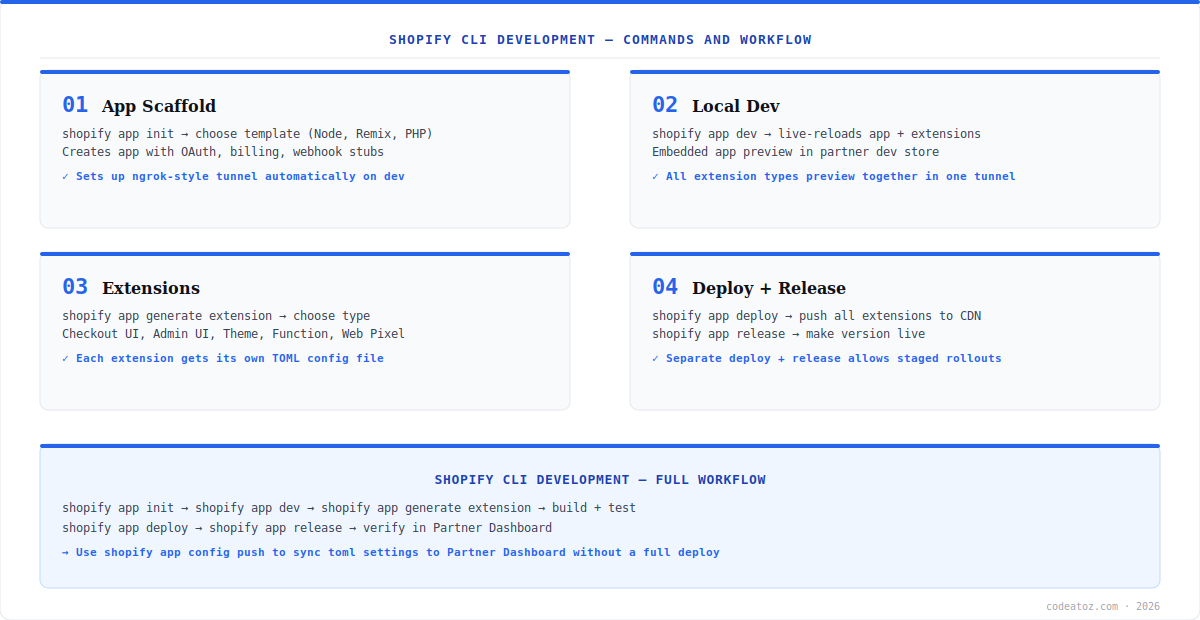
Shopify CLI Development: Init and Local Dev
Start Shopify CLI development with npm init @shopify/app@latest. Choose the Remix template, enter your app name, and the CLI scaffolds a complete project with shopify.app.toml, OAuth, session storage, and webhook stubs. Run shopify app dev to start the local server — it registers a Cloudflare tunnel URL to your Partner Dashboard app automatically. Add extensions with shopify app generate extension and they preview in the same Shopify CLI development tunnel session.
npm init @shopify/app@latest    # scaffold new Remix app
shopify app dev                 # local dev + auto Cloudflare tunnel
shopify app generate extension  # add extension to existing app
shopify app config push         # sync toml to Partner Dashboard
shopify app deploy              # push extensions to CDN (draft)
shopify app release             # make deployed version live
Shopify CLI Development: Deploy and Release
The Shopify CLI development deployment uses two steps: shopify app deploy pushes extensions to Shopify CDN as a draft, and shopify app release makes it live for all merchants. This staged approach enables testing before release. Your app server (Node.js or Remix backend) deploys separately to your hosting provider. The shopify.app.toml is the source of truth — edit OAuth scopes and settings there, then push with shopify app config push. Check the Shopify app deployment docs and CLI commands reference. Our Shopify development team uses Shopify CLI development on every app project.
In Shopify CLI development, shopify.app.toml defines scopes, redirect URLs, webhooks, and extension handles. Always edit via TOML and push with shopify app config push. Editing the Partner Dashboard directly creates configuration drift.
Frequently Asked Questions About Shopify CLI Development
What is Shopify CLI development?
Shopify CLI development is the official workflow for building Shopify apps using the Shopify CLI 3 tool. It covers app scaffolding, OAuth, local dev with a Cloudflare tunnel, extension generation, and deploy and release to Shopify CDN. It is the recommended approach for all Shopify app development in 2026.
How do I start Shopify CLI development for a new app?
Run npm init @shopify/app@latest and choose the Remix template. The CLI creates a complete project with shopify.app.toml, OAuth, session storage, and webhook stubs. Run shopify app dev to start local dev with an automatic Cloudflare tunnel registered to your Partner Dashboard app.
What does shopify app dev do in Shopify CLI development?
shopify app dev starts your app local server, creates a Cloudflare tunnel to expose localhost to Shopify, registers the tunnel URL in Partner Dashboard, and opens an embedded app preview in your partner dev store. All extensions preview together in the same tunnel session. The tunnel URL resets each dev session.
What is the difference between shopify app deploy and release in Shopify CLI development?
shopify app deploy pushes all extensions to Shopify CDN as a new draft version. shopify app release makes that version live for all merchants who have your app installed. The two-step process enables staged rollouts — deploy and test with a subset of stores before releasing to all merchants.
How do I add an extension in Shopify CLI development?
Run shopify app generate extension inside your app directory. The CLI prompts for the type — Checkout UI, Theme App Extension, Admin UI, Web Pixel, Function, or Post-purchase. It scaffolds the directory, a starter component, and shopify.extension.toml. Preview immediately with shopify app dev and deploy with shopify app deploy.
What is shopify.app.toml in Shopify CLI development?
shopify.app.toml is the configuration file for OAuth scopes, redirect URLs, webhook subscriptions, extension handles, and build settings in Shopify CLI development. It is the source of truth — edit here and push with shopify app config push. The CLI generates it on init and uses it to sync your Partner Dashboard app registration.
Need Help with Shopify CLI Development?
Our team builds production Shopify apps using the full CLI workflow — init, extensions, deploy, and App Store submission.




