
The Complete Shopify Webhook API Guide — Event-Driven Apps 2026
Build reliable event-driven Shopify apps with the Shopify webhook API — HMAC verification, idempotent handlers, GDPR webhooks, and async processing patterns.
HMAC verification
Webhook topics
Idempotent handlers
GDPR webhooks
Async processing
The Shopify webhook API is the foundation of any event-driven Shopify app. Instead of polling the Admin API every few minutes, the Shopify webhook API pushes notifications to your app endpoint the moment something changes — an order is placed, a product is updated, a customer registers. Mastering the Shopify webhook API means your app reacts instantly, scales without unnecessary API calls, and stays within Shopify’s rate limits.
Every production Shopify app relies on the Shopify webhook API for real-time data synchronisation. Whether you’re building an inventory management integration, an order fulfilment service, or a customer loyalty platform, webhooks are how Shopify tells your app what happened. This guide covers registration via GraphQL, HMAC verification, idempotency patterns, GDPR mandatory topics, and async processing — everything needed to build a robust Shopify webhook API integration in 2026.
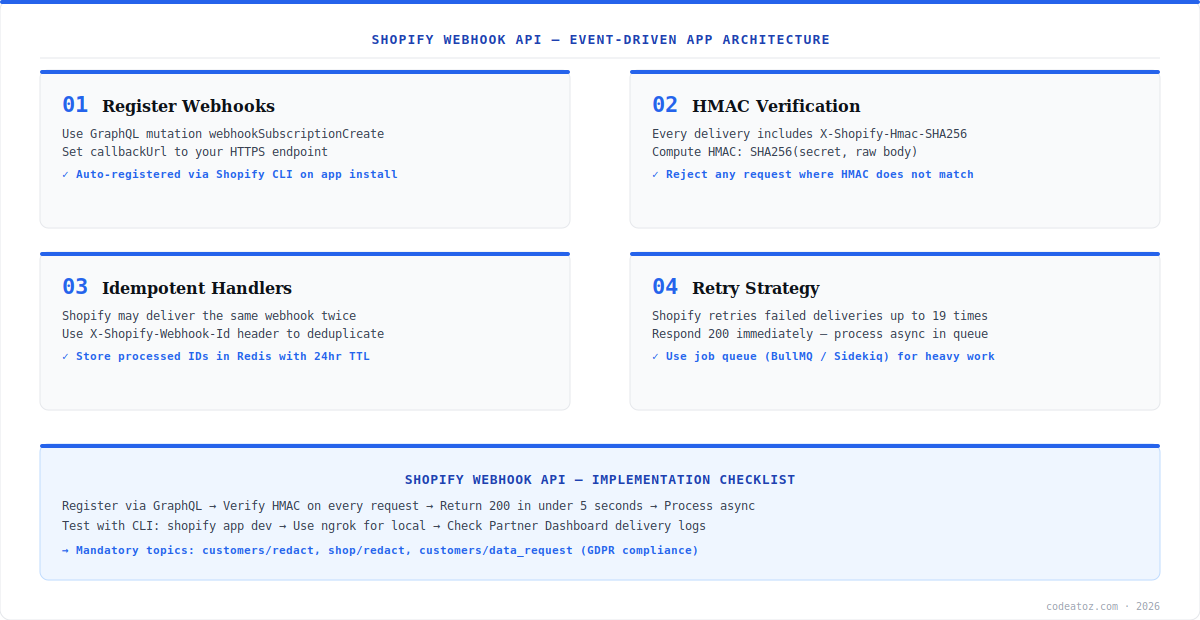
Shopify Webhook API: Registering Webhooks via GraphQL
The Shopify webhook API supports two registration methods: manual via the Partner Dashboard, and programmatic via the GraphQL Admin API. For production apps, always register webhooks programmatically using the webhookSubscriptionCreate mutation so they are set up automatically on every new merchant install. The Shopify webhook documentation covers all available topics and payload formats.
mutation webhookSubscriptionCreate($topic: WebhookSubscriptionTopic!, $callbackUrl: URL!) {
  webhookSubscriptionCreate(topic: $topic, webhookSubscription: {
    callbackUrl: $callbackUrl
    format: JSON
  }) {
    webhookSubscription { id topic callbackUrl }
    userErrors { field message }
  }
}
# Variables:
# { "topic": "ORDERS_CREATE", "callbackUrl": "https://your-app.com/webhooks/orders/create" }
Register all required topics during the app installation OAuth callback. Key topics for most apps include ORDERS_CREATE, ORDERS_UPDATED, PRODUCTS_CREATE, PRODUCTS_UPDATE, and CUSTOMERS_CREATE. In addition to business topics, three GDPR topics are mandatory for all public Shopify apps: CUSTOMERS_DATA_REQUEST, CUSTOMERS_REDACT, and SHOP_REDACT.
Shopify Webhook API: HMAC Verification
Every Shopify webhook API delivery includes an X-Shopify-Hmac-SHA256 header — a base64-encoded HMAC-SHA256 signature computed from the raw request body using your app’s client secret. You must verify this signature before processing any webhook payload. Skipping verification is a critical security vulnerability — any server could spoof webhook deliveries to your endpoint.
import crypto from 'crypto';

export function verifyShopifyWebhook(rawBody: Buffer, hmacHeader: string, secret: string): boolean {
  const computed = crypto
    .createHmac('sha256', secret)
    .update(rawBody)
    .digest('base64');
  return crypto.timingSafeEqual(Buffer.from(computed), Buffer.from(hmacHeader));
}

// Express middleware — must use express.raw() NOT express.json()
app.post('/webhooks/:topic', express.raw({ type: 'application/json' }), (req, res) => {
  const hmac = req.headers['x-shopify-hmac-sha256'] as string;
  if (!verifyShopifyWebhook(req.body, hmac, process.env.SHOPIFY_CLIENT_SECRET!)) {
    return res.status(401).send('Unauthorized');
  }
  res.status(200).send('OK'); // Respond 200 immediately
  processWebhookAsync(req.params.topic, JSON.parse(req.body.toString()));
});You must parse the raw body as a Buffer for HMAC verification — never use express.json() middleware before verifying, as it parses the body and changes whitespace, breaking the signature. Use express.raw({ type: 'application/json' }) on the Shopify webhook API route specifically, then parse to JSON after verification.
Shopify Webhook API: Idempotent Handlers and Deduplication
The Shopify webhook API guarantees at-least-once delivery — the same event may be delivered more than once, especially during retries. Your handlers must be idempotent: processing the same payload twice must produce the same result as processing it once. Use the X-Shopify-Webhook-Id header as a deduplication key. Store processed IDs in Redis with a 24-hour TTL and skip any webhook whose ID is already recorded.
- Check
X-Shopify-Webhook-Idbefore processing — skip if already seen - Use
SETNXin Redis for atomic deduplication with 24-hour TTL - Design database writes as upserts, not inserts — safe to run twice
- Respond
200 OKwithin 5 seconds — process heavy work asynchronously - Use BullMQ or Sidekiq for async job queues — never block the HTTP response
- Shopify retries failed deliveries up to 19 times over 48 hours
Shopify Webhook API: GDPR Mandatory Topics
All apps listed in the Shopify App Store must implement three GDPR Shopify webhook API topics. These are not optional — failing the review without them blocks your app from going public. The three topics are customers/data_request (a merchant requests customer data export), customers/redact (a customer requests data deletion), and shop/redact (a merchant uninstalls and requests store data deletion). Refer to the Shopify privacy compliance documentation for the full payload spec and required response actions.
For each GDPR topic, your endpoint must log the request and take the appropriate action — exporting data, deleting records, or confirming deletion. Even if your app stores no customer data, you must implement the endpoints and return 200. Our Shopify development team has shipped dozens of App Store-reviewed apps and can implement full GDPR compliance as part of any Shopify webhook API integration. See also our Shopify custom app development guide for the complete app architecture overview.
Use shopify app dev with the Shopify CLI and ngrok to test Shopify webhook API delivery locally. The CLI registers webhooks automatically and streams delivery logs to your terminal. This is far faster than deploying to a staging server for every webhook test.
Frequently Asked Questions About the Shopify Webhook API
What is the Shopify webhook API?
The Shopify webhook API is an event notification system that sends HTTP POST requests to your app’s endpoint whenever specific events occur in a merchant’s store — such as a new order, a product update, or a customer registration. It eliminates the need to poll the Admin API and enables real-time, event-driven app architecture.
How do I verify Shopify webhook API signatures?
The Shopify webhook API includes an X-Shopify-Hmac-SHA256 header with every delivery. Compute HMAC-SHA256 of the raw request body using your app’s client secret, base64-encode it, and compare to the header value using a timing-safe comparison. Reject any request where the values do not match. Always use the raw Buffer body — never a parsed JSON body — for verification.
How does the Shopify webhook API handle retries?
The Shopify webhook API retries failed deliveries — any response other than 200-299 — up to 19 times over 48 hours with exponential backoff. After 19 consecutive failures, the webhook subscription is automatically deleted. To prevent this, always return 200 immediately and process the payload asynchronously in a job queue.
Which Shopify webhook API topics are mandatory for App Store apps?
All Shopify App Store apps must implement three GDPR webhook topics via the Shopify webhook API: customers/data_request, customers/redact, and shop/redact. These handle merchant requests for customer data exports, customer data deletion, and store data deletion respectively. Failing to implement them blocks app review approval.
How do I prevent duplicate processing with the Shopify webhook API?
The Shopify webhook API may deliver the same event more than once. Use the X-Shopify-Webhook-Id header as a deduplication key. Store processed IDs in Redis with a 24-hour TTL using SETNX for atomic check-and-set. Design all database writes as upserts rather than inserts so running them twice produces the same result.
How do I test the Shopify webhook API locally?
Use shopify app dev with the Shopify CLI, which automatically registers webhooks and uses ngrok to expose your local server to Shopify. The CLI streams webhook delivery logs to your terminal in real time. Alternatively, use the Partner Dashboard to manually trigger test deliveries for any topic to your registered endpoint URL.
Need Help with Your Shopify Webhook API Integration?
Our team has built and shipped App Store-reviewed Shopify apps. Talk to us about your integration scope.




