
Next.js WooCommerce GraphQL — Build a Storefront (2026)
Build a Next.js WooCommerce GraphQL storefront — WPGraphQL setup, product queries, cart mutations, App Router Server Components, and ISR deployment on Vercel.
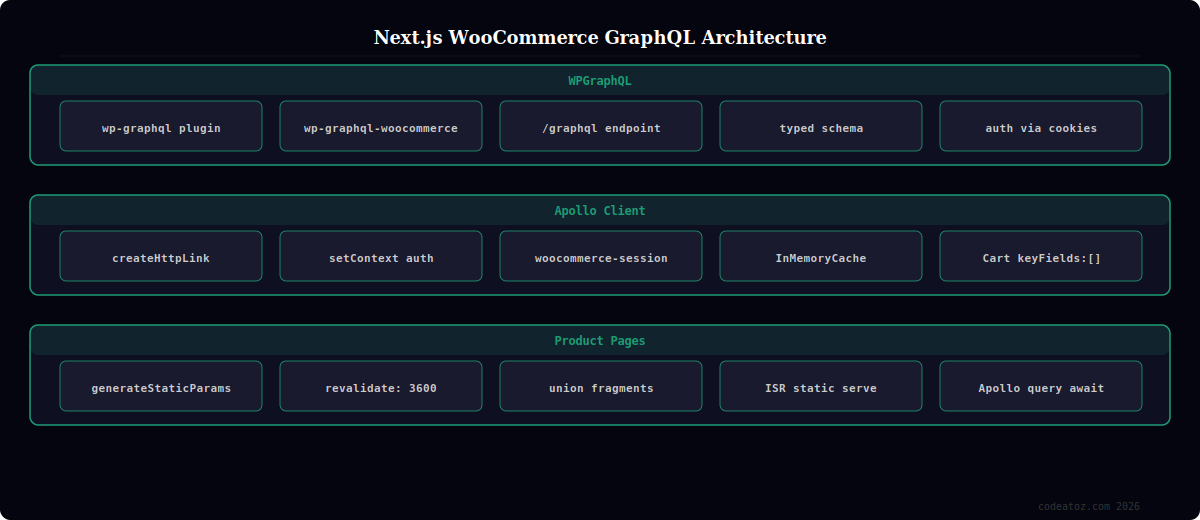
A Next.js WooCommerce GraphQL storefront combines the performance of Next.js ISR with GraphQL’s precise data fetching — requesting only the fields you need from WooCommerce rather than receiving every field the REST API returns by default. The Next.js WooCommerce GraphQL stack uses the WPGraphQL plugin and its WooCommerce extension to expose WooCommerce products, orders, and cart through a typed GraphQL schema. This guide covers the complete Next.js WooCommerce GraphQL setup: WPGraphQL installation, Apollo Client configuration, product page queries, cart mutations, and production deployment with ISR.
Next.js WooCommerce GraphQL: WPGraphQL Setup
The WPGraphQL plugin transforms your WordPress installation into a GraphQL API server. Install it via the WordPress plugin directory alongside WooCommerce. Then install the WPGraphQL for WooCommerce plugin which extends the schema with WooCommerce-specific types: Product, ProductVariation, Cart, Order, and Customer.
# Install via WP-CLI for Next.js WooCommerce GraphQL setup
wp plugin install wp-graphql --activate
wp plugin install wp-graphql-woocommerce --activate

# Your Next.js WooCommerce GraphQL endpoint is now available at:
# https://yourstore.com/graphql

# Test the endpoint with a simple query:
curl -X POST https://yourstore.com/graphql
  -H 'Content-Type: application/json'
  -d '{"query": "{ products(first: 5) { nodes { id name slug } } }"}'
Next.js WooCommerce GraphQL: Apollo Client Setup
Configure Apollo Client in your Next.js WooCommerce GraphQL project for both server-side and client-side queries. Server Components use the Apollo Client directly with await client.query(); client components use the useQuery hook via the ApolloProvider.
// lib/apollo-client.ts — Next.js WooCommerce GraphQL client
import { ApolloClient, InMemoryCache, createHttpLink } from '@apollo/client';
import { setContext } from '@apollo/client/link/context';

const httpLink = createHttpLink({
  uri: process.env.NEXT_PUBLIC_GRAPHQL_URL, // https://yourstore.com/graphql
});

// Add auth header for authenticated Next.js WooCommerce GraphQL queries
const authLink = setContext((_, { headers }) => ({
  headers: {
    ...headers,
    // Required for cart mutations in Next.js WooCommerce GraphQL
    'woocommerce-session': `Session ${process.env.WC_SESSION_TOKEN ?? ''}`,
  },
}));

export const apolloClient = new ApolloClient({
  link: authLink.concat(httpLink),
  cache: new InMemoryCache({
    typePolicies: {
      Cart: { keyFields: [] }, // Cart is a singleton in WooCommerce GraphQL
    },
  }),
  defaultOptions: {
    query: {
      fetchPolicy: 'network-only', // Ensure fresh data for cart
    },
  },
});
Next.js WooCommerce GraphQL: Product Page with ISR
// app/products/[slug]/page.tsx — Next.js WooCommerce GraphQL product page
import { apolloClient } from '@/lib/apollo-client';
import { gql } from '@apollo/client';

const GET_PRODUCT = gql`
  query GetProduct($slug: ID!) {
    product(id: $slug, idType: SLUG) {
      id name slug shortDescription description
      image { sourceUrl altText }
      ... on SimpleProduct {
        price salePrice regularPrice stockStatus
      }
      ... on VariableProduct {
        price variations { nodes { id name price stockStatus } }
      }
    }
  }
`;

// ISR: revalidate every 60 minutes for Next.js WooCommerce GraphQL pages
export const revalidate = 3600;

export async function generateStaticParams() {
  const { data } = await apolloClient.query({
    query: gql`{ products(first: 100) { nodes { slug } } }`,
  });
  return data.products.nodes.map(({ slug }: { slug: string }) => ({ slug }));
}

export default async function ProductPage({ params }: { params: { slug: string } }) {
  const { data } = await apolloClient.query({
    query: GET_PRODUCT,
    variables: { slug: params.slug },
  });

  const product = data?.product;
  if (!product) return <div>Product not found</div>;

  return (
    <main>
      <h1>{product.name}</h1>
      <p dangerouslySetInnerHTML={{ __html: product.shortDescription }} />
      <p className="price">{product.price}</p>
      <AddToCartMutation productId={product.id} />
    </main>
  );
}
💡 WPGraphQL for WooCommerce exposes cart mutations that require a session token. On first load, call the addToCart mutation and capture the woocommerce-session header from the response — this is your session token. Store it in a cookie and pass it as the woocommerce-session: Session TOKEN header on all subsequent Next.js WooCommerce GraphQL cart mutations. Without this, each cart mutation creates a new anonymous session and your cart appears empty on the next request.
The WPGraphQL documentation covers the plugin setup, authentication, and schema reference for the Next.js WooCommerce GraphQL integration. The WPGraphQL for WooCommerce documentation covers the WooCommerce-specific types used in Next.js WooCommerce GraphQL product and cart queries. The Apollo Client documentation covers the client configuration used in the Next.js WooCommerce GraphQL project. See our headless WooCommerce Next.js guide and our WooCommerce development services.
Frequently Asked Questions — Next.js WooCommerce GraphQL
What plugins do I need for a Next.js WooCommerce GraphQL storefront?
Install WPGraphQL (the base GraphQL server) and WPGraphQL for WooCommerce (adds WooCommerce product, cart, and order types to the schema). Both are available from the WordPress plugin directory. These two plugins transform your WooCommerce installation into a typed GraphQL API that your Next.js WooCommerce GraphQL frontend can query. No other configuration is needed to expose the GraphQL endpoint at /graphql.
How do product types work in WooCommerce GraphQL?
WooCommerce GraphQL uses GraphQL union types for products. The base Product interface contains common fields (id, name, slug, image). Use inline fragments to access type-specific fields: … on SimpleProduct for price and stock, … on VariableProduct for variations, … on ExternalProduct for externalUrl. Always include the type-specific fragments in your Next.js WooCommerce GraphQL product queries or you will not receive pricing data.
How does the cart work in a Next.js WooCommerce GraphQL storefront?
WooCommerce GraphQL manages cart state server-side via session tokens. When you call the addToCart mutation for the first time, the response includes a woocommerce-session header with a session token. Store this in a cookie. Pass the token as woocommerce-session: Session TOKEN header on subsequent Next.js WooCommerce GraphQL cart mutations (addToCart, updateItemQuantities, removeItemsFromCart). The session persists on the WordPress server until the cookie expires.
Should I use WooCommerce GraphQL or the WooCommerce REST API with Next.js?
Next.js WooCommerce GraphQL is better when you have complex product data structures, need to fetch products with their categories, tags, attributes, and variations in a single request, or want a typed schema. The WooCommerce REST API is better for simpler use cases, when you want to avoid installing additional plugins, or when you need the WooCommerce Store API for anonymous cart sessions. Both work well with Next.js ISR. Start with the REST API if you are new to the stack.
How do I deploy a Next.js WooCommerce GraphQL storefront?
Deploy the Next.js frontend to Vercel (the simplest option with automatic ISR support) or any Node.js hosting. Keep WooCommerce running on your existing WordPress hosting. Set NEXT_PUBLIC_GRAPHQL_URL to your WooCommerce store’s GraphQL endpoint as a Vercel environment variable. Enable CORS on WordPress for your Vercel deployment domain. ISR product pages revalidate automatically at the revalidate interval without triggering full site rebuilds.
Can I use Apollo Client with Next.js App Router for WooCommerce GraphQL?
Yes, with one caveat: Apollo Client’s useQuery hook is a client component feature. In Next.js App Router’s Server Components, use the Apollo Client directly with await apolloClient.query() — no hooks needed. For client-side cart mutations that need reactivity (adding to cart, updating quantities), use a Client Component with the useMutation hook wrapped in an ApolloProvider. Server Components handle all read operations in the Next.js WooCommerce GraphQL architecture; Client Components handle writes.
Need a Next.js WooCommerce GraphQL Storefront?
CodeAtoZ builds Next.js WooCommerce GraphQL storefronts — WPGraphQL setup, Apollo Client, ISR product pages, cart sessions, and Vercel deployment.




