
Best Shopify Billing API Guide — App Subscriptions 2026
Monetise your Shopify app with the Shopify billing API — recurring subscriptions, usage-based charges, free trials, and billing webhook handling in Node.js.
UsageCharge
Free trials
Confirmation flow
Billing webhooks
Test mode
The Shopify billing API is how you charge merchants for using your app. Whether you’re building a subscription SaaS, a usage-based tool, or a one-time setup service, the Shopify billing API handles the entire payment flow — plan creation, merchant approval, trial periods, and charge management. Getting the Shopify billing API integration right is essential for any app intending to generate revenue on the Shopify platform.
The Shopify billing API supports four charge types: AppSubscription (recurring monthly or annual), AppUsageRecord (per-event usage billing against a capped plan), AppPurchaseOneTime (single payment), and AppCredit (refund mechanism). Most commercial apps use AppSubscription with optional usage billing on top. The flow always requires merchant approval via a Shopify-hosted confirmation page before charges can be applied.
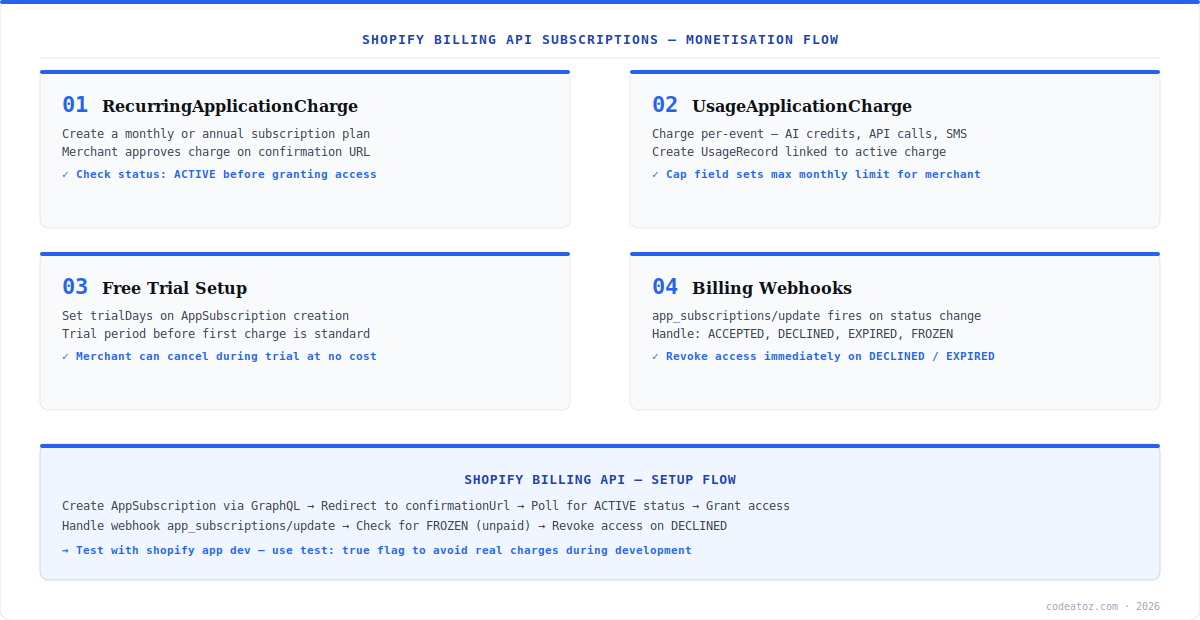
Shopify Billing API: Creating a Recurring Subscription
The Shopify billing API AppSubscription creates a recurring monthly or annual plan. Create the subscription via the appSubscriptionCreate GraphQL mutation, then redirect the merchant to the returned confirmationUrl. The merchant approves the charge on a Shopify-hosted page. After approval, Shopify redirects back to your returnUrl with a charge_id parameter. Check the charge status — it must be ACTIVE before granting the merchant access to paid features.
mutation appSubscriptionCreate {
  appSubscriptionCreate(
    name: "Pro Plan"
    returnUrl: "https://your-app.com/billing/callback"
    trialDays: 14
    test: false
    lineItems: [{
      plan: {
        appRecurringPricingDetails: {
          price: { amount: 29.00, currencyCode: USD }
          interval: EVERY_30_DAYS
        }
      }
    }]
  ) {
    appSubscription { id status }
    confirmationUrl
    userErrors { field message }
  }
}Shopify Billing API: Usage-Based Charges
Usage billing via the Shopify billing API lets you charge merchants per event — AI API calls, SMS messages, processed orders, or any countable unit. Create a capped AppUsageRecord plan as part of the subscription, then call appUsageRecordCreate each time a billable event occurs. The cappedAmount sets the maximum monthly spend, giving merchants cost predictability while you monetise actual usage.
mutation appUsageRecordCreate($subscriptionLineItemId: ID!, $price: MoneyInput!, $description: String!) {
  appUsageRecordCreate(
    subscriptionLineItemId: $subscriptionLineItemId
    price: $price
    description: $description
  ) {
    appUsageRecord { id createdAt }
    userErrors { field message }
  }
}
# Variables: { "subscriptionLineItemId": "gid://shopify/AppSubscriptionLineItem/...",
#   "price": { "amount": 0.05, "currencyCode": "USD" },
# "description": "1 AI product description generated" }Shopify Billing API: Handling Billing Webhooks
The Shopify billing API fires app_subscriptions/update webhooks whenever a subscription status changes. Handle the following status transitions: ACCEPTED (merchant approved — grant access), DECLINED (merchant declined — deny access), EXPIRED (trial ended without approval — downgrade to free tier), FROZEN (merchant’s Shopify plan payment failed — suspend access temporarily), and CANCELLED (merchant uninstalled or cancelled — revoke access). Refer to the Shopify billing API documentation for the full status transition map. See also the Shopify app monetisation guide for pricing strategy recommendations.
- Subscribe to
app_subscriptions/updatewebhook on app install - Check
statusfield in payload — grant or revoke access accordingly - Handle
FROZENgracefully — merchant’s store is paused, not cancelled - Set
test: trueduring development to avoid real charges in the Shopify billing test mode - Never grant access before status is confirmed as
ACTIVE
Never use the Shopify billing API in production without setting up webhook handling for FROZEN status. When a merchant’s Shopify bill goes unpaid, their app subscriptions are frozen. If your app does not handle this, it may continue serving paid features to merchants who are no longer paying, which violates Shopify’s Partner Programme terms.
Building and monetising Shopify apps requires careful Shopify billing API implementation alongside your core app features. Our Shopify development team handles billing integration, App Store submission, and full app architecture for startups and agencies building on Shopify.
Frequently Asked Questions About the Shopify Billing API
What is the Shopify billing API?
The Shopify billing API is a set of GraphQL mutations and webhooks that allow Shopify app developers to charge merchants for app usage. It supports recurring subscriptions, usage-based charges, one-time payments, and app credits. All charges require merchant approval via a Shopify-hosted confirmation page before they are applied.
How does the Shopify billing API subscription flow work?
The Shopify billing API subscription flow is: create an AppSubscription via GraphQL, redirect the merchant to the confirmationUrl, the merchant approves on a Shopify-hosted page, Shopify redirects to your returnUrl with a charge_id, you query the subscription status and only grant access when status is ACTIVE. Never grant access before ACTIVE status is confirmed.
How do I add a free trial to the Shopify billing API?
Add a trialDays parameter to the appSubscriptionCreate mutation in the Shopify billing API. The merchant approves the subscription but is not charged until the trial period ends. During the trial, status is PENDING. After the trial, if the merchant does not cancel, the first charge fires automatically and status becomes ACTIVE.
What is usage billing in the Shopify billing API?
Usage billing in the Shopify billing API lets you charge merchants per billable event rather than a flat monthly fee. You create a subscription with an AppUsagePricingDetails line item with a cappedAmount, then call appUsageRecordCreate each time a chargeable event occurs. The merchant sees a monthly usage summary capped at the agreed maximum amount.
How do I test the Shopify billing API without real charges?
Set test: true in the appSubscriptionCreate mutation to use Shopify billing API test mode. Test charges go through the full confirmation flow but no real money changes hands. Use a development store for testing — production stores cannot create test charges. Remove the test flag before submitting your app for App Store review.
What happens when a subscription is FROZEN in the Shopify billing API?
A FROZEN status in the Shopify billing API means the merchant’s Shopify bill is overdue and their account is temporarily paused. Your app should suspend access to paid features when it receives this status via the app_subscriptions/update webhook. When the merchant’s Shopify payment is resolved, status returns to ACTIVE and you restore access automatically.
Building a Shopify App with Billing?
Our team handles end-to-end Shopify app development — billing, OAuth, App Bridge, webhooks, App Store submission.




