
The Complete Guide to Headless WooCommerce Next.js in 2026
Build a production headless WooCommerce Next.js storefront using the App Router, React Server Components, WC REST API v3, the Store API for cart, and ISR for product pages.
Next.js App Router
WC REST API setup
Cart with Store API
ISR + revalidation
Deployment
This guide walks through building a headless WooCommerce Next.js storefront from scratch — connecting Next.js 15 to WooCommerce via the REST API, rendering product pages with React Server Components, managing cart state with the WooCommerce Store API, and deploying to Vercel with on-demand ISR revalidation triggered by WooCommerce webhooks.
Headless WooCommerce Next.js is the architecture choice for stores that need maximum performance, custom frontend experiences, or multi-channel deployments. Separating the WordPress/WooCommerce backend from the Next.js frontend lets each layer scale independently — WordPress handles commerce logic, Next.js handles rendering — and delivers Core Web Vital scores that traditional WooCommerce themes struggle to match.
In 2026, headless WooCommerce Next.js has become significantly more accessible. The WooCommerce Store API — introduced for the Blocks checkout — provides a proper cart and checkout REST interface without authentication requirements for guest users. Next.js 15 with React Server Components eliminates most of the client-side JavaScript overhead that hurt early headless implementations. The combination delivers Lighthouse scores consistently above 95 on product pages.
Headless WooCommerce Next.js: Architecture Decisions
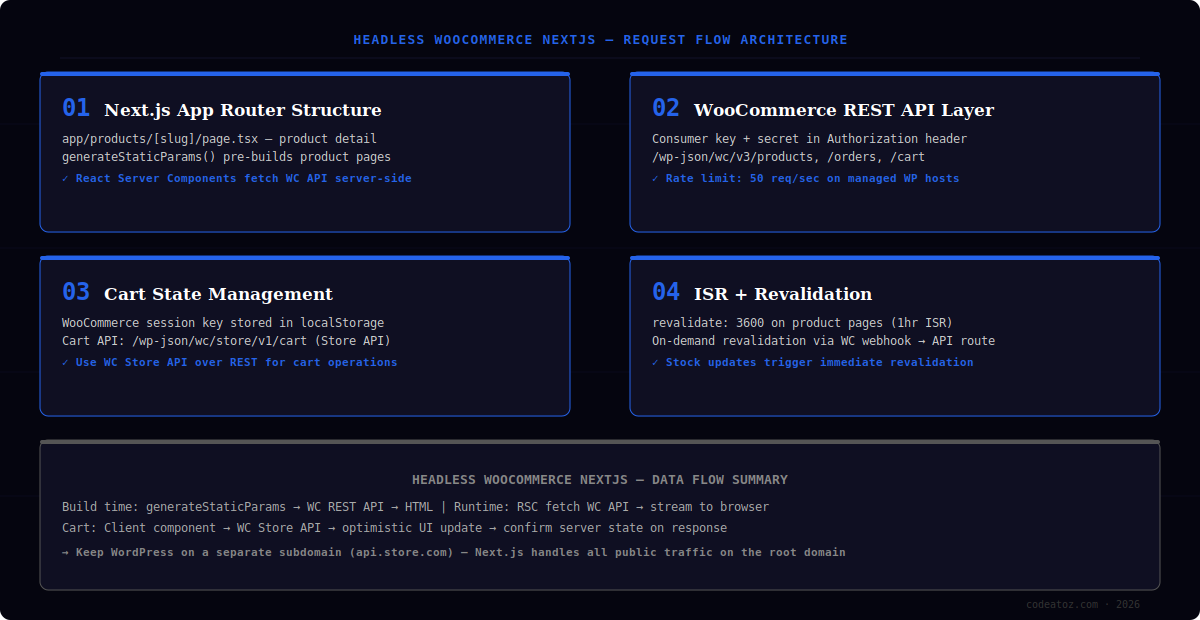
Before writing code for a headless WooCommerce Next.js project, three architecture decisions need to be settled. First: keep WordPress on a subdomain (api.yourstore.com) and serve all public traffic from the Next.js app on the root domain. This prevents WordPress’s URL structure from leaking into your SEO and allows aggressive Cloudflare caching on the frontend without interfering with WordPress admin routes.
Second: decide whether to use the WooCommerce REST API v3 or the newer Store API (/wp-json/wc/store/v1) for each data type. For headless WooCommerce Next.js builds, use the Store API for cart, checkout, and product listings (it is public, no auth needed for guest users), and use the REST API v3 with consumer keys for admin-level operations like order status updates or stock management.
- WordPress on
api.yourstore.com— Next.js onyourstore.com - Store API for cart and checkout — no authentication for guest users
- REST API v3 with consumer key/secret for admin operations
- Next.js App Router with React Server Components — fetch WC data server-side
- ISR with
revalidate: 3600for product pages — on-demand revalidation via webhooks
Do not use WooCommerce’s GraphQL layer (WPGraphQL + WooGraphQL) for a headless WooCommerce Next.js build unless you already have deep GraphQL infrastructure. The REST API v3 and Store API cover all storefront use cases, are officially maintained by WooCommerce, and require far less configuration to reach a production-ready state.
Headless WooCommerce Next.js: App Router and Product Pages
The Next.js App Router is the correct choice for headless WooCommerce Next.js in 2026. React Server Components fetch WooCommerce data server-side without hydration overhead — product titles, prices, descriptions, and images render as pure HTML with zero JavaScript. The generateStaticParams function pre-builds every product page at build time using the WC REST API product list.
// app/products/[slug]/page.tsx
import { notFound } from 'next/navigation';

const WC_BASE = process.env.WC_API_URL; // https://api.yourstore.com/wp-json/wc/v3
const AUTH = Buffer.from(
  `${process.env.WC_KEY}:${process.env.WC_SECRET}`
).toString('base64');

export const revalidate = 3600; // ISR: regenerate every hour

export async function generateStaticParams() {
  const res = await fetch(`${WC_BASE}/products?per_page=100&status=publish`, {
    headers: { Authorization: `Basic ${AUTH}` },
  });
  const products = await res.json();
  return products.map((p: { slug: string }) => ({ slug: p.slug }));
}

export default async function ProductPage({ params }: { params: { slug: string } }) {
  const res = await fetch(`${WC_BASE}/products?slug=${params.slug}`, {
    headers: { Authorization: `Basic ${AUTH}` },
  });
  const [product] = await res.json();
  if (!product) notFound();

  return (
    <main>
      <h1>{product.name}</h1>
      <p dangerouslySetInnerHTML={{ __html: product.short_description }} />
      <p>Price: {product.price_html}</p>
      {/* Cart button is a Client Component — see section 03 */}
    </main>
  );
}Headless WooCommerce Next.js: Cart with the WooCommerce Store API
Cart management is the most technically complex part of a headless WooCommerce Next.js build. WooCommerce’s traditional cart is server-side session-based, which does not translate to a stateless Next.js frontend. The Store API — introduced with WooCommerce Blocks — solves this by exposing a stateless cart REST endpoint at /wp-json/wc/store/v1/cart that uses a Nonce token for session management.
The pattern for headless WooCommerce Next.js cart state is: initialise a WooCommerce cart Nonce on first visit, store it in a cookie or localStorage, and pass it as the Nonce header on every Store API request. The Store API maintains the cart server-side tied to the Nonce, so cart items persist across page navigations. Use a React Context provider or Zustand store to manage the cart state client-side and sync with the Store API on every mutation.
Keep all WooCommerce API calls inside Next.js Route Handlers (app/api/) rather than calling the WC backend directly from the browser. This hides your consumer keys from client-side JavaScript and lets you add rate limiting, caching, and error handling in one place. For a headless WooCommerce Next.js production build, direct browser-to-WordPress API calls are a security anti-pattern.
Headless WooCommerce Next.js: ISR and On-Demand Revalidation
Incremental Static Regeneration (ISR) is the caching strategy that makes headless WooCommerce Next.js product pages both fast and fresh. With revalidate: 3600, Next.js serves the cached static page to all visitors and regenerates it in the background every hour. This gives blog-like performance — sub-100ms TTFB from CDN — for pages that are mostly static content.
On-demand revalidation handles the cases where ISR’s time-based refresh is too slow — price changes, stock updates, or flash sales. Set up a WooCommerce webhook (Product Updated) to POST to a Next.js Route Handler at /api/revalidate. The handler calls revalidatePath('/products/' + slug) to immediately regenerate the affected product page. This gives you the best of both worlds: static speed for normal traffic, instant updates when product data changes. Consult the Next.js ISR documentation and the WooCommerce REST API reference for the full implementation guide.
Headless WooCommerce Next.js: Deployment and SEO
Vercel is the natural deployment target for a headless WooCommerce Next.js project — it supports ISR natively, handles the Edge Network caching automatically, and the on-demand revalidation webhook pattern works out of the box. Netlify is a strong alternative. Both support environment variables for the WooCommerce API credentials, custom domain configuration, and deployment preview URLs for staging.
For SEO on a headless WooCommerce Next.js build, generate a sitemap.xml from the WooCommerce product list at build time using Next.js’s built-in app/sitemap.ts. Ensure product page metadata — title, description, Open Graph tags — is populated from WooCommerce product data in the generateMetadata function. The Schema.org Product schema should be included as JSON-LD in the page for rich search results. Our team has delivered headless WooCommerce Next.js builds for clients looking to break free from theme limitations — see our WooCommerce services or the developer hire guide for engagement options.
A well-built headless WooCommerce Next.js storefront consistently achieves Lighthouse Performance 95–100 on product pages. LCP under 1.0 second from Vercel’s Edge Network is realistic for above-fold images preloaded via priority on the Next.js Image component. This represents a 40–60 point Lighthouse improvement over the same store running on a standard WooCommerce theme with caching plugins.
Frequently Asked Questions About Headless WooCommerce Next.js
What is headless WooCommerce Next.js?
Headless WooCommerce Next.js is an architecture where WooCommerce runs as a backend API on WordPress, and Next.js serves as the frontend. The two are completely decoupled — WooCommerce handles products, orders, and payments via its REST API; Next.js handles all rendering, routing, and user interface. This separation enables Lighthouse scores above 95, custom design freedom, and frontend deployments independent of WordPress.
How does headless WooCommerce Next.js handle checkout?
Headless WooCommerce Next.js handles checkout via the WooCommerce Store API at /wp-json/wc/store/v1/checkout. The Store API supports guest and logged-in checkout, applies coupons, calculates shipping, and creates the order — all via REST. Payment is processed through the standard WooCommerce payment gateways (Stripe, PayPal etc.) which integrate at the WooCommerce level, not the Next.js level.
Is headless WooCommerce Next.js harder to maintain than a standard theme?
Headless WooCommerce Next.js has higher initial complexity but lower long-term maintenance friction. You no longer need to manage WordPress theme updates, page builder conflicts, or plugin CSS/JS collisions. The Next.js codebase is versioned in Git with standard JavaScript tooling. The tradeoff is that any WooCommerce feature requiring frontend UI — new product types, account pages, wishlists — must be built in Next.js rather than installed as a plugin.
Can headless WooCommerce Next.js use WooCommerce plugins?
Headless WooCommerce Next.js can use any WooCommerce plugin that exposes its data via the REST API or Store API. Payment gateways, shipping calculators, subscription plugins (WooCommerce Subscriptions), and product type plugins all work at the WooCommerce backend level. Plugins that add frontend UI via shortcodes or PHP templates do not work — their functionality must be reimplemented in Next.js components.
How much does headless WooCommerce Next.js development cost?
A basic headless WooCommerce Next.js store — product listing, product detail, cart, and checkout — takes four to six weeks for an experienced full-stack developer and typically costs £8,000–£20,000 depending on design complexity. This is more expensive than a standard WooCommerce theme build but delivers performance, scalability, and design flexibility that theme-based builds cannot match at scale.
How does headless WooCommerce Next.js affect SEO?
Headless WooCommerce Next.js improves SEO compared to standard WooCommerce when implemented correctly. React Server Components render product pages as static HTML — fully crawlable by Googlebot without JavaScript execution. Core Web Vitals scores improve significantly, which benefits rankings. The key SEO requirement is ensuring generateMetadata populates all meta tags from WooCommerce product data server-side, not client-side.
Need a Headless WooCommerce Next.js Build?
We build production headless WooCommerce Next.js storefronts — App Router, Store API cart, ISR, Vercel deployment. Lighthouse 95+ guaranteed.
Store API cart
On-demand ISR
Lighthouse 95+




