
The Complete Shopify Functions Guide — WASM Backend Logic 2026
Build Shopify Functions — discount, delivery, payment and validation functions compiled to WASM, with input queries, Rust or JavaScript, and fixture testing.
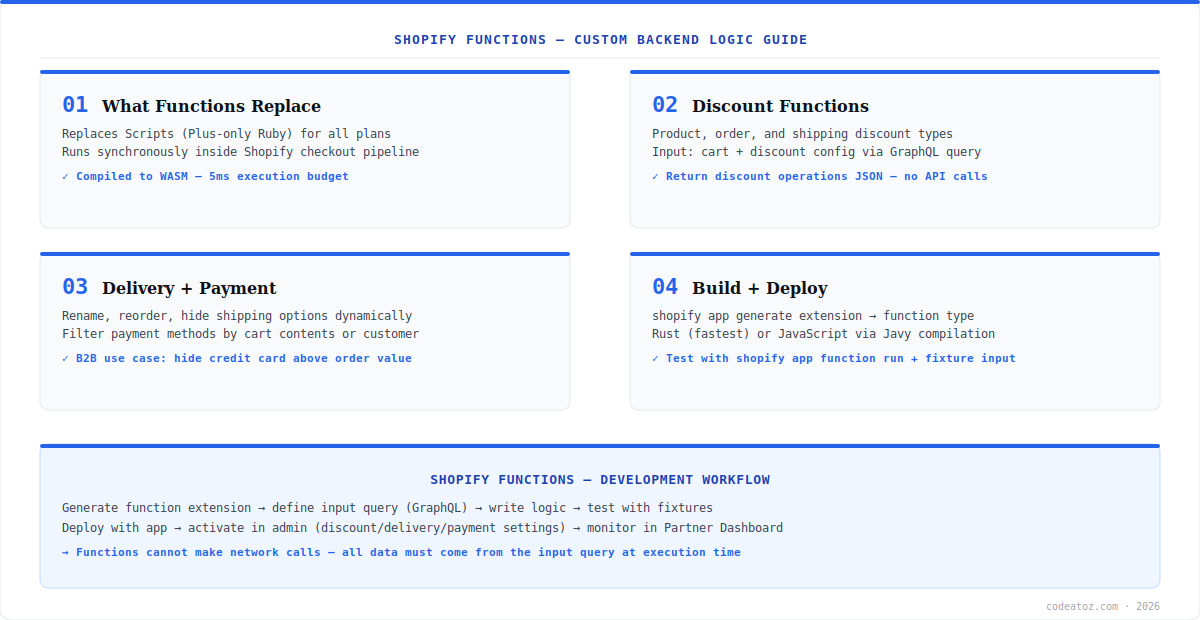
Shopify Functions let developers inject custom backend logic directly into Shopify’s checkout pipeline — discounts, shipping option customisation, payment method filtering, and cart validation. Shopify Functions compile to WebAssembly and execute synchronously inside Shopify’s infrastructure with a strict 5ms budget. They replace the Plus-only Ruby Scripts with a system available on all Shopify plans.
The architecture of Shopify Functions is deliberately constrained: a function receives its input via a GraphQL query you define, runs pure computation with no network access, and returns a JSON result describing the operations to apply. This makes Shopify Functions deterministic, fast, and safe to run inside checkout. This guide covers all function types, the input query pattern, language choice, and the local testing workflow. Refer to the Shopify Functions documentation for the complete API list.
Shopify Functions: Types and Input Queries
Shopify Functions come in several types: Discount functions (product, order, and shipping discounts), Delivery customisation (rename, reorder, or hide shipping options), Payment customisation (filter payment methods), and Cart and checkout validation (enforce purchase rules). Every function defines an input query — a GraphQL query against the cart that Shopify executes before invoking your function. The query result is your function’s only data source: no network calls, no database access, no environment variables at runtime.
query RunInput {
  cart {
    lines {
      quantity
      merchandise {
        ... on ProductVariant {
          id
          product { hasAnyTag(tags: ["bulk-discount"]) }
        }
      }
      cost { amountPerQuantity { amount } }
    }
  }
  discountNode { metafield(namespace: "config", key: "tiers") { value } }
}// 10% off lines tagged bulk-discount when quantity >= 5
export function run(input) {
const discounts = input.cart.lines
.filter(l => l.merchandise.product.hasAnyTag && l.quantity >= 5)
.map(l => ({
targets: [{ cartLine: { id: l.id } }],
value: { percentage: { value: "10.0" } }
}));
return { discounts, discountApplicationStrategy: "ALL" };
}Shopify Functions: Rust vs JavaScript and Testing
Shopify Functions can be written in Rust (compiled directly to WASM — fastest, smallest binaries) or JavaScript (compiled via Javy — easier for most teams, slightly larger output). For functions doing simple filtering and mapping, JavaScript is fine and stays well within the 5ms budget. Choose Rust for complex tier calculations on large carts. Test locally with shopify app function run using JSON fixture files as input — no store needed. The Functions testing documentation covers fixture formats and CI integration. Deploy with the app via shopify app deploy, then activate the function in the relevant admin area (Discounts, Shipping, or Payments settings). Our Shopify development team builds Shopify Functions for tiered B2B pricing, shipping logic, and payment gating. See our Shopify CLI development guide for the deploy workflow, and the Functions API reference for every available target.
Shopify Functions cannot make HTTP requests, read databases, or access external services at runtime. All configuration must arrive via the input query — typically from metafields on the discount node or shop. Design your data flow so an admin UI writes config to a metafield, and the function reads it from the input query.
Frequently Asked Questions About Shopify Functions
What are Shopify Functions?
Shopify Functions are custom backend logic modules that run inside Shopify’s checkout pipeline — discount calculation, shipping option customisation, payment method filtering, and cart validation. They compile to WebAssembly, execute in under 5ms, and are available on all Shopify plans. They replace the legacy Plus-only Ruby Scripts system.
What types of Shopify Functions exist?
Shopify Functions types include Discount functions (product, order, and shipping discounts), Delivery customisation (rename, reorder, hide shipping options), Payment customisation (show or hide payment methods), and Cart and checkout validation (enforce business rules like quantity limits). Each type has its own input schema and output format documented in the Functions API reference.
Should I write Shopify Functions in Rust or JavaScript?
JavaScript (compiled via Javy) is the easier choice for most teams building Shopify Functions and handles typical filtering and mapping logic within the 5ms budget. Rust compiles to smaller, faster WASM and is preferred for complex calculations on large carts. Both are first-class supported — start with JavaScript unless you have measured performance needs.
Can Shopify Functions make API calls?
No. Shopify Functions cannot make network requests, access databases, or read environment variables at runtime. All data must come from the input query — a GraphQL query against the cart and function configuration that Shopify executes before invoking the function. Store configuration in metafields and read them through the input query.
How do I test Shopify Functions locally?
Test Shopify Functions locally with shopify app function run, passing a JSON fixture file representing the input query result. This executes the function in the same WASM runtime used in production without needing a store. Write fixtures for edge cases — empty carts, maximum quantities, missing metafields — and run them in CI to prevent regressions.
Do Shopify Functions require Shopify Plus?
No. Shopify Functions are available on all Shopify plans — this is a key difference from the legacy Scripts system which was Plus-only. Some related capabilities like Checkout UI extensibility for fully custom checkout fields have Plus requirements, but discount, delivery, payment, and validation functions work on every plan.
Building Shopify Functions?
Our team builds discount, delivery, and payment functions — input queries, WASM, fixtures, and admin config UIs.




