
The Complete Shopify Storefront API Guide 2026
Build headless storefronts with the Shopify Storefront API — access tokens, product queries, cart mutations, Customer Account API, and caching strategy.
The Shopify Storefront API is the customer-facing GraphQL API for building headless storefronts — product catalogue queries, cart management, customer login, and checkout redirection. Unlike the Admin API, the Shopify Storefront API is designed to be called from browsers and edge runtimes with public tokens and per-IP rate limits. Every headless Shopify build — Hydrogen, Next.js, Nuxt, or Astro — runs on the Shopify Storefront API underneath.
The Shopify Storefront API exposes products, collections, search, cart, customer accounts, metaobjects, and localised content. It deliberately excludes admin operations — no order editing, no inventory writes — making the public token safe for client-side use. This guide covers the complete Shopify Storefront API integration: tokens, queries, cart flow, and the caching strategy that determines storefront performance. Refer to the Shopify Storefront API reference for the full schema.
Shopify Storefront API: Access Tokens and Setup
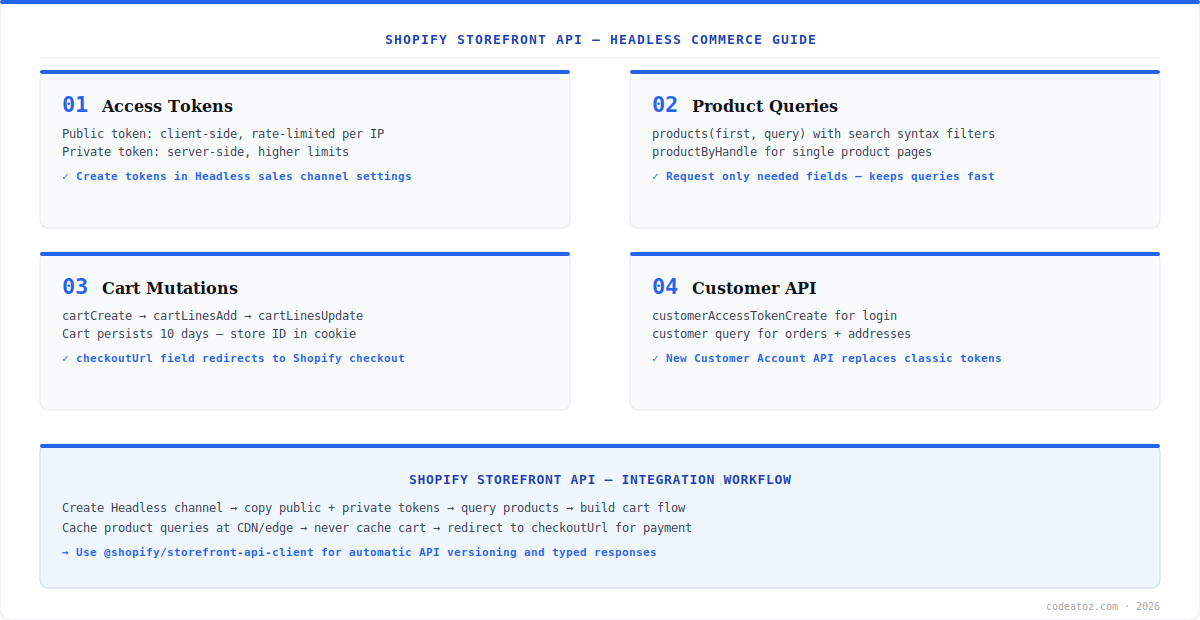
The Shopify Storefront API uses two token types. The public access token is safe for client-side code — it is rate-limited per visitor IP, not per app, so one customer cannot exhaust another’s quota. The private access token is for server-side calls with higher limits and should never reach the browser. Create both in the Headless sales channel (or a custom app’s Storefront API scope). Use the official @shopify/storefront-api-client package — it handles API versioning, token headers, and typed responses automatically.
import {createStorefrontApiClient} from '@shopify/storefront-api-client';

const client = createStorefrontApiClient({
  storeDomain: 'your-store.myshopify.com',
  apiVersion: '2025-01',
  publicAccessToken: process.env.NEXT_PUBLIC_SF_TOKEN,
});

const {data} = await client.request(`
  query Products($first: Int!) {
    products(first: $first, query: "available_for_sale:true") {
      nodes {
        id handle title
        priceRange { minVariantPrice { amount currencyCode } }
        featuredImage { url altText width height }
      }
    }
  }
`, { variables: {first: 12} });Shopify Storefront API: Cart Mutations and Checkout
The Shopify Storefront API cart flow is mutation-driven: cartCreate initialises the cart, cartLinesAdd, cartLinesUpdate, and cartLinesRemove manage items, and cartBuyerIdentityUpdate attaches the customer. The cart persists for 10 days — store the cart ID in a cookie and reuse it across sessions. When the customer is ready to pay, redirect them to the cart’s checkoutUrl field — Shopify’s hosted checkout handles payment, tax, and shipping. This is the recommended pattern; building fully custom payment against the Shopify Storefront API requires Shopify Plus and the Checkout Branding API instead. Check the Storefront API cart documentation for all mutation payloads.
Shopify Storefront API: Caching and Customer Accounts
Caching is where most Shopify Storefront API implementations win or lose. Product and collection queries are highly cacheable — cache them at the edge for 60 seconds to 1 hour depending on price-change frequency. Cart queries must never be cached. For customer login, the new Customer Account API (OAuth-based, passwordless) replaces the classic customerAccessTokenCreate mutation flow for new builds — it provides hosted login pages and stronger session security. Our Shopify development team builds headless storefronts on the Shopify Storefront API with Hydrogen and Next.js. See our Shopify Hydrogen storefront guide for the framework-level view, and the Customer Account API documentation for the login integration.
Never use an Admin API token where a Shopify Storefront API token belongs. Admin tokens grant write access to orders and customers — exposing one client-side is a critical security incident. The Storefront API public token is the only token that should ever appear in browser-delivered JavaScript.
Frequently Asked Questions About Shopify Storefront API
What is the Shopify Storefront API?
The Shopify Storefront API is the customer-facing GraphQL API for building headless storefronts. It provides product and collection queries, search, cart mutations, customer accounts, and checkout redirection. It is designed for client-side and edge use with public tokens and per-IP rate limiting, unlike the Admin API which is server-only.
What is the difference between the Shopify Storefront API and Admin API?
The Shopify Storefront API is for customer-facing storefronts — reading products, managing carts, and customer login with public tokens safe for browsers. The Admin API is for back-office operations — creating products, editing orders, managing inventory — with secret tokens that must stay server-side. Headless storefronts use Storefront API for the shop and Admin API for any back-office sync.
How do I get a Shopify Storefront API access token?
Get Shopify Storefront API tokens by installing the Headless sales channel from the Shopify App Store, which provides both public and private access tokens. Alternatively, create a custom app with Storefront API scopes enabled. The public token is safe for client-side code; the private token is for server-side calls with higher rate limits.
How does cart work in the Shopify Storefront API?
Cart in the Shopify Storefront API uses mutations: cartCreate to initialise, cartLinesAdd, cartLinesUpdate, and cartLinesRemove to manage items. The cart persists for 10 days — store the cart ID in a cookie. For payment, redirect to the cart checkoutUrl field which opens Shopify’s hosted checkout handling payment, tax, and shipping automatically.
What are the Shopify Storefront API rate limits?
The Shopify Storefront API public token is rate-limited per visitor IP rather than per app — each customer gets their own quota, so traffic spikes do not exhaust a shared limit. The private (server-side) token has higher fixed limits. Cache product and collection queries at the CDN or edge to minimise API calls — only cart and customer queries need to hit the API uncached.
Can I build a custom checkout with the Shopify Storefront API?
The Shopify Storefront API handles cart building, but payment goes through Shopify’s hosted checkout via the cart checkoutUrl — this is the standard pattern for all plans. Fully custom checkout UIs require Shopify Plus with Checkout Extensibility. For most headless builds, a custom cart plus hosted checkout gives full design control where it matters with PCI compliance handled by Shopify.
Building on the Shopify Storefront API?
Our team builds headless storefronts — Storefront API integration, cart flow, caching, and customer accounts.




