
Node.js WooCommerce Integration — Sync Orders and Products Automatically (2026)
A Node.js WooCommerce integration is the backbone of any custom ERP sync, inventory management system, or headless storefront that needs to communicate with WooCommerce in real time. This Node.js WooCommerce integration guide covers the full production architecture: the official @woocommerce/woocommerce-rest-api package for REST requests, webhooks for real-time order events, Express.js for the receiving server, node-cron for scheduled sync jobs, and exponential backoff retry logic to handle WooCommerce API rate limits. By the end you will have a complete, production-hardened Node.js WooCommerce integration ready to deploy.
The WooCommerce REST API provides full CRUD access to products, orders, customers, coupons, and settings. The Node.js WooCommerce integration pattern we use here separates concerns cleanly: inbound real-time events arrive via webhooks, outbound batch sync runs on a cron schedule, and all WooCommerce API calls pass through a single authenticated client with retry logic. This separation makes the integration testable, observable, and resilient to WooCommerce downtime.
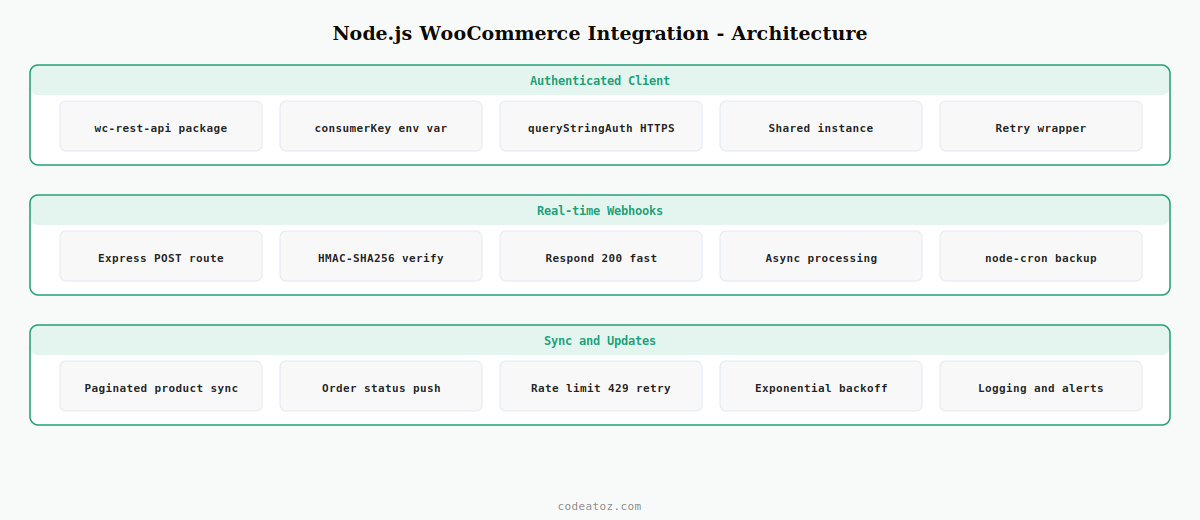
Step 1: Node.js WooCommerce Integration — Set Up the Authenticated Client
The official @woocommerce/woocommerce-rest-api package handles authentication, base URL construction, and request serialisation. Every Node.js WooCommerce integration should use a single shared client instance rather than re-instantiating per request.
npm install @woocommerce/woocommerce-rest-api express node-cron dotenv axiosimport WooCommerceRestApi from '@woocommerce/woocommerce-rest-api'
import 'dotenv/config'
// Single shared client for the Node.js WooCommerce integration
const wc = new WooCommerceRestApi({
url: process.env.WC_URL,
consumerKey: process.env.WC_KEY,
consumerSecret: process.env.WC_SECRET,
version: 'wc/v3',
queryStringAuth: true // use query string auth for HTTPS stores
})
// Exponential backoff retry wrapper
export async function wcRequest( method, endpoint, data = null, attempt = 1 ) {
try {
const res = method === 'get'
? await wc.get( endpoint, data )
: await wc[ method ]( endpoint, data )
return res.data
} catch ( err ) {
if ( attempt >= 4 ) throw err
// WooCommerce rate limit: 429 or 503 = back off and retry
if ( [429, 503].includes( err.response?.status ) ) {
const delay = Math.pow( 2, attempt ) * 1000
await new Promise( r => setTimeout( r, delay ) )
return wcRequest( method, endpoint, data, attempt + 1 )
}
throw err
}
}
export default wcStep 2: Node.js WooCommerce Integration — Receive Order Webhooks with Express
Webhooks make the Node.js WooCommerce integration real-time. When an order is created or updated in WooCommerce, it POSTs immediately to your Express server. This is far more efficient than polling — and essential for ERP and fulfilment systems that need near-instant notification.
import express   from 'express'
import crypto    from 'crypto'
import { processNewOrder } from './handlers/orders.js'

const router = express.Router()

function verifySignature( payload, signature, secret ) {
  const hash = crypto
    .createHmac( 'sha256', secret )
    .update( payload )
    .digest( 'base64' )
  return crypto.timingSafeEqual(
    Buffer.from( hash ),
    Buffer.from( signature )
  )
}

router.post( '/order/created', express.raw({ type: 'application/json' }), ( req, res ) => {
  const sig = req.headers['x-wc-webhook-signature']
  if ( ! verifySignature( req.body, sig, process.env.WC_WEBHOOK_SECRET ) ) {
    return res.status( 401 ).json({ error: 'Invalid signature' })
  }
  const order = JSON.parse( req.body )
  // Process asynchronously, respond immediately
  processNewOrder( order ).catch( console.error )
  res.status( 200 ).json({ received: true })
})

export default router
Always respond with HTTP 200 immediately and process the order asynchronously. WooCommerce marks a webhook as failed if it doesn’t receive a 200 within 5 seconds, then retries — causing your handler to run multiple times. The signature verification using HMAC-SHA256 is mandatory for any production Node.js WooCommerce integration.
Step 3: Node.js WooCommerce Integration — Scheduled Sync with node-cron
For bulk product updates, inventory reconciliation, and order status backfill, use node-cron to schedule periodic sync jobs. This is the batch layer of your Node.js WooCommerce integration — complementing the real-time webhook layer.
import cron        from 'node-cron'
import { wcRequest } from '../wc-client.js'

async function syncProducts( page = 1, updated = 0 ) {
  const products = await wcRequest( 'get', 'products', {
    per_page: 100,
    page,
    status: 'publish'
  })

  if ( ! products.length ) {
    console.log( `Node.js WooCommerce integration: synced ${updated} products` )
    return
  }

  for ( const product of products ) {
    await upsertProductInERP( product )   // your ERP integration here
    updated++
  }

  // Paginate through all products
  await syncProducts( page + 1, updated )
}

async function upsertProductInERP( product ) {
  // Push to your ERP, inventory system, or database
  console.log( `Syncing product ${product.id}: ${product.name}` )
}

// Run every hour at :00
cron.schedule( '0 * * * *', () => {
  syncProducts().catch( err => console.error( 'Sync failed:', err.message ) )
})

export { syncProducts }
Step 4: Node.js WooCommerce Integration — Update Orders via REST API
Your Node.js WooCommerce integration will frequently need to push data back to WooCommerce — updating order status after fulfilment, adding tracking numbers, or updating stock levels. Use the shared wcRequest wrapper for all outbound calls to get automatic retry logic.
import { wcRequest } from './wc-client.js'

export async function markOrderShipped( orderId, trackingNumber ) {
  // Update the order status via Node.js WooCommerce integration
  await wcRequest( 'put', `orders/${orderId}`, {
    status: 'completed',
    customer_note: `Your order has been dispatched. Tracking: ${trackingNumber}`
  })

  // Add a private order note
  await wcRequest( 'post', `orders/${orderId}/notes`, {
    note:           `Dispatched via Node.js WooCommerce integration. Tracking: ${trackingNumber}`,
    customer_note:  false
  })

  console.log( `Order ${orderId} marked shipped with tracking ${trackingNumber}` )
}
The WooCommerce REST API documentation covers all available endpoints. The @woocommerce/woocommerce-rest-api npm package handles authentication and request construction. See our WooCommerce API React tutorial for the frontend side of this integration and our WooCommerce development services for custom integration builds.
Frequently Asked Questions — Node.js WooCommerce Integration
What is the best package for a Node.js WooCommerce integration?
The official @woocommerce/woocommerce-rest-api npm package is the recommended choice for a Node.js WooCommerce integration. It handles consumer key authentication, HTTPS query string auth, request serialisation, and response parsing. Wrap it in a retry function to handle WooCommerce’s 429 rate limit responses automatically.
How do WooCommerce webhooks work in a Node.js WooCommerce integration?
WooCommerce sends an HTTP POST to your Express server when an order or product event occurs. Your Node.js WooCommerce integration must verify the HMAC-SHA256 signature using the webhook secret, respond with HTTP 200 immediately, then process the event asynchronously. Slow or failing responses cause WooCommerce to retry the webhook, leading to duplicate processing.
How do I handle rate limiting in a Node.js WooCommerce integration?
WooCommerce returns HTTP 429 when rate limits are exceeded. Implement exponential backoff in your Node.js WooCommerce integration — wait 2 seconds on the first retry, 4 on the second, 8 on the third, then fail. Use the wcRequest wrapper pattern shown in this guide to apply retry logic to all API calls centrally without repeating it in every handler.
Should I use webhooks or polling for a Node.js WooCommerce integration?
Use webhooks for real-time events like new orders, order status changes, and product updates. Use scheduled cron jobs for bulk reconciliation — syncing all products, reconciling stock levels, or backfilling order history. A production Node.js WooCommerce integration uses both: webhooks for real-time and cron for reliability.
How do I authenticate a Node.js WooCommerce integration securely?
Store consumer key and secret in environment variables, never hardcoded. Use HTTPS and set queryStringAuth to true in the WooCommerce REST API client. Always verify incoming webhook signatures with HMAC-SHA256. Rotate API keys if they are ever exposed. Never log the consumer key or secret anywhere in your Node.js WooCommerce integration codebase.
Can a Node.js WooCommerce integration sync products bidirectionally?
Yes — read products from WooCommerce using the REST API, push updates back using PUT /products/{id}. For bidirectional sync, implement a last-modified timestamp check to avoid overwriting more recent changes. Use webhooks to receive WooCommerce product update events and cron jobs to push your system’s changes back to WooCommerce on a schedule.
Need a WooCommerce Integration Built?
CodeAtoZ builds production Node.js WooCommerce integrations — ERP sync, inventory management, fulfilment APIs, and headless storefronts.




