
The Complete Next.js Shopify Headless Storefront Guide 2026
Build a Next.js Shopify storefront on the Storefront API — product pages with ISR, cart mutations, Shopify-hosted checkout, edge caching and crawlable SEO.
A Next.js Shopify storefront pairs the most popular React framework with Shopify’s commerce engine via the Storefront API — giving you a fully custom frontend while Shopify keeps handling catalogue, inventory, payments and checkout. Building Next.js Shopify headless means you own the entire customer-facing experience and rendering strategy, without giving up Shopify’s managed reliability. This guide is the practical build path.
Search intent: informational/procedural — developers building a headless Shopify storefront on Next.js. We cover the Storefront API, the per-route rendering strategy, cart and checkout, SEO and edge caching, and whether you need Hydrogen. It builds on our Shopify Storefront API and rendering strategy guides.
Next.js Shopify: The Storefront API Foundation
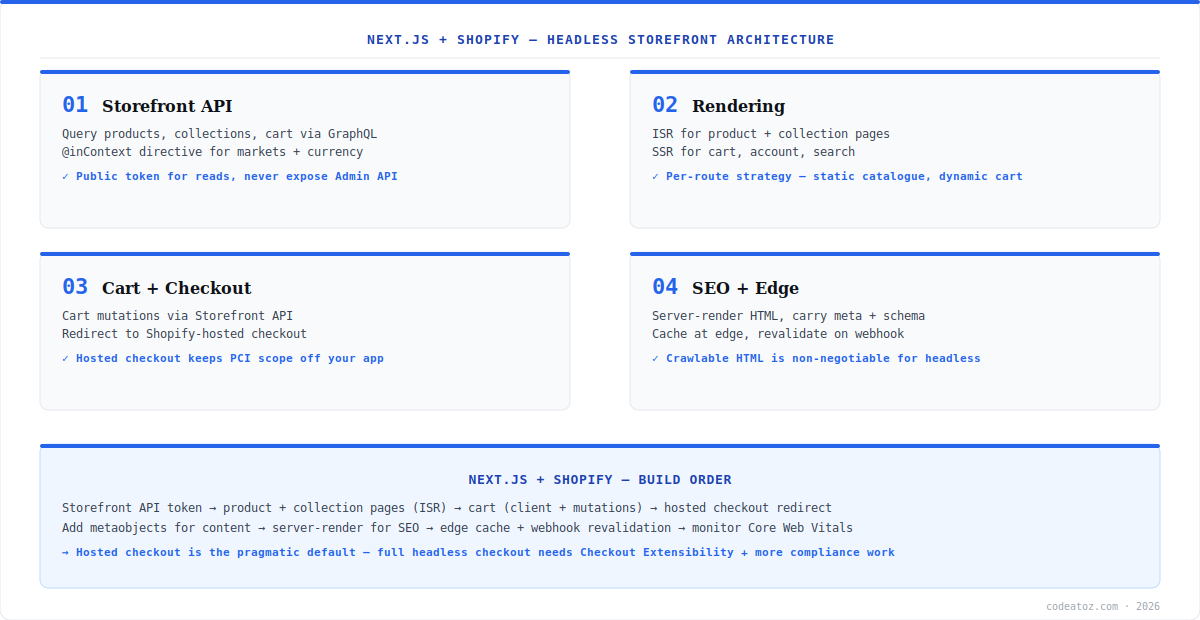
A Next.js Shopify build talks to Shopify through the Storefront API — a GraphQL API exposing products, collections, cart and customer data with a public access token safe for frontend use. You query exactly the fields each page needs, and the @inContext directive serves market-correct prices and translations for Shopify Markets. The cardinal rule of Next.js Shopify security: use the Storefront API (public, read + cart) from the frontend, and keep the Admin API (privileged) strictly server-side, never shipped to the browser.
// lib/shopify.ts
const endpoint = `https://${process.env.SHOPIFY_DOMAIN}/api/2025-01/graphql.json`;
export async function shopify(query: string, variables = {}) {
  const res = await fetch(endpoint, {
    method: 'POST',
    headers: {
      'Content-Type': 'application/json',
      'X-Shopify-Storefront-Access-Token': process.env.SF_TOKEN!,
    },
    body: JSON.stringify({ query, variables }),
    next: { revalidate: 60 }, // ISR: refresh product data every 60s
  });
  const { data, errors } = await res.json();
  if (errors) throw new Error(JSON.stringify(errors));
  return data;
}Next.js Shopify: Rendering, Cart and Checkout
The Next.js Shopify rendering strategy is per-route: ISR for product and collection pages (static speed, periodic price refresh), SSR for cart and account (always fresh). Cart lives via Storefront API cart mutations — create a cart, add lines, and persist the cart ID in a cookie. For checkout, the pragmatic Next.js Shopify default is to redirect to Shopify’s hosted checkout: it keeps PCI compliance scope off your application and inherits Shopify’s conversion-optimised, fraud-protected flow. Full in-app checkout is possible via Checkout Extensibility but adds compliance work most stores do not need. The Storefront API documentation details the cart mutations.
Next.js Shopify: SEO, Edge and Do You Need Hydrogen?
For SEO, a Next.js Shopify storefront must server-render crawlable HTML with proper titles, meta and product structured data — never client-only rendering. Cache pages at the edge and revalidate via Shopify webhooks on product changes for static-speed freshness. On the common question — Hydrogen vs plain Next.js Shopify: Hydrogen is Shopify’s own React framework (built on Remix) with commerce primitives baked in and first-class Oxygen hosting; plain Next.js gives you a larger ecosystem, more hosting freedom, and is the right pick if your team already runs Next.js. Both are valid; choose by team familiarity. The Next.js documentation and Hydrogen docs cover each path. Our Shopify development team builds both.
| Aspect | Plain Next.js + Shopify | Hydrogen + Oxygen |
|---|---|---|
| Framework | Next.js (React) | Hydrogen (Remix-based) |
| Commerce primitives | You build / use libraries | Built in |
| Hosting | Any (Vercel, etc.) | Oxygen (Shopify) optimised |
| Ecosystem | Largest in React | Shopify-focused |
| Best for | Existing Next.js teams | Shopify-native builds |
What we have learned building Next.js Shopify storefronts
Hosted checkout is almost always the right call. Teams want a fully in-app checkout for brand control, then discover the PCI and fraud-handling burden. Shopify’s hosted checkout converts well, is maintained for you, and keeps compliance scope minimal. We reserve Checkout Extensibility for genuinely specific requirements.
Cart state is the trickiest part of a Next.js Shopify build. Persisting the cart ID, handling expiry, and reconciling client and server cart state cause most early bugs. We standardise on a cart cookie plus server actions and treat the Storefront cart as the single source of truth.
The Admin API leaking to the client is the security mistake we audit for first. Storefront API on the frontend, Admin API server-only — every time. A leaked Admin token is a full-store compromise, and it is an easy slip in a fast-moving Next.js Shopify project.
Frequently Asked Questions About Next.js Shopify
Can you use Next.js with Shopify?
Yes. A Next.js Shopify storefront uses the Shopify Storefront API (GraphQL) for products, collections and cart, while Shopify handles inventory, payments and checkout. You build a fully custom React frontend with your own rendering strategy and keep Shopify’s managed commerce engine behind it.
Do I need Hydrogen for a headless Shopify store?
No. Hydrogen is Shopify’s own React framework with built-in commerce primitives and Oxygen hosting, but a plain Next.js Shopify build works equally well using the Storefront API directly. Choose Hydrogen for a Shopify-native stack, or Next.js if your team already uses it and wants the larger React ecosystem.
How does checkout work in a Next.js Shopify storefront?
The pragmatic default is to build cart with Storefront API mutations, then redirect to Shopify’s hosted checkout. This keeps PCI compliance scope off your app and uses Shopify’s conversion-optimised, fraud-protected flow. Full in-app checkout is possible via Checkout Extensibility but adds compliance work most stores do not need.
What rendering strategy should a Next.js Shopify store use?
Per route: ISR for product and collection pages (static speed with periodic price refresh), and SSR for cart, account and search (always fresh and per-user). Avoid client-only rendering for anything that must rank — Next.js Shopify storefronts need server-rendered, crawlable HTML for SEO.
Is the Storefront API or Admin API used in headless Shopify?
Both, in different places. A Next.js Shopify storefront uses the Storefront API (public token, reads and cart) from the frontend, and the Admin API (privileged) strictly server-side for tasks like order management. Never ship the Admin API token to the browser — that would expose full store control.
Is a Next.js Shopify storefront good for SEO?
Yes, when built correctly. Server-render product pages with ISR or SSR so Google receives crawlable HTML with titles, meta and structured data, cache at the edge, and revalidate on Shopify webhooks. A properly server-rendered Next.js Shopify storefront matches or beats a standard theme on SEO and speed.
Building a Next.js Shopify Storefront?
Our team builds headless Shopify on Next.js — Storefront API, ISR, cart, hosted checkout and edge SEO.




