
The Complete Headless Migration Checklist — No Lost SEO 2026
This headless migration checklist takes you from audit to phased launch without losing rankings, traffic or sales — URL mapping, 301s, SSR parity and monitoring.
A headless migration checklist exists because most headless “SEO disasters” are entirely preventable — they come from missing redirects and client-only rendering, not from headless itself. This headless migration checklist walks the full SEO-safe path: baseline your current state, map every URL to a 301, ensure server-rendered crawlable HTML, launch in phases, and monitor before decommissioning the old stack. Follow the headless migration checklist and you keep your rankings through the cutover.
Search intent: transactional/procedural — teams actively migrating to headless who need a concrete, SEO-safe runbook. We cover each phase of the headless migration checklist: audit and baseline, URL and 301 mapping, SSR parity and structured data, phased launch, and post-launch monitoring. It builds on our headless commerce SEO guide and the composable commerce overview.
Headless Migration Checklist: Audit and Baseline
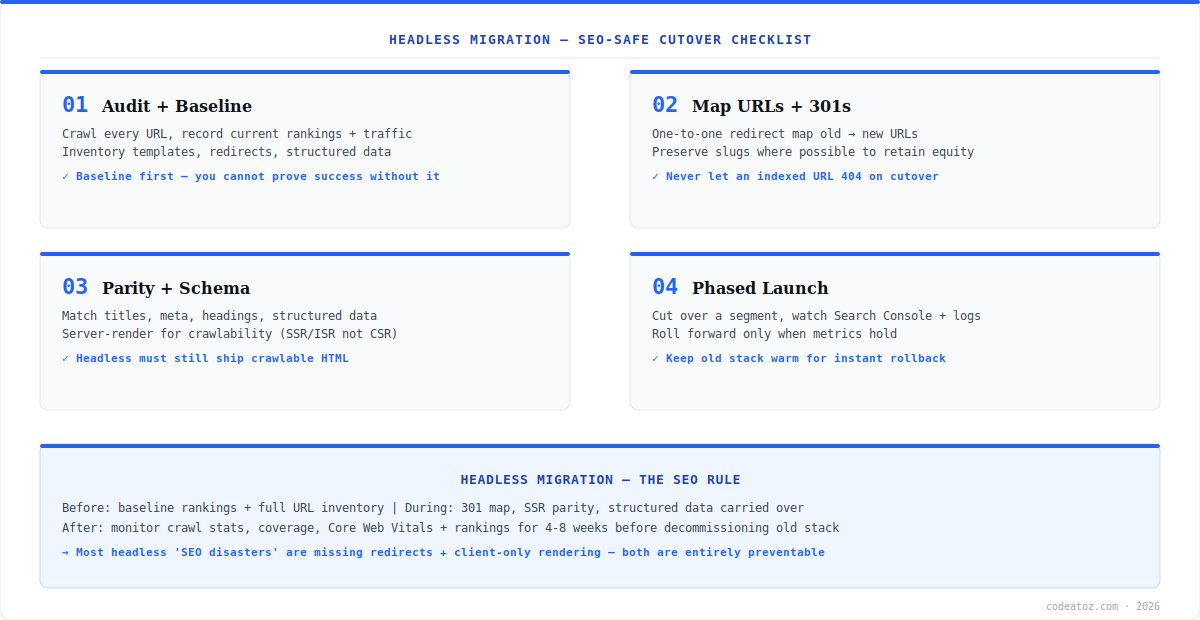
Step one of any headless migration checklist is the baseline you will measure success against. Crawl the entire current site and inventory every indexed URL, record current rankings and organic traffic per key page, and catalogue templates, existing redirects and structured data. You cannot prove a migration preserved SEO without a before-snapshot — and you cannot build a complete 301 map without a full URL inventory. This phase of the headless migration checklist is unglamorous and non-negotiable; skipping it is how teams discover lost pages only when traffic drops weeks later.
Headless Migration Checklist: URL Mapping, 301s and SSR Parity
The core of the headless migration checklist is two things done right: redirects and rendering. Build a one-to-one 301 redirect map from every old URL to its new equivalent, preserving slugs wherever possible to retain link equity — never let an indexed URL return a 404 on cutover. Then ensure rendering parity: a headless storefront must still ship crawlable server-rendered HTML (SSR or ISR, not client-only rendering), with titles, meta, headings and structured data carried over intact. This is the step of the headless migration checklist where most SEO is won or lost — Google must see the same content, server-rendered, at a redirected-or-preserved URL. Validate with Google’s Rich Results Test and the Search Console URL Inspection tool before launch.
Headless Migration Checklist: Phased Launch and Monitoring
The final phase of the headless migration checklist protects you at cutover. Launch in phases — migrate a segment (a category, a region) first, watch Search Console coverage, crawl stats and server logs, and only roll forward when metrics hold. Keep the old stack warm for instant rollback. After full launch, monitor crawl stats, index coverage, Core Web Vitals and rankings for four to eight weeks before decommissioning anything. The discipline of the headless migration checklist is patience: a phased, monitored cutover catches problems while they are small. The Google site move documentation is the authoritative reference. Our migration team runs this headless migration checklist end to end.
What we have learned running headless migrations
The 301 map is the whole game. Every headless migration that lost traffic, in our experience, traces back to incomplete redirects — a forgotten URL pattern, a parameter variant, an old campaign landing page. We crawl exhaustively and test the redirect map against the full historical URL list, not just the obvious pages.
Client-only rendering is the silent killer. A headless build that renders product content only in the browser can look perfect to users and be nearly invisible to crawlers. We require SSR or ISR for anything that must rank, and we verify with the URL Inspection tool’s rendered-HTML view — not assumptions.
Phased cutover turns disasters into hiccups. Big-bang launches make every problem site-wide and simultaneous. By migrating a segment first and watching the data, we catch redirect gaps or rendering issues on 5% of traffic instead of 100% — and keep the old stack ready for instant rollback.
Frequently Asked Questions About Headless Migration
What is a headless migration checklist?
A headless migration checklist is a step-by-step runbook for moving to a headless storefront without losing SEO: audit and baseline current rankings, build a complete 301 redirect map, ensure server-rendered crawlable HTML, launch in phases, and monitor before decommissioning the old stack. It exists because most headless SEO losses are preventable.
Why do headless migrations lose SEO traffic?
Almost always from two avoidable mistakes: missing 301 redirects (old indexed URLs 404 on cutover) and client-only rendering (content invisible to crawlers). A proper headless migration checklist prevents both with a complete redirect map and mandatory SSR or ISR for rankable content. Headless itself does not harm SEO; poor execution does.
Do I need server-side rendering for headless SEO?
Yes for any content that must rank. A headless migration checklist requires SSR or ISR so Google receives fully rendered HTML, not an empty shell hydrated in the browser. Client-only rendering can make product pages nearly invisible to crawlers. Verify rendered output with Search Console’s URL Inspection tool before launch.
How important are 301 redirects in a headless migration?
They are the single most important element. The headless migration checklist centres on a complete one-to-one 301 map from every old URL to its new equivalent, preserving link equity and preventing 404s. Most migrations that lose rankings trace back to an incomplete redirect map — test it against your full historical URL inventory.
Should I migrate to headless all at once or in phases?
In phases. The headless migration checklist recommends migrating a segment first — a category or region — while monitoring Search Console, crawl stats and logs, then rolling forward only when metrics hold. Phased cutover contains any redirect or rendering problem to a small slice of traffic and keeps the old stack ready for instant rollback.
How long should I monitor after a headless migration?
Four to eight weeks before decommissioning the old stack. The headless migration checklist requires watching index coverage, crawl stats, Core Web Vitals and rankings until they stabilise at or above baseline. Search engines take time to recrawl and reprocess a migrated site, so patience in monitoring is what confirms the migration truly preserved SEO.
Planning a Headless Migration?
Our team runs the full SEO-safe checklist — audit, 301 mapping, SSR parity and phased cutover with monitoring.




