
APSB26-73 — Magento Security Patch July 2026: Complete Guide
Adobe released APSB26-73 on 14 July 2026, fixing 13 vulnerabilities in Adobe Commerce and Magento Open Source — eight of them critical, topping out at CVSS 9.6. Here is exactly what it fixes, whether you are affected, and how to apply it.
APSB26-73 is Adobe’s regularly scheduled security bulletin for Adobe Commerce and Magento Open Source, published on 14 July 2026. It resolves thirteen vulnerabilities spanning critical, important and moderate severity, with impacts including arbitrary code execution, privilege escalation and security feature bypass. Adobe assigned it a Priority 2 rating and states it is not aware of any exploits in the wild for the issues addressed. That is reassuring but not a reason to wait — APSB26-73 includes an unauthenticated file-upload flaw scoring CVSS 9.6, and published bulletins are themselves a roadmap for attackers.
Search intent: urgent informational — Magento developers, agencies and merchants who need to know if their store is affected by APSB26-73 and how to patch it today. This guide covers the bulletin at a glance, every affected version, all thirteen CVEs with scores, what the vulnerabilities actually are at code level, step-by-step application for Cloud, on-premises, Open Source and Mage-OS, verification, and the pitfalls that break builds. It complements our Magento 2 developer guide and CI/CD deployment guide.
The short version: If you run Adobe Commerce, Magento Open Source, Commerce B2B or Commerce Events on any version at or below the levels listed below, you are affected. Get onto the latest -p release for your line, apply the isolated patch for your exact patch level, verify, and test on staging first. Isolated patches are not cumulative — the wrong patch level will simply fail to apply.
APSB26-73 at a Glance: What Adobe Released
APSB26-73 is the July 2026 entry in Adobe’s monthly security release cadence for Commerce. The essentials: bulletin ID APSB26-73, published 14 July 2026, priority rating 2, thirteen CVEs resolved across Adobe Commerce, Magento Open Source, Adobe Commerce B2B and Adobe Commerce Events. The vulnerability impacts break down as arbitrary code execution, privilege escalation and security feature bypass. Eight issues are rated critical, three important and two moderate. Crucially, Adobe alongside APSB26-73 also shipped an isolated patch (internally identified as 249-2026-07-001), which lets you remediate without taking a full version upgrade — reducing the integration risk that normally delays security work.
A Priority 2 rating in Adobe’s scheme means there is elevated risk but no known active exploitation; Adobe’s guidance for Priority 2 is to apply the update within a reasonable window rather than as an emergency. Read the official Adobe Security Bulletin for APSB26-73 and the Adobe severity and priority rating definitions for the source detail. Our view: treat APSB26-73 as a this-week job, not a this-quarter job, because of the 9.6 unauthenticated upload issue.
APSB26-73 Affected Versions: Are You Vulnerable?
The scope of APSB26-73 is broad — it reaches every supported release line, including the current 2.4.9. Note the “and earlier” qualifier on each entry: if you are behind the listed patch level, you are affected too. Check your version with bin/magento --version before anything else.
| Product | Affected versions | Fixed in |
|---|---|---|
| Adobe Commerce | 2.4.9 2.4.8-p5 and earlier 2.4.7-p10 and earlier 2.4.6-p15 and earlier 2.4.5-p17 and earlier 2.4.4-p18 and earlier | 2.4.9-2026-jul 2.4.8-2026-jul 2.4.7-2026-jul 2.4.6-2026-jul 2.4.5-2026-jul 2.4.4-2026-jul |
| Magento Open Source | 2.4.9 2.4.8-p5 and earlier 2.4.7-p10 and earlier 2.4.6-p15 and earlier | 2.4.9-2026-jul 2.4.8-2026-jul 2.4.7-2026-jul 2.4.6-2026-jul |
| Adobe Commerce B2B | 1.5.3 1.5.2-p5 and earlier 1.4.2-p10 and earlier 1.3.4-p17 and earlier 1.3.3-p18 and earlier | 1.5.3-2026-jul 1.5.2-2026-jul 1.4.2-2026-jul 1.3.4-2026-jul 1.3.3-2026-jul |
| Adobe Commerce Events | 1.6.0 to 1.20.0 | 1.21.0 |
Two things worth flagging about the APSB26-73 scope. First, Magento Open Source is only supported back to 2.4.6 here, while Adobe Commerce reaches back to 2.4.4 — if you are on Open Source 2.4.5 or older you are outside the supported window entirely and should be planning an upgrade, not just a patch. Second, if you run Adobe Commerce B2B, it has its own affected version track and its own patch; patching core alone leaves the B2B-specific stored XSS issue (CVE-2026-47995) unaddressed.
APSB26-73 CVE Breakdown: All 13 Vulnerabilities
Here is the complete APSB26-73 vulnerability list, ordered by CVSS base score. The columns that matter most operationally are “Auth required” and “Admin required” — the issues needing neither are the ones an anonymous internet attacker can reach, and they should drive your urgency.
| CVE | Type (CWE) | Impact | Severity | CVSS | Auth? | Admin? |
|---|---|---|---|---|---|---|
| CVE-2026-48356 | Unrestricted file upload (CWE-434) | Privilege escalation | CRITICAL | 9.6 | No | No |
| CVE-2026-48358 | Improper encoding/escaping of output (CWE-116) | Arbitrary code execution | CRITICAL | 9.1 | Yes | Yes |
| CVE-2026-47994 | Stored XSS (CWE-79) | Privilege escalation | CRITICAL | 8.7 | Yes | Yes |
| CVE-2026-47988 | Incorrect authorization (CWE-863) | Security feature bypass | CRITICAL | 8.6 | No | No |
| CVE-2026-47984 | Incorrect authorization (CWE-863) | Security feature bypass | CRITICAL | 8.2 | No | No |
| CVE-2026-47995 | Stored XSS (CWE-79) — B2B | Privilege escalation | CRITICAL | 8.1 | Yes | Yes |
| CVE-2026-47996 | Incorrect authorization (CWE-863) | Security feature bypass | CRITICAL | 7.6 | Yes | Yes |
| CVE-2026-47992 | Improper input validation (CWE-20) | Privilege escalation | CRITICAL | 7.2 | Yes | Yes |
| CVE-2026-47997 | Incorrect authorization (CWE-863) | Security feature bypass | IMPORTANT | 5.9 | No | No |
| CVE-2026-47998 | Incorrect authorization (CWE-863) | Security feature bypass | IMPORTANT | 5.9 | No | No |
| CVE-2026-47999 | Stored XSS (CWE-79) | Arbitrary code execution | IMPORTANT | 4.8 | Yes | Yes |
| CVE-2026-48000 | Open redirect (CWE-601) | Security feature bypass | MODERATE | 4.3 | Yes | Yes |
| CVE-2026-48001 | Information exposure (CWE-200) | Security feature bypass | MODERATE | 3.7 | No | No |
The headline item in APSB26-73 is CVE-2026-48356 at CVSS 9.6 — an unrestricted upload of a file with a dangerous type, leading to privilege escalation, requiring no authentication and no admin privileges. Its vector string is CVSS:3.1/AV:N/AC:L/PR:N/UI:R/S:C/C:H/I:H/A:L: network-attackable, low complexity, no privileges needed, though it does require user interaction and crosses a scope boundary. That combination — remote, unauthenticated, high confidentiality and integrity impact — is why APSB26-73 deserves prompt attention despite the Priority 2 label.
Also notable: CVE-2026-48358 (9.1, arbitrary code execution) applies to webhooks only, per Adobe’s note — so its relevance depends on whether you use Commerce webhooks. And five of the thirteen issues (CVE-2026-48356, 47988, 47984, 47997, 47998, 48001) need no authentication at all, meaning they are reachable without a login. Adobe credits the reporting researchers for APSB26-73 as 0x0.eth, T.H. Lassche, Sudhanshu Rajbhar (sudi), wohlie, akashhamal0x01, s (howtoplay) and schemonah — several through Adobe’s HackerOne bug bounty programme.
What the APSB26-73 Vulnerabilities Actually Are
Adobe’s bulletin gives categories, not mechanics. But because the Mage-OS project ports Adobe’s isolated patch to source and documents what changed, we can see what the APSB26-73 fixes actually do at code level — detail that is genuinely useful when assessing your own exposure. The Mage-OS 3.2.0 security release notes describe the following changes.
Guest cart takeover. The guest cart endpoints did not verify that a masked cart ID actually resolved to a guest cart — meaning a masked ID could be used to reach a signed-in customer’s cart. The fix makes every guest-facing entry point (cart, items, coupons, billing and shipping addresses, payment and shipping methods, totals, gift messages) validate cart ownership before acting, and promotes quote address validation from REST-only to all entry points including GraphQL. This is the most consequential functional change in APSB26-73 and maps to the unauthenticated incorrect-authorization CVEs.
Stored XSS via inline translation. Translated content is now stripped of script, iframe, object, form, style and similar tags along with on* event handlers, and external links are filtered out. Template-injection sanitiser bypass. The UI component data sanitiser could be evaded by embedding a newline inside a ${...} payload; it now matches across newlines. Template injection via product data. Product gallery and product-view-counter data injected into JSON is no longer treated as an interpolatable template. Disabled product disclosure via GraphQL. Disabled products could be surfaced through the CatalogUrlRewrite GraphQL URL resolver.
Customer address media hardening. This is the one that matters for the 9.6 upload issue: the customer_address directory is removed from the allowed media resources, additional dangerous file extensions (hta, mhtml, mht, htc, xht, shtm, php8) are blocked, and nginx.conf.sample gains a deny all rule for /media/customer_address/.
The nginx rule will not apply itself. If you maintain your own nginx configuration rather than using the shipped nginx.conf.sample, you must add the /media/customer_address/ deny rule by hand. Patching or upgrading does not modify your live web server config. This is the single item in APSB26-73 that does not take effect automatically — and it is attached to the highest-scoring vulnerability in the bulletin.
location /media/customer_address/ {
    deny all;
}How to Apply APSB26-73: Step by Step
Adobe distributes the APSB26-73 remediation as an isolated patch, delivered out-of-band. An important structural point: the isolated patch content is not published to any Magento git tag or Composer package — you download a patch file. The full instructions live in Adobe’s APSB26-73 release note and the composer patch application guide.
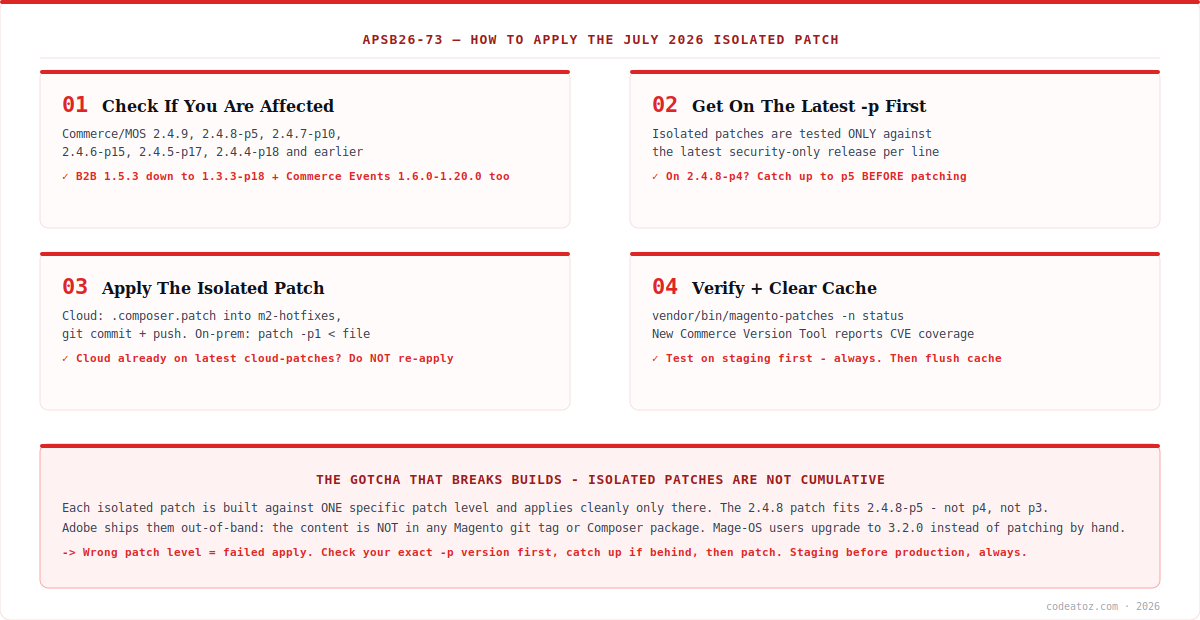
Step 1 — Confirm your exact patch level. Run bin/magento --version. Isolated patches for APSB26-73 are tested exclusively against the latest security-only release for each supported line. If you are on 2.4.8-p4, the 2.4.8 patch will not apply — you must first catch up to 2.4.8-p5.
Step 2 — Download the patch for your version. Each line has its own file:
| Your version | Patch file | Auth needed? |
|---|---|---|
| 2.4.9 | 2-4-9-jul-2026.zip | No |
| 2.4.8-p5 | 2-4-8-p5-jul-2026.zip | No |
| 2.4.7-p10 | 2-4-7-p10-jul-2026.zip | No |
| 2.4.6-p15 | 2-4-6-p15-jul-2026.zip | No |
| 2.4.5-p17 | 2-4-5-p17-jul-2026.zip | Yes — Composer keys |
| 2.4.4-p18 | 2-4-4-p18-jul-2026.zip | Yes — Composer keys |
Files are hosted under repo.magento.com/patch/. For 2.4.5-p17 and 2.4.4-p18 the download sits behind authentication: when the browser prompts, enter your Composer public key as the username and your private key as the password. Note that patch downloads bundle independent patches for Community Edition (CE) and Commerce/B2B (EE) — apply the one matching your edition.
Step 3 — Apply it. The procedure differs by hosting model. For Adobe Commerce on Cloud infrastructure, create an m2-hotfixes directory in your project root if it does not exist, drop the .composer.patch file in, then commit and push — the deploy pipeline applies it:
mkdir -p m2-hotfixes
cp /path/to/VULN-XXXXX-2.4.x_COMPOSER.patch m2-hotfixes/

git add -A
git commit -m "Apply APSB26-73 isolated security patch"
git push origin
For Adobe Commerce on-premises and Magento Open Source, upload the patch to your installation root and apply it with patch, then flush the cache:
# unzip the downloaded patch bundle first
unzip 2-4-8-p5-jul-2026.zip

# from the Magento root directory
patch -p1 < VULN-XXXXX-2.4.8_COMPOSER.patch

# if -p1 fails, try -p2
# patch -p2 < VULN-XXXXX-2.4.8_COMPOSER.patch

bin/magento cache:flush
bin/magento setup:upgrade      # if the patch touches schema/DI
bin/magento setup:di:compile   # production mode
bin/magento setup:static-content:deploy -f
For Mage-OS users the path is different and simpler: Mage-OS 3.2.0 ports the APSB26-73 patch to source, so you upgrade rather than apply a patch file by hand.
composer require mage-os/product-community-edition=3.2.0 --no-update
composer update
bin/magento setup:upgrade
Cloud merchants, read this first: the APSB26-73 issues are also resolved by the latest cloud-patches update. Attempting to apply the isolated patch when the fix is already in place from cloud-patches can cause installation failures. Check your cloud-patches state before patching manually.
How to Verify APSB26-73 Is Applied
Confirming remediation is not obvious, because APSB26-73 does not change your reported Magento version number. Two tools help. First, the Quality Patches Tool, which reports patch status — filter its output for the VULN identifier from your patch file:
# install the tool, then check status (VULN-27015 is Adobe's example)
vendor/bin/magento-patches -n status | grep "27015|Status"

# expected: the patch row reports  Applied
Second — and new with this release — Adobe introduced the Commerce Version Tool, a standalone executable bundled with each monthly security patch. It reports which monthly security patches are installed, which are missing, and which CVEs your installation is protected against. That last capability is genuinely useful for audit trails and for answering “are we covered for APSB26-73?” definitively. Two caveats: it works for both on-premises and Cloud, but it only becomes available after you apply the CE patch file, and Adobe reiterates that Commerce security patches are non-cumulative and must be applied in sequence.
One privacy note worth knowing: Adobe’s patch also ships a vendor/bin/patch-status tool that reports installed-patch state back to Adobe’s registry using your repo.magento.com credentials. Mage-OS deliberately omits this tool from its distribution — so if you diff Mage-OS against Adobe’s APSB26-73 patch and notice it missing, that is by design, not an incomplete port.
APSB26-73 Pitfalls: What Trips Teams Up
Most failed APSB26-73 deployments come down to a handful of predictable problems. Here is the decision table we work through.
| Situation | What to do |
|---|---|
| On 2.4.8-p4 (not latest -p) | Upgrade to 2.4.8-p5 first — the patch only applies there |
| Adobe Commerce on Cloud | Check cloud-patches first; re-applying can fail the install |
| Custom nginx config | Add the /media/customer_address/ deny rule manually |
| Running Commerce B2B | Apply the separate B2B patch too (CVE-2026-47995) |
| Running Commerce Events | Upgrade the module to 1.21.0 |
| On Mage-OS | Upgrade to 3.2.0 — do not hand-apply Adobe’s patch |
| On Open Source 2.4.5 or older | Out of support — plan a version upgrade, not a patch |
patch -p1 fails | Try -p2; if it still fails, check your exact -p level |
The pitfall that causes the most wasted hours with APSB26-73 is the non-cumulative nature of isolated patches. Unlike the old quarterly -p releases, each isolated patch is built against one specific prior patch level and applies cleanly only there. Teams assume “latest patch = applies to everything on the 2.4.8 line” and lose an afternoon to rejected hunks. Check your exact version, catch up if behind, then patch. And as with any change of this kind: staging first, production second, with a recent backup in hand — Adobe explicitly recommends testing on Staging or Integration before Production.
How we approach APSB26-73 across client stores
We audit the exact patch level before touching anything. The single biggest time-waster with isolated patches is discovering mid-deploy that a store sits on 2.4.7-p9 rather than p10. We inventory every client’s precise version first, batch the ones needing a catch-up release, and only then schedule the APSB26-73 patch itself. It turns a chaotic afternoon into a predictable sequence.
The custom nginx rule is the item that gets missed. Almost every store we manage runs a hand-tuned nginx config rather than the shipped sample — which means the /media/customer_address/ deny rule from this patch silently does not land. We treat it as a separate checklist item with its own verification, because it backs the highest-scoring vulnerability in the bulletin and nothing in the patch process will warn you it is absent.
Priority 2 is not permission to defer. “No known exploits in the wild” describes the moment of publication, not next week. A bulletin is a public description of where the weaknesses are, and unauthenticated issues get weaponised quickly once researchers start looking. We patch Priority 2 Commerce bulletins within days, on staging then production, rather than waiting for a quarterly window.
Frequently Asked Questions About APSB26-73
What is APSB26-73?
APSB26-73 is Adobe’s security bulletin for Adobe Commerce and Magento Open Source published on 14 July 2026. It resolves 13 vulnerabilities — eight critical, three important, two moderate — with impacts including arbitrary code execution, privilege escalation and security feature bypass. Adobe rated it Priority 2 and released an isolated patch alongside it.
Which Magento versions does APSB26-73 affect?
Adobe Commerce 2.4.9, 2.4.8-p5, 2.4.7-p10, 2.4.6-p15, 2.4.5-p17 and 2.4.4-p18 and earlier; Magento Open Source 2.4.9, 2.4.8-p5, 2.4.7-p10 and 2.4.6-p15 and earlier; Adobe Commerce B2B 1.5.3 down to 1.3.3-p18 and earlier; and Adobe Commerce Events 1.6.0 to 1.20.0. The “and earlier” wording means older patch levels are affected too.
Is APSB26-73 being exploited in the wild?
Adobe states it is not aware of any exploits in the wild for the issues addressed in APSB26-73, and assigned a Priority 2 rating. However, that reflects the position at publication. Because the bulletin includes an unauthenticated CVSS 9.6 file-upload flaw and publicly describes where the weaknesses are, prompt patching is still strongly advised.
What is the most serious vulnerability in APSB26-73?
CVE-2026-48356, scoring CVSS 9.6 — an unrestricted upload of a file with a dangerous type (CWE-434) leading to privilege escalation. It requires neither authentication nor admin privileges, making it reachable by an unauthenticated attacker, though it does require user interaction. The related fix hardens customer address media handling and blocks additional dangerous file extensions.
How do I apply the APSB26-73 patch?
Confirm you are on the latest -p release for your line, download the isolated patch matching your exact version from repo.magento.com, then apply it. On Cloud, place the .composer.patch file in the m2-hotfixes directory and commit and push. On-premises and Open Source, run patch -p1 against the file from your Magento root, then flush the cache. Test on staging first.
Why won’t the APSB26-73 patch apply to my installation?
Almost always because you are not on the latest security-only patch release for your line. Isolated patches are tested exclusively against that version — the 2.4.8 patch applies to 2.4.8-p5, not p4 or p3. Catch up to the latest -p release first. If patch -p1 fails on the correct version, try -p2 as Adobe suggests.
How do I check whether APSB26-73 has been applied?
Use the Quality Patches Tool and run vendor/bin/magento-patches -n status, filtering for your patch’s VULN identifier — an applied patch reports the Applied status. Adobe also introduced the Commerce Version Tool with this release: a standalone executable that reports which monthly patches are installed, which are missing, and which CVEs you are protected against.
Do I need to do anything extra if I use a custom nginx config?
Yes. The patch adds a deny all rule for /media/customer_address/ to nginx.conf.sample, but patching or upgrading never modifies your live web server configuration. If you maintain your own nginx config, add that deny rule manually. It is the one part of APSB26-73 that does not take effect automatically, and it backs the highest-scoring vulnerability in the bulletin.
What should Mage-OS users do about APSB26-73?
Upgrade to Mage-OS 3.2.0, which ports Adobe’s isolated patch to source — you receive the fixes by upgrading rather than hand-applying a patch file. It is built on the same Magento Open Source 2.4.9 base as 3.1.0 with no dependency or PHP support changes, so it is a drop-in upgrade. Mage-OS deliberately excludes Adobe’s vendor/bin/patch-status reporting tool.
Does APSB26-73 affect Adobe Commerce B2B separately?
Yes. Adobe Commerce B2B has its own affected version track (1.5.3, 1.5.2-p5, 1.4.2-p10, 1.3.4-p17 and 1.3.3-p18 and earlier) and its own patch. CVE-2026-47995, a critical stored XSS scoring 8.1, is specific to B2B. Patching core alone will not address it, so B2B merchants must apply the B2B patch as well.
Need APSB26-73 Applied Safely?
Our Magento team audits patch levels, applies security patches on staging then production, and verifies CVE coverage.




