
Hyvä Theme Migration Guide — Luma to Hyvä Step by Step (2026)
Complete Hyvä theme migration guide — pre-migration audit, extension compatibility check, template migration, checkout strategy, and PageSpeed impact after going live.
The Hyvä theme migration guide covers everything from the initial compatibility audit through to go-live and post-migration performance measurement. A Hyvä theme migration from Luma is not a simple theme switch — it is a frontend rebuild that replaces Knockout.js, RequireJS, and jQuery with Alpine.js and Tailwind CSS. Done correctly, the Hyvä theme migration delivers a PageSpeed jump from 20–40 on Luma to 85–98, a measurable conversion rate improvement, and a significantly simpler frontend codebase for your development team to maintain going forward.
The single most important decision in a Hyvä theme migration is made before any code is written: the extension compatibility audit. Every third-party extension in your Magento store that has frontend JavaScript (Knockout uiComponents, RequireJS modules, jQuery plugins) requires a Hyvä compatibility module to work after the migration. Discovering incompatible extensions after you have already started building is the most common cause of Hyvä theme migration delays and cost overruns.
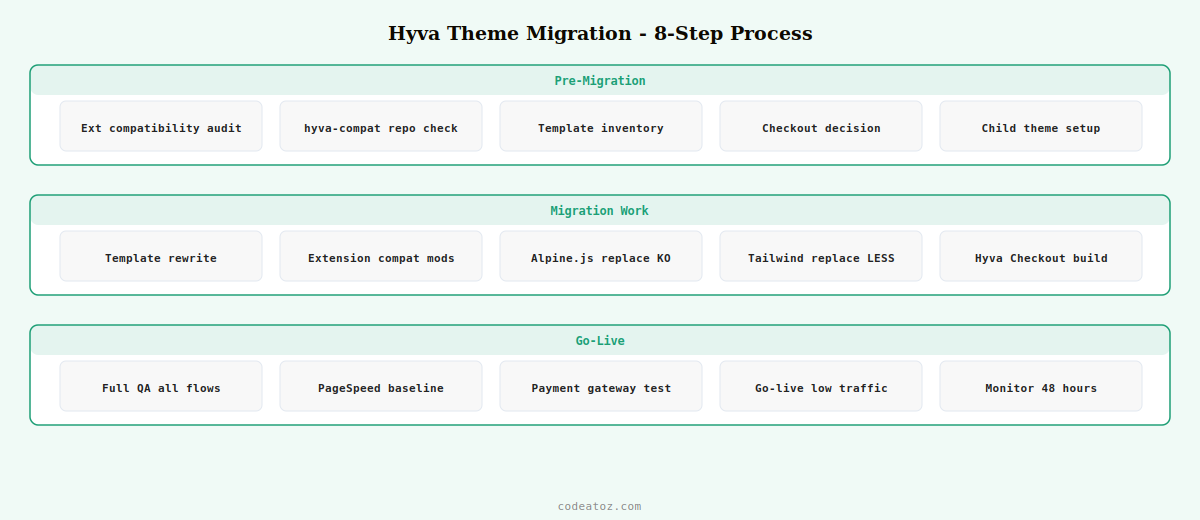
Hyvä Theme Migration Guide: The 8-Step Process
A Hyvä theme migration follows the same eight-step process regardless of store size. The time spent on each step scales with catalogue size and extension count, but the sequence is fixed.
Hyvä Theme Migration Guide: Extension Compatibility
The Hyvä compatibility matrix is the most important reference for any Hyvä theme migration. The community maintains a comprehensive list of extensions with their compatibility status at the Hyvä compatibility repository. Before starting any Hyvä theme migration project, cross-reference every extension against this list.
- Green (compatible): extension works with Hyvä out of the box — no additional work needed
- Yellow (has Hyvä module): install the listed
hyva-compat/module-*Composer package and it works - Red (needs custom work): the extension uses Luma-specific JS that must be rewritten — either custom compat module or extension replacement
- Admin only: the extension only has admin interface — no frontend compatibility work needed
⚠ Payment extension compatibility is non-negotiable. Before starting a Hyvä theme migration, confirm your payment gateway extension (Stripe, Braintree, Klarna, Razorpay, etc.) has a Hyvä-compatible checkout version. Payment gateways that use iFrame or hosted fields embedded in Luma checkout via Knockout.js components may require significant work or a different extension version to function in Hyvä Checkout. Test payment flows on staging before going live.
Hyvä Theme Migration Guide: Expected Performance Gains
The performance improvement from a Hyvä theme migration is real and measurable. Stores typically see Google PageSpeed mobile scores jump from 20–40 on Luma to 85–98 after a well-executed Hyvä theme migration. The primary gains come from: eliminating jQuery and Knockout.js (removing 200kb+ of JavaScript), the Tailwind CSS purged bundle (under 30kb versus LESS-compiled CSS at 150–300kb), and improved Core Web Vitals from reduced JavaScript execution time and layout shift.
💡 The PageSpeed improvement from a Hyvä theme migration is not automatic. It requires building the store correctly — using Alpine.js instead of jQuery for new components, configuring Tailwind CSS purge correctly, lazy-loading images, and not re-introducing jQuery through extension compatibility issues. A Hyvä theme migration done correctly by an experienced team delivers 90+ PageSpeed. One done incorrectly (with jQuery-heavy compatibility modules or unoptimised images) may deliver 60–70 — better than Luma but short of the potential.
The official Hyvä theme migration guide from the Hyvä team covers the migration process in detail. The Hyvä compatibility repository is the authoritative extension compatibility reference for every Hyvä theme migration. See our Hyvä theme Magento 2 developer guide for the architecture you will be building on, and our Magento 2 development services for managed Hyvä theme migration projects.
Frequently Asked Questions — Hyvä Theme Migration Guide
How long does a Hyvä theme migration take?
A Hyvä theme migration takes 6-16 weeks for most Magento stores. A store with few custom extensions and minimal Luma template overrides can migrate in 4-6 weeks. A store with many third-party extensions requiring compatibility work, a complex custom checkout, and extensive Luma template overrides can take 12-16 weeks. The extension compatibility audit (Step 1) is what determines the timeline — do it before committing to a go-live date.
Does a Hyvä theme migration break SEO?
A well-executed Hyvä theme migration improves SEO rather than harming it. Better PageSpeed scores improve Core Web Vitals, which Google uses as a ranking signal. Keep all URLs and canonical tags the same. Ensure structured data (product schema, breadcrumbs) is present in the new Hyvä templates. Monitor Google Search Console for crawl errors after the Hyvä theme migration go-live. The PageSpeed improvement from Hyvä typically leads to measurable organic ranking improvements within 2-4 weeks.
What is Hyvä Checkout and do I need it for the migration?
Hyvä Checkout is a separate package that replaces Luma’s Knockout.js checkout with a Hyvä-native Alpine.js checkout. It is available separately from the Hyvä theme licence. Without Hyvä Checkout, you use the Hyvä/Luma checkout bridge which loads Luma’s JS stack only on the checkout page. For the best performance gains from a Hyvä theme migration, purchase Hyvä Checkout — checkout pages are your highest-conversion pages and benefit most from the PageSpeed improvement.
How do I test extension compatibility before starting the Hyvä theme migration?
Set up a staging environment with Hyvä theme active. Check the hyva-themes.github.io/hyva-compat compatibility repository for each extension. Install available compatibility modules. Test each extension’s frontend functionality end-to-end: add to cart, checkout, account pages, and any custom features the extension provides. Document what works, what needs work, and what requires extension replacement before estimating your Hyvä theme migration timeline.
Can I migrate only part of my Magento store to Hyvä theme?
Yes — Hyvä supports per-website or per-store-view theme assignment. You can run Hyvä on your main storefront while keeping Luma on a B2B portal or admin-facing store that has incompatible extensions. This phased Hyvä theme migration approach lets you capture performance gains on your primary customer-facing store while managing extension compatibility work on a secondary store separately.
What PageSpeed score should I expect after a Hyvä theme migration?
A well-executed Hyvä theme migration typically delivers Google PageSpeed mobile scores of 85-98, compared to 20-45 on Luma. The exact score depends on image optimisation, third-party scripts (chat, analytics, advertising), server response time, and whether Hyvä Checkout is used on the checkout page. Stores that also optimise images, implement a CDN, and remove unnecessary third-party scripts alongside the Hyvä theme migration regularly achieve 95+ on mobile.
Ready to Migrate to Hyvä Theme?
CodeAtoZ runs Hyvä theme migrations — audit, extension compatibility, template rebuild, Hyvä Checkout, QA, and go-live. Get a free compatibility assessment for your store.




