
The Complete Headless Commerce SEO Guide 2026
Master headless commerce SEO — SSR rendering strategy, Product JSON-LD schema, dynamic sitemaps, canonical URLs for variants, and Core Web Vitals optimisation.
Headless commerce SEO is where headless builds either dominate or destroy their organic traffic. Done right — server-rendered HTML, structured data, fast Core Web Vitals — a headless storefront outranks any monolith. Done wrong — client-only rendering, missing schema, broken canonicals — it loses every product ranking the old site had. This guide covers the complete headless commerce SEO checklist: rendering, schema, technical SEO, and the migration safeguards.
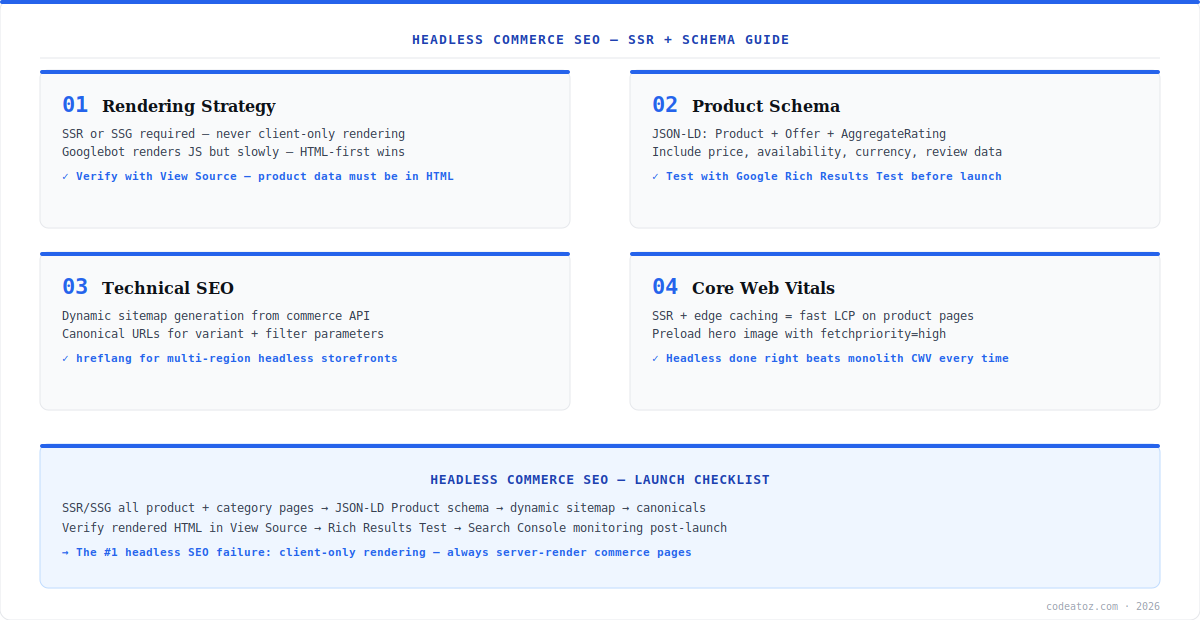
The single most important headless commerce SEO rule: product data must exist in the HTML response, not arrive later via JavaScript. Googlebot does render JavaScript, but rendering is queued, delayed, and budget-limited — client-only storefronts get crawled slower, indexed partially, and ranked worse. Every framework covered in this series — Remix, Nuxt, Astro, Gatsby — supports server rendering; headless commerce SEO starts with actually using it. This guide assumes that foundation and builds the full stack on top.
Headless Commerce SEO: Rendering and Product Schema
Verify your rendering with the simplest possible test: View Source (not DevTools Elements) on a product page. If the title, price, and description are not in that raw HTML, your headless commerce SEO has a critical problem regardless of what Google’s documentation says about JavaScript rendering. Next, add Product structured data as JSON-LD rendered server-side: Product, Offer (price, currency, availability), AggregateRating, and Brand. This powers rich results — price and stock in search snippets — which materially improve click-through rates. Validate every template with the Google Rich Results Test before launch.
{
  "@context": "https://schema.org",
  "@type": "Product",
  "name": "Trail Running Shoe",
  "image": ["https://cdn.store.com/shoe-1.webp"],
  "description": "Lightweight trail shoe with 8mm drop.",
  "sku": "TRS-2026-BLK-42",
  "brand": { "@type": "Brand", "name": "YourBrand" },
  "aggregateRating": { "@type": "AggregateRating", "ratingValue": "4.7", "reviewCount": "183" },
  "offers": {
    "@type": "Offer",
    "url": "https://store.com/products/trail-running-shoe",
    "priceCurrency": "GBP",
    "price": "129.00",
    "availability": "https://schema.org/InStock",
    "priceValidUntil": "2026-12-31"
  }
}Headless Commerce SEO: Sitemaps, Canonicals, and Core Web Vitals
Technical headless commerce SEO has three pillars. First, dynamic sitemaps: generate sitemap.xml from your commerce API on a schedule or at request time — products appear and disappear, and a stale sitemap wastes crawl budget on 404s. Second, canonical URLs: the Google JavaScript SEO documentation details how rendering affects crawling. Variant parameters (?size=42&colour=black) and filtered category pages must canonicalise to the clean URL, or Google splits ranking signals across duplicates. Third, Core Web Vitals: a server-rendered headless storefront behind an edge cache should beat any monolith on LCP — preload the product hero image with fetchpriority="high", and keep client JavaScript minimal. After migration, monitor Google Search Console daily for two weeks — coverage drops and schema errors show there first. Our headless commerce team runs headless commerce SEO audits on every storefront launch, and our image optimisation guide covers the LCP techniques in depth.
The biggest headless commerce SEO risk is migration day. Map every old URL to its new equivalent with 301 redirects — including category paths, filtered URLs that had rankings, and image URLs. Keep the redirect map live for at least a year. A headless relaunch without a complete redirect map can lose 40-60% of organic traffic within weeks.
Frequently Asked Questions About Headless Commerce SEO
What is headless commerce SEO?
Headless commerce SEO is the set of practices that make a headless storefront rank in search: server-side rendering so product data exists in the HTML response, Product JSON-LD structured data, dynamic sitemaps, canonical URL handling for variants and filters, and Core Web Vitals optimisation. It addresses the specific SEO risks that headless architectures introduce versus monolithic platforms.
Is headless commerce bad for SEO?
No — headless commerce SEO done correctly outperforms monolithic platforms. Server-rendered headless storefronts behind edge caches achieve better Core Web Vitals than any plugin-heavy monolith. The risk is implementation: client-only rendering, missing structured data, and broken redirects destroy rankings. The architecture is SEO-neutral; the rendering strategy decides the outcome.
Does Google render JavaScript for headless commerce SEO?
Google renders JavaScript, but rendering is queued and budget-limited — client-only headless storefronts get crawled slower and indexed less completely than server-rendered ones. For headless commerce SEO, never rely on Googlebot’s JS rendering for product content. Verify with View Source: title, price, and description must be in the raw HTML response.
What schema markup does headless commerce SEO need?
Headless commerce SEO requires Product schema as server-rendered JSON-LD: Product with name, image, description and SKU; Offer with price, currency and availability; AggregateRating with review data; and Brand. Category pages benefit from BreadcrumbList and ItemList. Validate with Google Rich Results Test — correct schema enables price and stock display in search snippets.
How do I handle canonical URLs in headless commerce SEO?
In headless commerce SEO, every variant parameter URL (size, colour) must canonicalise to the clean product URL, and filtered or paginated category URLs to the base category. Render the canonical link tag server-side. Without this, Google splits ranking signals across parameter duplicates and your clean URLs rank weaker than they should.
How do I protect SEO when migrating to headless commerce?
Protect headless commerce SEO during migration with a complete 301 redirect map covering every old URL — products, categories, filtered pages with rankings, and images. Keep URL structures identical where possible. Submit the new sitemap immediately, monitor Search Console coverage daily for two weeks post-launch, and keep the redirect map live for at least a year.
Need a Headless Commerce SEO Audit?
Our team audits rendering, schema, sitemaps, and migration redirect maps before and after headless launches.




