Pay on Account in WooCommerce — Net Terms & Trade Credit Done Safely
Pay on account is how B2B actually buys — on invoice, Net 30, not a credit card at checkout. But offering trade credit without approval, limits and overdue tracking is how stores get burned. Here’s how to do it the way a credit controller would.
Pay on account — letting approved business customers buy now and pay later on invoice terms — is a baseline expectation in B2B commerce, and WooCommerce doesn’t offer it out of the box. Trade buyers don’t want to enter a card for every order; they expect Net 15, 30 or 60 and a monthly invoice. But pay on account is also a genuine financial risk: extend credit to the wrong customer, with no limit and no overdue tracking, and you’ve turned a sale into an unpaid debt. This guide shows how to offer pay on account safely in WooCommerce using the B2B Suite for WooCommerce — approval, credit limits, net terms and overdue tracking as one connected workflow.
Search intent: commercial/how-to — B2B WooCommerce stores that want to offer invoice/credit terms. We cover why pay on account matters, approving accounts first, setting credit limits, offering net terms, and tracking what’s owed. It builds on our B2B ecommerce platform guide and net payment terms guide. The free version is on WordPress.org.
Pay on Account: Why B2B Buyers Expect It
The reason pay on account matters is that B2B purchasing works differently from retail. A business buyer placing a large or repeat order doesn’t pull out a personal card — they buy against agreed terms and settle by invoice, often monthly, through their accounts-payable process. For many trade customers, the absence of pay on account is a deal-breaker: if your competitor offers Net 30 and you demand card-on-checkout, the competitor is simply easier to buy from, and the order goes there.
So pay on account is not a nicety — it’s often a requirement to win trade business at all. But it flips the risk model of your store. With card payment, you have the money before the goods leave. With pay on account, you ship first and collect later, which means you’re extending credit — and credit to an unvetted customer, with no cap and no follow-up, is exactly how stores accumulate bad debt. The whole challenge is offering the terms buyers expect while keeping the financial risk controlled, which is what the rest of this guide is about.
Pay on Account: Approve the Account First
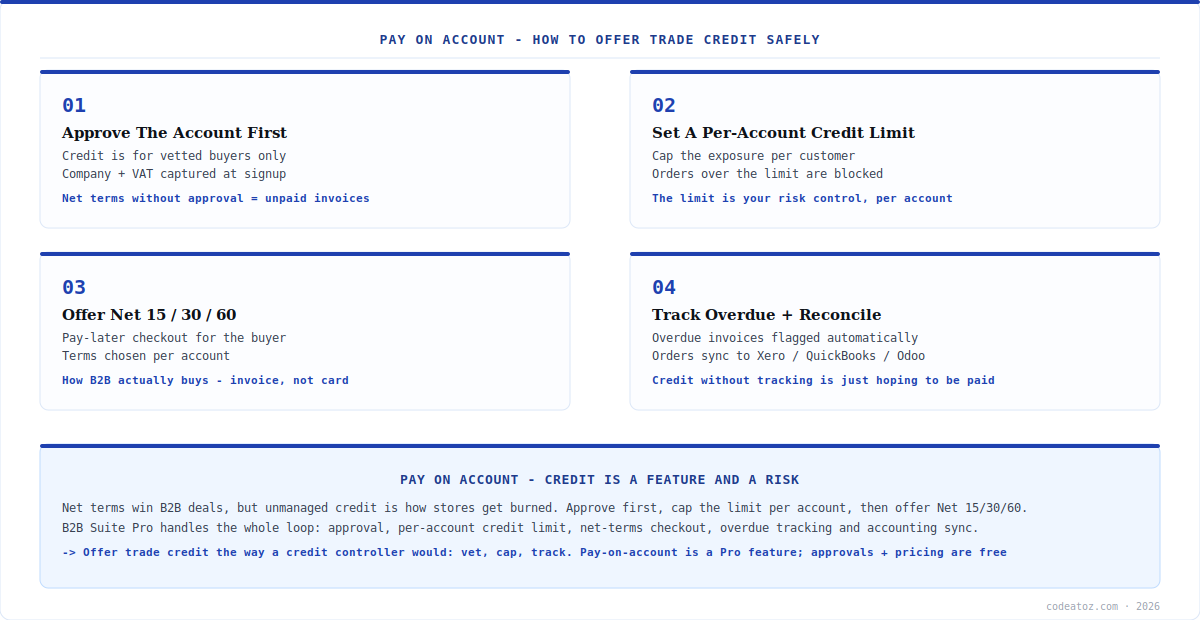
The first rule of safe pay on account is that credit is for vetted customers only — never a checkbox any guest can tick. B2B Suite handles this through its B2B Registration and Approvals module (available in the free version): new business customers register with company, VAT and country details, and you approve or reject them before they get an account. Only approved accounts should be eligible for pay on account terms, so the credit decision is deliberate, not automatic.
This approval step is the foundation everything else sits on. It means pay on account is offered to businesses you’ve chosen to extend credit to, with their company and tax details on file, rather than to anyone who finds your checkout. B2B Suite lets you set auto-approval options where appropriate, but for credit terms specifically, manual vetting is the sensible default — you’re deciding who you’re willing to be a creditor to. Getting this gate right is what separates pay on account as a controlled business tool from pay on account as an open invitation to never get paid.
Pay on Account: Credit Limits and Net Terms
Once an account is approved, two settings make pay on account safe: the credit limit and the terms. A per-account credit limit caps your exposure to any single customer — orders that would push their outstanding balance over the limit are blocked, so no one customer can run up more debt than you’ve decided to risk. This is the single most important control in pay on account: it turns “we extend credit” into “we extend this much credit to this customer”, which is how real trade credit works.
The terms themselves are the Net 15, 30 or 60 options B2B Suite’s Net Payment Terms module provides at checkout. An approved buyer within their credit limit can choose pay on account and receive the goods now with payment due in the agreed window. You set the terms per account, so a trusted long-standing customer might get Net 60 while a newer one gets Net 15. Combined with the credit limit, this gives you precise control: who can buy on credit, how much, and how long they have to pay — the three levers of safe pay on account.
| Control | What it does | Free or Pro |
|---|---|---|
| Account approval | Vet the business before credit | Free |
| Company / VAT capture | Details on file for the account | Free |
| Per-account credit limit | Caps exposure per customer | Pro |
| Net 15 / 30 / 60 terms | Pay-later checkout option | Pro |
| Overdue tracking | Flags unpaid invoices | Pro |
| Accounting sync | Reconcile to Xero/QuickBooks/Odoo | Pro |
Pay on Account: Track Overdue and Reconcile
The final piece of safe pay on account is what happens after the sale — because credit you don’t track is just hoping to be paid. B2B Suite’s Net Payment Terms module includes overdue tracking, so invoices that pass their due date are flagged automatically rather than quietly forgotten. This matters because the risk in pay on account isn’t only extending credit; it’s losing visibility of what’s owed. Automatic overdue flagging turns credit control from a manual spreadsheet chore into something your store surfaces for you.
And because pay on account orders are financial events, not just sales, B2B Suite Pro can sync them to your accounting system — Xero, QuickBooks Online or Odoo — so the invoice and payment status reconcile without manual re-keying. That closes the loop: approve the account, cap the credit limit, offer Net terms, track overdue, and reconcile to accounting, all in one connected workflow. The approval and registration pieces are in the free version; credit limits, net terms, overdue tracking and accounting sync are part of B2B Suite Pro ($99 one-time, single site). For complex credit-control or ERP needs, our ERPNext team can integrate further.
Pay on account is a feature and a risk — treat it like a credit controller would. The mistake stores make is enabling pay on account as a simple checkout option without the controls behind it. Offer it only to approved accounts, cap each one with a credit limit, set terms per customer, and track overdue automatically. Done that way, net terms win you trade business without turning your store into an uncollectable debt pile.
How we set up pay on account for trade clients
We never enable net terms without a credit limit. The most common and most dangerous request is “just let approved customers pay on invoice” with no cap. We always pair pay on account with a per-account credit limit, because an uncapped net-terms account is an open-ended loan, and that’s how a good trade customer becomes a bad debt after one oversized order.
We vet manually for credit, even when auto-approval is available. Auto-approval is fine for giving customers a wholesale login, but extending credit is a financial decision. We keep account approval manual for pay-on-account eligibility specifically, so a human decides who the store becomes a creditor to — the company and VAT details captured at registration are exactly what that decision needs.
We wire overdue tracking and accounting sync from day one. Clients focus on the checkout experience and forget the collection side. We insist on overdue flagging and accounting reconciliation up front, because the point where pay on account goes wrong is weeks after the sale, when an unpaid invoice has been quietly ignored. Surfacing it automatically is what keeps credit controlled.
Frequently Asked Questions About Pay on Account
How do I offer pay on account in WooCommerce?
Use B2B Suite for WooCommerce. Approve business accounts first (capturing company and VAT details), set a per-account credit limit to cap exposure, then enable Net 15/30/60 terms so approved buyers within their limit can choose pay on account at checkout. Overdue invoices are tracked automatically and orders can sync to your accounting system for reconciliation.
Is pay on account safe for my store?
It is when you control it properly. The risks — bad debt, overexposure — are managed by three things: only offering it to approved, vetted accounts; capping each account with a credit limit so no customer can exceed what you’re willing to risk; and tracking overdue invoices so nothing is forgotten. Unmanaged net terms are risky; approved, capped, tracked net terms are standard trade practice.
What net terms can I offer?
B2B Suite’s Net Payment Terms module supports Net 15, Net 30 and Net 60 at checkout, set per account. So you can offer a newer customer Net 15 and a long-trusted one Net 60, matching the terms to how much you trust each account. Terms are combined with a per-account credit limit for full control over your credit exposure.
What is a credit limit and why does it matter?
A per-account credit limit caps the total outstanding balance a customer can carry on pay-on-account terms. Orders that would push them over the limit are blocked. It matters because it’s your core risk control — it turns “we extend credit” into “we extend this specific amount to this specific customer”, so no single account can run up more debt than you’ve decided to accept.
How do I track unpaid invoices?
B2B Suite’s Net Payment Terms module includes overdue tracking — invoices that pass their due date are flagged automatically, so you don’t rely on a manual spreadsheet to spot late payers. Pro can also sync pay-on-account orders to Xero, QuickBooks Online or Odoo, so the invoice and payment status reconcile in your accounting system without re-keying.
Is pay on account free or Pro?
The foundation — B2B registration and account approval with company/VAT capture — is in the free version. Pay on account itself (Net 15/30/60 terms, per-account credit limits, overdue tracking) plus accounting sync are part of B2B Suite Pro, which is $99 one-time for a single site with a 14-day money-back guarantee. You can start free and upgrade when you’re ready to offer credit.
Offer Pay on Account — Safely
Net 15/30/60 terms, per-account credit limits and overdue tracking, all in one B2B suite. Start free with registration and approvals, add credit terms with Pro — $99 one-time, 14-day guarantee.