
The Complete WooCommerce Redis Cache Guide 2026
A WooCommerce Redis cache stores database query results in RAM as a persistent object cache — cutting repeated MySQL queries and speeding up logged-in and dynamic pages.
A WooCommerce Redis cache solves a specific, expensive problem: WooCommerce runs a large number of database queries on every page — options, transients, product data — and by default WordPress does not persist those results between requests. A WooCommerce Redis cache adds a persistent object cache in RAM (backed by Redis), so repeated queries are served from memory instead of hitting MySQL again. This is the single biggest win for logged-in, cart, account and dynamic pages that full-page caching cannot serve.
Search intent: informational/procedural — WooCommerce developers and store owners speeding up dynamic pages. We cover the query problem, what an object cache does, how WooCommerce Redis cache differs from page caching, setup, verifying hit rate, and pitfalls. It builds on our WooCommerce performance guide and TTFB reduction guide.
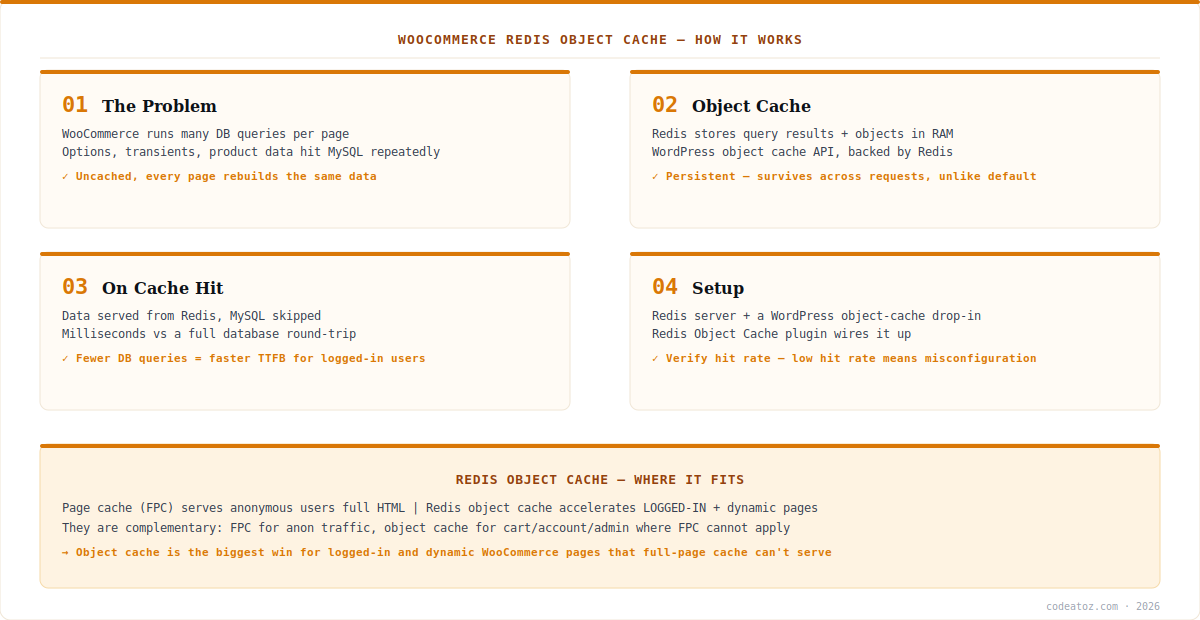
WooCommerce Redis Cache: The Problem It Solves
To understand the WooCommerce Redis cache, start with the problem. WordPress has an object cache API, but out of the box it is non-persistent — cached data lives only for the duration of a single request, then is discarded. WooCommerce is query-heavy (autoloaded options, transients, product lookups, session data), so every page rebuilds much of the same data with fresh MySQL queries. A WooCommerce Redis cache makes the object cache persistent: Redis holds query results and objects in RAM across requests, so the second and subsequent requests serve from memory. Fewer database round-trips means lower TTFB (see the Redis Object Cache plugin), especially on the dynamic pages that dominate a logged-in shopper’s session.
WooCommerce Redis Cache vs Page Cache
A crucial distinction people miss: a WooCommerce Redis cache (object cache) is not the same as full-page caching (FPC), and they are complementary. Full-page cache stores complete rendered HTML and serves it to anonymous visitors — brilliant for catalogue pages seen by logged-out users, but it cannot be used for cart, checkout, account or admin pages, which are per-user and dynamic. That is exactly where the WooCommerce Redis cache shines: it accelerates the dynamic, logged-in pages FPC must skip, by caching the underlying queries rather than the whole page. The ideal WooCommerce stack uses both — FPC for anonymous traffic, WooCommerce Redis cache for everything dynamic. Confusing the two, or expecting object cache to cache whole pages, is a common misunderstanding. The Redis documentation and the WordPress object cache reference explain the mechanism.
| Aspect | Redis Object Cache | Full-Page Cache (FPC) |
|---|---|---|
| Caches | Query results + objects | Complete rendered HTML |
| Serves | Logged-in + dynamic pages | Anonymous visitors |
| Cart / account | Accelerates them | Cannot cache them |
| Storage | Redis (RAM) | Disk / RAM / CDN |
| Role | Reduce DB queries | Skip PHP entirely (anon) |
WooCommerce Redis Cache: Setup and Hit Rate
Setting up a WooCommerce Redis cache needs two things: a running Redis server (many managed WooCommerce hosts provide one) and a WordPress object-cache drop-in that routes the object cache to Redis — the Redis Object Cache plugin installs this drop-in and wires it up. Once enabled, the key metric is hit rate: a healthy WooCommerce Redis cache should show a high percentage of requests served from cache. A low hit rate signals a misconfiguration (Redis not actually connected, or being flushed too aggressively) and means you are paying the overhead without the benefit. Watch for pitfalls: ensure Redis has enough memory and a sensible eviction policy, do not let plugins flush the entire cache on trivial changes, and confirm the drop-in is active. Done right, a WooCommerce Redis cache is one of the highest-return performance changes for a dynamic store. Our WooCommerce performance team configures and tunes it.
What we have learned deploying WooCommerce Redis cache
Hit rate is the only metric that matters at first. We regularly find stores that “have Redis” but with a poor hit rate — the drop-in is not active, or an aggressive plugin flushes it constantly. Installing Redis is step one; verifying it is actually serving a high proportion of requests is what delivers the speed.
Object cache helps exactly where page cache can’t. Clients often already have full-page caching and wonder why logged-in speed is poor. FPC skips those pages entirely. The Redis object cache is the piece that accelerates cart, account and checkout — the pages that most affect a buyer’s actual session.
Watch the eviction policy and memory. An undersized Redis or a policy that evicts too eagerly quietly destroys hit rate. We size Redis to the working set and set a sensible eviction policy, then monitor — a “Redis cache” that keeps evicting is barely a cache at all.
Frequently Asked Questions About WooCommerce Redis Cache
What is a WooCommerce Redis cache?
A WooCommerce Redis cache is a persistent object cache backed by Redis that stores database query results and objects in RAM. Because WooCommerce runs many queries per page and WordPress’s default object cache is not persistent, Redis serves repeated queries from memory instead of MySQL, reducing database load and speeding up dynamic pages.
What is the difference between Redis object cache and page cache?
A Redis object cache stores query results and accelerates logged-in and dynamic pages like cart and account. Full-page cache stores complete HTML and serves anonymous visitors but cannot cache per-user pages. They are complementary — use full-page cache for anonymous traffic and a WooCommerce Redis cache for everything dynamic.
Does a WooCommerce Redis cache speed up cart and checkout?
Yes — this is exactly where it helps most. Cart, checkout and account pages are dynamic and per-user, so full-page caching cannot serve them. A WooCommerce Redis cache accelerates them by caching the underlying database queries, reducing TTFB on the pages that most affect a logged-in shopper’s experience.
How do I set up Redis cache on WooCommerce?
You need a running Redis server (many managed WooCommerce hosts include one) and a WordPress object-cache drop-in pointing the object cache to Redis — the Redis Object Cache plugin installs and wires this up. After enabling, verify the cache hit rate is high to confirm the WooCommerce Redis cache is actually serving requests.
Why is my Redis cache hit rate low?
A low hit rate usually means the object-cache drop-in is not active, Redis is not truly connected, memory is too small, or a plugin flushes the cache too aggressively. A WooCommerce Redis cache only helps when hit rate is high — a low rate means you carry the overhead without the speed benefit, so investigate configuration.
Is Redis better than Memcached for WooCommerce?
Both provide a persistent object cache for WooCommerce and both work well. Redis is more feature-rich (data structures, persistence options) and is the more common choice, with the well-maintained Redis Object Cache plugin. For most stores, a properly configured WooCommerce Redis cache is the recommended and best-supported option.
Need Faster Dynamic WooCommerce Pages?
Our team configures and tunes Redis object caching — high hit rates, sane eviction, and real TTFB gains.




