
The Complete WooCommerce Customer Groups Guide 2026
WooCommerce customer groups segment buyers by role for tiered pricing, restricted catalogues, B2B access and targeted tax and discounts — the backbone of wholesale on WooCommerce.
WooCommerce customer groups let you segment customers — wholesale, VIP, retail, trade — and treat each group differently: show group-specific pricing, restrict which products or categories they see, apply group tax rules, and target discounts. WooCommerce builds this on WordPress user roles as the native grouping primitive, and WooCommerce customer groups are the foundation of any B2B or wholesale setup (built on WordPress roles and capabilities). This guide covers how to implement them, from native roles to the plugins that add full pricing and access control.
Search intent: informational/procedural — WooCommerce developers and merchants segmenting customers for B2B, wholesale or tiered pricing. We cover what WooCommerce customer groups are, roles, tiered pricing, access control, the plugins that extend them, and the B2B foundation. It connects to our WooCommerce B2B and wholesale pricing guides.
WooCommerce Customer Groups: Roles as the Foundation
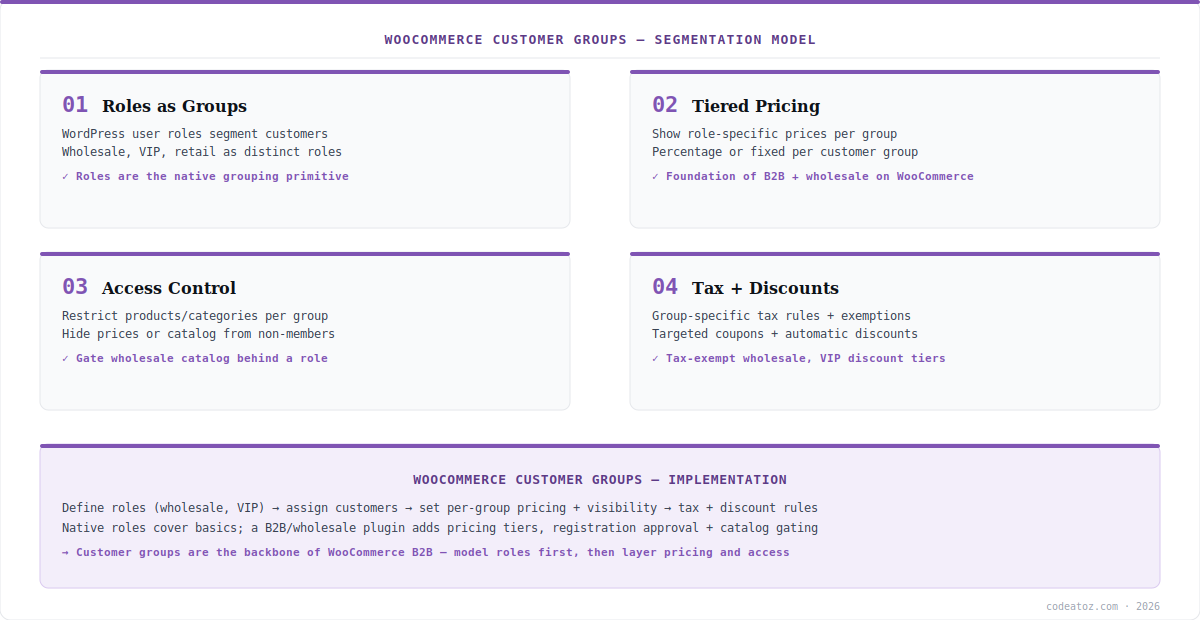
WooCommerce does not have a built-in “customer group” object the way some platforms do — instead, WooCommerce customer groups are implemented through WordPress user roles. You define roles like wholesale, vip or trade alongside the default customer role, assign customers to them, and then make pricing, visibility and tax depend on the role. This role-based approach is why WooCommerce customer groups integrate cleanly with WordPress’s permission system and why most B2B and wholesale plugins are built around roles. Understanding that roles are the grouping primitive is the key to implementing WooCommerce customer groups correctly — model your roles first, then layer behaviour on them.
WooCommerce Customer Groups: Tiered Pricing and Access
The two things WooCommerce customer groups most commonly drive are pricing and access. Tiered pricing shows each group its own prices — a wholesale role sees wholesale prices (percentage off or fixed), retail sees retail — which is the core of wholesale selling. Access control restricts what a group can see or do: hide a wholesale-only catalogue or category from non-members, hide prices until a trade customer logs in, or gate purchasing behind an approved role. WooCommerce customer groups also enable group-specific tax (tax-exempt wholesale customers) and targeted discounts or coupons. Together these let one store serve retail and wholesale audiences with completely different experiences, all keyed off the customer’s group. Core WooCommerce handles basic role-based tax; richer pricing and visibility usually come from dedicated plugins, discussed next. The WooCommerce customer documentation and WordPress roles reference cover the foundations.
| Capability | How customer groups deliver it |
|---|---|
| Segmentation | WordPress roles (wholesale, VIP, trade) |
| Tiered pricing | Group-specific prices per role |
| Catalogue access | Show/hide products + categories by role |
| Price visibility | Hide prices until approved login |
| Tax + discounts | Per-group tax rules and targeted coupons |
WooCommerce Customer Groups: Plugins and B2B
Core WooCommerce gives you roles and basic role-based tax, but full WooCommerce customer groups functionality — tiered pricing rules, catalogue visibility per role, registration with approval, and B2B workflows — generally comes from a dedicated plugin (a B2B/wholesale suite). These build on the role foundation to add the pricing engine and access controls that core lacks, turning WooCommerce customer groups into a complete B2B system: wholesale registration with admin approval, role-based price lists, hidden retail pricing, minimum order rules and tax exemption. Because WooCommerce customer groups underpin all of this, they are the first thing to design when building B2B on WooCommerce — see our WooCommerce B2B guide for the full picture. Model the roles, choose how pricing and access attach to them, then select the plugin that implements your model. Our WooCommerce team builds role-based B2B and wholesale systems.
What we have learned implementing WooCommerce customer groups
Design the roles before touching pricing. The cleanest B2B builds start by mapping the customer segments to roles — wholesale, distributor, VIP — and only then attaching pricing and access. Teams that bolt roles on after building pricing rules end up reworking everything. Roles are the schema; get them right first.
Hide pricing until approval for true wholesale. A recurring requirement is that wholesale prices — and sometimes the catalogue itself — must not be visible to the public or unapproved users. WooCommerce customer groups, with a B2B plugin’s registration-and-approval flow, deliver this; planning it in from the start avoids leaking trade pricing.
Core gets you started; plugins make it real. Native roles and role-based tax cover the basics, but production B2B needs the tiered-pricing engine and visibility controls a dedicated plugin provides. We are clear with clients about where core ends and a wholesale suite becomes necessary, so expectations match the build.
Frequently Asked Questions About WooCommerce Customer Groups
What are WooCommerce customer groups?
WooCommerce customer groups segment buyers — wholesale, VIP, retail, trade — so each group gets different treatment: group-specific pricing, restricted catalogue access, tailored tax rules and targeted discounts. WooCommerce implements them through WordPress user roles, making roles the foundation of any B2B or wholesale setup.
Does WooCommerce have built-in customer groups?
Not as a dedicated object — WooCommerce uses WordPress user roles as the grouping mechanism. You create roles like wholesale or VIP and make pricing, visibility and tax depend on them. Core handles basic role-based tax; full WooCommerce customer groups pricing and access typically require a dedicated B2B or wholesale plugin.
How do I set up tiered pricing with customer groups?
Define roles for each tier (e.g. wholesale, distributor), assign customers to them, then apply group-specific prices — percentage off or fixed — per role. Core WooCommerce does not include a tiered-pricing engine, so this is usually delivered by a wholesale plugin built on WooCommerce customer groups (roles).
Can I restrict products to certain customer groups?
Yes. Using WooCommerce customer groups, you can show or hide specific products and categories per role — for example a wholesale-only catalogue hidden from retail customers — and hide prices until an approved trade customer logs in. This access control is a core reason to use customer groups, typically enabled via a B2B plugin.
Are customer groups how you build B2B on WooCommerce?
Yes — WooCommerce customer groups are the backbone of B2B. Role-based segmentation drives wholesale pricing, restricted catalogues, registration with approval, tax exemption and minimum orders. Design your roles first, then layer pricing and access, choosing a B2B/wholesale plugin that implements the model on top of the customer groups.
Do I need a plugin for WooCommerce customer groups?
For basic role-based tax, no — core WooCommerce and WordPress roles suffice. For full functionality — tiered pricing rules, per-role catalogue visibility, hidden pricing, wholesale registration and approval — you need a dedicated B2B or wholesale plugin that builds on WooCommerce customer groups to add the pricing engine and access controls core lacks.
Building B2B or Wholesale on WooCommerce?
Our team designs role-based customer groups — tiered pricing, catalogue access, approval flows and tax.




