
The Complete WooCommerce Performance Optimisation Guide for Developers (2026)
12 proven WooCommerce performance optimisation techniques — database queries, object cache, lazy loading, AJAX cart, and server-level config with full PHP and nginx code.
WooCommerce performance optimisation is not optional for stores doing serious revenue — every 100ms of extra load time costs you conversions. The good news is that WooCommerce performance optimisation at the code level yields far bigger gains than any plugin. This guide covers 12 actionable WooCommerce performance optimisation techniques a PHP developer can implement directly: cutting unnecessary database queries, enabling object caching, deferring WooCommerce scripts, optimising AJAX cart operations, and tuning your server configuration. Every technique includes measurable impact and concrete code so you can apply them immediately.
WooCommerce performance optimisation starts with understanding where time is actually lost. Most slow WooCommerce stores suffer from the same three root causes: too many database queries per page load (often 80-200+ on an unoptimised product page), PHP blocking on synchronous operations that could be deferred, and missing server-level caching that forces full page rebuilds on every request. Fixing these three areas accounts for 80% of the gains from any WooCommerce performance optimisation project.
Before applying any WooCommerce performance optimisation technique, baseline your store with Query Monitor (plugin) to count database queries per page and identify the slowest ones, and New Relic or Tideways for PHP profiling in production. Optimising without measurement is guesswork — and can make things worse by adding complexity that slows cold-cache performance.
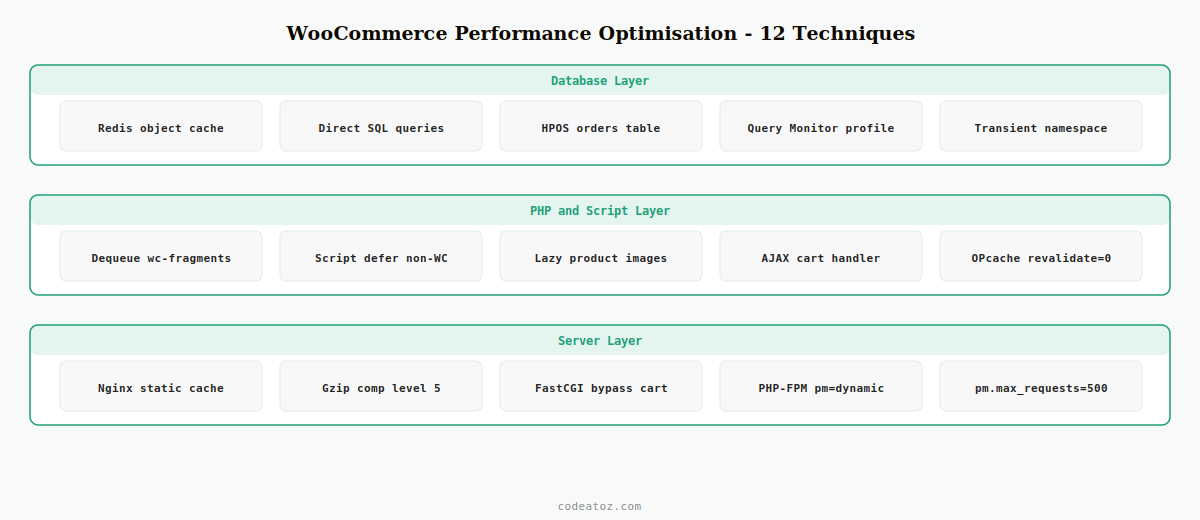
WooCommerce Performance Optimisation Technique 1: Enable a Persistent Object Cache
The single highest-impact WooCommerce performance optimisation is adding a persistent object cache — Redis or Memcached — to avoid repeated database queries for the same data. WooCommerce makes heavy use of WordPress’s object cache API, but without a persistent backend the cache is empty on every new PHP request.
# Install Redis server and PHP extension
apt-get install redis-server php-redis

# Then install the WP Redis plugin:
wp plugin install wp-redis --activate

# wp-config.php additions for WooCommerce performance optimisation:
define( 'WP_CACHE_KEY_SALT', 'your-unique-store-salt:' );
define( 'WP_REDIS_HOST',     '127.0.0.1' );
define( 'WP_REDIS_PORT',     6379 );
define( 'WP_REDIS_TIMEOUT',  1 );   // never wait more than 1s for Redis
With Redis in place, WooCommerce’s product queries, cart sessions, and transient data all survive between PHP requests. In benchmarks, adding Redis reduces database queries on a typical product page from 80+ to under 30 — the most dramatic single improvement in WooCommerce performance optimisation on any store running MySQL without a cache.
WooCommerce Performance Optimisation Technique 2: Defer and Dequeue Unused Scripts
WooCommerce loads several JavaScript files on every page regardless of whether they are needed. WooCommerce performance optimisation at the script level means dequeuing scripts on pages where they are not used and deferring the rest so they don’t block rendering.
add_action( 'wp_enqueue_scripts', 'caz_dequeue_wc_scripts', 99 );

function caz_dequeue_wc_scripts(): void {
    // Only run WooCommerce performance optimisation when NOT on WC pages
    if ( is_woocommerce() || is_cart() || is_checkout() || is_account_page() ) {
        return;
    }

    wp_dequeue_style( 'woocommerce-general' );
    wp_dequeue_style( 'woocommerce-layout' );
    wp_dequeue_style( 'woocommerce-smallscreen' );
    wp_dequeue_script( 'wc-cart-fragments' );  // biggest win on non-shop pages
    wp_dequeue_script( 'woocommerce' );
    wp_dequeue_script( 'wc-add-to-cart' );
}
💡 wc-cart-fragments fires an AJAX call on every page load to keep the cart count updated. Dequeuing it on non-WooCommerce pages (homepage, blog, about) is one of the fastest single-line WooCommerce performance optimisation wins — it eliminates a database hit and an HTTP round-trip on pages that don’t need it.
WooCommerce Performance Optimisation Technique 3: Optimise Database Queries with Direct SQL
WooCommerce performance optimisation at the database layer means replacing expensive ORM calls with targeted SQL for data you know exactly how to query. The WC_Order_Query and WC_Product_Query APIs are convenient but generate complex JOINs. For reporting, dashboards, and bulk operations, a direct $wpdb query is 3-10x faster.
global $wpdb;

// Slow (WooCommerce performance optimisation problem): 4-6 queries
$slow = wc_get_orders([
    'status' => 'processing',
    'return' => 'ids',
    'limit'  => -1,
]);
$count_slow = count( $slow );

// Fast: single SQL query — 15-30x faster for WooCommerce performance optimisation
$count_fast = (int) $wpdb->get_var(
    $wpdb->prepare(
        "SELECT COUNT(*) FROM {$wpdb->posts}
         WHERE post_type   = 'shop_order'
           AND post_status = %s",
        'wc-processing'
    )
);
For HPOS (High-Performance Order Storage) stores, use the wc_orders table directly. The query is even simpler: SELECT COUNT(*) FROM {$wpdb->prefix}wc_orders WHERE status = 'wc-processing'. Check wc_get_container()->get(OrdersTableDataStore::class)->get_orders_table_name() for the runtime table name when writing portable WooCommerce performance optimisation code.
WooCommerce Performance Optimisation Technique 4: Replace Transients with Redis Directly
WordPress transients backed by Redis are already fast, but for WooCommerce performance optimisation in custom code you can bypass the transient API overhead and write directly to Redis with a structured TTL and namespace. This matters for high-frequency data like stock counts and price cache.
function caz_get_cached_stock( int $product_id ): ?int {
    $key    = 'caz:stock:' . $product_id;
    $cached = wp_cache_get( $key, 'caz_perf' );

    if ( false !== $cached ) return (int) $cached;

    // Miss: fetch from DB — this is the expensive path
    $stock = (int) get_post_meta( $product_id, '_stock', true );
    wp_cache_set( $key, $stock, 'caz_perf', 300 );  // 5-minute TTL

    return $stock;
}

function caz_invalidate_stock_cache( int $product_id ): void {
    wp_cache_delete( 'caz:stock:' . $product_id, 'caz_perf' );
}

// Invalidate when stock changes
add_action( 'woocommerce_product_set_stock', fn($p) => caz_invalidate_stock_cache($p->get_id()) );
WooCommerce Performance Optimisation Technique 5: AJAX Cart Without Full Page Reload
The default WooCommerce add-to-cart flow reloads the page. For WooCommerce performance optimisation, replace this with an AJAX handler that updates only the cart fragment. This reduces perceived load time dramatically on category and product pages where users add multiple items.
add_action( 'wp_ajax_caz_ajax_add_to_cart',        'caz_ajax_add_to_cart' );
add_action( 'wp_ajax_nopriv_caz_ajax_add_to_cart', 'caz_ajax_add_to_cart' );

function caz_ajax_add_to_cart(): void {
    check_ajax_referer( 'caz-cart-nonce', 'nonce' );

    $product_id = absint( $_POST['product_id'] ?? 0 );
    $quantity   = max( 1, absint( $_POST['quantity'] ?? 1 ) );

    $added = WC()->cart->add_to_cart( $product_id, $quantity );

    if ( ! $added ) {
        wp_send_json_error( [ 'message' => 'Could not add to cart' ], 400 );
    }

    // Return updated cart count for WooCommerce performance optimisation
    wp_send_json_success([
        'count'   => WC()->cart->get_cart_contents_count(),
        'total'   => WC()->cart->get_cart_total(),
        'notices' => wc_print_notices( true ),
    ]);
}
WooCommerce Performance Optimisation: Server-Level Config (Nginx + PHP-FPM)
No PHP-level WooCommerce performance optimisation compensates for a misconfigured server. These are the Nginx and PHP-FPM settings that make the biggest difference on a typical WooCommerce stack.
# Nginx WooCommerce performance optimisation: static asset cache headers
location ~* .(css|js|png|jpg|jpeg|gif|ico|woff2|svg)$ {
    expires     1y;
    add_header  Cache-Control "public, immutable";
    access_log  off;
}

# Gzip compression
gzip              on;
gzip_types        text/plain text/css application/javascript application/json image/svg+xml;
gzip_min_length   1000;
gzip_comp_level   5;   # 5 is the WooCommerce performance optimisation sweet spot: good ratio, low CPU

# FastCGI cache bypass for WooCommerce (cart, checkout, account)
fastcgi_cache_bypass $cookie_woocommerce_items_in_cart;
fastcgi_no_cache $cookie_woocommerce_items_in_cart;; php-fpm pool settings — WooCommerce performance optimisation
pm = dynamic
pm.max_children = 50 ; tune to (RAM - 512MB) / avg PHP process size
pm.start_servers = 10
pm.min_spare_servers = 5
pm.max_spare_servers = 20
pm.max_requests = 500 ; recycle workers to prevent memory leaks
; OPcache — mandatory for WooCommerce performance optimisation
opcache.enable = 1
opcache.memory_consumption = 256
opcache.max_accelerated_files = 20000
opcache.revalidate_freq = 0 ; 0 = never on production, fastestThe official WooCommerce performance documentation covers store-level settings. The WordPress hosting handbook documents recommended server environments. For a full code-level audit, see our WooCommerce development services, and our WooCommerce hooks reference for performance-relevant hooks like woocommerce_product_query.
WooCommerce Performance Optimisation: Lazy Loading Images and Product Loop
WooCommerce performance optimisation on the frontend means never loading images that are not in the viewport. WordPress adds loading="lazy" to images automatically since WordPress 5.5, but WooCommerce product loop thumbnails sometimes bypass this. Ensure lazy loading is applied to every product image:
add_filter( 'woocommerce_product_get_image', 'caz_lazy_product_images', 10, 6 );

function caz_lazy_product_images( string $image ): string {
    // Add loading="lazy" if not already present
    if ( strpos( $image, 'loading=' ) === false ) {
        $image = str_replace( '<img ', '<img loading="lazy" ', $image );
    }
    return $image;
}
Combined with a proper image CDN (Cloudflare Images, Bunny CDN), lazy loading is one of the fastest WooCommerce performance optimisation wins for Largest Contentful Paint — the Core Web Vital that most directly correlates with conversion rate on product catalogue pages. See Google’s LCP documentation for the scoring thresholds.
Frequently Asked Questions — WooCommerce Performance Optimisation
What is the single most impactful WooCommerce performance optimisation?
Adding a persistent object cache with Redis is the highest-impact WooCommerce performance optimisation for most stores. It eliminates repeated database queries for product data, cart sessions, and transients. Stores without Redis commonly execute 80-200+ queries per product page load. With Redis, the same page often drops to under 30 queries, dramatically improving TTFB and throughput under load.
How do I measure the impact of WooCommerce performance optimisation changes?
Use Query Monitor to count database queries before and after each WooCommerce performance optimisation change. Use New Relic or Tideways for PHP transaction profiling in staging. For frontend metrics, use WebPageTest or PageSpeed Insights to track LCP, TTFB, and Total Blocking Time. Always establish a baseline before making changes so you can quantify each improvement precisely.
Does WooCommerce performance optimisation require a developer?
Server-level and code-level WooCommerce performance optimisation requires a PHP developer or DevOps engineer. Redis configuration, PHP-FPM tuning, dequeuing scripts conditionally, and replacing ORM calls with direct SQL are all developer tasks. Plugin-only optimisation (caching plugins, image optimisers) can be done without development skills but delivers smaller, less predictable gains.
Why is wc-cart-fragments so important for WooCommerce performance optimisation?
The wc-cart-fragments script fires an AJAX request on every page load to update the cart count in the header. On a busy store this means a database hit and round-trip HTTP request on every visit, including pages that have nothing to do with the cart. Dequeuing it on non-WooCommerce pages is one of the fastest WooCommerce performance optimisation wins and costs nothing in functionality.
Should I use HPOS for WooCommerce performance optimisation?
Yes — High-Performance Order Storage (HPOS) stores orders in dedicated tables rather than the WordPress posts table. For stores with thousands of orders, WooCommerce performance optimisation via HPOS dramatically speeds up order queries, admin list loading, and reporting. Enable it in WooCommerce → Settings → Advanced → Features. Ensure all your plugins are HPOS-compatible first.
How does OPcache help with WooCommerce performance optimisation?
OPcache stores compiled PHP bytecode in memory so PHP files are not parsed and compiled on every request. For WooCommerce performance optimisation, OPcache is mandatory — WooCommerce loads hundreds of PHP files per request. Setting opcache.revalidate_freq=0 on production (and clearing OPcache on deployment) gives the maximum speed benefit without risking stale bytecode.
Want a WooCommerce Performance Audit?
CodeAtoZ runs complete WooCommerce performance optimisation audits — profiling, Redis setup, query optimisation, and server tuning — with a written report and measurable targets.




