
Best WooCommerce Core Web Vitals Fix Guide 2026
Fix WooCommerce Core Web Vitals — LCP under 2.5s, FID under 100ms, CLS under 0.1, INP under 200ms. Actionable fixes for each metric in 2026.
WooCommerce Core Web Vitals scores directly affect your Google search rankings since Core Web Vitals became a ranking signal in 2021. Most WooCommerce stores fail at least one WooCommerce Core Web Vitals metric — LCP (Largest Contentful Paint) is usually broken by unoptimised hero images; CLS (Cumulative Layout Shift) by images without dimensions and late-loading fonts; INP (Interaction to Next Paint) by jQuery-heavy plugin stacks. This guide covers the exact cause and fix for every WooCommerce Core Web Vitals failure, with specific WordPress plugin settings and code patterns for each metric.
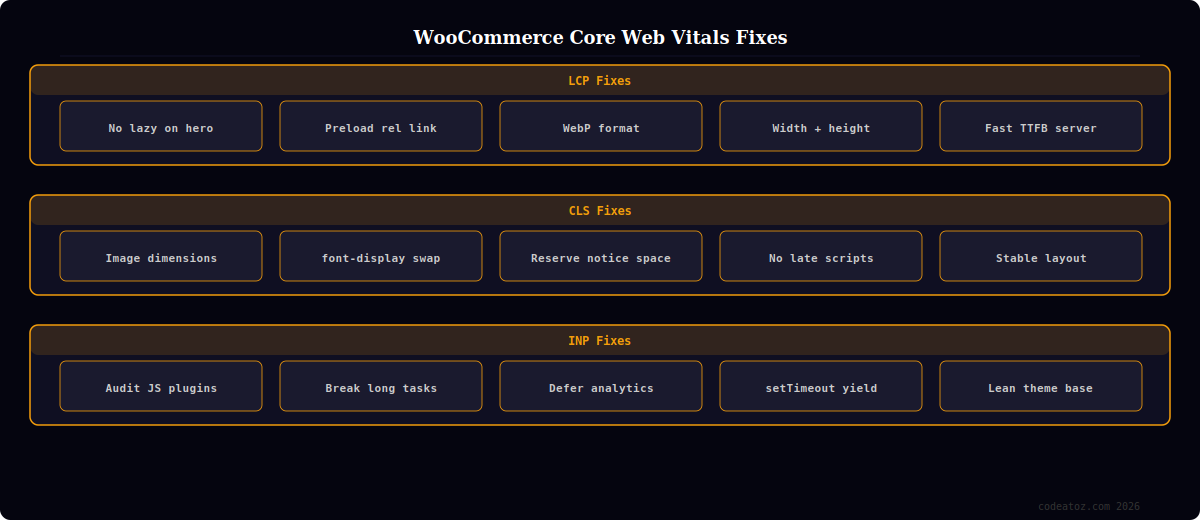
WooCommerce Core Web Vitals: Fixing LCP (Largest Contentful Paint)
LCP measures how long it takes the largest visible element — usually the hero product image or featured image — to appear on screen. On WooCommerce product and shop pages, the featured product image is almost always the LCP element. Poor LCP on WooCommerce stores is usually caused by one of three issues: the hero image is lazy-loaded (which blocks it), the image is not preloaded in the <head>, or the image is unoptimised (wrong format, too large).
- Never lazy-load the hero image: the
loading="lazy"attribute tells the browser to defer the image — but the hero image is above-fold and should load immediately. Remove lazy loading from the featured product image in WooCommerce templates. This single fix often drops LCP by 0.5–1.5 seconds - Preload the hero image: add a
<link rel="preload">tag for the featured image inwp_head— this tells the browser to fetch it at the highest priority before parsing the page body - Serve WebP: WebP images are 25–35% smaller than JPEG at the same quality, directly reducing LCP load time
- Use explicit width and height on image: prevents the browser from waiting to know the image dimensions before showing it
WooCommerce Core Web Vitals: Fixing CLS (Cumulative Layout Shift)
CLS measures unexpected layout movement as the page loads — elements jumping around after initial render. WooCommerce Core Web Vitals CLS failures are most commonly caused by: images without explicit dimensions, web fonts causing text reflow (FOUT), and WooCommerce notices injecting content above the page fold after the initial render.
- Add width and height to all images: WordPress adds these automatically from Media Library metadata, but custom templates and third-party plugins often strip them. Audit your product image markup to ensure every
<img>has both attributes - Preload critical fonts: use
<link rel="preload" as="font">for your primary font. Usefont-display: swapin CSS — this tells the browser to show text immediately in a fallback font rather than staying invisible until the web font loads - Reserve space for WooCommerce notices: WooCommerce injects cart/checkout notices dynamically which shifts content. Set a minimum height on the notices container in your CSS to prevent content shift when notices appear
- Fix Cloudflare Rocket Loader conflicts: Cloudflare’s Rocket Loader can change when JavaScript executes, causing layout-dependent scripts to fire at different times and shift content unexpectedly
WooCommerce Core Web Vitals: Fixing INP (Interaction to Next Paint)
INP (which replaced FID as a Core Web Vitals metric in March 2024) measures how long it takes your WooCommerce store to visually respond to a user interaction — a click, tap, or key press. Poor INP on WooCommerce stores is almost always caused by excessive JavaScript execution on the main thread — typically from jQuery, Knockout.js, or plugin scripts that run synchronous blocking operations when a user clicks.
- Audit and remove unnecessary plugins: each active plugin that loads frontend JavaScript increases INP. Deactivate plugins and measure INP improvement with PageSpeed Insights to identify the offenders
- Break up long tasks: JavaScript tasks over 50ms block the main thread and prevent the browser from responding to user input. Use
setTimeout(() => {}, 0)orrequestAnimationFrameto yield control back to the browser between heavy computations - Defer non-critical JavaScript: add the
deferattribute to non-essential scripts — analytics, chat widgets, marketing pixels — so they do not compete with user interaction handlers
💡 The fastest single action to improve all three WooCommerce Core Web Vitals metrics simultaneously is switching from Luma-style bloated themes to a lean theme like GeneratePress, Astra, or Blocksy. These themes ship with under 50kb of CSS and minimal JavaScript, leaving the main thread free for content rendering and user interactions. Combine a lean theme with WP Rocket for caching and an image CDN for WebP delivery, and most WooCommerce stores reach passing scores on all three Core Web Vitals.
The Google LCP documentation covers Largest Contentful Paint causes and fixes including the WooCommerce Core Web Vitals LCP patterns. The Google CLS documentation covers Cumulative Layout Shift measurement and the image dimension patterns critical for WooCommerce. The Google INP documentation covers Interaction to Next Paint measurement and main thread optimisation. See our WooCommerce page speed optimisation guide and our WooCommerce performance services.
Frequently Asked Questions — WooCommerce Core Web Vitals
Do WooCommerce Core Web Vitals affect Google rankings?
Yes — Core Web Vitals (LCP, CLS, INP) are confirmed Google ranking signals since 2021. Stores that pass all three WooCommerce Core Web Vitals thresholds (LCP under 2.5s, CLS under 0.1, INP under 200ms) receive a mild ranking boost over stores that fail. The boost is typically modest — content quality and backlinks remain stronger signals — but for competitive keyword categories, passing WooCommerce Core Web Vitals can be the tiebreaker between positions 3 and 5.
What causes high LCP on WooCommerce product pages?
The most common WooCommerce Core Web Vitals LCP cause is the product featured image loading with loading=”lazy” (which defers it) or without a preload hint. Other causes: large unoptimised JPEG images (use WebP instead), missing explicit width and height attributes causing the browser to delay layout, slow server response time (TTFB above 600ms), and render-blocking JavaScript or CSS above the image in the document.
What causes layout shift (CLS) on WooCommerce stores?
The most common WooCommerce Core Web Vitals CLS causes are: images without width and height attributes (the browser reserves no space until the image loads, then shifts everything), web fonts loading after text has already rendered in a fallback font (FOUT), WooCommerce cart/checkout notices appearing dynamically above existing content, and late-loading ad slots or widgets without reserved dimensions.
How do I measure WooCommerce Core Web Vitals?
Use PageSpeed Insights (pagespeed.web.dev) for a lab measurement of LCP, CLS, and INP with specific element attribution. Use Google Search Console’s Core Web Vitals report for real-user field data across your entire site. Use Chrome DevTools Performance panel for deep profiling of INP interactions. The Search Console report shows which URLs are failing which WooCommerce Core Web Vitals, making it the most actionable starting point for an optimisation project.
Why did FID change to INP for WooCommerce Core Web Vitals?
Google replaced First Input Delay (FID) with Interaction to Next Paint (INP) as a Core Web Vitals metric in March 2024. FID only measured the delay on the very first interaction on a page. INP measures the worst interaction delay across the entire page session — any click, tap, or key press. INP is a much stricter metric for WooCommerce stores because it captures slow add-to-cart buttons, filter interactions, and checkout form inputs that FID missed entirely.
Can WooCommerce Core Web Vitals be improved without a developer?
Some improvements are possible through plugins alone: WP Rocket handles LCP preloading, image lazy-load exclusions, and font preloading through its admin settings. ShortPixel or Imagify handles WebP conversion automatically. These tools together can move a failing store to passing on LCP and CLS with no code changes. INP improvements almost always require a developer to audit and defer or remove JavaScript from poorly-written plugins that run heavy operations on user interactions.
Need WooCommerce Core Web Vitals Fixed?
CodeAtoZ fixes WooCommerce Core Web Vitals — LCP image optimisation, CLS layout fixes, INP JavaScript audit, and before/after PageSpeed measurement.




