
The Complete Guide to WooCommerce ERPNext Integration — CAZ WooSync 2026
Two-way sync for products, orders, inventory, customers, prices, accounting, refunds, and coupons — free and open source on ERPNext v14/v15/v16.
What syncs
Webhook + polling
Queue dashboard
Multi-store
Installation
If you run WooCommerce as your storefront and ERPNext as your ERP, WooCommerce ERPNext integration has historically meant expensive middleware, fragile custom scripts, or hours of manual data entry. CAZ WooSync changes that — it is a free, open-source Frappe app that delivers production-grade WooCommerce ERPNext integration out of the box, syncing every critical data entity in both directions automatically.
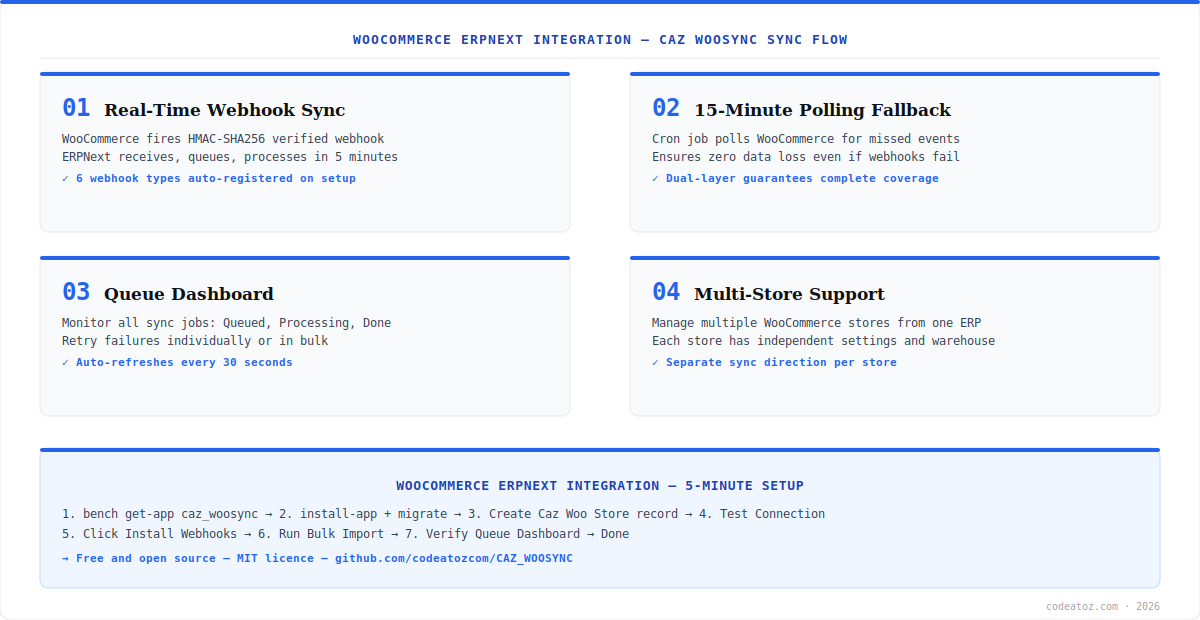
WooCommerce ERPNext integration via CAZ WooSync covers the full commerce data lifecycle: products and variants, live inventory, customer records, sales orders, invoices, payment entries, refunds, coupons, and prices. Every sync is triggered in real time by HMAC-verified webhooks, with a 15-minute polling fallback to catch anything missed during downtime. A built-in queue dashboard lets you monitor, retry, and debug every sync event.
CAZ WooSync was built by the CodeAtoZ WooCommerce development team and released today as a free MIT-licensed Frappe app. It supports ERPNext v14, v15, and v16, WooCommerce 7.0+, and WordPress 6.0+. Multiple WooCommerce stores can be managed from a single ERPNext instance, each with independent sync direction, warehouse, and account configuration.
WooCommerce ERPNext Integration: What CAZ WooSync Syncs
CAZ WooSync covers every entity a commerce business needs in its WooCommerce ERPNext integration. Simple products sync both ways as ERPNext Items. Variable products sync from WooCommerce as Item Templates with Variants. Orders flow from WooCommerce to ERPNext as Sales Orders, with paid orders automatically generating Sales Invoices and Payment Entries. Refunds create ERPNext credit notes. Coupons map to ERPNext Pricing Rules.
- Simple Products — both ways as ERPNext Items
- Variable Products — WooCommerce to ERPNext as Item Template + Variants
- Orders — WooCommerce to ERPNext Sales Orders, Invoices, Payment Entries
- Customers — WooCommerce to ERPNext Customers, Contacts, Addresses
- Inventory — both ways, ERPNext Bin to WooCommerce stock_quantity
- Prices — both ways, ERPNext Item Price to WooCommerce regular/sale price
- Refunds — WooCommerce refunds to ERPNext credit notes
- Coupons — WooCommerce coupons to ERPNext Pricing Rules
For your initial WooCommerce ERPNext integration setup, always run the Bulk Import in this order: Customers first, then Products, then Orders. Orders reference customers and products in ERPNext — if they do not exist yet, orders will fail to sync and queue up as errors.
WooCommerce ERPNext Integration: Real-Time Webhooks and Polling Fallback
CAZ WooSync uses a dual-layer approach to ensure your WooCommerce ERPNext integration never misses a data change. The primary layer is HMAC-SHA256 verified webhooks — WooCommerce fires an event the moment an order is placed, a product is updated, or a customer registers. ERPNext receives and queues the event, processing it within five minutes via a scheduled background job.
The secondary layer is a 15-minute polling cron that actively queries WooCommerce for any records changed since the last poll. This fallback ensures that even if your ERPNext server was briefly unreachable when a webhook fired, the data change will be caught on the next poll cycle. Together, the two layers make the WooCommerce ERPNext integration resilient to transient network issues without requiring any manual intervention.
# From your ERPNext bench directory
bench get-app https://github.com/codeatozcom/CAZ_WOOSYNC
bench --site your-site.local install-app caz_woosync
bench --site your-site.local migrate
bench restart
WooCommerce ERPNext Integration: The Queue Dashboard
Every sync event in your WooCommerce ERPNext integration passes through the CAZ WooSync queue. The Queue Dashboard at ERPNext → Caz Woosync → Caz Woo Queue gives you full visibility into every item — its status (Queued, Processing, Done, Failed, Skipped), the direction of sync, the entity type, and a full error log for any failures. The dashboard auto-refreshes every 30 seconds.
Failed items can be retried individually or in bulk. The max retry count defaults to five — after five failed attempts, an item is marked Failed and an alert email is sent. This prevents silent data loss, which is the most common problem with naive WooCommerce ERPNext integration scripts that fail without notification. Refer to the CAZ WooSync GitHub repository for the full troubleshooting guide.
If your WooCommerce ERPNext integration queue shows items stuck on Queued but never processing, check that ERPNext background workers are running. Run bench doctor to inspect worker status, and bench restart to restart them. Workers must be active for the queue processor to run every five minutes.
WooCommerce ERPNext Integration: Multi-Store Architecture
CAZ WooSync supports running multiple WooCommerce stores against a single ERPNext instance — a key requirement for businesses operating regional stores, separate brand storefronts, or B2B and B2C stores side by side. Each store gets its own Caz Woo Store record in ERPNext, with independent configuration for sync direction, warehouse, income account, item group, and default UOM.
This means your WooCommerce ERPNext integration can route UK store orders to a UK warehouse and income account, EU store orders to an EU warehouse, and wholesale orders to a separate wholesale warehouse — all from the same ERPNext instance, all through the same CAZ WooSync installation. The WooCommerce REST API and Frappe Framework both support this architecture cleanly.
WooCommerce ERPNext Integration: Requirements and Compatibility
CAZ WooSync’s WooCommerce ERPNext integration supports ERPNext v14, v15, and v16, WooCommerce 7.0+, WordPress 6.0+, and Python 3.10+. The test suite covers 613 tests, all passing, giving a solid baseline of confidence for production deployments. Installation takes five minutes via bench get-app and does not require any changes to your WooCommerce theme or WordPress configuration beyond generating a REST API key.
If you need assistance setting up or extending the WooCommerce ERPNext integration for your specific business requirements — custom field mapping, additional entity types, or integration with other Frappe apps — our development team offers implementation support. See also our guide on hiring an e-commerce developer for longer-term integration work.
CAZ WooSync is released under the MIT licence — free to use, modify, and distribute. The complete source code for this WooCommerce ERPNext integration is available at github.com/codeatozcom/CAZ_WOOSYNC. Contributions, bug reports, and feature requests are welcome via GitHub Issues.
Frequently Asked Questions About WooCommerce ERPNext Integration
What is WooCommerce ERPNext integration?
WooCommerce ERPNext integration is the process of connecting a WooCommerce store to an ERPNext instance so that data — products, orders, customers, inventory, prices, and accounting entries — flows automatically between the two systems. CAZ WooSync delivers this integration as a free Frappe app with real-time webhook sync, a 15-minute polling fallback, and a queue dashboard for monitoring.
Is WooCommerce ERPNext integration free with CAZ WooSync?
Yes. CAZ WooSync is released under the MIT licence and is completely free to use. The WooCommerce ERPNext integration covers products, orders, customers, inventory, prices, accounting, refunds, coupons, and multi-store support at no cost. The source code is publicly available at github.com/codeatozcom/CAZ_WOOSYNC.
How long does WooCommerce ERPNext integration take to set up?
The initial WooCommerce ERPNext integration setup with CAZ WooSync takes approximately five minutes on a server with ERPNext already installed. The steps are: install the app via bench, create a Caz Woo Store record with your WooCommerce URL and API keys, click Test Connection, click Install Webhooks, and run Bulk Import for existing data.
Does WooCommerce ERPNext integration support variable products?
Yes. CAZ WooSync maps WooCommerce variable products to ERPNext Item Templates with Variants. Each WooCommerce product variation becomes an ERPNext Item Variant, with attributes (Size, Colour etc.) mapped automatically. Variable product sync flows from WooCommerce to ERPNext, and price and stock changes sync back in both directions.
What ERPNext versions does WooCommerce ERPNext integration support?
CAZ WooSync supports ERPNext v14, v15, and v16 for the WooCommerce ERPNext integration. It requires Python 3.10+, WooCommerce 7.0+, and WordPress 6.0+. The test suite covers 613 tests against these versions. Older ERPNext versions are not officially supported.
Can WooCommerce ERPNext integration handle multiple stores?
Yes. CAZ WooSync supports multiple WooCommerce stores connected to a single ERPNext instance. Each store has its own Caz Woo Store record with independent settings for sync direction, warehouse, income account, and item group. This makes the WooCommerce ERPNext integration suitable for businesses running regional, brand, or wholesale storefronts from one ERP.
Get Started with WooCommerce ERPNext Integration
CAZ WooSync is free, open source, and installs in 5 minutes. Need implementation help or custom sync extensions? Talk to our team.
ERPNext v14/v15/v16
Real-time webhooks
613 tests passing




