
Complete Guide to WooCommerce Inventory Sync ERPNext with CAZ WooSync
Keep WooCommerce stock levels and ERPNext Bin quantities in perfect sync — both ways, in real time, with per-warehouse control and automatic order deduction.
ERPNext Bin → WooCommerce
Order deduction
Price sync
Bulk import
Warehouse config
Keeping stock levels accurate across two systems is one of the hardest operational challenges for any WooCommerce store using ERPNext as its ERP. WooCommerce inventory sync ERPNext via CAZ WooSync solves this completely — ERPNext Bin quantities push to WooCommerce in real time, WooCommerce orders deduct stock from ERPNext automatically, and a 60-second guard prevents the import loops that plague simpler WooCommerce inventory sync ERPNext scripts.
CAZ WooSync’s WooCommerce inventory sync ERPNext system is bidirectional. When a stock adjustment is made in ERPNext — a stock entry, a material receipt, or a stock reconciliation — the corresponding WooCommerce product’s stock_quantity is updated automatically. When a WooCommerce order is placed and flows to ERPNext as a Sales Order, the stock is deducted from the configured warehouse. Refunds restore stock in both directions.
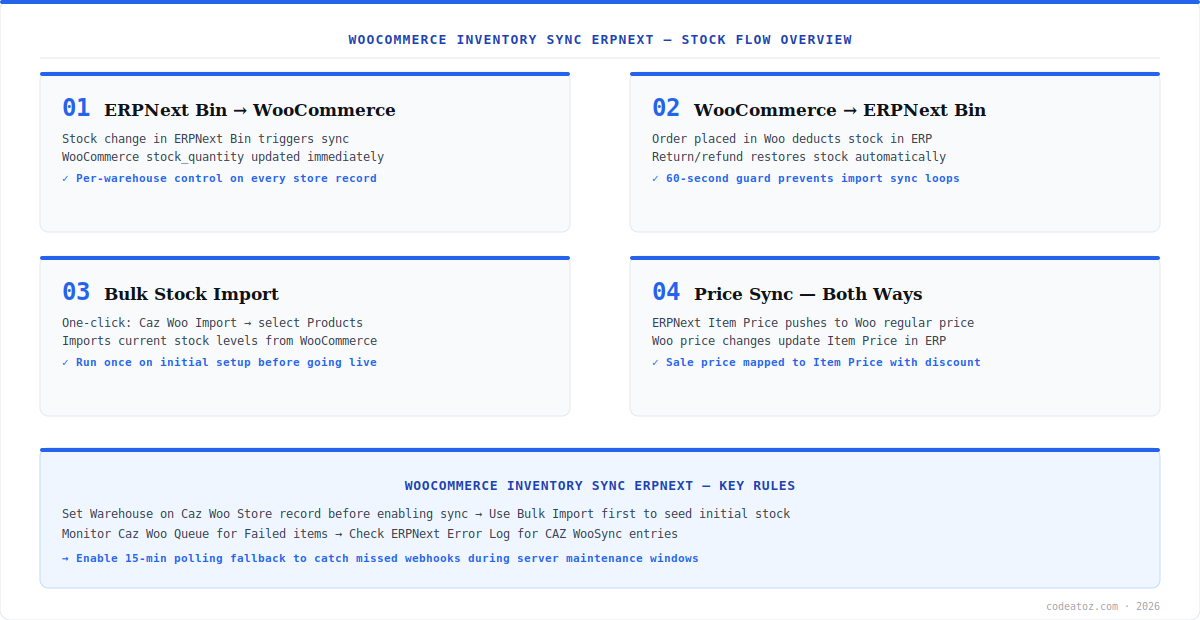
WooCommerce Inventory Sync ERPNext: How the Stock Flow Works
The WooCommerce inventory sync ERPNext flow in CAZ WooSync has two directions. The outbound direction — ERPNext to WooCommerce — fires whenever an ERPNext Bin quantity changes. This covers stock entries, material transfers, purchase receipts, and direct stock edits. The sync picks up the new actual_qty from the Bin for the configured warehouse and pushes it to WooCommerce via the WooCommerce REST API.
The inbound direction — WooCommerce to ERPNext — is handled automatically when WooCommerce orders sync to ERPNext Sales Orders. ERPNext’s standard order fulfilment flow reduces stock when the delivery note is created. This keeps WooCommerce inventory sync ERPNext consistent with your ERPNext accounting — stock movement is traceable through the full Sales Order → Delivery Note → Stock Ledger chain.
Before enabling live WooCommerce inventory sync ERPNext, run a Bulk Import of existing stock levels first. This seeds ERPNext with WooCommerce’s current quantities, preventing false out-of-stock events on your first sync cycle. Go to ERPNext → Caz Woosync → Caz Woo Import, select your store, tick Products, and click Start Import.
WooCommerce Inventory Sync ERPNext: Warehouse Configuration
Each Caz Woo Store record has a dedicated Warehouse field that controls which ERPNext warehouse is used for the WooCommerce inventory sync ERPNext operations. When stock is pushed from ERPNext to WooCommerce, CAZ WooSync reads actual_qty from the Bin record for that specific warehouse. When orders create Delivery Notes, stock is deducted from the same warehouse.
- Set the Warehouse field on your Caz Woo Store record before enabling sync
- Each store can map to a different warehouse — UK store to UK Warehouse, EU store to EU Warehouse
- Default UOM (unit of measure) is also configured per store — default is “Nos”
- If no warehouse is set, order sync will fail — orders reference warehouse for delivery
- Check ERPNext Warehouse documentation for multi-warehouse setup best practices
WooCommerce Inventory Sync ERPNext: Price Sync Both Ways
CAZ WooSync’s WooCommerce inventory sync ERPNext package includes price sync as part of the same bidirectional flow. ERPNext Item Price records push to WooCommerce as the regular price. WooCommerce sale prices are mapped back to ERPNext Item Price records with the discount applied. Price changes in ERPNext trigger a WooCommerce update on save, and WooCommerce price changes update the Item Price on the next sync cycle.
After initial Bulk Import for WooCommerce inventory sync ERPNext, you may briefly see products showing as out of stock. This was a known issue fixed in v1.0.0 — the 60-second import guard prevents the sync loop that caused it. If you are on an older version, update to v1.0.0 and manually restore affected stock levels in WooCommerce.
WooCommerce Inventory Sync ERPNext: Monitoring and Troubleshooting
Every WooCommerce inventory sync ERPNext event is visible in the Caz Woo Queue dashboard. Filter by entity type “Stock” or “Inventory” to see stock-specific sync events. Failed items show the full error message — the most common causes are a missing Warehouse on the store record, a deleted ERPNext Item, or an API rate limit hit on the WooCommerce side (the default rate limit is 40 requests per minute).
If stock updates are not flowing from ERPNext to WooCommerce, check that background workers are running with bench doctor and that the five-minute scheduler is active. For local development testing, use ngrok to expose your ERPNext instance to WooCommerce webhooks. The full WooCommerce inventory sync ERPNext source code and troubleshooting guide is at github.com/codeatozcom/CAZ_WOOSYNC. Our WooCommerce team also provides implementation support for complex inventory configurations.
Frequently Asked Questions About WooCommerce Inventory Sync ERPNext
How does WooCommerce inventory sync ERPNext work in CAZ WooSync?
WooCommerce inventory sync ERPNext in CAZ WooSync works bidirectionally. ERPNext Bin quantity changes push to WooCommerce stock_quantity in real time via the REST API. WooCommerce orders flow to ERPNext as Sales Orders, and stock is deducted when Delivery Notes are created. A 15-minute polling fallback catches any changes missed during downtime.
Can WooCommerce inventory sync ERPNext handle multiple warehouses?
Yes. Each Caz Woo Store record has its own Warehouse field for WooCommerce inventory sync ERPNext. Multiple WooCommerce stores can each map to a different ERPNext warehouse. Stock levels pushed to WooCommerce are read from the specific warehouse assigned to that store, so regional or brand-specific inventory is kept separate.
Does WooCommerce inventory sync ERPNext handle refunds and returns?
Yes. WooCommerce refunds trigger a credit note in ERPNext and restore stock to the configured warehouse. WooCommerce inventory sync ERPNext via CAZ WooSync maps WooCommerce refund events to ERPNext credit note creation, which in turn updates the stock ledger. Partial refunds are supported as partial credit notes.
How often does WooCommerce inventory sync ERPNext update?
WooCommerce inventory sync ERPNext via webhooks is near-real-time — ERPNext receives and queues the event immediately, with the queue processor running every five minutes. The 15-minute polling fallback catches any missed webhooks. Price and stock changes made directly in ERPNext push to WooCommerce on the next scheduled sync cycle.
What causes WooCommerce inventory sync ERPNext failures?
The most common WooCommerce inventory sync ERPNext failures are: missing Warehouse on the store record (orders fail without a warehouse), deleted ERPNext Items that WooCommerce still references, API rate limit exceeded (default 40 req/min), and ERPNext not publicly accessible for incoming webhooks. All failures are visible with full error detail in the Caz Woo Queue dashboard.
Is WooCommerce inventory sync ERPNext included free in CAZ WooSync?
Yes. WooCommerce inventory sync ERPNext is fully included in CAZ WooSync at no cost. The app is MIT-licensed and covers inventory, price sync, order deduction, and refund stock restoration out of the box. There are no paid tiers or feature limits on the inventory sync functionality.
Enable WooCommerce Inventory Sync ERPNext Today
CAZ WooSync installs in 5 minutes and keeps stock perfectly in sync — both ways. Free, open source, MIT licence.
Per-warehouse control
Price sync included
Free MIT licence




