WooCommerce AI Inventory Forecast — Predict Stock Needs (2026)
Build a WooCommerce AI inventory forecast using historical sales data, seasonal patterns, and AI analysis to predict reorder points and prevent stockouts automatically.
Stockouts cost WooCommerce stores 4–8% of annual revenue on average. Overstocking ties up capital and increases storage costs. A WooCommerce AI inventory forecast system analyses your historical sales velocity, seasonal patterns, promotional uplift, and current stock levels to predict when each product will need reordering — before it runs out. This guide builds a practical WooCommerce AI inventory forecast using WooCommerce order data, an AI model for pattern analysis, and an automated admin notification system that alerts you when the WooCommerce AI inventory forecast predicts a stockout within your supplier lead time window.
WooCommerce AI Inventory Forecast: Building the Data Layer
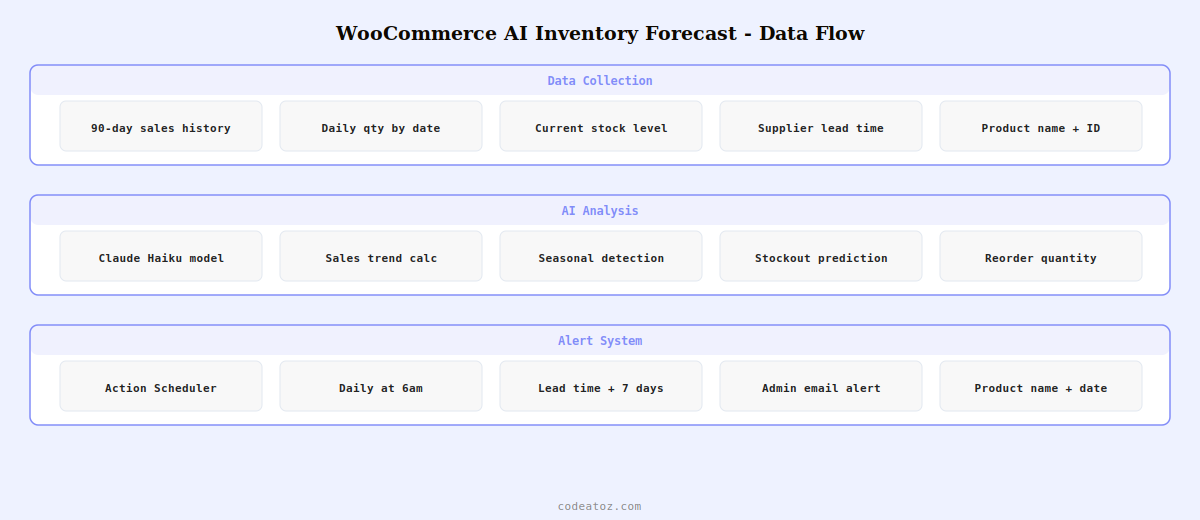
An effective WooCommerce AI inventory forecast needs at least 90 days of sales history per product. Query WooCommerce order data to build a daily sales series, then pass this series to the AI model with context about seasonal events, supplier lead times, and current stock levels.
<?php
function caz_get_product_sales_history( int $product_id, int $days = 90 ): array {
    global $wpdb;

    // Query WooCommerce order items for WooCommerce AI inventory forecast data
    $results = $wpdb->get_results( $wpdb->prepare(
        "SELECT DATE(p.post_date) as sale_date, SUM(oi_meta.meta_value) as qty
         FROM {$wpdb->prefix}woocommerce_order_items oi
         JOIN {$wpdb->prefix}woocommerce_order_itemmeta oi_meta
           ON oi.order_item_id = oi_meta.order_item_id AND oi_meta.meta_key = '_qty'
         JOIN {$wpdb->prefix}woocommerce_order_itemmeta oi_meta2
           ON oi.order_item_id = oi_meta2.order_item_id AND oi_meta2.meta_key = '_product_id'
         JOIN {$wpdb->prefix}posts p ON oi.order_id = p.ID
         WHERE oi_meta2.meta_value = %d
           AND p.post_status IN ('wc-completed', 'wc-processing')
           AND p.post_date >= DATE_SUB(NOW(), INTERVAL %d DAY)
         GROUP BY DATE(p.post_date)
         ORDER BY sale_date ASC",
        $product_id, $days
    ));

    return array_column( $results, 'qty', 'sale_date' );
}

function caz_ai_inventory_forecast( int $product_id ): array {
    $product       = wc_get_product( $product_id );
    $current_stock = $product->get_stock_quantity();
    $sales_history = caz_get_product_sales_history( $product_id, 90 );
    $lead_time_days = (int) get_post_meta( $product_id, '_supplier_lead_days', true ) ?: 14;

    $prompt = "You are a WooCommerce AI inventory forecast assistant.
Product: {$product->get_name()}
Current stock: {$current_stock} units
Supplier lead time: {$lead_time_days} days
Sales history (date: units sold): " . json_encode( $sales_history ) . "

Analyse this data and return a JSON object with:
- daily_avg: average daily sales rate
- weekly_avg: average weekly sales
- trend: 'increasing', 'stable', or 'decreasing'
- days_until_stockout: estimated days at current trend
- reorder_date: recommended reorder date (YYYY-MM-DD)
- suggested_reorder_qty: units to order to cover 60 days
- confidence: 'high', 'medium', or 'low'
Return only valid JSON, no explanation.";

    $response = wp_remote_post( 'https://api.anthropic.com/v1/messages', [
        'headers' => [
            'x-api-key'         => get_option( 'caz_claude_api_key' ),
            'anthropic-version' => '2023-06-01',
            'Content-Type'      => 'application/json',
        ],
        'body' => wp_json_encode([
            'model'      => 'claude-haiku-4-5-20251001',
            'max_tokens' => 300,
            'messages'   => [[ 'role' => 'user', 'content' => $prompt ]],
        ]),
        'timeout' => 30,
    ]);

    $body = json_decode( wp_remote_retrieve_body( $response ), true );
    $json_str = $body['content'][0]['text'] ?? '{}';
    return json_decode( $json_str, true ) ?: [];
}
WooCommerce AI Inventory Forecast: Automated Admin Alerts
Run the WooCommerce AI inventory forecast daily via WooCommerce’s Action Scheduler and send admin alerts when any product is predicted to reach zero stock within the supplier lead time window.
<?php
// Schedule WooCommerce AI inventory forecast daily at 6am
add_action( 'init', function() {
    if ( ! as_next_scheduled_action( 'caz_run_inventory_forecast' ) ) {
        as_schedule_recurring_action( strtotime('tomorrow 6am'), DAY_IN_SECONDS, 'caz_run_inventory_forecast' );
    }
});

add_action( 'caz_run_inventory_forecast', function() {
    $at_risk = [];

    $products = wc_get_products([
        'limit'        => -1,
        'stock_status' => 'instock',
        'manage_stock' => true,
        'return'       => 'ids',
    ]);

    foreach ( $products as $product_id ) {
        $forecast = caz_ai_inventory_forecast( $product_id );
        if ( empty( $forecast['days_until_stockout'] ) ) continue;

        $lead_time = (int) get_post_meta( $product_id, '_supplier_lead_days', true ) ?: 14;

        // Alert if stockout is predicted within lead time
        if ( $forecast['days_until_stockout'] <= $lead_time + 7 ) {
            $product = wc_get_product( $product_id );
            $at_risk[] = [
                'name'            => $product->get_name(),
                'stock'           => $product->get_stock_quantity(),
                'days_remaining'  => $forecast['days_until_stockout'],
                'reorder_by'      => $forecast['reorder_date'],
                'suggested_order' => $forecast['suggested_reorder_qty'],
            ];
        }
        sleep(1); // Respect AI API rate limits
    }

    if ( ! empty( $at_risk ) ) {
        // Send WooCommerce AI inventory forecast alert email
        $message = "WooCommerce AI Inventory Forecast Alertnn";
        foreach ( $at_risk as $item ) {
            $message .= "Product: {$item['name']}n";
            $message .= "  Stock: {$item['stock']} units ({$item['days_remaining']} days remaining)n";
            $message .= "  Reorder by: {$item['reorder_by']}n";
            $message .= "  Suggested order: {$item['suggested_order']} unitsnn";
        }
        wp_mail( get_option('admin_email'), 'Inventory Reorder Alert', $message );
    }
});
💡 The WooCommerce AI inventory forecast is most accurate for products with at least 60 days of consistent sales history. For new products or those with very sporadic sales, set a lower confidence threshold and flag these for manual review rather than automated alerts. Products with zero sales in the last 30 days should be excluded from the WooCommerce AI inventory forecast to avoid noisy alerts on dead stock.
The Action Scheduler API documentation covers the recurring action scheduling used for the daily WooCommerce AI inventory forecast run. The Anthropic Claude API documentation covers the Claude Haiku model endpoint used for AI analysis in the WooCommerce AI inventory forecast. See our WooCommerce AI SEO meta description guide for another AI automation pattern, and our WooCommerce development services for custom AI inventory systems.
Frequently Asked Questions — WooCommerce AI Inventory Forecast
How does a WooCommerce AI inventory forecast work?
A WooCommerce AI inventory forecast queries historical sales order data to build a daily sales velocity series per product. This data, along with current stock levels and supplier lead times, is passed to an AI model as structured context. The AI analyses sales trends, seasonality patterns, and current trajectory to predict when each product will reach zero stock and recommend a reorder date and quantity. Alerts are sent when the predicted stockout falls within the supplier lead time window.
How much sales history does the WooCommerce AI inventory forecast need?
The WooCommerce AI inventory forecast is most accurate with 90+ days of daily sales data. With less than 60 days, seasonal trends and weekly patterns cannot be reliably detected. Products with fewer than 30 days of history should be excluded from automated forecasting and flagged for manual review. The more complete and consistent the sales history, the higher the confidence rating the AI assigns to its WooCommerce AI inventory forecast prediction.
Can the WooCommerce AI inventory forecast detect seasonal demand spikes?
Yes, with sufficient historical data spanning at least one previous seasonal cycle (12 months). When the AI has year-over-year data it can identify seasonal uplift periods and factor them into the WooCommerce AI inventory forecast. For a first-year store without historical seasonal data, you can provide explicit context in the AI prompt: “This product typically sells 3x higher in November and December.” The AI incorporates this context into its forecast calculations.
How do I set supplier lead times for the WooCommerce AI inventory forecast?
Store lead time as a product-level custom field: _supplier_lead_days as a post meta value on each product. Set it from the product edit screen or programmatically via update_post_meta(). The WooCommerce AI inventory forecast reads this field to calculate the critical threshold — any product predicted to stockout within lead time plus a safety buffer receives an alert. Default to 14 days if not set, which covers most UK/EU supplier lead times.
What AI model is best for WooCommerce AI inventory forecast?
Claude Haiku (claude-haiku-4-5) is well-suited for WooCommerce AI inventory forecast analysis — it handles structured JSON data reliably, costs a fraction of larger models, and produces consistent structured output when prompted correctly. For stores with complex multi-SKU forecasting needs, Claude Sonnet provides better reasoning about complex seasonal patterns. Both models return valid JSON when instructed to, making them easy to integrate into the WooCommerce AI inventory forecast data pipeline.
How often should the WooCommerce AI inventory forecast run?
Daily forecasting is appropriate for most WooCommerce stores — running at 6am gives you the day’s reorder recommendations based on the previous day’s complete sales data. For stores with very fast-moving products or very short supplier lead times (under 5 days), run the WooCommerce AI inventory forecast twice daily. Avoid running more frequently than every 4 hours as the sales data changes minimally between runs and the additional AI API cost is not justified.
Want AI Inventory Forecasting for Your WooCommerce Store?
CodeAtoZ builds custom WooCommerce AI inventory forecast systems — historical data analysis, lead time integration, daily alerts, and reorder quantity recommendations.