
The Complete Gatsby WooCommerce Guide — Static + DSG 2026
Build a Gatsby WooCommerce headless storefront — gatsby-source-wordpress, GraphQL product queries, DSG for large catalogues, Gatsby Functions for cart, and Netlify deploy.
A Gatsby WooCommerce headless storefront uses Gatsby’s static site generation and GraphQL data layer to build a fast, pre-rendered storefront from WooCommerce product data. With Gatsby WooCommerce, product pages are generated at build time — the HTML is ready before any user visits, making load times exceptional. Deferred Static Generation (DSG) handles large catalogues by building the top pages upfront and generating the rest on first request.
The Gatsby WooCommerce stack uses gatsby-source-wordpress to pull WooCommerce product, category, and order data into Gatsby’s GraphQL layer. Queries are static and typed — no runtime API calls for product pages. Cart and checkout operations use Gatsby Functions (serverless endpoints) to call the WooCommerce Store API. This guide covers the complete Gatsby WooCommerce build from source plugin setup to Netlify deployment with ISR. Refer to the Gatsby documentation for the full framework reference.
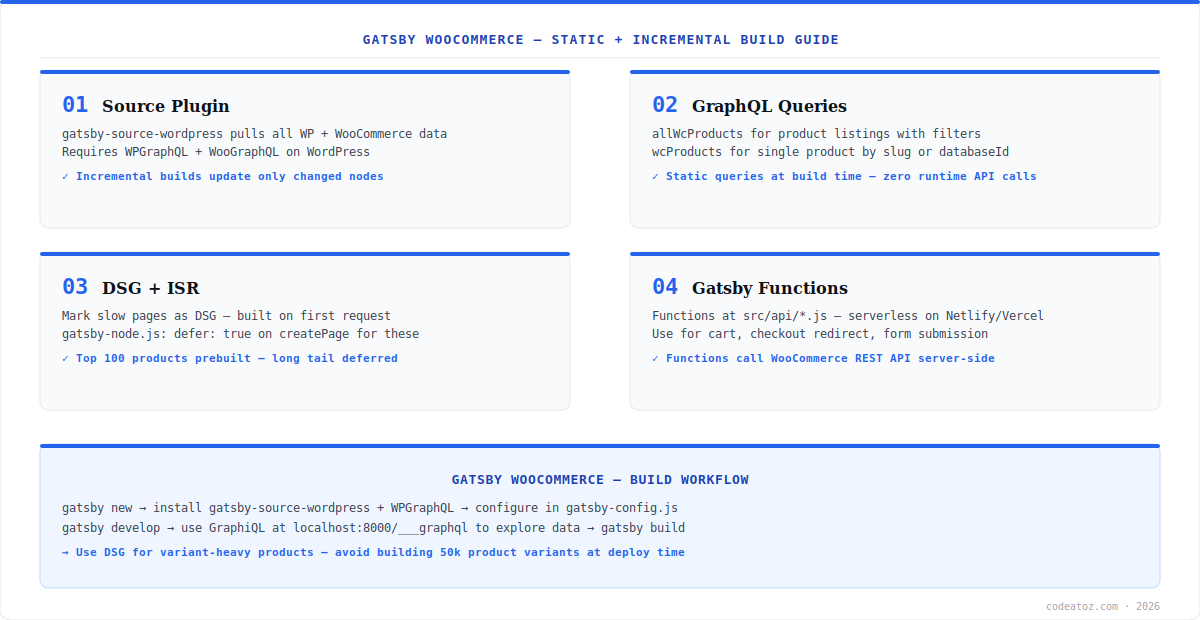
Gatsby WooCommerce: Source Plugin and GraphQL Queries
The Gatsby WooCommerce data layer starts with gatsby-source-wordpress. Configure it in gatsby-config.js with your WordPress URL — it pulls all WooCommerce products, categories, and media into the Gatsby GraphQL layer at build time. WooCommerce product data is available as allWcProducts and wcProducts in GraphiQL. For product images, the plugin handles Gatsby image processing automatically — all product images go through gatsby-plugin-image for optimised loading. Install WPGraphQL and WooGraphQL plugins on your WordPress instance to enable the Gatsby WooCommerce source connection. The gatsby-source-wordpress documentation covers all configuration options.
// gatsby-config.js
plugins: [{
  resolve: 'gatsby-source-wordpress',
  options: { url: 'https://yourstore.com/graphql' }
}]

// GraphQL product query (gatsby-node.js or page component)
query AllProducts {
  allWcProducts(filter: { status: { eq: "publish" } }) {
    nodes {
      id slug name price regularPrice salePrice
      images { src alt }
      productCategories { nodes { name slug } }
    }
  }
}Gatsby WooCommerce: DSG, Functions, and Cart
Deferred Static Generation (DSG) is the key Gatsby WooCommerce feature for large catalogues. Mark slow-to-build pages as deferred in gatsby-node.js with defer: true on createPage(). Pre-build your top 100-200 products at deploy time and defer the rest — they generate on first request and are cached by the CDN from that point. For cart operations, Gatsby WooCommerce uses Gatsby Functions — serverless endpoints in src/api/ that run on Netlify or Vercel. Cart functions call the WooCommerce Store API server-side, keeping credentials out of the browser. Our headless commerce team builds full Gatsby WooCommerce storefronts. See our headless architecture guide for when to choose Gatsby over Remix or Next.js. The Netlify Gatsby Functions guide covers serverless cart endpoint deployment.
Without DSG, a Gatsby WooCommerce store with 10,000+ products will have very long build times — potentially 30+ minutes. Always use DSG for large catalogues: pre-render only the top products and configure the rest as deferred. Use gatsby build –log-pages to identify build bottlenecks.
Frequently Asked Questions About Gatsby WooCommerce
What is a Gatsby WooCommerce headless setup?
A Gatsby WooCommerce headless setup uses Gatsby’s static site generation and GraphQL layer to build a pre-rendered storefront from WooCommerce data. Product pages are generated at build time — no runtime API calls for product content. Cart and checkout use Gatsby Functions calling the WooCommerce Store API. It delivers excellent page speed scores for product pages.
How do I connect Gatsby to WooCommerce?
Connect Gatsby to WooCommerce using gatsby-source-wordpress. Install WPGraphQL and WooGraphQL plugins on your WordPress instance, then configure gatsby-source-wordpress in gatsby-config.js with your WordPress GraphQL URL. Product, category, and media data become available as GraphQL nodes in Gatsby’s data layer, queryable in pages and components.
What is DSG in Gatsby WooCommerce?
DSG (Deferred Static Generation) in Gatsby WooCommerce builds high-priority pages at deploy time and generates long-tail pages on first request. Set defer: true on createPage() for slow-to-build pages in gatsby-node.js. This keeps build times fast while ensuring all pages eventually become static. Use it for large catalogues with thousands of product variants.
How does cart work in a Gatsby WooCommerce store?
Cart in Gatsby WooCommerce uses Gatsby Functions — serverless endpoints in src/api/ that run on Netlify or Vercel. Functions call the WooCommerce Store API server-side to add items, update quantities, and process checkout. Client-side cart state is managed with React context or Zustand. This keeps WooCommerce credentials out of the browser bundle.
How do I deploy a Gatsby WooCommerce store?
Deploy a Gatsby WooCommerce store to Netlify or Vercel for full DSG and Gatsby Functions support. Both platforms support gatsby build and serverless functions natively. Configure build hooks in Netlify or Vercel to trigger rebuilds when WooCommerce products are updated via a WordPress webhook. Set up incremental builds to rebuild only changed content.
When should I choose Gatsby WooCommerce over Next.js WooCommerce?
Choose Gatsby WooCommerce for content-heavy stores where SEO is the top priority and product catalogue changes infrequently — Gatsby’s static HTML gives the best possible PageSpeed scores. Choose Next.js WooCommerce for stores with real-time inventory or pricing where ISR and on-demand revalidation are needed. Both frameworks work well; the choice depends on catalogue size and update frequency.
Building a Gatsby WooCommerce Storefront?
Our team builds Gatsby headless storefronts — source plugin, GraphQL, DSG, cart functions, and CDN deployment.




