
The Complete Shopify App Extensions Guide — UI, Checkout & Post-Purchase 2026
Build Shopify app extensions that extend checkout, admin, and post-purchase flows — Checkout UI Extensions, Admin UI Extensions, Post-purchase Extensions, and Web Pixels explained.
Post-purchase Extensions
Admin UI Extensions
Web Pixels
Extension targets
Build workflow
Shopify app extensions are the modern way to add functionality to Shopify stores without injecting scripts into theme files. Instead of depending on a merchant’s theme, Shopify app extensions run in sandboxed, Shopify-managed contexts — checkout, the admin panel, the post-purchase page, and browser analytics events. Building with Shopify app extensions means your features work consistently across every Shopify theme, survive theme updates, and meet the requirements for Shopify App Store listing in 2026.
The Shopify platform has been steadily moving away from theme-based app integration — ScriptTag, theme app extensions with direct liquid edits, and app proxy patterns — towards sandboxed Shopify app extensions that are managed independently of merchant themes. Understanding which extension type to use for which use case is the foundation of any modern Shopify app architecture. This guide covers all four major Shopify app extensions types, their APIs, targets, and build workflows.
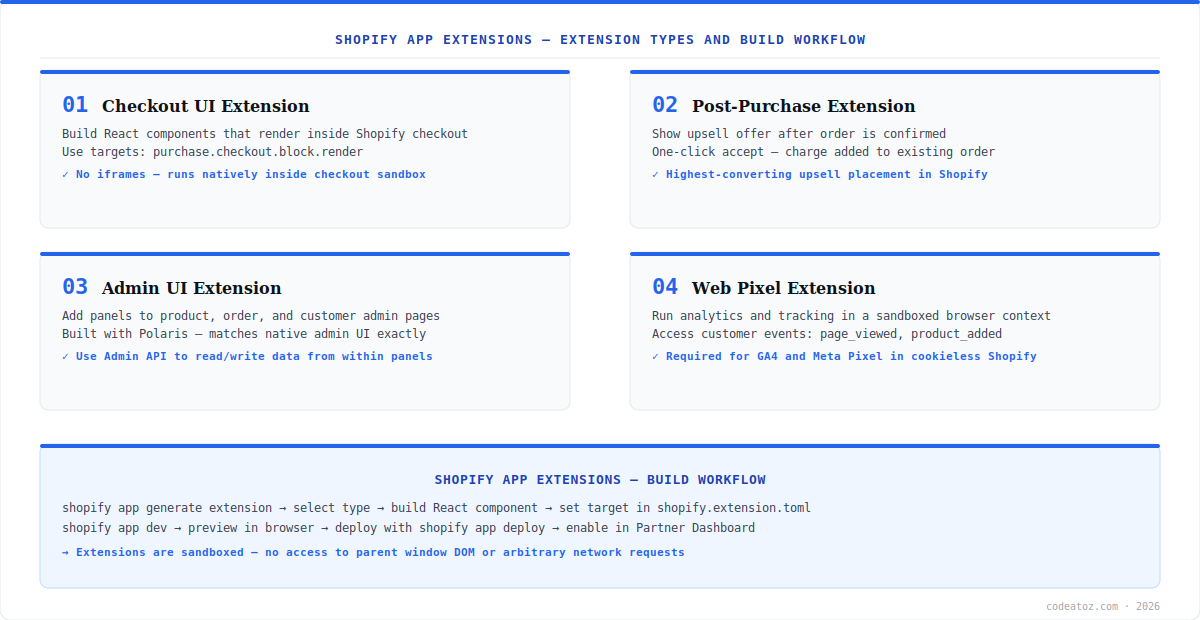
Shopify App Extensions: Checkout UI Extensions
Checkout UI Extensions are the most widely used type of Shopify app extensions. They allow you to render React components directly inside the Shopify checkout — above the payment button, below the order summary, on the thank-you page, and at dozens of other targets. Unlike the legacy ScriptTag approach, Checkout UI Extensions run in a sandboxed environment with no access to the parent checkout DOM, making them more secure and consistently rendered. All merchants on Shopify Plus and Basic plans can use Checkout UI Extensions. Refer to the Shopify Checkout UI Extensions API documentation for the full component and target reference.
import { extension, Banner, Button, useSettings } from '@shopify/ui-extensions-react/checkout';

export default extension('purchase.checkout.block.render', (root, { settings }) => {
  root.appendChild(
    root.createComponent(Banner, { title: 'Gift wrapping available', status: 'info' })
  );
});

// Or using React hooks with @shopify/ui-extensions-react/checkout:
export default reactExtension('purchase.checkout.block.render', () => <GiftWrapBlock />);

function GiftWrapBlock() {
  const { gift_message_enabled } = useSettings();
  return gift_message_enabled ? (
    <BlockStack>
      <Heading>Add gift wrapping</Heading>
      <Button>Add to order (+£3.99)</Button>
    </BlockStack>
  ) : null;
}
The shopify.extension.toml file configures which targets your Shopify app extensions render at, the extension name, and any merchant-configurable settings. Settings defined here appear in the Shopify Theme Editor under Checkout, letting merchants customise the extension without touching code.
[[extensions]]
name = "Gift Wrap Block"
handle = "gift-wrap-block"
type = "ui_extension"

[[extensions.targeting]]
module = "./src/index.tsx"
target = "purchase.checkout.block.render"

[extensions.settings]
  [[extensions.settings.fields]]
  key = "gift_message_enabled"
  type = "boolean"
  name = "Enable gift message input"
Shopify App Extensions: Post-Purchase Extensions
Post-purchase Shopify app extensions render immediately after the order confirmation, before the thank-you page. This is the highest-converting upsell placement in the entire Shopify funnel — the customer has just committed to a purchase and their card is still active. A one-click accept adds the upsell product to the existing order without re-entering payment details. Post-purchase extensions are available on all Shopify plans and are one of the highest-ROI Shopify app extensions for apps in the upsell, cross-sell, and subscription space.
- Render an offer using
@shopify/post-purchase-ui-extensions-react - Call
Actions.Renderto display the offer,Actions.AcceptOfferto process - Use the
useExtensionInput()hook to access order data and initial purchase - Configure eligible offers server-side via the
ShouldRenderendpoint — only show relevant offers - One-click charge uses the customer’s saved payment method — no re-authentication
- Test using
shopify app devwith a development store — post-purchase renders after test orders
Shopify App Extensions: Admin UI Extensions
Admin UI Shopify app extensions let you add panels and blocks to the Shopify merchant admin — on the product detail page, order detail page, customer detail page, and the main app page. They are built with Shopify Polaris components, so they match the native admin UI exactly. Admin extensions use the same sandboxed architecture as Checkout UI Extensions — no direct DOM access, communication only via the Shopify Admin API through the extension’s authenticated context.
A common Admin UI extension pattern is adding a custom data panel to the product page — displaying supplier information, sync status from an ERP, or custom metafield data. The extension reads and writes data via the Admin GraphQL API using the access token provided by the extension context, with no separate OAuth flow needed. Our Shopify development team regularly builds Admin UI extensions as part of larger ERP and OMS integrations, and our Shopify custom app development guide covers the full architecture context.
Shopify App Extensions: Web Pixels and Analytics
Web Pixel Shopify app extensions replace the legacy ScriptTag for analytics and tracking. They run in a sandboxed browser context with access to Shopify’s standard customer events — page_viewed, product_added_to_cart, checkout_completed, and more. This sandboxed model is required for GA4, Meta Pixel, and other tracking integrations on Shopify stores post-iOS 14, as direct cookie access is increasingly restricted. Web Pixels are the only way to reliably implement Shopify app extensions for tracking on stores using Shopify’s Customer Privacy API. The Shopify Web Pixels API documentation lists all available events and the sandbox API.
Generate any type of Shopify app extensions using the Shopify CLI: shopify app generate extension then select the type. The CLI scaffolds the correct directory structure, shopify.extension.toml, and a starter React component. Preview locally with shopify app dev and deploy to Shopify’s CDN with shopify app deploy — extensions are hosted by Shopify, not your server.
Shopify app extensions run in a strict sandbox — no access to window, document, or arbitrary fetch calls to external domains. All network requests must go through allowed endpoints defined in the extension configuration. Plan your data architecture around this constraint — extensions that need external data should use Shopify metafields or the App Proxy pattern to pre-load it.
Frequently Asked Questions About Shopify App Extensions
What are Shopify app extensions?
Shopify app extensions are sandboxed components that add functionality to Shopify stores without modifying theme code. The four main types are Checkout UI Extensions (blocks inside checkout), Post-purchase Extensions (upsell after order), Admin UI Extensions (panels in the merchant admin), and Web Pixels (analytics tracking). They are deployed to Shopify’s CDN and managed independently of the merchant’s theme.
What is a Checkout UI Extension in Shopify app extensions?
A Checkout UI Extension is a type of Shopify app extension that renders React components directly inside the Shopify checkout at defined targets — above the payment button, below the order summary, on the thank-you page, and more. They run in a sandbox with no DOM access and are configured via shopify.extension.toml. They work on all Shopify plans and survive theme changes without breaking.
How do I build Shopify app extensions?
Build Shopify app extensions using the Shopify CLI. Run shopify app generate extension and select the extension type — Checkout UI, Post-purchase, Admin UI, or Web Pixel. The CLI scaffolds the project with a shopify.extension.toml configuration file and a React starter component. Preview with shopify app dev and deploy with shopify app deploy. Extensions are hosted on Shopify’s CDN, not your server.
What are extension targets in Shopify app extensions?
Extension targets in Shopify app extensions define where the extension renders — for example, purchase.checkout.block.render renders a block in the checkout flow, purchase.thank-you.block.render renders on the thank-you page, and admin.product-details.block.render adds a panel to the product detail page in the admin. Each target has its own API surface and available components. Targets are configured in shopify.extension.toml.
What is a Post-purchase Extension in Shopify app extensions?
A Post-purchase Extension is a type of Shopify app extension that renders an upsell offer immediately after order confirmation, before the thank-you page. The customer can accept the offer with one click, adding the product to their existing order without re-entering payment details. It is one of the highest-converting placements in the Shopify funnel and is available on all Shopify plans.
Can Shopify app extensions access external APIs?
Shopify app extensions run in a sandbox that restricts direct external network requests. Checkout UI Extensions can communicate with allowed backend endpoints defined in the extension settings. Web Pixels can send analytics events to approved pixel endpoints. For extensions that need external data, pre-load via Shopify metafields or use the App Proxy pattern to serve data through your app’s backend as an allowed source.
Building Shopify App Extensions?
Our team builds production Shopify apps with Checkout UI, Admin UI, Post-purchase, and Web Pixel extensions. App Store ready.




