
Best Headless Commerce Architecture Guide — Decoupled Storefronts 2026
Understand headless commerce architecture — frontend, API gateway, commerce engine, and CMS layers explained with technology choices and decision frameworks.
Frontend choices
API gateway
Commerce engine
CMS integration
When to go headless
Headless commerce architecture decouples the customer-facing frontend from the commerce engine — WooCommerce, Shopify, or Magento — so each layer can be developed, deployed, and scaled independently. A well-designed headless commerce architecture delivers sub-100ms page loads from CDN, enables multiple storefronts from one backend, and supports native mobile apps alongside the web store. But headless commerce architecture is not right for every project — this guide gives you the decision framework to know when it is and when it is not worth the complexity.
The term headless commerce architecture covers a broad spectrum — from a simple Next.js frontend calling the WooCommerce REST API to a fully composable stack with a separate CMS, search engine, and payment orchestration layer. The right architecture depends on your traffic, team, budget, and growth trajectory. This guide covers the four core layers of any headless commerce architecture, the technology choices at each layer, and the practical trade-offs that determine whether headless is the right call for your project.
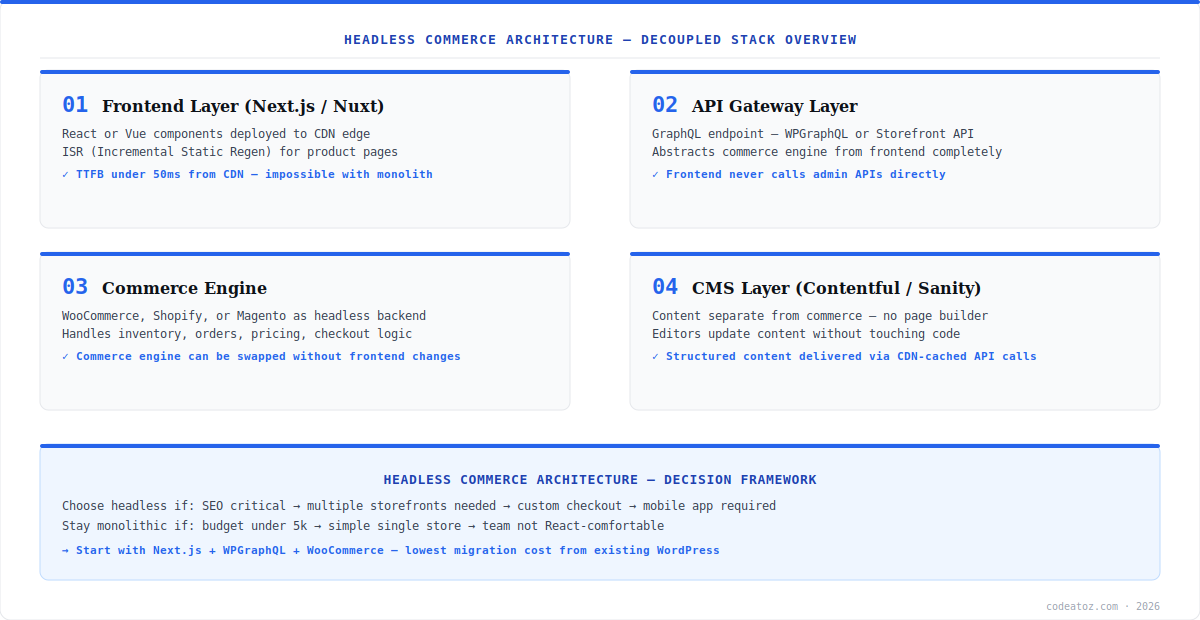
Headless Commerce Architecture: The Four Layers
Every production headless commerce architecture has four layers. The frontend layer is a React or Vue application (Next.js, Nuxt, or Astro) deployed to a CDN via Vercel, Netlify, or Cloudflare Pages. It handles rendering, routing, and user interaction. The API gateway layer is a GraphQL or REST endpoint that abstracts the commerce engine — the frontend never calls the commerce admin directly. The commerce engine (WooCommerce, Shopify, or Magento) manages catalogue, pricing, inventory, orders, and checkout. The CMS layer (Contentful, Sanity, or Storyblok) handles editorial content — banners, landing pages, blog posts — separately from product data. Refer to the Next.js documentation for deployment patterns that suit this architecture.
Headless Commerce Architecture: Frontend Technology Choices
The frontend technology choice in a headless commerce architecture has the largest impact on developer experience and long-term maintainability. Next.js with the App Router is the most common choice in 2026 — React Server Components, ISR for product pages, and edge runtime support make it well-suited to e-commerce. Nuxt 3 is preferred by Vue teams. Astro is a strong choice for content-heavy stores with lower interactivity requirements. The key architectural rule: every product page should use ISR or SSG so it is pre-rendered at the CDN — never server-render product pages on every request in a headless commerce architecture.
- Next.js App Router — React Server Components reduce client-side JavaScript
- ISR on product pages — revalidate every 60 seconds without a full rebuild
- Nuxt 3 — preferred for Vue-native teams, strong module ecosystem
- Astro — partial hydration, ideal for content-first stores with low interactivity
- Cart and checkout — always client-side rendered, never cached
- Deploy to Vercel, Cloudflare Pages, or Netlify — all support ISR natively
Headless Commerce Architecture: When to Go Headless
Headless commerce architecture adds real complexity — separate deployments, CORS configuration, more moving parts, and a higher initial build cost. It is the right choice when: you need sub-second page loads and the monolith cannot achieve them; you run multiple storefronts (mobile app, web, kiosk) from one backend; your content and editorial teams need independence from the commerce team; or you need custom checkout experiences that the hosted checkout cannot support. It is the wrong choice when your budget is under £10k, you have a simple single-language store, or your team lacks React experience. Our guide on headless WooCommerce with Next.js covers the most common starting point. For a full architecture review, speak to our performance and architecture team. See Google Web.dev performance benchmarks for headless vs monolith comparisons.
For most teams moving to headless commerce architecture for the first time, the lowest-risk starting point is Next.js + WPGraphQL + WooCommerce. WooCommerce remains the commerce engine, WPGraphQL provides a GraphQL API, and Next.js handles the frontend. You get the performance benefits of headless without abandoning your WooCommerce investment or rebuilding the entire checkout flow. See the GraphQL documentation for API design principles.
Frequently Asked Questions About Headless Commerce Architecture
What is headless commerce architecture?
Headless commerce architecture decouples the customer-facing frontend from the commerce backend. The frontend (Next.js, Nuxt, or Astro) is deployed separately to a CDN and communicates with the commerce engine (WooCommerce, Shopify, Magento) via a GraphQL or REST API. This enables sub-100ms page loads, multiple storefronts from one backend, and independent scaling of each layer.
What are the four layers of headless commerce architecture?
The four layers of headless commerce architecture are: the frontend layer (Next.js / Nuxt / Astro deployed to CDN), the API gateway layer (GraphQL or REST abstracting the commerce engine), the commerce engine (WooCommerce, Shopify, or Magento managing products, orders, and checkout), and the CMS layer (Contentful, Sanity, or Storyblok handling editorial content separately from product data).
When should I use headless commerce architecture?
Use headless commerce architecture when you need sub-second page loads that the monolith cannot achieve, when you run multiple storefronts (web, mobile, kiosk) from one backend, when content and commerce teams need independent workflows, or when you need custom checkout experiences. Avoid headless if your budget is under £10k, you have a simple single-store setup, or your team lacks React or Vue experience.
What is the best tech stack for headless commerce architecture in 2026?
The most common headless commerce architecture stack in 2026 is Next.js App Router for the frontend, WPGraphQL or Shopify Storefront API for the API layer, WooCommerce or Shopify as the commerce engine, and Contentful or Sanity for CMS. For existing WooCommerce stores, Next.js + WPGraphQL is the lowest-risk migration path. Deploy to Vercel or Cloudflare Pages for ISR support.
How much does headless commerce architecture cost to build?
A basic headless commerce architecture project — Next.js frontend + WooCommerce backend — typically costs £15,000-£40,000 for a full-service agency build. A full composable architecture with separate CMS, search, and payment orchestration layers starts from £50,000. The ongoing hosting cost is typically £100-£400/month for Vercel, CDN, and WooCommerce hosting combined.
Does headless commerce architecture affect SEO?
Headless commerce architecture with server-side rendering or ISR is neutral or positive for SEO compared to a traditional WooCommerce setup. Product pages pre-rendered with Next.js ISR are fully crawlable HTML, often loading faster than monolith pages. Avoid client-side-only rendering (CSR) for product and category pages — dynamic rendering without SSR harms SEO significantly.
Planning a Headless Commerce Architecture?
Our team designs and builds decoupled storefronts — Next.js, WPGraphQL, Shopify Storefront API, Contentful. Fixed-price scoping available.




