
Why Is My Magento Admin Slow? Diagnose and Fix It in 2026
A slow Magento admin is almost always indexers, cron, grids or cache — in that order of likelihood. Here is how to find the real cause instead of guessing, and fix it for good.
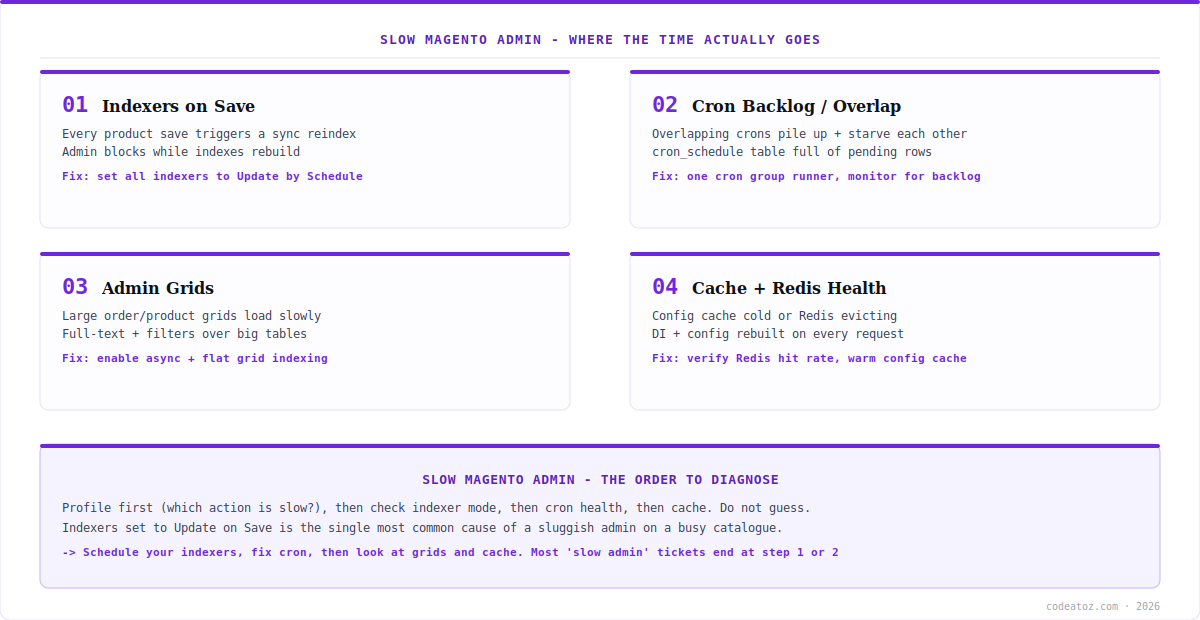
When your Magento admin slow problem has your team waiting ten seconds for a product grid to load, the temptation is to blame hosting and buy a bigger server. That rarely fixes it, because a Magento admin slow issue is usually a configuration problem, not a capacity one. Four causes account for the overwhelming majority: indexers set to reindex on save, cron backlog or overlap, unoptimised admin grids, and cache or Redis health. This guide shows how to diagnose which one you actually have, then fix it.
Search intent: troubleshooting — Magento developers and store operators whose backend is sluggish. We cover profiling to find the real bottleneck, then the four common causes in order of likelihood, each with a concrete fix. It builds on our Magento 2 indexer guide, cron setup guide and debugging guide.
Magento Admin Slow: Profile Before You Change Anything
The first rule of any Magento admin slow investigation is to measure, not guess. “The admin is slow” is not actionable — you need to know which action is slow, because saving a product, loading the order grid and opening a dashboard have completely different bottlenecks. Reproduce the slow action with the browser network tab open and note whether the time is spent waiting for the server (a slow response) or rendering in the browser (a slow front-end). For a Magento admin slow problem, it is almost always the server side.
Then narrow it down. Magento’s built-in profiler, enabled in developer mode, breaks a request into its component timings and shows where the seconds go. On the database side, MySQL’s slow query log tells you if a specific query is the culprit — large stores frequently have one or two pathological queries driving most of the pain. This ten minutes of profiling saves hours of changing settings that were never the problem.
# current mode - developer mode enables the profiler
bin/magento deploy:mode:show

# indexer mode is the first thing to check on a slow admin
bin/magento indexer:show-mode

# is cron actually keeping up, or backlogged?
bin/magento cron:run --group=index
mysql -e "SELECT status, COUNT(*) FROM cron_schedule GROUP BY status;" magento

# enable MySQL slow query log to catch pathological queries
mysql -e "SET GLOBAL slow_query_log='ON'; SET GLOBAL long_query_time=2;"
Magento Admin Slow: Indexers Set to Update on Save
This is the single most common cause of a Magento admin slow complaint, and the easiest to fix. Magento indexers have two modes: Update on Save reindexes synchronously the moment data changes, and Update by Schedule queues changes for cron to process in the background. With indexers on Update on Save, every product save, category edit or price change triggers a synchronous reindex — and the admin user sits and waits for it, sometimes for many seconds on a large catalogue.
Switching all indexers to Update by Schedule moves that work off the request and into cron. The admin action returns immediately; the reindex happens moments later in the background. For any store with a catalogue of meaningful size or more than one person editing products, this is the correct setting, and flipping it resolves a large share of Magento admin slow tickets outright.
# see current modes (look for "Update on Save")
bin/magento indexer:show-mode

# switch ALL indexers to schedule mode
bin/magento indexer:set-mode schedule

# confirm cron is running to process the queue
bin/magento cron:run
bin/magento indexer:status
The prerequisite, and the reason this connects to the next section, is that Update by Schedule only works if cron is actually running. Schedule mode with a broken cron is worse than on-save, because indexes silently never update. See our indexer guide for how the mview change-tracking works underneath.
Magento Admin Slow: Cron Backlog and Overlap
Cron is the hidden engine behind a healthy Magento, and cron problems produce a Magento admin slow experience in two ways. First, if cron is not running at all, scheduled indexing never happens and grids fall back to slow, uncached queries. Second — and more subtly — overlapping cron runs pile up: if a cron job takes longer than the interval between runs, a new run starts before the last finished, and they compete for database and CPU while a backlog of pending jobs grows in the cron_schedule table.
Diagnose it by querying cron_schedule for the distribution of job statuses. A healthy table has jobs moving to success; a backlogged one shows a growing pile of pending or a scatter of error rows. The fix is to ensure a single, correctly configured cron runner, adjust schedules so heavy jobs do not overlap, and monitor the table so a backlog is caught early rather than discovered when the admin grinds to a halt.
| Symptom | Likely cause | Fix |
|---|---|---|
| Grids slow, prices stale | Cron not running | Install and verify cron runner |
| DB CPU spikes on interval | Overlapping cron runs | Stagger schedules, single runner |
| Growing pending jobs | A job exceeds its interval | Profile and optimise the slow job |
| Scattered error rows | A failing scheduled task | Check var/log, fix the task |
Magento Admin Slow: Grids and Cache Health
If profiling points at specific admin pages rather than save actions, the cause is usually grids. The order and product grids can query large tables with full-text search and multiple filters, and on a big store an unoptimised grid is genuinely slow to load. Magento offers asynchronous grid indexing, which decouples grid population from order placement, and enabling it removes a common Magento admin slow bottleneck on high-order-volume stores. Trimming the columns and default filters on heavily used grids helps too — every sortable column is work.
Finally, cache and Redis health. If the configuration cache is cold or Redis is evicting keys under memory pressure, Magento rebuilds configuration and dependency-injection data far more often than it should, and that shows up as general backend sluggishness affecting everything. Confirm Redis is healthy — hits far exceeding misses, evictions near zero — as covered in our Redis configuration guide. A Magento admin slow problem that survives fixing indexers and cron is often a cache one. Our Magento team diagnoses and fixes backend performance as part of support work.
Do not skip to buying hardware. A bigger server occasionally helps, but a Magento admin slow problem caused by on-save indexing or broken cron will be just as slow on a larger box — you will have spent money to move the same bottleneck. Diagnose first; upgrade hardware only once profiling shows you are genuinely resource-bound.
How we approach a slow Magento admin
Most tickets end at indexer mode. When a client reports a slow admin, the first thing we check is indexer:show-mode, and more often than not the answer is there — indexers on Update on Save, reindexing synchronously on every edit. Switching to schedule mode resolves it before we look at anything else.
Cron is the second stop, and the quieter culprit. A surprising number of “slow admin” and “stale data” reports are really cron not running or cron overlapping itself. We query the cron_schedule table early, because a growing pending backlog explains a whole cluster of otherwise confusing symptoms.
We resist the hardware conversation until profiling justifies it. Clients often arrive convinced they need a bigger server. Sometimes they do — but we profile first, because upgrading hardware to fix a configuration bottleneck is an expensive way to keep the same problem.
Frequently Asked Questions About a Slow Magento Admin
Why is my Magento admin so slow?
The most common cause is indexers set to Update on Save, which reindex synchronously on every product or price change while the admin user waits. Other frequent causes are cron backlog or overlap, unoptimised admin grids, and unhealthy cache or Redis. Profile the specific slow action first rather than assuming it is hosting.
Does switching indexers to Update by Schedule speed up the admin?
Usually dramatically, yes. Update by Schedule moves reindexing off the admin request and into background cron, so saving a product returns immediately instead of waiting for a synchronous reindex. It is the correct mode for any store with a sizeable catalogue — but it requires cron to be running reliably.
How do I check if Magento cron is causing the slowdown?
Query the cron_schedule table grouped by status. A healthy setup shows jobs reaching success; a problem shows a growing pile of pending jobs or scattered error rows. Overlapping cron runs also spike database CPU on each interval. Fixing cron often resolves both slow-admin and stale-data symptoms at once.
Will a bigger server fix a slow Magento admin?
Often not. If the cause is on-save indexing, broken cron or a cold cache, the same bottleneck persists on a larger server — you have spent money without fixing the problem. Diagnose with profiling first, and upgrade hardware only when the evidence shows you are genuinely CPU or memory bound.
Why are my Magento admin grids slow to load?
Order and product grids query large tables with full-text search and multiple filters, which is slow on a big store. Enable asynchronous grid indexing to decouple grid population from order placement, and trim unnecessary columns and default filters on frequently used grids, since every sortable column adds work.
Can Redis problems make the Magento admin slow?
Yes. If the configuration cache is cold or Redis is evicting keys under memory pressure, Magento repeatedly rebuilds configuration and dependency-injection data, which surfaces as general backend sluggishness. Verify Redis shows a high hit ratio and near-zero evictions; if not, it needs resizing or reconfiguration.
Backend Grinding to a Halt?
Our team profiles and fixes slow Magento admins — indexers, cron, grids and cache, diagnosed properly.




