
7 Things You Must Check Before Starting a Hyvä Theme Migration
We’ve done over 50 Hyvä migrations. The ones that went over budget all had one thing in common — they skipped this checklist.
This Hyva migration checklist exists because Hyvä Theme is genuinely transformational for Magento 2 stores. We’ve seen stores go from a PageSpeed score of 28 to 94 after migration. The performance improvement is real, consistent, and significant enough to affect conversions and SEO rankings.
But Hyvä migrations are not simple drop-in replacements. A migration done without proper pre-work tends to go over scope, over budget, and over timeline — sometimes dramatically. The stores we’ve migrated that went smoothly all had one thing in common: we did a thorough pre-migration audit before writing a single line of code.
Here’s everything we check, in the order we check it.
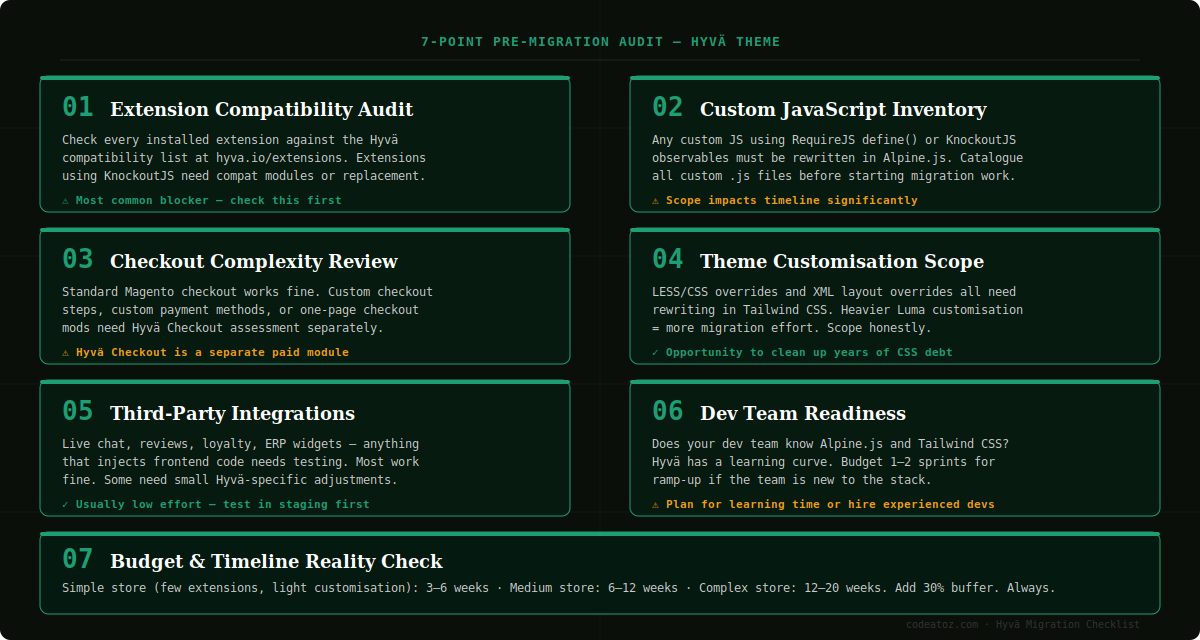
The Complete Hyva Migration Checklist — 7 Points
Extension Compatibility Audit
This is the single most important check and the most common source of migration problems. Hyvä replaces the entire Magento frontend — which means any extension that renders frontend output needs to either have a Hyvä compatibility module, or needs to be replaced.
The Hyvä team maintains a compatibility list at hyva.io/extensions. Run every installed extension against it. For each one, you need to know: does it have a Hyvä compat module? Is that module free or paid? Is it actively maintained?
Extensions built on KnockoutJS — which is most pre-2021 Magento extensions — will need compatibility work. Some vendors have released official Hyvä modules. Others haven’t. If a critical extension has no Hyvä support, you have three options: build a compatibility layer, find an alternative extension, or keep that functionality on a Luma fallback (which is possible but not ideal).
Custom JavaScript Inventory
Any custom JavaScript written for the existing Luma theme almost certainly uses RequireJS define() calls and possibly KnockoutJS observables. None of that works in Hyvä. Hyvä uses Alpine.js for reactive UI — it’s a completely different paradigm.
Before starting a migration, catalogue every custom .js file in your theme. For each one, understand what it does and estimate the effort to rewrite it in Alpine.js. Simple UI interactions are quick to convert. Complex KnockoutJS view models with multiple bindings take more time.
This step also reveals any custom AMD modules that interact with Magento’s default JS — these are often invisible until you start migration work and suddenly things break.
Checkout Complexity Review
The standard Magento 2 checkout works fine with Hyvä’s default theme — but Hyvä has its own separate checkout module called Hyvä Checkout, which is sold separately and priced separately from the core theme licence.
If your store has custom checkout steps, custom payment method integrations with frontend components, a one-page checkout extension, or any checkout UI customisation, you need to assess these carefully before starting. Some payment extensions have Hyvä-compatible versions. Some don’t yet.
The worst time to discover your payment gateway’s Magento extension doesn’t support Hyvä is three weeks into a migration when you’re trying to test the checkout flow.
Theme Customisation Scope
Everything in your current Luma theme — LESS overrides, CSS customisations, XML layout modifications — needs to be rebuilt in Hyvä’s Tailwind CSS system. This is actually one of the advantages of migration: you get to clean up years of accumulated CSS debt and start with a clean, utility-based system.
But the scope of your current customisations directly determines how much work this is. A store with minimal customisation on top of a standard Luma theme might take a week to rebuild in Hyvä. A store with heavily customised templates, bespoke category page layouts, and complex product page variations could take several weeks just for the theme rebuild.
Do a proper count of custom templates (phtml files), layout XML overrides, and LESS/CSS overrides. This gives you the real scope of theming work.
Third-Party Integrations
Anything that injects code into your storefront frontend needs testing — live chat widgets, review platforms, loyalty programme widgets, customer tracking scripts, analytics integrations, A/B testing tools.
Most of these work fine because they’re JavaScript widgets injected via a simple script tag, which Hyvä doesn’t interfere with. But some tools inject code that interacts with Magento’s frontend framework and these need adjustments.
Make a list of every third-party tool currently active on your storefront. For each one, check whether the vendor has Hyvä-specific documentation or known compatibility notes. Most are fine — but a few common ones (certain review platforms, some B2B tools) have historically needed small compatibility fixes.
Dev Team Readiness
Hyvä uses Alpine.js and Tailwind CSS. If your development team (or the agency you’re hiring) knows these tools, migration work is fast and enjoyable. If they don’t, there’s a learning curve.
Alpine.js is not difficult to learn — experienced developers typically get comfortable with it within a sprint or two. Tailwind CSS has a short learning curve for anyone with CSS experience. But both require adjustment time, and that time needs to be budgeted.
If you’re evaluating agencies for a Hyvä migration, ask specifically about their Alpine.js and Tailwind experience. Ask to see previous Hyvä projects. The difference between a team that’s done 10 Hyvä migrations and one doing their first is substantial in terms of speed and quality.
Budget and Timeline Reality Check
After completing checks 1–6, you have enough information to estimate the migration properly. Here’s a realistic framework based on our experience:
- Simple store — few extensions (all Hyvä compatible), minimal theme customisation, standard checkout: 3–6 weeks
- Medium store — some custom extensions needing compat work, moderate theme customisation: 6–12 weeks
- Complex store — multiple incompatible extensions, heavy custom theme, custom checkout: 12–20 weeks
Whatever estimate you arrive at after the audit, add 30%. Not because developers are bad at estimating — but because Magento migrations have a consistent habit of revealing additional complexity once work starts. Build that buffer in explicitly rather than discovering it mid-project.
How to Run Your Hyva Migration Checklist Audit
This Hyva migration checklist audit should take 1–3 days depending on the complexity of your current store. Here’s how to approach it:
- Export your full extension list from Magento admin → System → Extensions and cross-reference against the Hyvä compatibility database
- Run a search across your codebase for
define(andKnockoutJSto find all RequireJS/KO dependencies - Count phtml template overrides in your custom theme using:
find app/design -name "*.phtml" | wc -l - List all active extensions from your
app/etc/config.phpand check each frontend-facing one - Document your checkout flow in detail — every step, every customisation, every payment method
Essential external resources for your Hyva migration checklist:
- Official compatibility database: hyva.io/extensions — check every extension before starting
- Alpine.js documentation: alpinejs.dev — the JS framework that replaces KnockoutJS in Hyvä
- Tailwind CSS documentation: tailwindcss.com — the CSS framework used in Hyvä themes
We offer a standalone pre-migration audit as a fixed-price service — a detailed written report covering all 7 points with a clear estimate of migration complexity, timeline, and cost. It’s the most efficient way to make a proper go/no-go decision on a Hyvä migration.
HYVÄ THEME SERIES — 4 PARTS
Part 1: 7 Things to Check Before Hyvä Migration (you are here)
Part 2: How to Install and Set Up Hyvä Theme →
Part 3: Building Custom Components in Hyvä →
Part 4: Hyvä and Third-Party Extensions →
Thinking About Migrating to Hyvä?
We’ll run a full pre-migration audit — covering all 7 points — and give you a clear picture of scope, timeline, and cost before you commit to anything.





1 Comments
checklist? If you’re installing Hyvä on an existing Magento store (not a fresh install), read Part 1: 7 Things to Check Before a Hyvä Migration first. Installing Hyvä without the pre-audit on an existing store is how migrations go over