
The Complete Magento GraphQL Performance Guide 2026
Magento GraphQL performance done right — kill N+1 resolvers, make read queries cacheable, guard query complexity, and stop the API becoming your headless storefront’s bottleneck.
Magento GraphQL performance is what determines whether a headless or PWA storefront feels instant or sluggish, because in a decoupled architecture every page is assembled from GraphQL calls. A slow resolver that was invisible behind Luma’s full-page cache becomes painfully visible when the front end waits on it directly. Good Magento GraphQL performance comes down to four things: eliminating N+1 resolver patterns, making read queries cacheable, guarding query complexity, and measuring the right numbers. This guide covers each.
Search intent: informational/procedural — Magento developers building headless or PWA storefronts on GraphQL. We cover why performance matters more in headless, the N+1 problem, caching GraphQL, query-complexity limits, and measurement. It builds on our custom GraphQL query guide and React GraphQL search tutorial.
Magento GraphQL Performance: Why It Matters More in Headless
On a traditional Luma storefront, Magento’s server-side rendering plus full-page caching hides a great deal of backend cost — a slow query behind a cached page never reaches most visitors. Headless changes that contract. In a headless architecture, the front end requests exactly the data it needs via GraphQL, and the user waits on those responses directly. This is why Magento GraphQL performance becomes a first-class concern the moment you go headless: the API is no longer an internal detail, it is the critical path to render.
The practical consequence is that GraphQL resolver efficiency, previously a background concern, now directly shapes perceived speed. A product listing page that fires one query per product instead of one query for all products will feel slow no matter how fast your front-end framework is. Getting Magento GraphQL performance right is therefore foundational to any headless project, not an optimisation to bolt on later.
Magento GraphQL Performance: The N+1 Resolver Problem
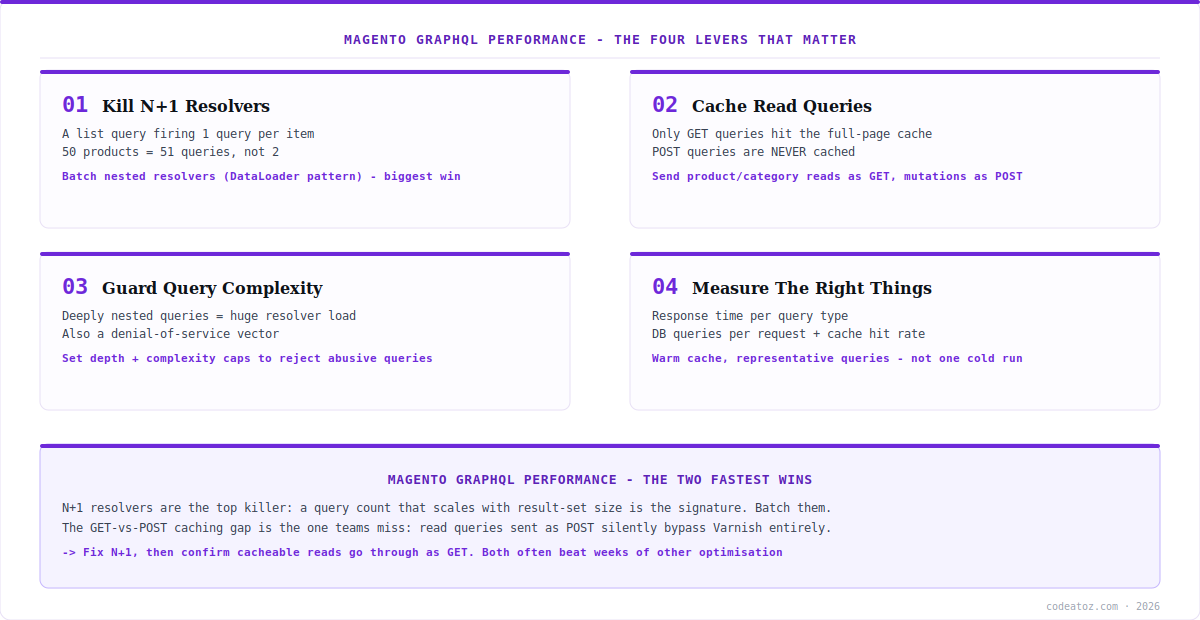
The single biggest Magento GraphQL performance killer is the N+1 query pattern. It happens when a resolver for a list fetches the list in one query (the “1”), then fires a separate query for each item in it (the “N”) to resolve a nested field. Request 50 products with their stock status and a naive resolver runs 51 queries instead of 2. Under load, this multiplies catastrophically.
The fix is batching. Rather than resolving each nested field individually, collect the identifiers and resolve them in a single batched query — the pattern popularised by DataLoader in the GraphQL world. Magento’s resolver architecture supports batching, and custom resolvers should be written to use it from the start. When you inherit a slow GraphQL endpoint, N+1 is the first thing to look for: enable query logging, run a representative GraphQL request, and count the database queries. A number that scales with the size of your result set is the signature of an N+1 problem, and fixing it is often the largest single Magento GraphQL performance win available.
# turn on the MySQL general query log briefly
mysql -e "SET GLOBAL general_log='ON'; SET GLOBAL general_log_file='/tmp/q.log';"

# fire a representative products query at your endpoint
curl -s -X POST https://example.com/graphql
  -H "Content-Type: application/json"
  -d '{"query":"{ products(filter:{}, pageSize:50){ items{ sku stock_status } } }"}'
  > /dev/null

# count queries - a number that scales with pageSize = N+1
mysql -e "SET GLOBAL general_log='OFF';"
grep -c "SELECT" /tmp/q.logMagento GraphQL Performance: Caching and Query Complexity
Two further levers shape Magento GraphQL performance. The first is caching. Magento can serve GraphQL queries through the full-page cache, but only for queries sent as HTTP GET requests — POST queries are never cached. Many client libraries default to POST for everything, silently forgoing cacheability on read queries that could be cached. Configuring your client to send cacheable read queries (product, category, CMS data) as GET, while keeping mutations and personalised queries as POST, can transform Magento GraphQL performance for anonymous traffic — the same Varnish layer that caches Luma pages then caches your GraphQL reads.
The second is query complexity. GraphQL’s flexibility is a double-edged sword: a client can request deeply nested data — products, their categories, those categories’ products, and so on — generating enormous resolver work from a compact query. Left unguarded, this is both a performance risk and a denial-of-service vector. Magento supports query complexity and depth limits that reject abusively expensive queries before they execute. Setting sensible limits protects Magento GraphQL performance under both accidental over-fetching and deliberate abuse.
| Lever | Problem it solves | Action |
|---|---|---|
| Resolver batching | N+1 query explosion | Batch nested resolvers (DataLoader pattern) |
| GET requests | Read queries not cached | Send cacheable reads as GET, mutations as POST |
| Query complexity limit | Expensive nested queries | Set depth + complexity caps |
| Field selection | Over-fetching unused data | Request only needed fields client-side |
| Persisted queries | Large query payloads | Use query hashes where supported |
The GET-versus-POST detail is the one teams miss. It is easy to spend days optimising resolvers while every read query bypasses the cache because the client sends POST by default. Before deep resolver work, confirm your cacheable Magento GraphQL performance queries are actually going through as GET and hitting Varnish — it is often the fastest improvement available.
Magento GraphQL Performance: Measuring It Properly
You cannot improve Magento GraphQL performance you are not measuring. Three numbers matter: response time per query type (a product query and a complex cart query have very different profiles, so measure them separately), database queries per GraphQL request (the N+1 detector), and cache hit rate on cacheable queries (are your GET reads actually hitting Varnish?). Capture these under realistic conditions — a warm cache and representative query shapes — because a cold-cache benchmark tells you little about production.
Instrument at both ends. Client-side timing shows what the user experiences; server-side query counting and profiling show why. When the two disagree — fast server response but slow perceived load — the problem is often too many separate GraphQL requests rather than slow individual ones, which points at consolidating queries rather than tuning resolvers. Treating Magento GraphQL performance as a measured discipline rather than a guessing game is what separates a headless build that flies from one that frustrates. Our Magento team builds and optimises GraphQL for headless storefronts.
What we have learned optimising Magento GraphQL
N+1 is the first thing we hunt, every time. When we inherit a slow GraphQL endpoint, we log queries and fire a representative request before theorising. A query count that scales with result-set size is the unmistakable signature, and batching those resolvers is usually the biggest single win on the board.
The GET-versus-POST caching gap is astonishingly common. We regularly find teams who have optimised resolvers hard while every read query goes through as POST and skips the cache entirely. Switching cacheable reads to GET so they hit Varnish often beats weeks of resolver tuning, for an afternoon’s work.
Unbounded query complexity is a latent problem. A storefront works fine until a client — or an attacker — sends a deeply nested query that generates enormous resolver load. We set depth and complexity limits early, because it is both a performance safeguard and a denial-of-service control, and retrofitting it after an incident is no fun.
Frequently Asked Questions About Magento GraphQL Performance
Why is my Magento GraphQL slow?
The most common cause is N+1 resolvers — a list query that fires a separate database query per item for a nested field, so a 50-item request runs 51 queries. Other causes are read queries sent as POST bypassing the cache, unbounded query complexity, and over-fetching unused fields. Log queries and count them to confirm N+1.
What is the N+1 problem in Magento GraphQL?
It is when a resolver fetches a list in one query, then fires an additional query for each item to resolve a nested field — N queries plus the original 1. It multiplies badly under load. The fix is batching nested resolvers so all items are resolved in a single query, the DataLoader pattern.
Can Magento GraphQL queries be cached?
Yes, but only queries sent as HTTP GET requests are served through the full-page cache — POST queries are never cached. Many clients default to POST for everything, forgoing cacheability. Send cacheable read queries (products, categories, CMS) as GET and keep mutations as POST to let Varnish cache your reads.
How do I limit expensive GraphQL queries in Magento?
Use Magento’s query complexity and depth limits, which reject abusively expensive queries before they execute. GraphQL lets a client request deeply nested data that generates huge resolver work from a small query, which is both a performance risk and a denial-of-service vector. Sensible caps protect the endpoint from both.
Does GraphQL performance matter more for headless Magento?
Considerably. On Luma, server-side rendering and full-page caching hide backend cost. In headless, the front end waits on GraphQL responses directly, so resolver efficiency shapes perceived speed. A slow query that was invisible behind a cached Luma page becomes a visible bottleneck the moment you go headless.
How do I measure Magento GraphQL performance?
Track three numbers: response time per query type measured separately, database queries per GraphQL request (to catch N+1), and cache hit rate on cacheable GET queries. Measure under a warm cache with representative queries, and instrument both client and server so you can tell slow resolvers from too many separate requests.
GraphQL Bottlenecking Your Headless Build?
Our team optimises Magento GraphQL — resolver batching, cacheable reads, complexity limits and measurement.




