
The Complete Astro Ecommerce Guide — Islands Architecture 2026
Build an Astro ecommerce storefront — islands architecture, zero-JS product pages, interactive cart islands, Nano Stores state, and hybrid SSG + SSR rendering.
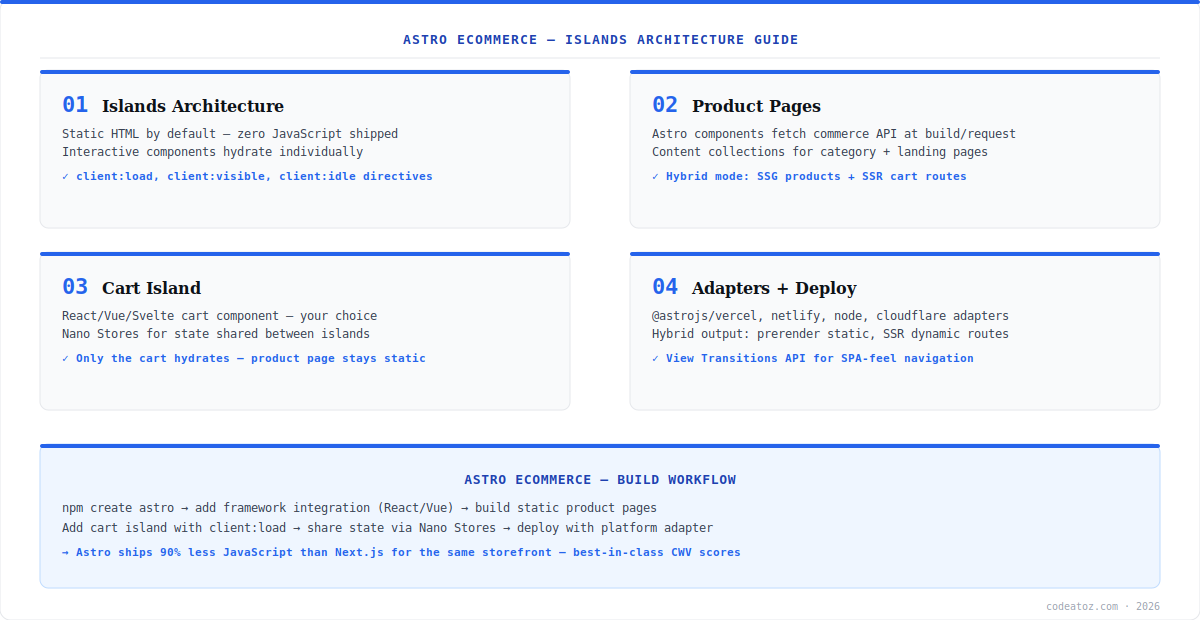
Astro ecommerce applies Astro’s islands architecture to online stores: product and category pages ship as pure static HTML with zero JavaScript, while only genuinely interactive components — the cart, variant picker, search — hydrate as isolated islands. The result is an Astro ecommerce storefront that ships up to 90% less JavaScript than an equivalent Next.js build, with best-in-class Core Web Vitals scores out of the box.
The core insight of Astro ecommerce is that most of a storefront is content, not application. Product descriptions, images, pricing, and category grids need no client-side JavaScript — they are HTML. Astro renders them at build time (SSG) or request time (SSR) and ships them static. Interactivity is opt-in per component via client directives. This guide covers the full Astro ecommerce architecture: product pages, the cart island pattern, cross-island state with Nano Stores, and hybrid rendering. Refer to the Astro documentation for the framework fundamentals, and the islands architecture guide for the hydration model.
Astro Ecommerce: Islands and Product Pages
In Astro ecommerce, product pages are .astro components that fetch from your commerce API (Shopify Storefront API, WooCommerce REST, or Medusa) in the component frontmatter — code that runs at build time for SSG or request time for SSR, never in the browser. The rendered output is pure HTML. Interactive pieces are framework components (React, Vue, Svelte, or Solid — Astro supports all) mounted with a client directive: client:load hydrates immediately, client:visible when scrolled into view, client:idle when the main thread is free.
---
// src/pages/products/[handle].astro — runs server/build side only
import Layout from '../../layouts/Shop.astro';
import AddToCart from '../../components/AddToCart.tsx';
const { handle } = Astro.params;
const product = await fetchProduct(handle); // commerce API call
export const prerender = true; // SSG this route
---

{product.title}
{product.price}
Astro Ecommerce: Cart State with Nano Stores and Hybrid Rendering
Islands are isolated by design, so Astro ecommerce needs a state layer that works across them — the cart button in the header and the add-to-cart island on the product page must share state. Nano Stores is the official answer: a sub-1KB store library with bindings for React, Vue, Svelte, and Solid, letting differently-framed islands read the same atoms. For rendering, use Astro’s hybrid output: prerender = true on product and category routes (static, CDN-cached), and SSR for cart, search, and account routes that need request-time data. Deploy with the adapter for your platform — @astrojs/vercel, @astrojs/netlify, @astrojs/cloudflare, or @astrojs/node. The Nano Stores repository documents the cross-framework patterns. Our headless commerce team builds Astro ecommerce storefronts where Core Web Vitals are the priority. See our headless commerce architecture guide for choosing Astro vs Remix vs Next.js.
Enable Astro’s View Transitions in your Astro ecommerce layout for SPA-feel page navigation — product images morph between the grid and detail page with native browser animations, no client router or JavaScript framework required. One line in the layout head: <ViewTransitions />.
Frequently Asked Questions About Astro Ecommerce
What is Astro ecommerce?
Astro ecommerce is building online storefronts with the Astro framework’s islands architecture — product and category pages ship as static HTML with zero JavaScript, while interactive components like the cart hydrate as isolated islands. It delivers up to 90% less JavaScript than equivalent Next.js builds with best-in-class Core Web Vitals scores.
What commerce backends work with Astro ecommerce?
Astro ecommerce works with any API-driven commerce backend — Shopify Storefront API, WooCommerce REST and Store API, Medusa, BigCommerce, and Commerce Layer are all common. Astro components fetch from the API at build time (SSG) or request time (SSR) in the component frontmatter. There is no Astro-specific commerce requirement; any HTTP API works.
How does the cart work in Astro ecommerce?
The cart in Astro ecommerce is an interactive island — a React, Vue, Svelte, or Solid component mounted with client:load. Cart state shared between islands (header cart count, add-to-cart buttons) uses Nano Stores, a sub-1KB cross-framework store. Cart operations call your commerce backend’s cart API; only the cart components ship JavaScript, the rest of the page stays static.
Should I use SSG or SSR for Astro ecommerce?
Use Astro’s hybrid mode for ecommerce: prerender product and category pages as static (SSG) for instant CDN delivery, and SSR the routes needing request-time data — cart, search results, and account pages. Set prerender = true per route. For catalogues with frequent price changes, SSR product pages behind a short CDN cache works better than constant rebuilds.
Is Astro ecommerce good for SEO?
Yes — Astro ecommerce is exceptional for SEO. Product pages are complete HTML at response time with no client-side rendering dependency, JSON-LD schema renders server-side, and the minimal JavaScript payload produces excellent Core Web Vitals which are a Google ranking signal. Astro storefronts routinely score 95+ on PageSpeed mobile where JS-heavy frameworks struggle.
When should I choose Astro ecommerce over Next.js or Remix?
Choose Astro ecommerce when page speed and Core Web Vitals are the top priority and your storefront is content-heavy with focused interactivity — most retail catalogues fit this. Choose Next.js or Remix when the storefront is application-heavy: complex B2B configurators, dashboards, or real-time features across every page where a full client framework earns its weight.
Building an Astro Ecommerce Storefront?
Our team builds islands-architecture storefronts — static product pages, cart islands, and hybrid rendering.




