
The Complete Shopify Theme App Extensions Guide 2026
Build Shopify theme app extensions — App Blocks for Theme Editor, App Embeds for global injection, scoped assets, and merchant-editable schema settings.
Shopify theme app extensions are the correct way to add content to storefronts without editing theme code. With Shopify theme app extensions, merchants drag-drop blocks inside the Theme Editor. A Shopify theme app extensions build deploys to Shopify CDN and works with every theme by default — no Liquid edits, no upgrade conflicts.
Before Shopify theme app extensions, apps used ScriptTag or required merchants to paste Liquid snippets — both broke on theme updates. Shopify theme app extensions use a sandboxed block system fully independent of the merchant theme. Refer to the Shopify theme app extensions documentation for the full schema reference.
Shopify Theme App Extensions: App Blocks
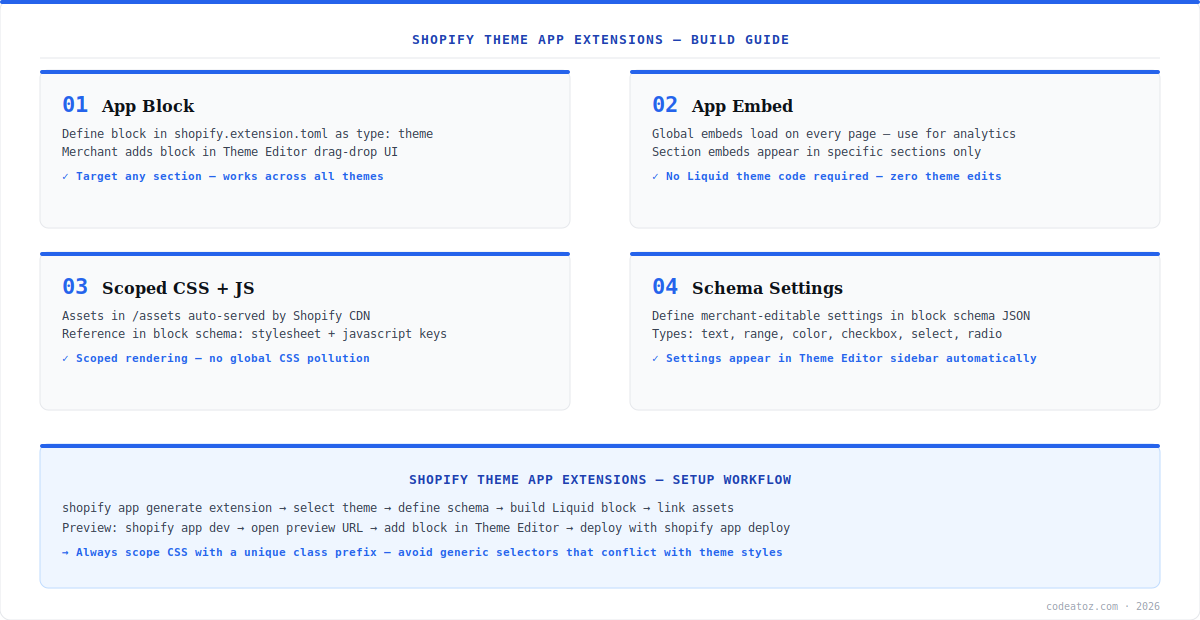
App Blocks are the primary type of Shopify theme app extensions. They render as drag-drop blocks in the Theme Editor that merchants place in any section. An App Block is a Liquid file in blocks/ with a JSON schema defining the block name, settings, and targets. Settings appear in the Theme Editor sidebar — no code required for merchants to customise them. Scoped CSS and JS go in assets/ and are referenced in the schema.
{
  "name": "App Block: Reviews",
  "target": "section",
  "stylesheet": "review-block.css",
  "javascript": "review-block.js",
  "settings": [
    {"type":"range","id":"max_reviews","label":"Max reviews","min":1,"max":20,"default":5},
    {"type":"color","id":"star_color","label":"Star colour","default":"#F59E0B"}
  ]
}Shopify Theme App Extensions: App Embeds and Assets
App Embeds are Shopify theme app extensions that inject content globally — into the head, before body close, or into a section across all pages. Merchants toggle them on or off in the Theme Editor under App Embeds. Ideal for analytics scripts, chat widgets, and sticky banners. Unlike App Blocks, they do not require merchant placement. Our Shopify development team builds Shopify theme app extensions for loyalty widgets, review blocks, and B2B pricing displays. See our Shopify app extensions guide for the full extension type overview. Also see the Shopify Theme App Extension UX guidelines for App Store review requirements. Check the Shopify extensions framework docs for the complete asset reference.
Shopify theme app extensions never modify merchant theme files. App Embeds survive theme upgrades automatically. App Blocks may need re-adding in a new theme but require zero code edits. This is required for Shopify App Store listing approval.
Frequently Asked Questions About Shopify Theme App Extensions
What are Shopify theme app extensions?
Shopify theme app extensions are a way for apps to add blocks and embeds to Shopify storefronts without editing theme code. They include App Blocks (drag-drop in Theme Editor) and App Embeds (global toggle injection). They deploy to Shopify CDN and work with any Shopify theme without the merchant editing Liquid files.
What is the difference between App Blocks and App Embeds in Shopify theme app extensions?
App Blocks are Shopify theme app extensions that merchants manually place in sections via Theme Editor drag-drop. App Embeds are toggled globally and inject into the head, body close, or a section across all pages. Use App Blocks for positioned content; App Embeds for site-wide scripts and widgets.
How do I create a Shopify theme app extension?
Run shopify app generate extension and select theme_app_extension. The CLI creates blocks/ and assets/ directories with starter files and shopify.extension.toml. Add your Liquid block in blocks/, scoped CSS and JS in assets/, define merchant settings in the schema, and deploy with shopify app deploy.
Do Shopify theme app extensions work with all themes?
Yes. Shopify theme app extensions work with any Online Store 2.0 theme — all themes launched on Shopify since 2021. App Embeds work with all themes regardless of version. The extension is sandboxed and theme-independent, making it compatible without any merchant theme customisation.
How do Shopify theme app extensions handle theme upgrades?
Shopify theme app extensions survive theme upgrades automatically — they are stored independently of the theme. App Embeds remain active after an upgrade. App Blocks may need re-adding in the new theme sections but require no code edits. This is a major advantage over legacy Liquid snippet injection and is required for App Store compliance.
Can Shopify theme app extensions access theme settings?
Yes. Shopify theme app extensions access theme settings and section settings via standard Liquid template variables. App Blocks receive block.settings with merchant-configured values from the schema. Extensions are sandboxed — they cannot modify or read other extensions output or the DOM outside their own rendered element.
Building Shopify Theme App Extensions?
Our team builds App Blocks, App Embeds, and full theme extension architectures for App Store apps.




