
The Complete WooCommerce Headless Checkout Guide 2026
Build a custom WooCommerce headless checkout — Store API cart, nonce session management, address collection, Stripe Elements payment, and order creation.
WooCommerce headless checkout is the most complex part of any headless WooCommerce build. It requires session management, authentication, shipping selection, payment processing, and order creation — all through the WooCommerce Store API without the native WordPress checkout page. This guide covers the complete WooCommerce headless checkout flow using the Store API v1, Stripe Elements, and JWT authentication for logged-in customers.
The WooCommerce Store API (/wc/store/v1) is the correct API for WooCommerce headless checkout. It provides CORS support, session-based guest checkout via nonce, cart management, shipping method selection, and a checkout endpoint that creates the order and processes payment. Pair it with Stripe Elements for PCI-compliant payment UI. This guide assumes familiarity with the WooCommerce GraphQL API and headless architecture covered earlier in this series.
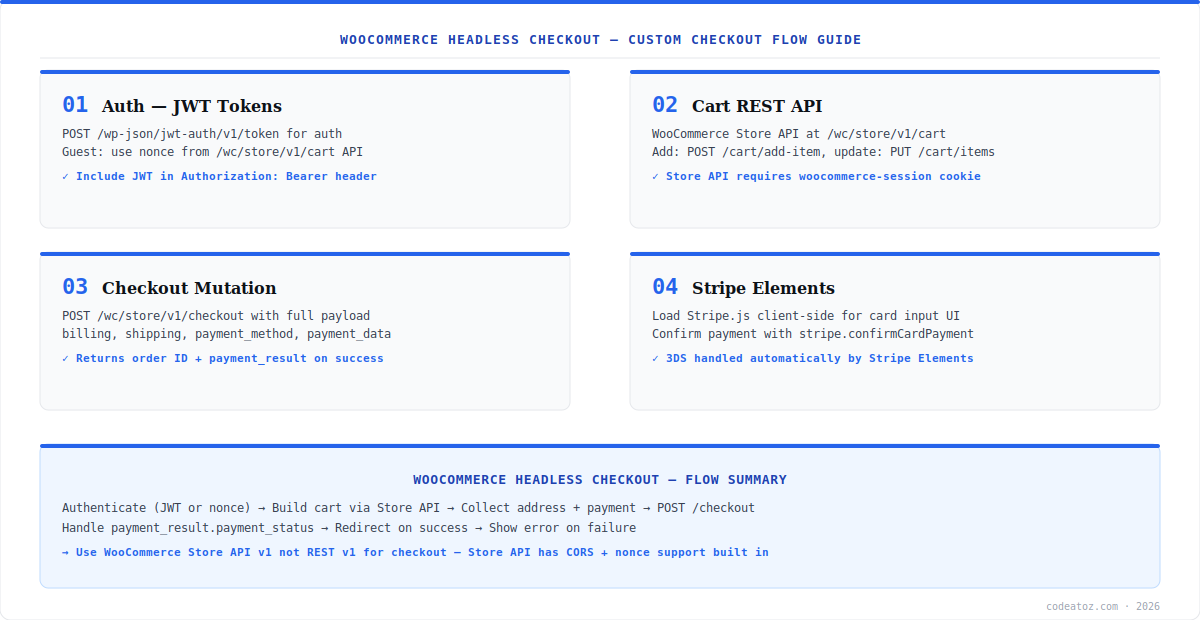
WooCommerce Headless Checkout: Store API and Nonce Session
The WooCommerce headless checkout flow begins with the Store API cart. POST to /wc/store/v1/cart/add-item — the first response returns an X-WC-Store-API-Nonce header and a cart_key cookie. Store both and send them on every subsequent cart request — the nonce rotates with each response so always use the latest value. For logged-in customers, also include an Authorization: Bearer [jwt] header from the WP JWT Authentication plugin alongside the nonce. This dual-auth approach supports both guest and authenticated WooCommerce headless checkout in a single codebase.
class WooCheckout {
  private nonce = '';
  async request(path: string, method = 'GET', body?: object) {
    const res = await fetch(`${WOO_URL}/wp-json/wc/store/v1${path}`, {
      method,
      headers: { 'Content-Type': 'application/json', 'Nonce': this.nonce },
      credentials: 'include',
      body: body ? JSON.stringify(body) : undefined,
    });
    const n = res.headers.get('X-WC-Store-API-Nonce');
    if (n) this.nonce = n;
    return res.json();
  }
  addToCart = (id: number, qty = 1) =>
    this.request('/cart/add-item', 'POST', { id, quantity: qty });
  getShippingRates = () => this.request('/cart/shipping-rates');
  selectShipping = (rateId: string) =>
    this.request('/cart/select-shipping-rate', 'POST', { rate_id: rateId });
}WooCommerce Headless Checkout: Address, Shipping, and Payment
Update billing and shipping address via PUT /wc/store/v1/cart/update-customer. After updating, call GET /wc/store/v1/cart/shipping-rates to retrieve available methods and let the customer select one. For payment, use Stripe Elements client-side — mount a CardElement, call stripe.createPaymentMethod() on submit, and pass the returned paymentMethod.id as the payment token in the Store API checkout POST. Stripe handles 3DS automatically. The checkout endpoint at /wc/store/v1/checkout creates the order and returns an order ID and payment_result. Check the Stripe Elements documentation for the full card tokenisation flow and 3DS handling. Our headless development team builds complete WooCommerce headless checkout implementations with custom UX design. Check the WooCommerce Store API documentation for the full endpoint reference.
The WooCommerce headless checkout approach here keeps WooCommerce as the order management system — orders appear in wp-admin, trigger fulfilment hooks, and fire WooCommerce email notifications. You get a fully custom frontend checkout experience without losing any WooCommerce backend functionality or plugin compatibility.
Frequently Asked Questions About WooCommerce Headless Checkout
What is WooCommerce headless checkout?
WooCommerce headless checkout is a custom checkout UI built in a frontend framework that communicates with WooCommerce via the Store API instead of using the native WordPress checkout page. It enables fully custom checkout designs and flows while keeping WooCommerce as the order management backend. Orders created via headless checkout appear normally in the WooCommerce admin.
Which API should I use for WooCommerce headless checkout?
Use the WooCommerce Store API at /wc/store/v1 for headless checkout — not the REST v3 API. The Store API supports CORS, guest checkout via session nonce, cart management, shipping rate selection, and a checkout endpoint. The REST v3 API requires authentication for all operations and has no native checkout endpoint, making it unsuitable for frontend checkout flows.
How does session management work in WooCommerce headless checkout?
The Store API returns an X-WC-Store-API-Nonce header on every response — store the latest value and include it in all subsequent requests. A woocommerce-cart-nonce cookie is also set on the first request for session tracking. For logged-in customers, add a JWT Bearer token alongside the nonce. The nonce rotates with each response, so always use the latest value returned.
How do I process payments in WooCommerce headless checkout?
Use Stripe Elements for payment in WooCommerce headless checkout. Load Stripe.js, mount a CardElement, and call stripe.createPaymentMethod() on form submit. Pass the paymentMethod.id as the payment token in the Store API POST /checkout request body. Stripe handles 3DS automatically. Never send raw card numbers to your server — always tokenise client-side with Stripe first.
Can I use Apple Pay in WooCommerce headless checkout?
Yes. Add Apple Pay and Google Pay to WooCommerce headless checkout using the Stripe Payment Request Button element. It detects available payment methods and shows the appropriate button. The payment flow creates a Stripe PaymentMethod token which you pass to the Store API checkout endpoint — identical to a standard card payment with no additional backend changes needed.
Do WooCommerce plugins work with headless checkout?
Plugins that extend the native checkout UI will not work with WooCommerce headless checkout. However, plugins that add server-side order processing logic — fulfilment, email, inventory, accounting — work normally because orders created via the Store API go through the same WooCommerce pipeline. Always test plugin compatibility on staging before building your headless checkout.
Building a WooCommerce Headless Checkout?
Our team builds custom headless checkout flows — Store API, Stripe Elements, JWT auth, and multi-step UX design.




