
The Complete Nuxt js WooCommerce Guide — Vue Headless 2026
Build a headless WooCommerce storefront with Nuxt.js 3 — useAsyncData for products, Pinia cart store, ISR routeRules, WooCommerce REST API and Vercel deployment.
A Nuxt js WooCommerce headless storefront combines Nuxt 3 SSR and ISR with WooCommerce’s REST API. For Vue-native teams, a Nuxt js WooCommerce stack is the natural alternative to Next.js — same architecture, same WooCommerce backend, but Vue components, Pinia state, and Nuxt composables. This guide covers the complete Nuxt js WooCommerce build from initial setup to Vercel deployment with ISR. A Nuxt js WooCommerce stack requires no GraphQL plugin — the REST API works directly.
A Nuxt js WooCommerce store uses Nuxt routeRules for per-route ISR, useAsyncData for server-side product fetching, and Pinia plus the WooCommerce Store API for cart management. No GraphQL plugin is needed — the WooCommerce REST API is called directly from Nuxt server routes. Refer to our headless architecture guide for the broader context on choosing headless. The Nuxt 3 documentation is the canonical reference. For WooCommerce configuration, see the WooCommerce REST API getting started guide.
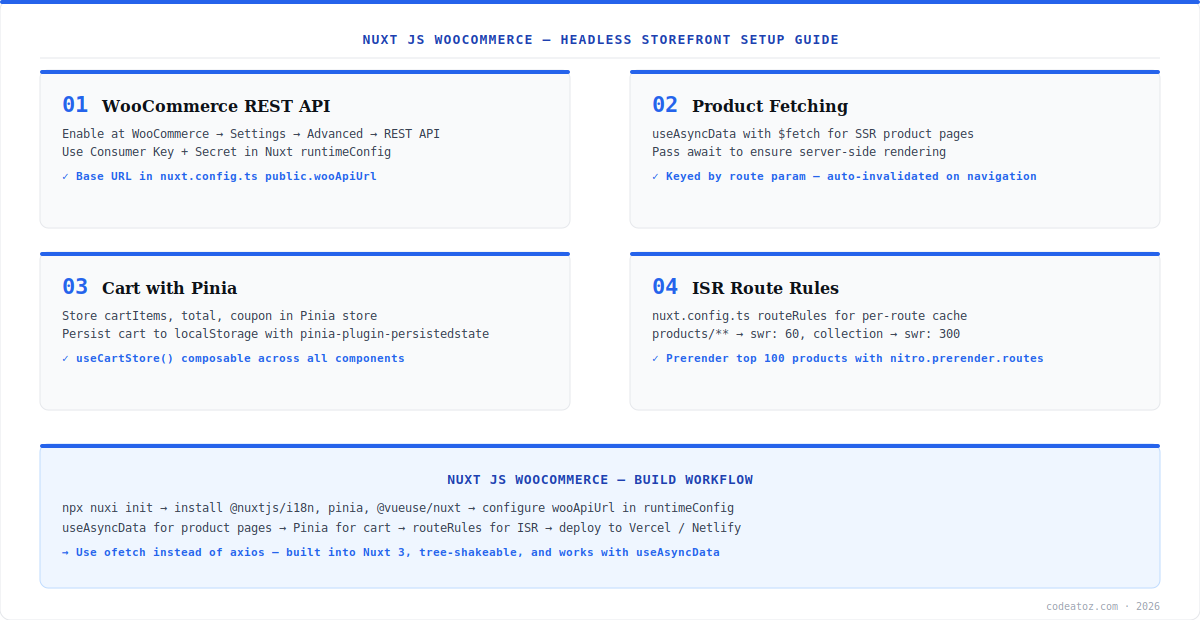
Nuxt js WooCommerce Guide: Setup and runtimeConfig
Store the Nuxt js WooCommerce API credentials in nuxt.config.ts runtimeConfig. The public section exposes values to the client — keep Consumer Key and Secret in the private (server-only) section. Use useRuntimeConfig() in server-side composables to access them. Configure routeRules for ISR at the same time — this sets cache behaviour per route type without any additional CDN configuration when deploying to Vercel or Netlify.
export default defineNuxtConfig({
  runtimeConfig: {
    wooKey: process.env.WOO_CONSUMER_KEY,
    wooSecret: process.env.WOO_CONSUMER_SECRET,
    public: { wooApiUrl: process.env.WOO_API_URL }
  },
  routeRules: {
    '/products/**': { swr: 60 },
    '/product-category/**': { swr: 300 },
    '/cart': { ssr: false },
    '/checkout': { ssr: false },
  }
})Nuxt js WooCommerce: useAsyncData for SSR Product Pages
Fetch products in a Nuxt js WooCommerce page using useAsyncData with a unique key derived from the route param. This composable runs server-side during SSR and client-side during navigation, automatically deduplicating requests. Add getCachedData to serve from the Nuxt payload cache on client navigation — this avoids re-fetching data the server already returned. Check the WooCommerce REST API reference for endpoint details.
// pages/products/[slug].vue
const route = useRoute()
const config = useRuntimeConfig()
const { data: product } = await useAsyncData(
  `product-${route.params.slug}`,
  () => $fetch(`${config.public.wooApiUrl}/products`, {
    params: { slug: route.params.slug, status: 'publish' }
  }).then(r => r[0] ?? null),
  { getCachedData: (key, nuxtApp) => nuxtApp.payload.data[key] ?? null }
)Nuxt js WooCommerce: Pinia Cart and Store API Session
The Nuxt js WooCommerce cart uses the WooCommerce Store API at /wc/store/v1 with a session nonce. On the first cart request, the API returns a cart_key — store it with useCookie() and include it as a Cart-Token header on all subsequent requests. Use Pinia for reactive cart state (item count, total, items array) and pinia-plugin-persistedstate to survive page refreshes. Our headless commerce team can help architect the full Nuxt js WooCommerce cart and checkout flow for your project.
The WooCommerce REST v3 API requires authentication for all operations — it is not suitable for guest cart in a Nuxt js WooCommerce storefront. Always use the Store API at /wc/store/v1 for cart management. It supports CORS, guest checkout via nonce, and returns a cart_key for session tracking without requiring customer login.
Frequently Asked Questions About Nuxt js WooCommerce
What is a Nuxt js WooCommerce headless setup?
A Nuxt js WooCommerce headless setup uses Nuxt 3 as the Vue frontend and WooCommerce as the commerce backend via its REST API. Nuxt useAsyncData fetches products server-side for SSR, Pinia manages cart state client-side, and routeRules configure ISR per route. It is the Vue alternative to a Next.js headless WooCommerce setup with the same architecture.
How do I connect Nuxt.js to WooCommerce?
Store your WooCommerce REST API URL and Consumer Key in nuxt.config.ts runtimeConfig. Use useAsyncData with $fetch to call WooCommerce REST endpoints server-side. For cart operations, use the WooCommerce Store API at /wc/store/v1 which supports CORS and session-based guest checkout. Keep Consumer Key and Secret in the private (server-only) runtimeConfig section.
How does ISR work in Nuxt js WooCommerce?
Configure ISR in Nuxt js WooCommerce using routeRules in nuxt.config.ts. Set swr: 60 on product pages (60-second stale-while-revalidate), swr: 300 on category pages, and ssr: false on cart and checkout for client-only rendering. Deploy to Vercel or Netlify for edge ISR support. Nuxt’s prerender option can pre-build top products at deploy time.
How do I manage cart state in Nuxt js WooCommerce?
Use Pinia for reactive cart state in Nuxt js WooCommerce — item count, total, and line items. Use the WooCommerce Store API for server-side cart operations. Store the cart_key from the first Store API response in a cookie via useCookie() and pass it as a Cart-Token header. Use pinia-plugin-persistedstate to persist cart state across page refreshes.
Do I need GraphQL for a Nuxt js WooCommerce store?
No. A Nuxt js WooCommerce setup works perfectly with the WooCommerce REST API — no GraphQL plugin required. The REST API provides all needed endpoints for products, categories, cart, and checkout. Use GraphQL only if your team prefers typed queries or if you are combining WooCommerce with a headless CMS that uses GraphQL. The REST approach is simpler to set up.
Where should I deploy a Nuxt js WooCommerce storefront?
Deploy a Nuxt js WooCommerce storefront to Vercel or Netlify for full ISR support with routeRules. Both platforms support Nuxt 3 server-side rendering and stale-while-revalidate caching natively. Alternatively, deploy to a Node.js server with PM2 for full SSR without edge caching. Cloudflare Pages also supports Nuxt with some configuration for the server routes.
Building a Nuxt js WooCommerce Storefront?
Our team builds Vue headless storefronts — useAsyncData, Pinia, ISR, WooCommerce REST + Store API integration.




