
Best WooCommerce Checkout Optimisation Guide 2026
Speed up WooCommerce checkout — block checkout migration, JS audit, Stripe Link, address autocomplete, and server-side PHP optimisation to cut abandonment.
WooCommerce checkout optimisation is the most commercially valuable performance investment on any store — every second saved at checkout directly reduces cart abandonment. The legacy shortcode checkout reloads on every field change. WooCommerce checkout optimisation starts with migrating to the block checkout, which handles all updates via AJAX with no page reload. Combined with Stripe Link and address autocomplete, a full WooCommerce checkout optimisation project reduces checkout time by 30-50%.
Checkout is where purchase intent is highest and patience is lowest. A one-second delay at checkout causes significantly more abandonment than on a product page. WooCommerce checkout optimisation covers both UX — fewer fields, faster payment methods — and technical — less JavaScript, faster server response. This guide covers every layer of WooCommerce checkout optimisation in priority order. See our WooCommerce speed guide and caching guide for complementary work.
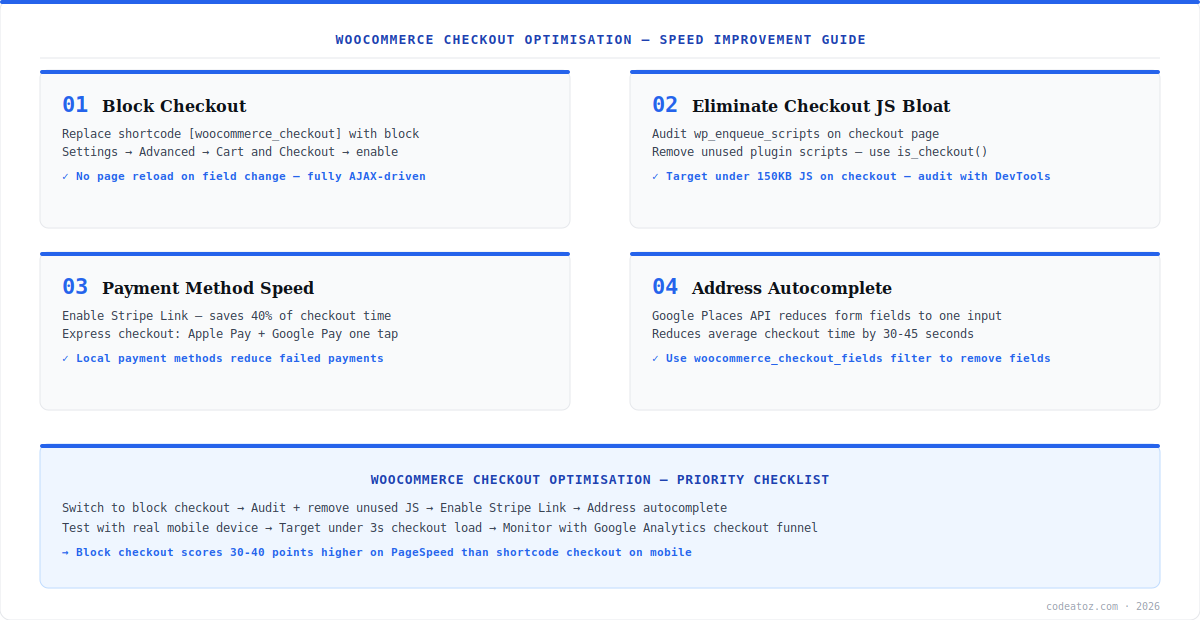
WooCommerce Checkout Optimisation: Block Checkout Migration
The first step in any WooCommerce checkout optimisation project is migrating from the legacy shortcode checkout to the block checkout. The shortcode checkout submits a full form POST and reloads the page on every change — address update, shipping selection, coupon application all cause a full reload. The block checkout handles everything via REST API with instant AJAX updates. Enable it at WooCommerce → Settings → Advanced → Cart and Checkout. Check plugin compatibility at the same time — plugins using woocommerce_checkout_fields need to be updated to the Checkout Block extensibility API.
add_filter('woocommerce_checkout_fields', function($fields) {
    unset($fields['billing']['billing_company']);
    unset($fields['billing']['billing_address_2']);
    return $fields;
});
// Or via block checkout visibility settings in WP Admin → Pages → CheckoutWooCommerce Checkout Optimisation: JS Audit and Stripe Link
The average WooCommerce checkout page loads 400-800KB of JavaScript from plugins not needed there. A WooCommerce checkout optimisation JS audit uses is_checkout() to dequeue irrelevant scripts. Target under 150KB total JavaScript. Use Chrome DevTools Coverage tab to find unused code. Enable Stripe Link — it pre-fills saved card, email, and address in one click. For Stripe stores, Stripe Link is the single highest-impact WooCommerce checkout optimisation for returning customers. Check the Stripe Link documentation and Google Web.dev checkout benchmarks for performance standards.
Run a WooCommerce checkout optimisation JS audit in 5 minutes: Chrome DevTools → Network → reload checkout → sort by size → identify the top 5 largest scripts → check if each is needed on checkout with is_checkout(). Common offenders are sliders, chat widgets, and popup scripts that load on every page.
WooCommerce Checkout Optimisation: Address Autocomplete and Server Speed
Address autocomplete via the Google Places Autocomplete API reduces 4-6 address fields to a single search input. Customers type 3-4 characters, select from dropdown, and all fields populate instantly — saving 20-40 seconds on average. On the server side, the WooCommerce checkout optimisation priority is TTFB: enable Redis object cache, exclude checkout from page cache (but keep object cache active), and run PHP 8.2+ for JIT performance gains. Our WooCommerce performance team runs full WooCommerce checkout optimisation audits as a fixed-price service.
The most common WooCommerce checkout optimisation mistake: accidentally caching the checkout page. Checkout and cart must always be excluded from page cache — they contain session-specific data. Check your caching plugin exclusion list explicitly. The block checkout sets no-store cache headers automatically — do not override them.
Frequently Asked Questions About WooCommerce Checkout Optimisation
What is WooCommerce checkout optimisation?
WooCommerce checkout optimisation is reducing checkout completion time and cart abandonment by improving checkout page speed, reducing form friction, enabling fast payment methods, and eliminating unnecessary JavaScript. Key steps include migrating to block checkout, enabling Stripe Link, adding address autocomplete, and auditing checkout JavaScript to reduce page weight below 150KB.
How much does WooCommerce checkout optimisation reduce abandonment?
Industry benchmarks show each 1-second delay at checkout increases abandonment by 7-10%. Migrating to block checkout typically saves 1-3 seconds per interaction. Stripe Link reduces checkout time for returning customers by 40-60%. Combined with address autocomplete and JS audit, WooCommerce checkout optimisation commonly reduces overall abandonment rate by 15-25%.
What is the WooCommerce block checkout and why is it better?
The WooCommerce block checkout replaces the legacy shortcode checkout with a fully AJAX-driven React experience. Unlike the shortcode version which reloads the page on every change, the block checkout updates shipping costs, totals, and validation instantly via REST API calls. It scores 30-40 points higher on PageSpeed and loads significantly faster on mobile devices.
How do I audit JavaScript for WooCommerce checkout optimisation?
Open Chrome DevTools → Network tab → reload checkout page → sort by size to find the largest JavaScript files. Use the Coverage tab to see unused code percentages. Then use is_checkout() in WordPress to conditionally dequeue scripts not needed on checkout. Target under 150KB total JavaScript. Common offenders are slider libraries, chat widgets, and popup scripts loaded on all pages.
Should I use Stripe Link for WooCommerce checkout optimisation?
Yes. Stripe Link is one of the highest-impact WooCommerce checkout optimisation tools for Stripe stores. It pre-fills payment and address details for returning Stripe Link users with a single click, reducing checkout to 2-3 fields for repeat customers. Enable it in the Stripe WooCommerce plugin settings. It works with the block checkout and requires no custom code.
Does WooCommerce checkout optimisation require custom code?
Basic WooCommerce checkout optimisation — enabling block checkout, Stripe Link, removing unused fields — requires no custom code. JS audit and dequeuing scripts requires a small functions.php snippet. Advanced optimisation like address autocomplete, custom field removal, and server-side TTFB reduction may require a developer. Our performance team offers fixed-price checkout audits.
Need a WooCommerce Checkout Audit?
Our performance team optimises checkout end-to-end — block migration, JS audit, Stripe Link, and server tuning.




