
Best WooCommerce Caching Plugins Guide — Speed Up Your Store 2026
The complete guide to WooCommerce caching plugins — page cache, Redis object cache, CDN, and fragment caching configured correctly for dynamic WooCommerce stores.
Redis object cache
CDN setup
Fragment cache
Cache exclusions
Recommended stack
Choosing the right WooCommerce caching plugins is the fastest way to improve store performance without touching a line of code. The wrong WooCommerce caching plugins configuration — particularly caching cart and checkout pages — causes broken checkout flows, stale prices, and empty baskets. This guide shows the correct WooCommerce caching plugins stack for 2026: what to cache, what to exclude, and how to layer page, object, fragment, and CDN caching for maximum effect.
WooCommerce stores have unique caching challenges compared to standard WordPress sites. Cart contents, prices, and stock levels are user-specific and dynamic — they must never be served from a full-page cache. WooCommerce caching plugins must be configured with the correct exclusion rules for /cart/, /checkout/, and /my-account/. Get this wrong and customers see each other’s cart contents — a critical failure that no amount of performance gain is worth. With correct configuration, WooCommerce caching plugins routinely deliver a 3-5x reduction in page load times. See also our full WooCommerce page speed optimisation guide for the complete performance checklist.
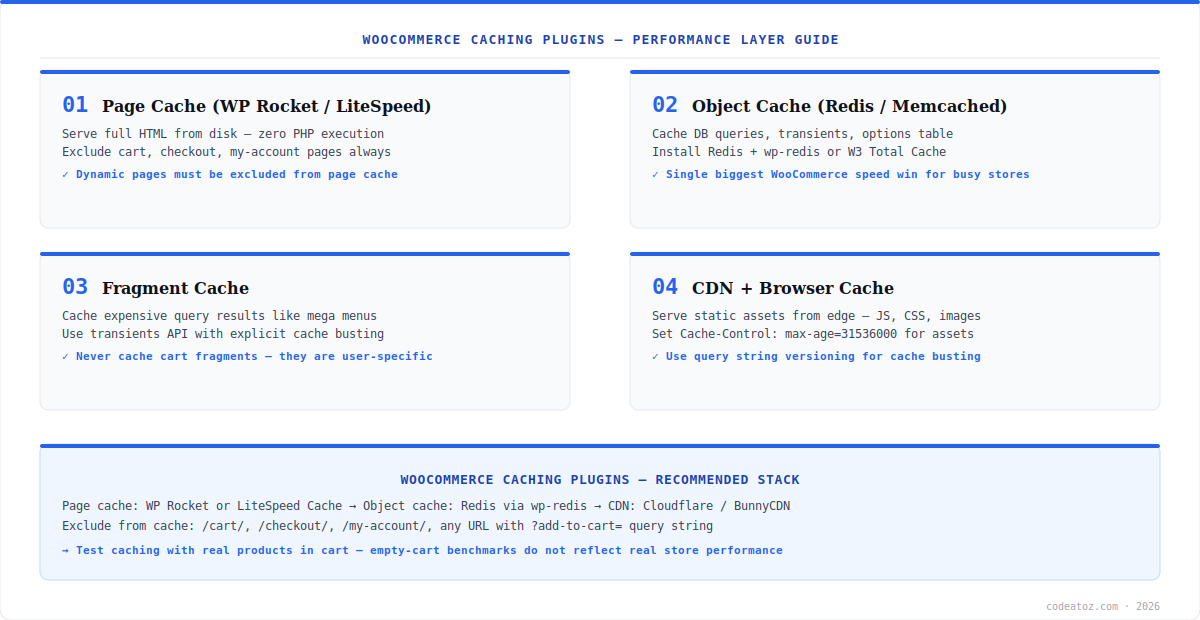
WooCommerce Caching Plugins: Page Cache
Page cache is the highest-impact layer in any WooCommerce caching plugins stack. It stores the full rendered HTML of a page to disk and serves subsequent requests from the cache file, bypassing PHP and MySQL entirely. For a typical WooCommerce product page, this reduces Time to First Byte from 800ms to under 50ms. The two leading WooCommerce caching plugins for page caching are WP Rocket and LiteSpeed Cache (requires a LiteSpeed or OpenLiteSpeed server). Both handle WooCommerce exclusions correctly out of the box when the WooCommerce add-on is enabled.
- Always exclude
/cart/,/checkout/,/my-account/from page cache - Exclude any URL with
?add-to-cart=query parameter - Exclude logged-in users — cached pages may expose account-specific content
- Enable separate cache files per device type if you have a mobile-optimised theme
- Purge relevant cache entries on product stock changes and price updates
WooCommerce Caching Plugins: Redis Object Cache
Object cache is the most impactful WooCommerce caching plugins win for stores running more than a few hundred orders per day. WooCommerce makes dozens of database queries per request — product lookups, option reads, transient checks, customer data. Redis stores these query results in memory, serving them in microseconds instead of milliseconds. Install Redis on your server and use the wp-redis object cache plugin to connect WordPress to it.
// Add to wp-config.php above /* That's all, stop editing! */
define('WP_REDIS_HOST', '127.0.0.1');
define('WP_REDIS_PORT', 6379);
define('WP_REDIS_DATABASE', 0);
define('WP_REDIS_TIMEOUT', 1);
define('WP_REDIS_READ_TIMEOUT', 1);
define('WP_CACHE', true);

// Then place the drop-in:
// wp-content/object-cache.php (provided by the wp-redis plugin)WooCommerce Caching Plugins: CDN and Browser Cache
A CDN completes the WooCommerce caching plugins stack by serving static assets — images, CSS, JavaScript — from edge servers geographically close to each visitor. Cloudflare is the most common choice for WooCommerce stores; BunnyCDN offers better performance at lower cost for high-traffic stores. Configure Cache-Control: max-age=31536000 for all static assets and use query string versioning (?ver=1.2.3) for cache busting on deploys — WordPress already does this for theme assets. Check Google Web.dev performance guidance for Core Web Vitals impact of CDN configuration.
The most common WooCommerce caching plugins misconfiguration is caching the cart, checkout, and my-account pages. These pages contain user-specific data — cart contents, order history, personal details. If cached, customers see other users’ data. Always keep these pages excluded regardless of which WooCommerce caching plugins you use.
Our WooCommerce performance team configures the full WooCommerce caching plugins stack as part of site speed audits and optimisation projects. We also cover database query optimisation, image delivery, and Core Web Vitals remediation. Read our full WooCommerce Core Web Vitals fix guide for the complementary optimisation steps.
Frequently Asked Questions About WooCommerce Caching Plugins
What are the best WooCommerce caching plugins in 2026?
The best WooCommerce caching plugins stack in 2026 is WP Rocket or LiteSpeed Cache for page caching, Redis with wp-redis for object caching, and Cloudflare or BunnyCDN for static assets. WP Rocket is the easiest to configure correctly for WooCommerce. LiteSpeed Cache is faster on LiteSpeed servers and free. Both include WooCommerce-specific exclusion rules built in.
Which pages should be excluded from WooCommerce caching plugins?
WooCommerce caching plugins must exclude the cart (/cart/), checkout (/checkout/), and my-account (/my-account/) pages as well as any URL containing ?add-to-cart= as a query parameter. These pages contain user-specific, session-dependent content that must never be served from a cache. Most WooCommerce caching plugins add these exclusions automatically when the WooCommerce integration is enabled.
Does Redis work as a WooCommerce caching plugin replacement?
Redis is an object cache — it works alongside WooCommerce caching plugins for page caching, not instead of them. Redis caches database query results and PHP objects in memory, while page caching plugins serve full HTML from disk. For maximum WooCommerce performance, use both: a page caching plugin and Redis object cache together.
Can WooCommerce caching plugins break checkout?
Yes. Misconfigured WooCommerce caching plugins are a common cause of broken checkout. If the checkout page is accidentally included in the page cache, customers see a cached version of another user’s checkout — including their cart contents and address. Always verify your WooCommerce caching plugins exclude /checkout/ and /cart/ by testing after any cache configuration change.
How much do WooCommerce caching plugins improve page speed?
Correctly configured WooCommerce caching plugins typically reduce Time to First Byte from 600-1200ms to under 100ms for cached pages — a 6-10x improvement in TTFB. Combined with Redis object cache and a CDN, total page load times commonly drop from 3-5 seconds to under 1 second. The largest gains come from page cache; Redis provides most value on high-traffic stores with heavy database load.
Do WooCommerce caching plugins work with variable products?
Yes, WooCommerce caching plugins work correctly with variable products when configured properly. Variable product pages are safe to cache — the product page itself is static HTML. Only the cart, checkout, and session-dependent fragments must be excluded. Variation price and stock data loaded via AJAX after page load bypasses the page cache entirely and always reflects live data.
Want a Faster WooCommerce Store?
Our performance team configures the full caching stack — Redis, CDN, page cache, and Core Web Vitals fixes included.




