
Complete Guide to ERPNext WooCommerce Product Sync with CAZ WooSync
Sync ERPNext Items and Item Templates to WooCommerce products and variable products — both ways, with automatic variant mapping, price list sync, and per-store configuration.
Variable products
Price list sync
Auto-create items
SKU matching
Push triggers
ERPNext WooCommerce product sync is the foundation layer of any WooCommerce-ERP integration. Before orders can sync correctly, products must exist in both systems with matching SKUs. CAZ WooSync handles ERPNext WooCommerce product sync bidirectionally — ERPNext Items push to WooCommerce, WooCommerce products pull into ERPNext, and variable products with attributes and variants are fully supported.
The ERPNext WooCommerce product sync in CAZ WooSync is SKU-based. The ERPNext item_code maps to the WooCommerce product SKU. This unique identifier is the bridge between both systems — every product match, update, and price sync relies on consistent SKUs. Setting up clean SKUs before enabling sync is the single most important preparation step for a successful ERPNext WooCommerce product sync.
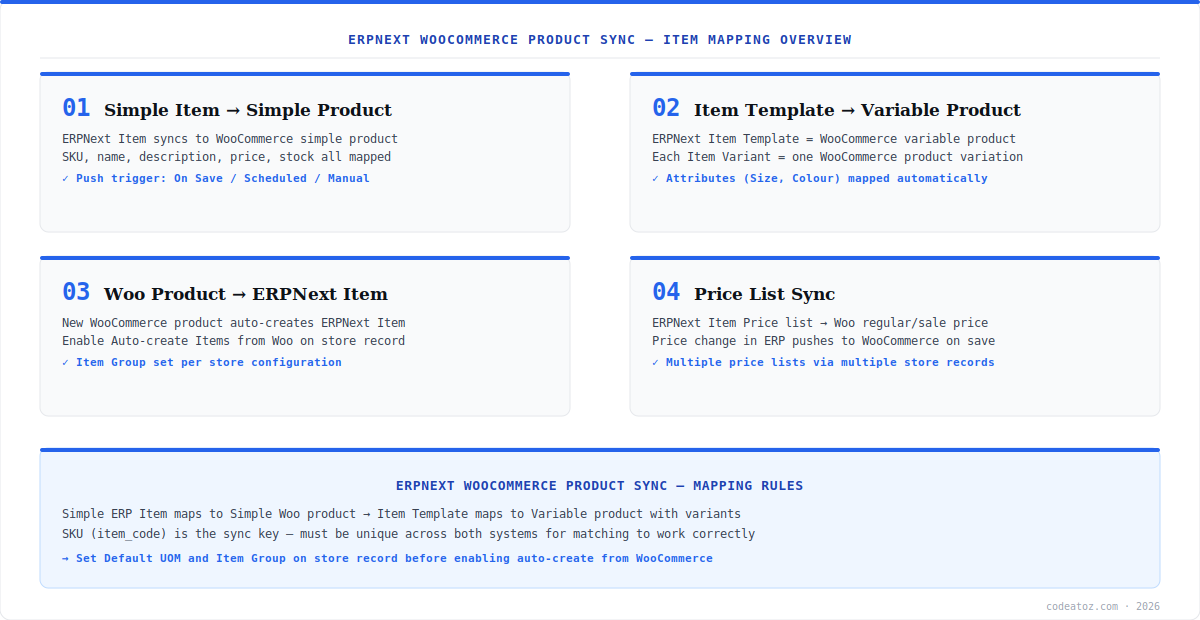
ERPNext WooCommerce Product Sync: Simple Items to Simple Products
A standard ERPNext Item maps to a WooCommerce simple product in the ERPNext WooCommerce product sync flow. The sync carries the item name, description, SKU (item_code), price (from the configured Item Price list), and stock quantity. The push trigger is configurable per store: On Save (immediate), Scheduled (via the 15-minute cron), or Manual (via the Queue Dashboard).
The reverse direction — WooCommerce product to ERPNext Item — is controlled by the “Create Items from Woo” setting on the Caz Woo Store record. When enabled, new WooCommerce products automatically create ERPNext Items with the product SKU as the item_code, assigned to the default Item Group configured on the store record. This makes ERPNext WooCommerce product sync work cleanly for merchants who manage their product catalogue in WooCommerce rather than ERPNext.
For reliable ERPNext WooCommerce product sync, ensure every WooCommerce product and every ERPNext Item has a unique, matching SKU before enabling sync. The item_code in ERPNext must exactly match the WooCommerce product SKU. Products without SKUs will fail to match and create duplicate items. Audit your WooCommerce catalogue for blank SKUs before going live.
ERPNext WooCommerce Product Sync: Variable Products and Variants
Variable product handling is the most complex part of ERPNext WooCommerce product sync. In ERPNext, variable products map to Item Templates with Item Variants. Each WooCommerce product variation (e.g. Size: Small / Colour: Red) becomes an ERPNext Item Variant with the matching attribute values. CAZ WooSync handles this mapping automatically — you do not need to manually create variants in ERPNext for products synced from WooCommerce.
- WooCommerce variable product → ERPNext Item Template
- WooCommerce product variation → ERPNext Item Variant (e.g. T-Shirt-S-Red)
- WooCommerce product attributes (Size, Colour) → ERPNext Item Attributes
- Variation SKU → ERPNext Item Variant item_code
- Variation price + stock sync → ERPNext Item Variant price + Bin quantity
ERPNext WooCommerce Product Sync: Price Lists and Push Triggers
Price sync in the ERPNext WooCommerce product sync flow uses ERPNext’s Item Price doctype. Each store record can be configured to use a specific Price List — Standard Selling is the default. When a price changes in ERPNext Item Price, it pushes to WooCommerce as the regular price on the next sync cycle. WooCommerce sale prices map back to ERPNext Item Price records with the discount flag.
The push trigger setting on each Caz Woo Store record controls when ERPNext WooCommerce product sync runs. “On Save” is the most responsive — any ERPNext Item save immediately queues a sync. “Scheduled” batches syncs with the 15-minute cron, reducing API calls for bulk price updates. “Manual” gives full control for bulk operations. Refer to the CAZ WooSync documentation for the full push trigger configuration guide. For ERPNext Item Price configuration, see the ERPNext Item Price documentation. For WooCommerce product REST API details, refer to the WooCommerce REST API reference.
For complex product catalogue setups — custom attributes, product bundles, or integration with other Frappe apps — our WooCommerce development team can extend the ERPNext WooCommerce product sync to meet your specific requirements. We also offer WooCommerce developer hire for ongoing product catalogue management projects.
Frequently Asked Questions About ERPNext WooCommerce Product Sync
How does ERPNext WooCommerce product sync work?
ERPNext WooCommerce product sync in CAZ WooSync is SKU-based and bidirectional. ERPNext Items push to WooCommerce simple products using item_code as the SKU. WooCommerce products can auto-create ERPNext Items. Variable products sync as Item Templates with Item Variants. Price list changes push from ERPNext to WooCommerce, and WooCommerce price changes update ERPNext Item Price records.
Does ERPNext WooCommerce product sync support variable products?
Yes. ERPNext WooCommerce product sync in CAZ WooSync supports variable products. WooCommerce variable products sync as ERPNext Item Templates, with each variation becoming an Item Variant. Product attributes like Size and Colour are mapped to ERPNext Item Attributes. Variation SKUs are used as the Item Variant item_code for matching across both systems.
What is the SKU requirement for ERPNext WooCommerce product sync?
For ERPNext WooCommerce product sync, every product in both systems must have a unique SKU. The ERPNext item_code must exactly match the WooCommerce product SKU. Products without SKUs cannot be matched and will create duplicates. Audit your WooCommerce catalogue for blank or duplicate SKUs before enabling sync, and ensure ERPNext item codes follow the same naming convention.
Can ERPNext WooCommerce product sync auto-create ERPNext items?
Yes. Enable the Create Items from Woo setting on the Caz Woo Store record to have ERPNext WooCommerce product sync automatically create ERPNext Items for new WooCommerce products. The WooCommerce product SKU becomes the item_code. The default Item Group and UOM for auto-created items are configured on the store record.
How does ERPNext WooCommerce product sync handle prices?
ERPNext WooCommerce product sync handles prices via ERPNext’s Item Price doctype. ERPNext Item Price (Standard Selling list by default) pushes to WooCommerce as the regular price. WooCommerce sale prices sync back to ERPNext Item Price records. The push trigger controls frequency — On Save for immediate sync, Scheduled for batched updates via the 15-minute cron.
Is ERPNext WooCommerce product sync free with CAZ WooSync?
Yes. ERPNext WooCommerce product sync is fully included in CAZ WooSync at no cost. The app is MIT-licensed and available at github.com/codeatozcom/CAZ_WOOSYNC. Product sync, variable product support, price list sync, and the auto-create feature are all included without any paid tier or feature restriction.
Start ERPNext WooCommerce Product Sync Today
CAZ WooSync keeps your product catalogue perfectly in sync — simple items, variable products, prices, and stock. Free and open source.
Variable products
Price list sync
Free MIT licence




