
Magento 2 Unit Testing PHPUnit — Integration Test Setup Guide (2026)
Magento 2 unit testing with PHPUnit catches regressions in custom modules before they reach production — but setting up the test environment correctly is non-trivial because Magento’s DI container, ObjectManager, and database layer are all involved. This guide covers complete Magento 2 unit testing PHPUnit setup: the dev/tests directory structure, writing pure unit tests with mocked dependencies, writing integration tests that boot the Magento 2 DI container, running tests via PHPUnit directly and from a CI pipeline. All patterns follow the conventions Magento uses in its own Magento 2 unit testing PHPUnit test suite.
Magento 2 unit testing comes in two distinct modes: pure unit tests that mock all dependencies and run without bootstrapping Magento (fast, milliseconds per test), and integration tests that boot the full Magento DI container and can access the database (slow, seconds per test but tests real behaviour). Both are important for a complete Magento 2 unit testing PHPUnit strategy.
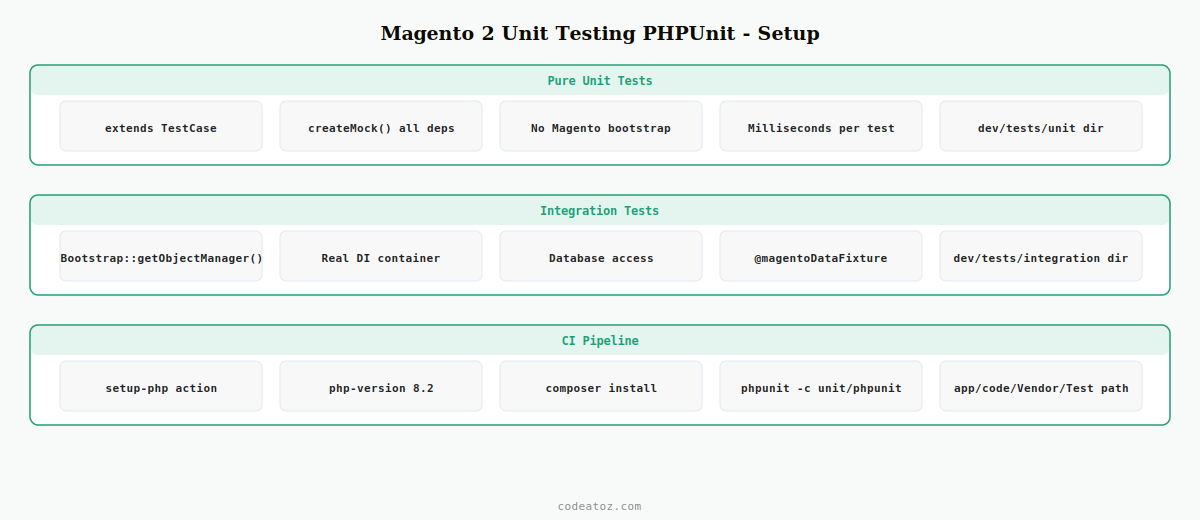
Magento 2 Unit Testing PHPUnit: Directory Structure and Configuration
Magento 2 unit testing PHPUnit uses the dev/tests/unit/ directory for pure unit tests and dev/tests/integration/ for integration tests. Each has its own phpunit.xml.dist configuration file.
# Install PHPUnit and Magento testing utilities
composer install  # Magento ships with phpunit in require-dev

# Run pure unit tests — Magento 2 unit testing PHPUnit
vendor/bin/phpunit -c dev/tests/unit/phpunit.xml.dist

# Run integration tests (requires a test database)
vendor/bin/phpunit -c dev/tests/integration/phpunit.xml.dist

# Run only your module's unit tests
vendor/bin/phpunit -c dev/tests/unit/phpunit.xml.dist
  app/code/Vendor/Module/Test/Unit/

# Run with coverage report
vendor/bin/phpunit -c dev/tests/unit/phpunit.xml.dist
  --coverage-html var/coverage/
  app/code/Vendor/Module/Test/Unit/
Magento 2 Unit Testing PHPUnit: Writing a Pure Unit Test
Pure unit tests in Magento 2 unit testing PHPUnit extend PHPUnitFrameworkTestCase directly — no Magento bootstrap needed. All Magento dependencies are mocked with createMock(). This makes them run in milliseconds and suitable for CI pre-commit hooks.
<?php
namespace VendorModuleTestUnitModel;

use PHPUnitFrameworkTestCase;
use VendorModuleModelPriceCalculator;
use MagentoCatalogApiProductRepositoryInterface;
use MagentoCatalogApiDataProductInterface;

class PriceCalculatorTest extends TestCase
{
    private PriceCalculator $calculator;
    private ProductRepositoryInterface $productRepository;

    protected function setUp(): void
    {
        // Mock all dependencies — Magento 2 unit testing PHPUnit isolation
        $this->productRepository = $this->createMock( ProductRepositoryInterface::class );
        $this->calculator        = new PriceCalculator( $this->productRepository );
    }

    public function test_calculate_returns_discounted_price(): void
    {
        // Arrange: set up mock product for Magento 2 unit testing PHPUnit
        $product = $this->createMock( ProductInterface::class );
        $product->method('getPrice')->willReturn( 100.00 );
        $this->productRepository->method('getById')->willReturn( $product );

        // Act
        $result = $this->calculator->calculateDiscounted( 1, 20 );

        // Assert: Magento 2 unit testing PHPUnit assertion
        $this->assertEquals( 80.00, $result,
            'PriceCalculator should apply 20% discount correctly.' );
    }

    public function test_throws_exception_for_invalid_discount(): void
    {
        $this->expectException( InvalidArgumentException::class );
        $this->calculator->calculateDiscounted( 1, 150 );  // >100% is invalid
    }
}
Magento 2 Unit Testing PHPUnit: Integration Tests with ObjectManager
Integration tests in the Magento 2 unit testing PHPUnit suite extend MagentoTestFrameworkTestCaseAbstractController or PHPUnitFrameworkTestCase and use MagentoTestFrameworkHelperBootstrap::getObjectManager() to get the real DI container.
<?php
namespace VendorModuleTestIntegrationModel;

use MagentoTestFrameworkHelperBootstrap;
use VendorModuleModelPriceCalculator;

/**
 * @magentoAppArea frontend
 */
class PriceCalculatorIntegrationTest extends PHPUnitFrameworkTestCase
{
    private PriceCalculator $calculator;

    protected function setUp(): void
    {
        // Get real instance via Magento DI — Magento 2 unit testing PHPUnit integration mode
        $objectManager    = Bootstrap::getObjectManager();
        $this->calculator = $objectManager->get( PriceCalculator::class );
    }

    /**
     * @magentoDataFixture Magento/Catalog/_files/product_simple.php
     */
    public function test_calculates_with_real_product(): void
    {
        // Uses the fixture product — Magento 2 unit testing PHPUnit integration
        $result = $this->calculator->calculateDiscounted( 1, 10 );
        $this->assertIsFloat( $result );
        $this->assertGreaterThan( 0, $result );
    }
}
Magento 2 Unit Testing PHPUnit: GitHub Actions CI Configuration
Run Magento 2 unit testing PHPUnit automatically on every pull request with GitHub Actions. Use the pure unit test suite in CI for fast feedback — integration tests require a full Magento install and are better run on a staging server.
name: Magento 2 Unit Testing PHPUnit

on: [push, pull_request]

jobs:
  unit-tests:
    runs-on: ubuntu-latest
    steps:
      - uses: actions/checkout@v4

      - uses: shivammathur/setup-php@v2
        with:
          php-version: '8.2'
          extensions: bcmath, ctype, gd, iconv, intl, mbstring, simplexml, soap, xsl, zip

      - name: Install Composer dependencies
        run: composer install --no-progress --prefer-dist

      - name: Run Magento 2 unit testing PHPUnit
        run: vendor/bin/phpunit -c dev/tests/unit/phpunit.xml.dist app/code/Vendor/Module/Test/Unit/
The Adobe Commerce unit testing documentation covers the full Magento 2 unit testing PHPUnit directory structure and fixture annotations. The Magento 2 integration testing guide covers ObjectManager usage and data fixtures. See our Magento 2 DI guide for writing injectable service classes that are straightforward to unit test, and our Magento 2 plugin guide for testing plugins and observers with createMock.
💡 Structure your Magento 2 module classes for testability from the start: inject all dependencies via constructor DI, avoid calling ObjectManager::getInstance() directly inside business logic, and keep service class methods focused on a single concern. Classes that instantiate dependencies internally are hard to unit test. Classes that receive dependencies through constructor injection need only createMock() in your Magento 2 unit testing PHPUnit setup.
Frequently Asked Questions — Magento 2 Unit Testing PHPUnit
How do I set up Magento 2 unit testing with PHPUnit?
Magento ships PHPUnit as a dev dependency — run composer install to get vendor/bin/phpunit. Create your test files under app/code/Vendor/Module/Test/Unit/ extending PHPUnitFrameworkTestCase. Mock all Magento dependencies with createMock(). Run tests with vendor/bin/phpunit -c dev/tests/unit/phpunit.xml.dist. No database or Magento bootstrap is needed for pure Magento 2 unit testing PHPUnit tests.
What is the difference between unit and integration tests in Magento 2 unit testing PHPUnit?
Pure unit tests extend PHPUnitFrameworkTestCase, mock all Magento dependencies with createMock(), and run in milliseconds without booting Magento. Integration tests use Bootstrap::getObjectManager() to get real Magento DI instances, can access the database, and use @magentoDataFixture annotations to create test data. Run unit tests in CI for fast feedback and integration tests on a dedicated test environment for Magento 2 unit testing PHPUnit coverage of database-dependent code.
How do I mock Magento interfaces in Magento 2 unit testing PHPUnit?
Use $this->createMock(InterfaceName::class) to create a mock. Chain method(‘methodName’)->willReturn($value) to configure return values. Use expects($this->once())->method(‘methodName’) to assert a method is called during the test. For constructor-injected Magento services like ProductRepositoryInterface, create the mock in setUp() and inject it into the class under test using new ClassName($mock). This is the standard Magento 2 unit testing PHPUnit isolation pattern.
How do I use data fixtures in Magento 2 integration tests?
Add a @magentoDataFixture annotation above the test method pointing to a PHP fixture file path relative to the Magento root. Magento includes built-in fixtures under dev/tests/integration/testsuite/Magento/. For custom fixtures, create a PHP file that uses ObjectManager to create products, customers, or orders. Magento automatically rolls back all database changes after each integration test in the Magento 2 unit testing PHPUnit suite.
How do I run only my module’s tests in Magento 2 unit testing PHPUnit?
Pass the path to your module’s Test directory as the last argument to vendor/bin/phpunit: vendor/bin/phpunit -c dev/tests/unit/phpunit.xml.dist app/code/Vendor/Module/Test/Unit/. You can also filter by test name using –filter=TestClassName. For CI pipelines, always specify the module path to avoid running all of Magento’s own unit tests, which takes significantly longer than running just your Magento 2 unit testing PHPUnit test suite.
Can I test Magento 2 plugins and observers with PHPUnit?
Yes — plugins and observers are standard PHP classes that receive the subject class as a parameter. In Magento 2 unit testing PHPUnit, mock the subject class with createMock() and call the plugin or observer method directly. Assert on the return value for plugins (around and after) or on side effects (logged messages, mocked service calls) for observers and event plugins. Plugin interception logic itself is tested by Magento’s framework — your Magento 2 unit testing PHPUnit tests should focus on your plugin’s business logic.
Need Your Magento 2 Module Properly Tested?
CodeAtoZ builds Magento 2 modules with full PHPUnit test suites — unit tests, integration tests, and GitHub Actions CI from day one.




