
The Complete WPGraphQL Guide — Headless WordPress + WooCommerce 2026
WPGraphQL turns WordPress and WooCommerce into a headless commerce backend — one typed GraphQL endpoint for products, cart, content and checkout, consumed by any frontend.
WPGraphQL is the plugin that adds a single, typed GraphQL endpoint to any WordPress site — and with the WooGraphQL extension (see the WooGraphQL documentation), to any WooCommerce store. Instead of stitching together a dozen REST endpoints, WPGraphQL lets a headless frontend request exactly the data a page needs in one query. For teams building headless WordPress commerce in 2026, WPGraphQL is the standard data layer underneath Next.js, Astro, Nuxt and Remix storefronts.
Search intent: this guide serves developers and technical decision-makers evaluating WPGraphQL as the API layer for a headless WordPress or WooCommerce build — informational with strong commercial intent. We cover what it is, how WooGraphQL extends it for commerce, query patterns, frontend consumption, and the caching and security work that separates a demo from production. The official WPGraphQL documentation is the canonical schema reference.
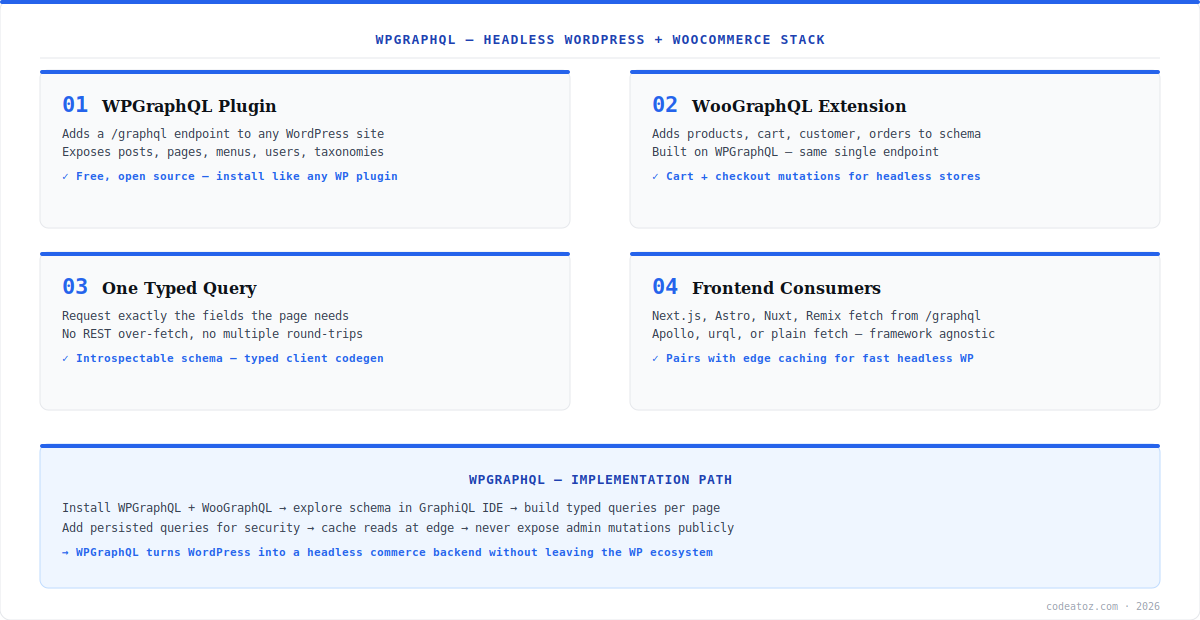
What WPGraphQL Is and How WooGraphQL Extends It
WPGraphQL is a free, open-source plugin that exposes a /graphql endpoint serving WordPress data — posts, pages, menus, users, taxonomies, custom post types and custom fields — through a typed, introspectable schema. WooGraphQL (the WPGraphQL for WooCommerce extension) builds on it to add products, variations, cart, customers, orders and checkout mutations to the same endpoint. The result is one GraphQL API covering both content and commerce, which is exactly what a headless storefront needs: marketing pages and product data from a single typed source.
WPGraphQL Query Patterns for Commerce
The core advantage of WPGraphQL over REST is precision: a product page fetches the product, its variations, related products and reviews in one request with only the fields it renders — no over-fetching, no waterfall of REST calls. Explore the schema interactively in the GraphiQL IDE that WPGraphQL adds to wp-admin (the WPGraphQL source repository documents every type), then move to persisted queries in production. A typical headless product query:
query Product($slug: ID!) {
  product(id: $slug, idType: SLUG) {
    name slug description
    ... on SimpleProduct { price regularPrice salePrice stockStatus }
    ... on VariableProduct {
      variations(first: 50) {
        nodes { name price stockStatus attributes { nodes { name value } } }
      }
    }
    image { sourceUrl altText }
    related(first: 4) { nodes { name slug ... on SimpleProduct { price } } }
  }
}WPGraphQL: Frontends, Caching and Security
Any frontend consumes WPGraphQL — Next.js, Astro, Nuxt and Remix all fetch from the /graphql endpoint with Apollo, urql, or plain fetch. The production concerns are caching and security. GraphQL POST requests are harder to cache at the CDN than REST GET URLs, so use persisted queries (which turn queries into cacheable GET requests by hash) and cache read responses at the edge with a short TTL. On security, never expose authenticated mutations publicly, disable introspection in production if your schema is sensitive, and rate-limit the endpoint. These trade-offs are exactly why the GraphQL vs REST decision matters, and why CDN architecture deserves its own design pass. Our headless commerce team builds WPGraphQL storefronts with persisted queries and edge caching as standard.
| Aspect | WPGraphQL | WooCommerce REST API |
|---|---|---|
| Data fetching | One query, exact fields | Multiple endpoints, fixed payloads |
| Over-fetching | None — request only what you need | Common — full objects returned |
| Edge caching | Needs persisted queries | Trivial (GET by URL) |
| Best for | Headless storefronts, complex UIs | Webhooks, simple integrations |
What we have learned shipping WPGraphQL in production
The N+1 trap is real. A naive WooGraphQL query for a category of 50 products, each resolving variations and related products, can fire hundreds of database queries. We always add query depth and complexity limits, and lean on object caching (Redis) so resolvers do not hammer the database on every request.
Persisted queries are not optional at scale. The most common mistake we see is teams shipping raw POST GraphQL to production and wondering why their CDN hit rate is near zero. Converting queries to persisted GET requests is the single change that makes WPGraphQL fast at the edge.
Keep mutations server-side. Cart and checkout mutations should be proxied through your frontend’s server layer with the auth token never reaching the browser — the same discipline as any headless commerce build.
Frequently Asked Questions About WPGraphQL
What is WPGraphQL?
WPGraphQL is a free, open-source WordPress plugin that adds a single typed GraphQL endpoint at /graphql, exposing posts, pages, taxonomies, users and custom fields. With the WooGraphQL extension it also serves products, cart, customers and checkout — turning WordPress and WooCommerce into a headless commerce backend for any frontend.
Is WPGraphQL free?
Yes. WPGraphQL is free and open source, installed like any WordPress plugin. The WooGraphQL extension that adds WooCommerce types is also free. There is no licence cost — the investment is the engineering work to build and cache the headless frontend that consumes the schema.
What is the difference between WPGraphQL and the WooCommerce REST API?
WPGraphQL returns exactly the fields you request in one query with no over-fetching, ideal for headless storefronts. The WooCommerce REST API uses fixed endpoints with full payloads and caches trivially by URL, ideal for webhooks and simple integrations. Many stacks use WPGraphQL for the storefront and REST for integrations.
Can WPGraphQL handle WooCommerce cart and checkout?
Yes — through the WooGraphQL extension, which adds cart, customer and checkout mutations to the WPGraphQL schema. You can build a complete headless purchase flow. Keep these authenticated mutations proxied through your frontend’s server layer so tokens never reach the browser.
How do you cache WPGraphQL for performance?
Use persisted queries to convert GraphQL POST requests into cacheable GET requests by hash, then cache read responses at the CDN edge with a short TTL and stale-while-revalidate. Add Redis object caching on the WordPress side so resolvers do not repeatedly hit the database. Never cache cart or account queries.
Which frontends work with WPGraphQL?
Any frontend that can make HTTP requests — Next.js, Astro, Nuxt, Remix, SvelteKit, or a mobile app. Use a GraphQL client like Apollo or urql, or plain fetch. WPGraphQL is framework-agnostic; the schema is the contract and the frontend choice is independent.
Building a Headless WordPress Store with WPGraphQL?
Our team builds WPGraphQL + WooGraphQL backends with persisted queries, edge caching and secure mutations.




