
The Complete WooCommerce Webhooks Guide 2026
WooCommerce webhooks deliver store events in real time — order, product and customer changes POSTed to your endpoint for ERP, CRM and automation sync, done reliably.
WooCommerce webhooks push store events to external systems the moment they happen — when an order is created, a product’s stock changes, or a customer registers, WooCommerce POSTs a JSON payload to a URL you control. Instead of polling the REST API on a schedule, WooCommerce webhooks give you real-time event delivery, making them the right foundation for ERP sync, CRM updates, fulfilment automation and alerting (the underlying WordPress APIs back them). This guide covers setup and, more importantly, doing them reliably.
Search intent: informational/procedural — WooCommerce developers integrating the store with external systems. We cover what events fire, payloads and topics, signature verification, reliability rules, webhooks versus polling, and common consumers. It connects to our Store API and ERP integration coverage.
WooCommerce Webhooks: What Fires and the Payload
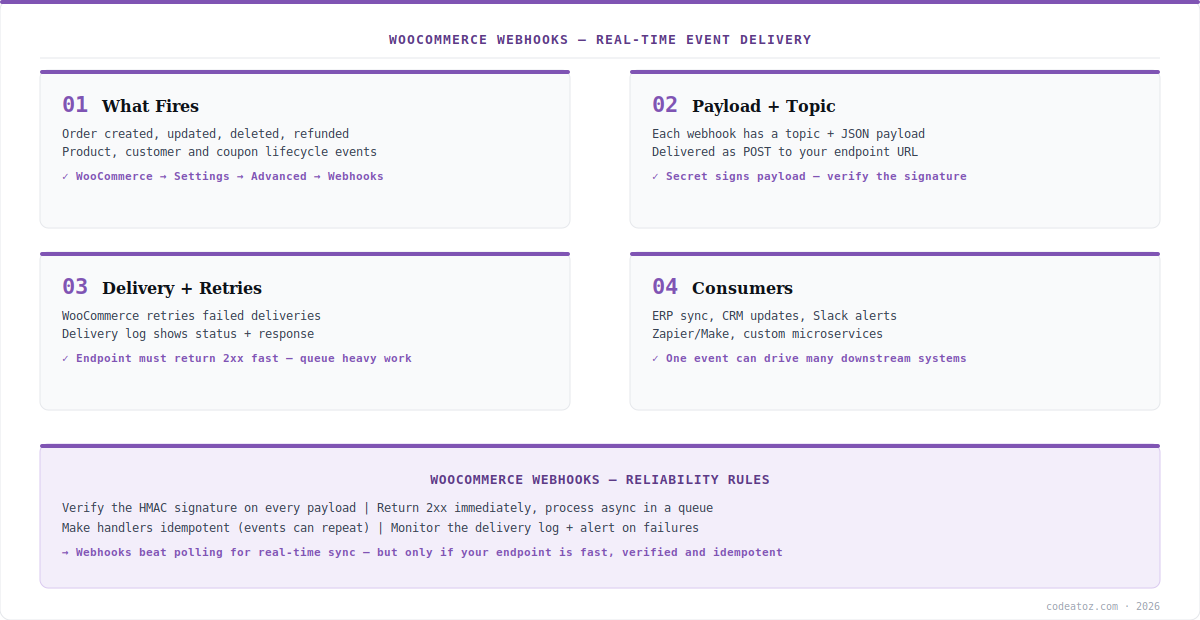
WooCommerce webhooks are configured under WooCommerce → Settings → Advanced → Webhooks (or via the REST API). Each webhook has a topic — the event it listens for: order created, updated, deleted or refunded; product created, updated or deleted; customer created or updated; coupon events. When the event fires, WooCommerce sends a POST request to your delivery URL with a JSON payload describing the changed resource. The set of topics covers the commercial lifecycle, so most integrations find the trigger they need in core WooCommerce webhooks without custom code. Each delivery carries a signature header for verification.
WooCommerce Webhooks: Signature, Reliability and Idempotency
Doing WooCommerce webhooks right is mostly about reliability. First, security: each delivery includes an HMAC-SHA256 signature in the X-WC-Webhook-Signature header, computed with the webhook’s secret — always verify it before trusting a payload, or anyone who learns your URL can forge events. Second, speed: your endpoint must return a 2xx response quickly, so do not process heavy work inline — acknowledge fast and push the job to a queue. Third, idempotency: WooCommerce webhooks can deliver the same event more than once (retries on failure), so your handler must be safe to run twice on the same event without double-processing. WooCommerce retries failed deliveries and records every attempt in the delivery log. The WooCommerce webhooks documentation and REST API developer docs detail topics and signatures.
import crypto from 'crypto';
import express from 'express';
const app = express();

app.post('/wc-webhook', express.raw({ type: '*/*' }), (req, res) => {
  const sig = req.get('X-WC-Webhook-Signature');
  const expected = crypto
    .createHmac('sha256', process.env.WC_WEBHOOK_SECRET)
    .update(req.body) // raw body, not parsed
    .digest('base64');
  if (sig !== expected) return res.sendStatus(401); // reject forged

  res.sendStatus(200);            // ack FAST (2xx)
  queue.add('process-wc-event', JSON.parse(req.body)); // async work
});WooCommerce Webhooks: vs Polling, and Consumers
The case for WooCommerce webhooks over polling the REST API is real-time delivery without wasted requests — polling either lags (infrequent) or hammers the API (frequent), while webhooks fire exactly when something changes. Typical consumers of WooCommerce webhooks: an ERP that needs new orders immediately (see our ERPNext sync), a CRM updating on customer changes, Slack alerts on high-value orders, and Zapier or Make scenarios for no-code automation. One event can fan out to many systems. The one caveat: because WooCommerce webhooks depend on your endpoint being reachable and fast, mission-critical syncs should pair them with a periodic reconciliation job to catch any missed deliveries. Our WooCommerce team builds robust webhook integrations.
What we have learned building WooCommerce webhook integrations
Always verify the signature — it is skipped far too often. The single most common security gap we find in WooCommerce webhook handlers is no signature verification. Without it, the endpoint trusts anything that POSTs to it. HMAC verification is a few lines and non-negotiable.
Acknowledge fast, process later. Handlers that do ERP writes or external API calls inline before responding cause timeouts and trigger retries — which then double-process. We always return 2xx immediately and hand the work to a queue. This one pattern eliminates most webhook reliability problems.
Pair webhooks with reconciliation for critical data. Webhooks can be missed if your endpoint is down. For anything financial or inventory-critical, we add a scheduled job that reconciles against the REST API, so a missed delivery is caught rather than silently lost.
Frequently Asked Questions About WooCommerce Webhooks
What are WooCommerce webhooks?
WooCommerce webhooks are real-time event notifications — when an order, product, customer or coupon changes, WooCommerce POSTs a JSON payload to a URL you configure. They let external systems react instantly to store events, replacing inefficient polling for integrations like ERP sync, CRM updates and automation.
How do I set up a WooCommerce webhook?
Go to WooCommerce → Settings → Advanced → Webhooks (or use the REST API), create a webhook, choose a topic such as “order created”, set the delivery URL, and save the secret. WooCommerce then POSTs the event payload to your endpoint whenever that event fires, signing each delivery for verification.
How do I verify a WooCommerce webhook is genuine?
Each WooCommerce webhook delivery includes an HMAC-SHA256 signature in the X-WC-Webhook-Signature header, computed from the raw body using your webhook secret. Recompute the signature on your endpoint and compare — if it does not match, reject the request. Always verify before trusting any webhook payload.
Do WooCommerce webhooks retry on failure?
Yes. If your endpoint does not return a successful (2xx) response, WooCommerce retries delivery, and every attempt is recorded in the webhook delivery log. Because retries can re-send the same event, your handler must be idempotent — safe to process the same event more than once without duplicating effects.
Are WooCommerce webhooks better than polling the REST API?
For real-time needs, yes. Polling either lags (if infrequent) or wastes requests and rate limit (if frequent), while WooCommerce webhooks fire exactly when data changes. For mission-critical data, pair webhooks with a periodic reconciliation job against the REST API to catch any deliveries missed while your endpoint was down.
What can WooCommerce webhooks integrate with?
Common consumers include ERP systems needing new orders immediately, CRMs updating on customer changes, Slack for order alerts, and Zapier or Make for no-code automation, plus custom microservices. One WooCommerce webhook event can fan out to multiple downstream systems, each reacting to the same store change in real time.
Integrating WooCommerce with External Systems?
Our team builds reliable webhook integrations — signature verification, queued processing and reconciliation.




