
WooCommerce Shipping Zone API — Custom Rates & Methods in PHP (2026)
The WooCommerce shipping zone API lets you create and configure shipping zones, regions, and methods entirely in PHP — useful for setting up shipping programmatically during plugin activation, synchronising shipping rates from a carrier API, or building complex rate logic that changes based on postcode, cart weight, and order total. This guide covers the complete WooCommerce shipping zone API: creating zones with PHP, adding flat rate and free shipping methods, building a fully custom WooCommerce shipping zone API method class that calculates rates dynamically, and the correct hook sequence for registering custom shipping methods.
WooCommerce shipping is organised into zones. Each zone has one or more region definitions (countries, states, postcodes) and one or more shipping methods. When a customer enters a shipping address at checkout, WooCommerce finds the best matching zone and presents that zone’s methods as shipping options. The WooCommerce shipping zone API exposes this architecture fully in PHP via the WC_Shipping_Zone class and the woocommerce_shipping_methods filter.
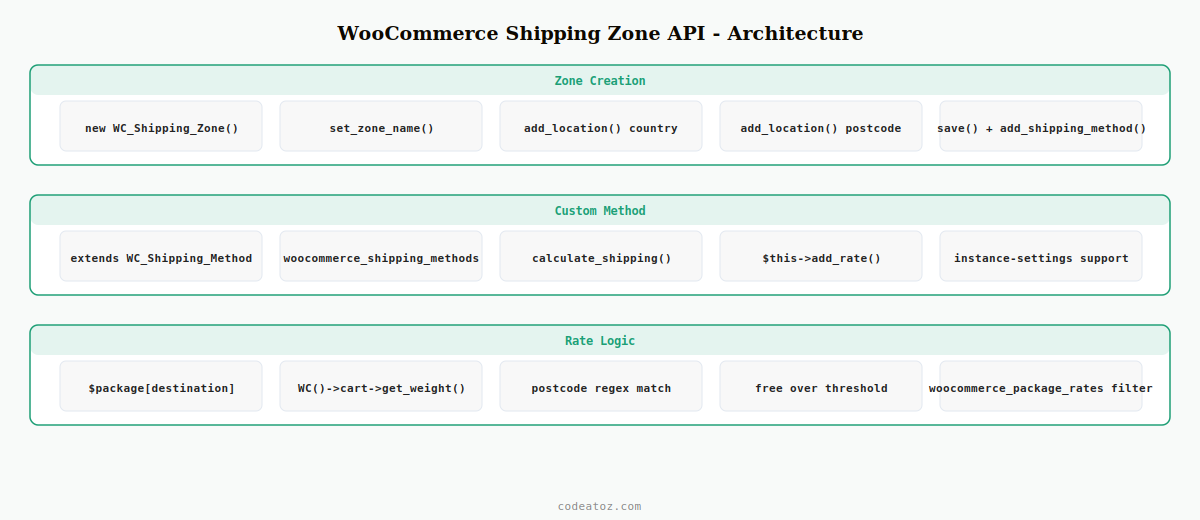
Creating Shipping Zones with the WooCommerce Shipping Zone API
Use the WC_Shipping_Zone class to create zones programmatically. This is ideal for plugin activation routines that need to set up a default shipping configuration, or for synchronising zones from an external carrier management system.
<?php
// Create a UK zone using the WooCommerce shipping zone API
function caz_create_shipping_zones(): void {
    // Check if zone already exists before creating
    $existing = WC_Shipping_Zones::get_zones();
    foreach ( $existing as $zone_data ) {
        if ( $zone_data['zone_name'] === 'United Kingdom' ) return;
    }

    $uk_zone = new WC_Shipping_Zone();
    $uk_zone->set_zone_name( 'United Kingdom' );
    $uk_zone->set_zone_order( 1 );

    // Add UK as a region using the WooCommerce shipping zone API
    $uk_zone->add_location( 'GB', 'country' );

    // Add Scottish Highlands postcodes as an exclusion zone
    $uk_zone->add_location( 'IV*', 'postcode' );  // prefix match

    $uk_zone->save();

    // Add flat rate method to the zone
    $uk_zone->add_shipping_method( 'flat_rate' );

    // Add free shipping method with minimum order condition
    $free_id = $uk_zone->add_shipping_method( 'free_shipping' );
    $methods = $uk_zone->get_shipping_methods( true );
    foreach ( $methods as $method ) {
        if ( $method->id === 'free_shipping' ) {
            $method->update_option( 'requires', 'min_amount' );
            $method->update_option( 'min_amount', '50' );
        }
    }
}
Building a Custom Method with the WooCommerce Shipping Zone API
A custom shipping method class extending WC_Shipping_Method integrates with the WooCommerce shipping zone API and calculates rates dynamically based on postcode, cart weight, or any business logic. Once registered, it appears in the shipping method dropdown for any zone.
<?php
add_filter( 'woocommerce_shipping_methods', 'caz_register_shipping_method' );

function caz_register_shipping_method( array $methods ): array {
    $methods['caz_carrier_rates'] = CAZ_Carrier_Shipping::class;
    return $methods;
}

class CAZ_Carrier_Shipping extends WC_Shipping_Method {

    public function __construct( int $instance_id = 0 ) {
        $this->id                 = 'caz_carrier_rates';
        $this->instance_id        = absint( $instance_id );
        $this->method_title       = __( 'Carrier Calculated Rates', 'caz-ship' );
        $this->method_description = __( 'Dynamic rates from carrier API via WooCommerce shipping zone API.', 'caz-ship' );
        $this->supports           = [ 'shipping-zones', 'instance-settings' ];
        $this->title              = $this->get_option( 'title', 'Carrier Delivery' );
        $this->init();
    }

    public function init(): void {
        $this->init_form_fields();
        $this->init_settings();
        add_action( 'woocommerce_update_options_shipping_' . $this->id,
                    [ $this, 'process_admin_options' ] );
    }

    public function init_form_fields(): void {
        $this->instance_form_fields = [
            'title'       => [ 'title' => 'Method title', 'type' => 'text', 'default' => 'Carrier Delivery' ],
            'max_weight'  => [ 'title' => 'Max weight (kg)', 'type' => 'number', 'default' => '30' ],
        ];
    }

    // WooCommerce shipping zone API: calculate_shipping() is called at checkout
    public function calculate_shipping( array $package = [] ): void {
        $postcode    = $package['destination']['postcode'] ?? '';
        $cart_weight = WC()->cart->get_cart_contents_weight();
        $cart_total  = WC()->cart->get_cart_contents_total();

        // Dynamic rate logic — replace with real carrier API call
        $rate = $this->get_rate_for( $postcode, $cart_weight, $cart_total );

        if ( $rate !== null ) {
            $this->add_rate([
                'id'    => $this->get_rate_id(),
                'label' => $this->title,
                'cost'  => $rate,
            ]);
        }
    }

    private function get_rate_for( string $postcode, float $weight, float $total ): ?float {
        // Free for orders over £75
        if ( $total >= 75 ) return 0.00;
        // Higher rate for Scottish Highlands (IV, KW, PH, etc.)
        if ( preg_match( '/^(IV|KW|PH|PA|FK|KY)/i', $postcode ) ) return 12.95;
        // Standard weight-based rate
        return match ( true ) {
            $weight <= 1   => 3.99,
            $weight <= 5   => 5.99,
            $weight <= 20  => 9.99,
            default        => 15.99,
        };
    }
}
The WooCommerce shipping method API documentation covers the full WC_Shipping_Method class for building custom methods via the WooCommerce shipping zone API. The WooCommerce shipping zones documentation covers the WC_Shipping_Zone class and zone location types. See our WooCommerce hooks reference for all shipping-related filters including woocommerce_package_rates for post-calculation rate modification.
💡 Always return early from calculate_shipping() if the destination is incomplete — check that $package['destination']['postcode'] and $package['destination']['country'] are set before running carrier API calls or rate calculations. WooCommerce calls calculate_shipping() on every cart page update, including before the customer has entered their full address.
Frequently Asked Questions — WooCommerce Shipping Zone API
How do I create shipping zones programmatically with the WooCommerce shipping zone API?
Use the WC_Shipping_Zone class: instantiate it, call set_zone_name() and set_zone_order(), add regions with add_location() using country, state, or postcode types, then call save(). Add shipping methods with add_shipping_method() passing the method ID string. The WooCommerce shipping zone API creates the zone and all its configuration in the database, identical to the result of using the WP Admin UI.
How do I add a custom shipping method to the WooCommerce shipping zone API?
Register your method class via the woocommerce_shipping_methods filter, returning an array with your method ID as key and class name as value. Your class extends WC_Shipping_Method and implements calculate_shipping() where you add rates using $this->add_rate(). The method appears in the Add Shipping Method dropdown for any zone in WooCommerce Settings Shipping once registered with the WooCommerce shipping zone API.
How does the WooCommerce shipping zone API match customer postcodes to zones?
WooCommerce evaluates zones in order (zone_order ASC) and returns the first zone that matches the customer’s destination country and postcode. Postcode locations support exact matches and wildcard prefixes using the * suffix (e.g. IV* matches all IV postcodes). The Rest of the World zone with ID 0 is the fallback catch-all. Zone order matters — more specific zones should have lower order values in the WooCommerce shipping zone API.
How do I calculate shipping rates dynamically in the WooCommerce shipping zone API?
Implement calculate_shipping() in your WC_Shipping_Method subclass. Access the customer’s destination from $package[‘destination’] and the cart contents from WC()->cart. Call $this->add_rate() with an id, label, and cost for each available rate. For live carrier rates, make the API call inside calculate_shipping() and cache the result using WC session or transients to avoid repeated API calls on the same destination.
Can I modify existing shipping rates after calculation in WooCommerce?
Yes — use the woocommerce_package_rates filter which fires after calculate_shipping() runs for all methods in the matched zone. The filter receives the array of calculated WC_Shipping_Rate objects. You can modify costs, remove rates, or add surcharges. This is the correct WooCommerce shipping zone API approach for applying surcharges based on product categories or adding fuel levies without modifying the underlying shipping method class.
How do I add free shipping with a minimum order amount using the WooCommerce shipping zone API?
After adding the free_shipping method to a zone with add_shipping_method(), retrieve the method instance from get_shipping_methods() and call update_option() with requires set to min_amount and min_amount set to your threshold value. Alternatively, in your custom shipping method class, check WC()->cart->get_cart_contents_total() in calculate_shipping() and add a rate with cost 0 when the threshold is met. Both approaches work with the WooCommerce shipping zone API.
Need Custom WooCommerce Shipping Logic Built?
CodeAtoZ builds custom WooCommerce shipping zone API integrations — carrier API rate fetching, postcode-based surcharges, and zone configuration tools.




