
How to Get a WooCommerce Daily Sales Report Email in 2026
A WooCommerce daily sales report email means you wake up to your numbers instead of logging into wp-admin to find them. Here’s how to set one up in minutes — free — with sales, orders to ship and stock all in one digest.
A WooCommerce daily sales report email is one of those small automations that quietly improves how you run a store: instead of opening wp-admin every morning to check yesterday’s sales, the numbers arrive in your inbox before you have finished your coffee. This guide shows how to set up a WooCommerce daily sales report email using the free CodeAtoZ Store Reports plugin — including not just sales figures but the orders you need to ship and any stock running low, all in one digest. It takes about two minutes and costs nothing.
Search intent: how-to — WooCommerce store owners who want automated daily sales emails. We cover why a daily email helps, what a good one contains, step-by-step setup, fixing delivery issues, and getting it right. This is part of our WooCommerce Store Reports guide; see also order reports and low stock alerts. The plugin is free on the WordPress.org directory.
WooCommerce Daily Sales Report Email: Why It Helps
The case for a WooCommerce daily sales report email is simple: it replaces a small, repetitive manual task with an automatic one. Most store owners start their day by checking the store — how many orders came in yesterday, what the revenue was, whether anything needs shipping or restocking. Doing that means logging into wp-admin and clicking around. A daily email brings that information to you, so the routine check happens whether or not you remember to log in, and you notice problems (a zero-sales day, a stock-out) sooner.
The subtler benefit of a WooCommerce daily sales report email is consistency. When the check depends on you remembering to log in, it slips on busy days — exactly the days when something might need attention. An email that arrives every morning at a set time makes the check reliable. A good daily report also puts the key numbers in the subject line, so on a normal day you get the headline figures at a glance without even opening the email, and an unusual day (no orders) is flagged in the subject so the anomaly is impossible to miss.
WooCommerce Daily Sales Report Email: What a Good One Contains
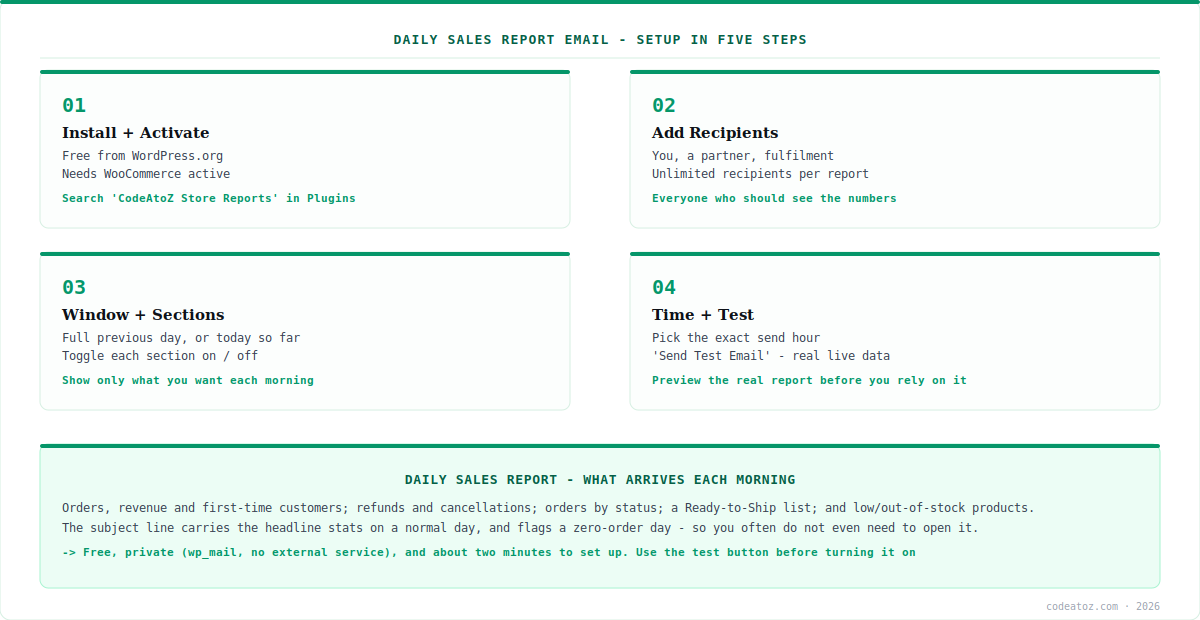
A useful WooCommerce daily sales report email is more than a revenue figure. With CodeAtoZ Store Reports, the daily email covers order count and revenue for your chosen window (the full previous day, or today so far), how many orders came from first-time customers, and a refunds-and-cancellations line so those are visible without digging. That gives you the sales picture in a glance.
But the reason a WooCommerce daily sales report email earns its place is the operational detail alongside the sales. The report breaks orders down by status (Pending, Processing, On hold, Completed, and so on) and includes a Ready to Ship list — paid orders still waiting to be fulfilled, each linked to its order screen — so you know exactly what to ship today. It also lists low stock and out of stock products with SKUs and edit links. In other words, a good daily email answers not just “how did we do?” but “what do I need to do?” — which is what makes it genuinely useful rather than just informative.
| Section | Answers |
|---|---|
| Orders + revenue | How did we do yesterday? |
| First-time customers | How many were new? |
| Refunds / cancellations | Anything reversed? |
| Orders by status | Where’s everything in the pipeline? |
| Ready to Ship | What do I ship today? |
| Low / out of stock | What needs restocking? |
WooCommerce Daily Sales Report Email: Setting It Up
Setting up your WooCommerce daily sales report email with CodeAtoZ Store Reports takes about two minutes. Install the plugin free from the WordPress.org directory or via your wp-admin Plugins screen, activate it with WooCommerce active, and open WooCommerce → Store Reports. The setup itself is a handful of choices, none of them technical.
Turn on the daily report, then add your recipients (you can send to as many people as you like — perhaps yourself, a co-owner and your fulfilment person). Choose the report window: the full previous day is the sensible default. Pick the exact hour it sends — early morning works for most, so the report is waiting when you start. Toggle which sections you want; if you do not care about, say, first-time customers, switch that section off. If you never want a report on Sundays, set that weekday to skip. Finally — and this is the step that builds confidence — click “Send Test Email” to receive the real, live-data WooCommerce daily sales report email in your inbox immediately, so you see exactly what will arrive before you rely on it. A live preview panel in the admin shows the same. That is the entire setup.
WooCommerce Daily Sales Report Email: If It Doesn’t Arrive
If your WooCommerce daily sales report email does not show up, the cause is almost always email delivery in general, not the plugin specifically. Report emails are sent through wp_mail() — the same function WooCommerce uses for order confirmation emails. So a useful test: are your WooCommerce order emails arriving reliably? If they are not either, the issue is your host’s outgoing mail setup, which affects all your site’s email, not just reports.
If emails don’t arrive, an SMTP plugin usually fixes it. Many hosts have unreliable default mail. The standard fix is to install an SMTP plugin, which sends your site’s email through a real mail provider instead of the host’s default function — this resolves missing WooCommerce daily sales report email delivery (and missing order emails) in most cases. Use “Send Test Email” on the Store Reports screen to check delivery any time. This is an email-infrastructure issue, not a plugin fault.
Once delivery is sorted, your WooCommerce daily sales report email simply arrives each morning at your chosen time. If you also want the weekly trend view — this week’s revenue versus last week, top sellers, new products — the same plugin sends a weekly report too, and you can run both. And because CodeAtoZ Store Reports connects to no external service and adds no database tables, your WooCommerce daily sales report email is generated privately from your own data and sent through your own mail — nothing about your store leaves your site. It is free, private, and about as low-friction as store automation gets. Our WooCommerce team can help if you want custom reporting on top.
What makes a daily report email actually useful
The subject line matters more than people expect. A store owner scanning a phone at 7am should get the headline from the subject alone — orders and revenue on a normal day, a clear “no orders yesterday” flag on an unusual one. We put the key numbers in the subject deliberately, because the best daily report is one you often do not even need to open.
Ship-today information is what turns a report into a tool. Sales figures are nice to know; the Ready to Ship list is something you act on. We made sure the daily email answers “what do I need to do today?” — orders to fulfil, stock to reorder — not just “how did we do?”, because the actionable part is what earns a daily email its place in your routine.
Delivery problems are almost never the report — they’re the host. When a daily email does not arrive, it is nearly always the same host mail issue that affects order emails too. We point people to the SMTP fix and the test-send button rather than debugging the plugin, because that is where the real problem — and the real solution — actually lives.
Frequently Asked Questions About WooCommerce Daily Sales Report Emails
How do I get a daily sales report email from WooCommerce?
Install the free CodeAtoZ Store Reports plugin, activate it with WooCommerce, and go to WooCommerce → Store Reports. Turn on the daily report, add recipients, choose the report window and send time, pick which sections to include, and use “Send Test Email” to preview it. It then arrives automatically each morning. Setup takes about two minutes and costs nothing.
Is there a free WooCommerce daily sales report plugin?
Yes. CodeAtoZ Store Reports sends a free daily sales report email with no Pro tier or locked features. The daily report includes orders and revenue, first-time customers, refunds and cancellations, an order-status breakdown, a Ready to Ship list and low/out-of-stock products — all free for every store, forever, with no upgrade prompts.
What time does the daily report send?
Whatever hour you choose — you set the exact send time in the plugin settings. Early morning is popular so the report is waiting when you start your day. You can also choose the report window (the full previous day, or today so far up to send time) and skip specific weekdays, such as not sending on Sundays.
Why isn’t my daily sales report email arriving?
Almost always because of your host’s email delivery, not the plugin. Reports send through wp_mail(), the same function as WooCommerce order emails — if those also aren’t arriving, the issue is your host’s outgoing mail. Installing an SMTP plugin to send through a real mail provider fixes it in most cases. Use “Send Test Email” on the Store Reports screen to check delivery.
Can I send the daily report to more than one person?
Yes, to unlimited recipients, with a separate recipient list for the daily and weekly reports. You might send the daily report to yourself, a business partner and whoever handles fulfilment, for example. Each recipient gets the same report, and you manage the lists independently per report in the plugin settings.
Can I choose what’s in the daily report?
Yes. Each section — the sales summary, order-status breakdown, Ready to Ship, low stock, out of stock — can be switched on or off independently. You also choose the report window and which order statuses count as revenue (defaulting to Processing and Completed). So you can tailor the daily email to show only what you actually want to see each morning.
Get Your Daily Sales Email — Free
Wake up to your WooCommerce numbers: sales, orders to ship, and low stock, in one digest. Free, no Pro tier, two-minute setup.




