
Building with the Shopify Storefront API React — Headless Store Guide (2026)
Complete Shopify Storefront API React guide — Apollo Client setup, product and collection queries, cart mutations, checkout redirect, and full TypeScript code.
The Shopify Storefront API React combination is the foundation of every custom headless Shopify storefront — it gives you full control over the frontend while keeping Shopify’s battle-tested checkout, payments, and inventory management. A Shopify Storefront API React build using Apollo Client handles product listing, collection pages, search, and cart state through a single GraphQL endpoint. This guide covers the complete Shopify Storefront API React implementation: Apollo setup with the Storefront API token, product and collection queries, cart create and update mutations, and the checkout redirect flow.
The Shopify Storefront API React pattern uses Shopify’s public Storefront API — authenticated with a storefront access token, not an admin API key. The storefront access token is safe to use client-side because it only grants read access to published products and the ability to create and modify carts. Admin operations (inventory, order management, customer data) still require the Admin API from a secure server-side context.
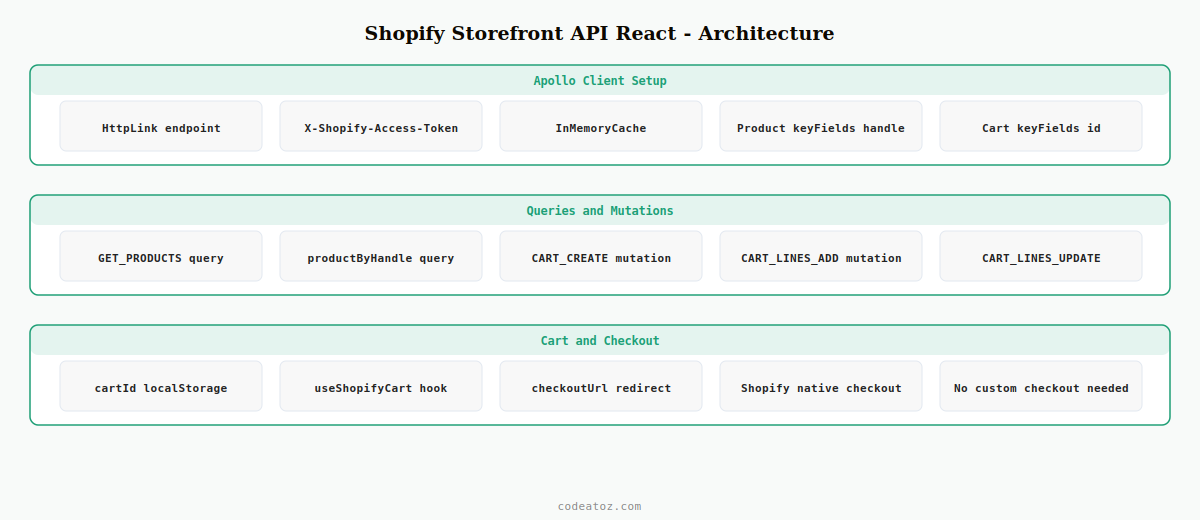
Step 1: Set Up Apollo Client for Shopify Storefront API React
The Shopify Storefront API uses GraphQL, making Apollo Client the natural choice for a Shopify Storefront API React implementation. The Storefront API endpoint and access token go into the Apollo HTTP link headers.
npm install @apollo/client graphqlimport { ApolloClient, InMemoryCache, HttpLink, ApolloLink } from '@apollo/client'
// Shopify Storefront API React: Apollo client configuration
const shopifyLink = new HttpLink({
uri: `https://${process.env.NEXT_PUBLIC_SHOPIFY_DOMAIN}/api/2025-01/graphql.json`,
headers: {
'X-Shopify-Storefront-Access-Token':
process.env.NEXT_PUBLIC_SHOPIFY_STOREFRONT_TOKEN!,
'Content-Type': 'application/json',
},
})
export const shopifyClient = new ApolloClient({
link: shopifyLink,
cache: new InMemoryCache({
typePolicies: {
// Shopify Storefront API React: cache products by handle
Product: { keyFields: ['handle'] },
Cart: { keyFields: ['id'] },
},
}),
})Step 2: Query Products with Shopify Storefront API React
The Shopify Storefront API React product query fetches published products with their variants, images, and pricing. Request only the fields your UI needs — the Storefront API returns large payloads by default.
import { gql } from '@apollo/client'

// Shopify Storefront API React: product listing query
export const GET_PRODUCTS = gql`
  query GetProducts($first: Int!, $after: String) {
    products(first: $first, after: $after, sortKey: BEST_SELLING) {
      pageInfo {
        hasNextPage
        endCursor
      }
      edges {
        node {
          id
          handle
          title
          description
          priceRange {
            minVariantPrice { amount currencyCode }
          }
          images(first: 1) {
            edges { node { url altText } }
          }
          variants(first: 1) {
            edges { node { id availableForSale } }
          }
        }
      }
    }
  }
`

// Shopify Storefront API React: single product query by handle
export const GET_PRODUCT_BY_HANDLE = gql`
  query GetProductByHandle($handle: String!) {
    productByHandle(handle: $handle) {
      id handle title descriptionHtml
      priceRange {
        minVariantPrice { amount currencyCode }
      }
      images(first: 10) {
        edges { node { url altText } }
      }
      variants(first: 100) {
        edges {
          node {
            id title availableForSale
            selectedOptions { name value }
            price { amount currencyCode }
          }
        }
      }
    }
  }
`
Step 3: Cart Mutations for Shopify Storefront API React
Cart management in a Shopify Storefront API React build uses GraphQL mutations. The cart ID is created on first item add and persisted in localStorage. All subsequent operations — adding, updating, removing lines — use the same cart ID.
import { gql } from '@apollo/client'

const CART_FIELDS = gql`
  fragment CartFields on Cart {
    id checkoutUrl
    totalQuantity
    cost { totalAmount { amount currencyCode } }
    lines(first: 100) {
      edges {
        node {
          id quantity
          merchandise {
            ... on ProductVariant {
              id title
              product { title handle }
              image { url altText }
              price { amount currencyCode }
            }
          }
        }
      }
    }
  }
`

// Create a new cart — Shopify Storefront API React first add
export const CART_CREATE = gql`
  mutation CartCreate($lines: [CartLineInput!]!) {
    cartCreate(input: { lines: $lines }) {
      cart { ...CartFields }
      userErrors { field message }
    }
  }
  ${CART_FIELDS}
`

// Add lines to existing cart — Shopify Storefront API React subsequent adds
export const CART_LINES_ADD = gql`
  mutation CartLinesAdd($cartId: ID!, $lines: [CartLineInput!]!) {
    cartLinesAdd(cartId: $cartId, lines: $lines) {
      cart { ...CartFields }
      userErrors { field message }
    }
  }
  ${CART_FIELDS}
`

// Update quantity — Shopify Storefront API React quantity change
export const CART_LINES_UPDATE = gql`
  mutation CartLinesUpdate($cartId: ID!, $lines: [CartLineUpdateInput!]!) {
    cartLinesUpdate(cartId: $cartId, lines: $lines) {
      cart { ...CartFields }
      userErrors { field message }
    }
  }
  ${CART_FIELDS}
`
💡 The cart.checkoutUrl field returned by all cart mutations is your Shopify Storefront API React checkout redirect URL. When the customer clicks checkout, redirect them to this URL — it opens Shopify’s native checkout with the cart contents pre-populated, handling all payment gateways, tax calculation, and order creation automatically.
Step 4: Cart Hook for Shopify Storefront API React
Encapsulate all cart logic in a custom hook so Shopify Storefront API React components stay focused on rendering. The hook manages the cart ID in localStorage, exposes add/update/remove methods, and returns the current cart state.
import { useState, useCallback } from 'react'
import { useMutation }           from '@apollo/client'
import { CART_CREATE, CART_LINES_ADD } from '../graphql/cart.mutations'

export function useShopifyCart() {
  const [ cartId, setCartId ] = useState<string | null>(
    () => localStorage.getItem( 'shopify_cart_id' )
  )
  const [ cart, setCart ] = useState<any>( null )

  const [ createCart ]   = useMutation( CART_CREATE )
  const [ addCartLines ] = useMutation( CART_LINES_ADD )

  // Add to cart — Shopify Storefront API React
  const addToCart = useCallback( async ( variantId: string, quantity = 1 ) => {
    const lines = [{ merchandiseId: variantId, quantity }]

    if ( ! cartId ) {
      // First item: create cart in Shopify Storefront API React
      const { data } = await createCart({ variables: { lines } })
      const newCart  = data?.cartCreate?.cart
      if ( newCart ) {
        setCartId( newCart.id )
        setCart( newCart )
        localStorage.setItem( 'shopify_cart_id', newCart.id )
      }
    } else {
      // Subsequent items: add to existing cart
      const { data } = await addCartLines({ variables: { cartId, lines } })
      setCart( data?.cartLinesAdd?.cart )
    }
  }, [ cartId, createCart, addCartLines ])

  const checkout = useCallback( () => {
    if ( cart?.checkoutUrl ) window.location.href = cart.checkoutUrl
  }, [ cart ])

  return { cart, addToCart, checkout, itemCount: cart?.totalQuantity ?? 0 }
}
The Shopify Storefront API documentation covers all available queries, mutations, and the 2025-01 API version schema. The Shopify Cart object reference lists all cart fields including checkout URL and buyer identity. See our React Magento GraphQL search guide for the Magento equivalent, and our Next.js WooCommerce setup guide for the WooCommerce headless approach.
Frequently Asked Questions — Shopify Storefront API React
What is the Shopify Storefront API and how does it work with React?
The Shopify Storefront API is a public GraphQL API that exposes products, collections, carts, and checkout to headless frontends. In a Shopify Storefront API React build, Apollo Client connects to the API endpoint using a storefront access token. React components query products and collections, cart mutations add and update items, and the checkout URL returned by cart mutations redirects customers to Shopify’s native checkout flow.
Is the Shopify Storefront API access token safe to use in React?
Yes — the storefront access token is a public credential designed to be used client-side in Shopify Storefront API React applications. It only grants read access to published product data and the ability to create and modify carts. It cannot access admin data, customer PII, or order management. The Admin API key is the sensitive one — that must never be exposed to client-side code.
How do I handle the Shopify checkout in a React headless store?
Every cart mutation in a Shopify Storefront API React app returns a checkoutUrl field on the cart object. When the customer clicks the checkout button, redirect them to this URL using window.location.href. This opens Shopify’s native checkout with the cart pre-populated, handling payment gateways, tax, shipping, and order creation. You do not need to build a custom checkout for Shopify Storefront API React — the native checkout handles everything.
How do I persist the cart between page navigations in Shopify Storefront API React?
Store the Shopify cart ID in localStorage after cartCreate returns. On every subsequent add-to-cart, use the stored cart ID with cartLinesAdd rather than creating a new cart. When the page loads, read the cart ID from localStorage and use cartQuery to restore the current cart state. This gives your Shopify Storefront API React app a persistent cart that survives page refreshes and navigation.
Which Shopify Storefront API version should I use in 2026?
Use the 2025-01 version for new Shopify Storefront API React projects in 2026. Shopify releases API versions quarterly and supports each for at least 12 months. Pin your API version explicitly in the endpoint URL (api/2025-01/graphql.json) rather than using unstable, so breaking changes in newer versions do not affect your Shopify Storefront API React app without an intentional upgrade.
Can I use Next.js with the Shopify Storefront API React approach?
Yes — Next.js is the most common framework for Shopify Storefront API React builds. Use Server Components to fetch product and collection data server-side with ISR revalidation for performance. Use Client Components for cart interactions since cart mutations require browser localStorage access. Apollo Client works in both contexts — use the Apollo Client for Client Components and a plain fetch for Server Component data fetching in your Shopify Storefront API React Next.js app.
Need a Headless Shopify Store Built?
CodeAtoZ builds custom headless Shopify storefronts with the Storefront API and React — full product catalogue, cart, and checkout integration.




