
Why Your Shopify Store Isn’t Converting — 12 Proven Developer Fixes (2026)
Your Shopify store isn’t converting? These 12 developer fixes cover speed, checkout friction, trust signals, app bloat, and structured data — with a clear priority order.
If your Shopify store isn’t converting despite decent traffic, this is the guide you need. A Shopify store not converting is almost always a developer problem, not a content problem — and every cause is measurable and fixable. Whether your Shopify store isn’t converting because of slow load times, checkout friction, missing trust signals, or app bloat, the following 12 fixes address the most common culprits in priority order, from the highest-impact changes to the finishing touches.
We have audited dozens of Shopify stores across e-commerce verticals. The same issues appear again and again. None of them require a new theme, a rebrand, or a large agency retainer — they are technical problems with technical solutions that a developer can implement in an afternoon.
Before applying any fix to a Shopify store that isn’t converting, measure. Run your key pages — homepage, product page, and cart — through Google PageSpeed Insights and record your LCP, INP, and CLS scores. These become your baseline. Every fix should move these numbers.
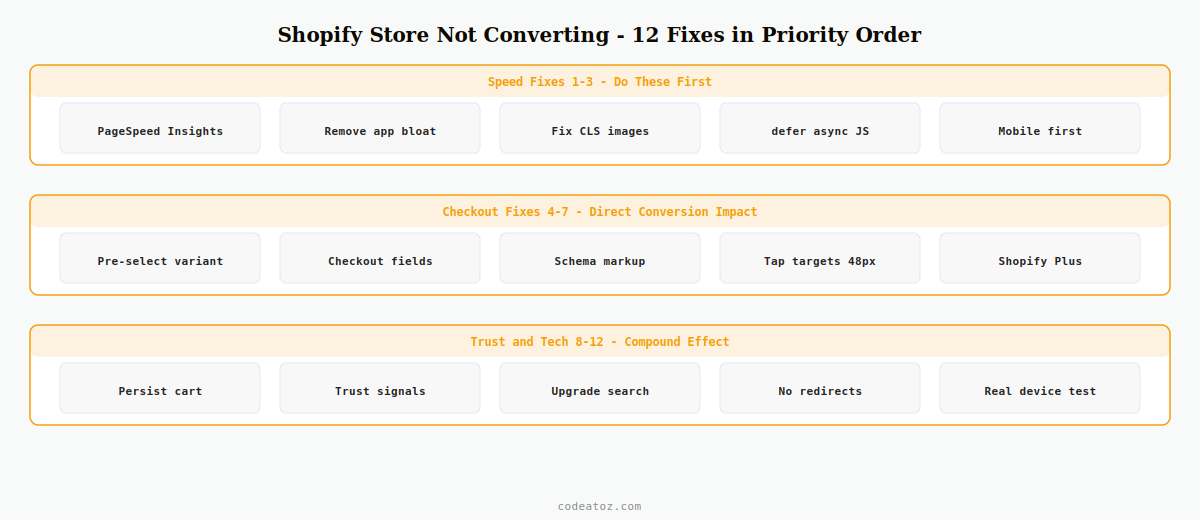
Fix 1–3: Speed Fixes for a Shopify Store That Isn’t Converting
Speed is the most impactful area when your Shopify store isn’t converting. A 1-second delay in load time reduces conversions by 7%. These three speed fixes should be first.
- Fix 1: Audit Core Web Vitals — Run PageSpeed Insights on your product page. Target LCP under 2.5s, INP under 200ms, CLS under 0.1 on mobile. This is your diagnostic baseline when your Shopify store isn’t converting.
- Fix 2: Remove render-blocking app scripts — Every Shopify app injecting JavaScript adds to Time to Interactive. Audit every installed app and remove anything you cannot directly attribute to revenue. Most stores carry 3-5 apps with no measurable conversion lift but significant load-time cost.
- Fix 3: Fix Cumulative Layout Shift on product images — Add explicit
widthandheightattributes to allimgtags. Useloading="lazy"for below-fold images. CLS above 0.1 is a significant cause of a Shopify store not converting on mobile.
Fix 4–7: Checkout Fixes for Your Shopify Store Not Converting
Checkout friction is the second most common reason a Shopify store isn’t converting. These four fixes address the specific friction points that block purchase completion.
- Fix 4: Pre-select a default variant — The Add to Cart button should never be greyed out on page load. A variant must be pre-selected. Test at 390px viewport on mobile — the ATC button must be visible above the fold. This single fix often resolves a Shopify store not converting on mobile.
- Fix 5: Streamline checkout fields — On Shopify Plus, use Checkout Extensibility to remove unnecessary fields. Every field is a drop-off opportunity. Company name for B2C, address line 2 for digital products, and fax number are common removable fields.
- Fix 6: Add product structured data — Schema.org Product markup with offers, price, availability, and aggregate rating enables rich snippets in Google — star ratings, price, and stock status visible directly in search results. This improves click-through rate from search, bringing more purchase-intent traffic to a Shopify store that isn’t converting.
- Fix 7: Fix mobile tap target sizes — Navigation links, filter checkboxes, and social icons in many Shopify themes fall below Google’s recommended 48x48px minimum. Test your critical path at 390px viewport width in Chrome DevTools mobile emulation.
Fix 8–12: Trust and Technical Fixes for a Shopify Store Not Converting
The final five fixes compound the impact of the speed and checkout improvements. These are the trust signals and technical refinements that push conversion rates from acceptable to strong.
- Fix 8: Implement persistent cart recovery — Use the Shopify Cart API to restore cart state for returning visitors. A returning visitor finding an empty cart is one of the most avoidable causes of a Shopify store not converting.
- Fix 9: Place trust signals at decision points — SSL badge and accepted payment icons at checkout. Security badge and delivery estimate near the ATC button. Return policy summary in the cart. Trust signals placed at the wrong point in the funnel are ineffective when a Shopify store isn’t converting.
- Fix 10: Upgrade site search — Visitors who use search convert at 3–5x the rate of browsers. Replace Shopify’s native search with Shopify Search & Discovery (free, significantly better). Search results must appear in under 300ms — any delay causes abandonment.
- Fix 11: Eliminate redirect chains — Each redirect adds 100–300ms of latency. Check for chains using httpstatus.io. Common sources: platform migration URL changes, www vs non-www mismatches, and canonical URL configuration errors.
- Fix 12: Test checkout on real devices — Emulators miss real-world issues. Test the full checkout flow on a physical iPhone (Safari) and Android (Chrome) on a 4G connection. If your Shopify store isn’t converting on mobile, keyboard covering input fields and Apple Pay not rendering are the most common device-specific culprits.
💡 Priority order matters. Fix speed first — it affects every page and every visitor. Then checkout friction — it directly blocks purchase completion. Trust signals and structured data have the highest ROI for effort. Do not reverse this order when your Shopify store isn’t converting.
Frequently Asked Questions — Shopify Store Isn’t Converting
Why is my Shopify store not converting despite good traffic?
A Shopify store not converting with good traffic almost always indicates a technical issue rather than an audience mismatch. Start with PageSpeed Insights on your product and cart pages, then test the full checkout on a real mobile device. The most common causes of a Shopify store isn’t converting are slow load times, checkout friction, and missing trust signals at key decision points.
How do too many apps cause a Shopify store not converting?
Every Shopify app that injects JavaScript or CSS adds to page load time and Time to Interactive. When your Shopify store isn’t converting, app bloat is a primary suspect. Audit every app with frontend scripts — if you cannot directly attribute revenue to it, remove it. Most stores that experience a Shopify store not converting carry 3-5 apps adding load time with no measurable conversion benefit.
What Core Web Vitals score should fix a Shopify store not converting?
Target LCP under 2.5 seconds, INP under 200ms, and CLS under 0.1 on mobile — these are Google’s Good thresholds. A mobile PageSpeed score above 70 is a realistic minimum for an actively optimised Shopify store. Improving from under 50 to over 70 on mobile PageSpeed commonly resolves a Shopify store isn’t converting situation on mobile devices.
Can I customise Shopify checkout to reduce a store not converting?
On Shopify Plus, Checkout Extensibility allows you to remove fields, add custom UI extensions, and use the branding API — directly addressing checkout friction when a Shopify store isn’t converting. On standard Shopify plans, checkout customisation is very limited. The only option is checkout.liquid edits, which Shopify restricts on standard plans.
Does structured data help fix a Shopify store not converting?
Directly, structured data is not visible to store visitors. Indirectly, it enables rich snippets in Google — star ratings, price, and stock status in search results — which improve click-through rate from search. This brings more purchase-intent traffic to a Shopify store not converting, which combined with the other 11 fixes produces a compound conversion improvement.
How do I measure whether speed is causing my Shopify store not converting?
Use Google Analytics 4 to create an exploration correlating LCP with conversion rate, segmented by device type. Sessions with LCP under 2.5s consistently convert at a significantly higher rate than sessions with LCP over 4s. The conversion rate gap between fast and slow sessions on mobile is almost always the primary data point when investigating a Shopify store not converting.
Need a Shopify Performance Audit?
CodeAtoZ audits and fixes Shopify conversion issues — speed, checkout friction, trust signals, and structured data. No guesswork, data-driven results.




